 16
16
Lancool Metal Boned K7 Review
Value & Conclusion »Installation


Installing the mainboard outside of the case is done traditionally, simply screw the stand-offs in place and add the mainboard on top. All this can be done outside the case, but this is where we were presented with the one and only real problem. Any large CPU cooler will not fit due to the angle at which the mainboard tray needs to be reinserted. As a result, you will have to install the mainboard inside the case, which makes the removable tray useless. Nonetheless, there is plenty of space to work with.

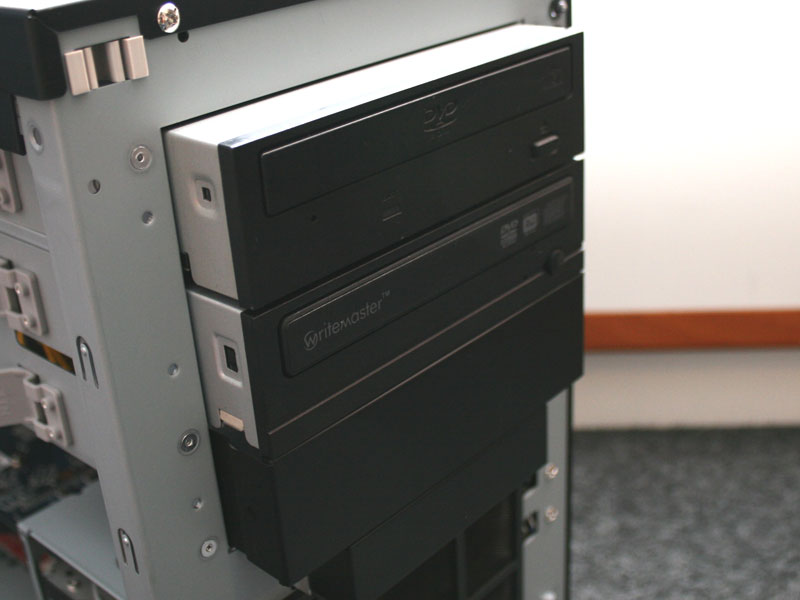

Installing the hard drives is easily done as well. Simply place the metal screws with rubber rings on the drives and slide them into place. The optical drives are even easier, as you only need to slide them in until the latch falls into place. Both drive types can be further secured by screws and this is certainly recommended, as the K7 is intended as a sturdy LAN party case.
Finished Look

After everything is installed, you will notice that even though a standard 550W PSU was used, which has seperated power cables, there are a lot missing. The same goes for the power lines that run to the hard drives, graphic card and the SATA cables to the four hard drives. These have all been routed behind the mainboard. Using a few zip ties to hold the small number of visible cables together should go a long way and insure a very clean system. Even if you do not do that, the insides are not visible to anyone, as there are no windows or large air vents.


Taking a look at the optical drives, both line up perfectly with the outside of the case. The small power and hard drive LEDs are located on the top right corner of the front. One thing you notice with the case is even though three fans are used, the case is incredibly quiet. This is simply due to the use of mainboard headers to power the fans and the ABIT IN9 32X-MAX used in this review has plenty of those.
Apr 24th, 2024 03:55 EDT
change timezone
Latest GPU Drivers
New Forum Posts
- Serious bug in PHP reported! (3)
- The TPU UK Clubhouse (24774)
- ThrottleStop 9.6 Voltage won't change (2)
- Which new games will you be buying? (307)
- What phone you use as your daily driver? And, a discussion of them. (1456)
- Sexy Mechanical Keyboard Thread (486)
- Is there a technical reason that Windows 11 doesn't have built into it battery charge limitation? (38)
- ROG Strix LC III 360 ARG AIO What should the pump speed be? (3)
- Official Board Game Discussion (14)
- Random blue screen from winload.efi error (0xc000000e) (0)
Popular Reviews
- Fractal Design Terra Review
- Corsair 2000D Airflow Review
- Thermalright Phantom Spirit 120 EVO Review
- Minisforum EliteMini UM780 XTX (AMD Ryzen 7 7840HS) Review
- ASUS GeForce RTX 4090 STRIX OC Review
- NVIDIA GeForce RTX 4090 Founders Edition Review - Impressive Performance
- ASUS GeForce RTX 4090 Matrix Platinum Review - The RTX 4090 Ti
- MSI GeForce RTX 4090 Suprim X Review
- MSI GeForce RTX 4090 Gaming X Trio Review
- Gigabyte GeForce RTX 4090 Gaming OC Review
Controversial News Posts
- Sony PlayStation 5 Pro Specifications Confirmed, Console Arrives Before Holidays (116)
- NVIDIA Points Intel Raptor Lake CPU Users to Get Help from Intel Amid System Instability Issues (106)
- AMD "Strix Halo" Zen 5 Mobile Processor Pictured: Chiplet-based, Uses 256-bit LPDDR5X (101)
- US Government Wants Nuclear Plants to Offload AI Data Center Expansion (98)
- Windows 10 Security Updates to Cost $61 After 2025, $427 by 2028 (84)
- Developers of Outpost Infinity Siege Recommend Underclocking i9-13900K and i9-14900K for Stability on Machines with RTX 4090 (84)
- TechPowerUp Hiring: Reviewers Wanted for Motherboards, Laptops, Gaming Handhelds and Prebuilt Desktops (77)
- Intel Realizes the Only Way to Save x86 is to Democratize it, Reopens x86 IP Licensing (70)