| Thursday, September 24 2009 |
System BIOS vendor Phoenix Technology, the company behind the popular Award BIOS software found on several PC motherboards, has come up with a new highly-optimized implementation of UEFI (Unified Extensible Firmware Interface), that can boot the OS in under one second. This cuts time of the arbitrary 5~15 second (typical) POST process. With this time saved, system startup times are significantly reduced. Startup times are further reduced by the optimized startup procedure on Windows 7.
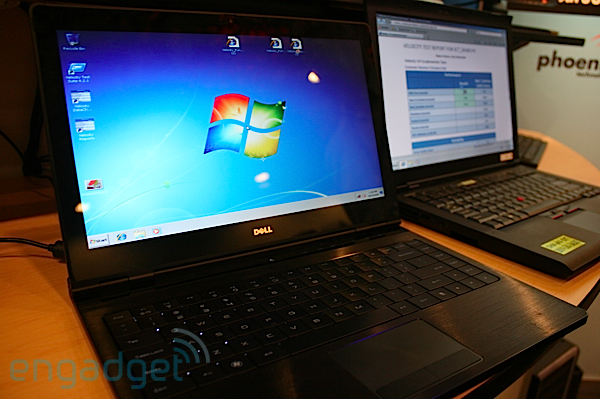
To put this to test, a Dell Adamo notebook with the technology, was able to reach the Windows Desktop in 20 seconds from the push of the power button, while Lenovo T400 notebooks with faster SSDs reached the Desktop in under 10 seconds. The technology should be out pretty soon.
Source: Engadget
To put this to test, a Dell Adamo notebook with the technology, was able to reach the Windows Desktop in 20 seconds from the push of the power button, while Lenovo T400 notebooks with faster SSDs reached the Desktop in under 10 seconds. The technology should be out pretty soon.
Source: Engadget
posted by btarunr - 12:48 AM | Related News |
User comments
Many Thanks to ColdStorm for sending this in.
Check out the video at the source.
by Cold Storm (September 25th - 1:02 AM) - Reply
that sounds Pretty neat. I wonder how it will do in real world substance instead of a testing area
:toast:
:toast:
by A Cheese Danish (September 25th - 1:32 AM) - Reply
That would be nice to have on my laptop. Except 7 is really pissing me off with my video card and driver...
But booting to Windows in 20 seconds would be nice.
k this is your captain speaking ... youl notice ive turned off the no going @pe$hit sign.
:roll::toast::nutkick::banghead::rockout::respect::twitch::laugh:
WOW!
:roll::toast::nutkick::banghead::rockout::respect::twitch::laugh:
WOW!
The ultimate power saver... being able to make the PC go away and come back that fast will make more people simply turn them off.
from one second to this, I'm not sure I follow: "To put this to test, a Dell Adamo notebook with the technology, was able to reach the Windows Desktop in 20 seconds from the push of the power button, while Lenovo T400 notebooks with faster SSDs reached the Desktop in under 10 seconds. The technology should be out pretty soon."
by sneekypeet (September 25th - 2:32 AM) - Reply
by: SasquiSays the bios loads in under 1 second, the following 9-19 seconds is actually the windows loading process.
The ultimate power saver... being able to make the PC go away and come back that fast will make more people simply turn them off.
from one second to this, I'm not sure I follow: "To put this to test, a Dell Adamo notebook with the technology, was able to reach the Windows Desktop in 20 seconds from the push of the power button, while Lenovo T400 notebooks with faster SSDs reached the Desktop in under 10 seconds. The technology should be out pretty soon."
by DanishDevil (September 25th - 3:39 AM) - Reply
I really hope this ends up being standard soon! DO WANT.
by TheGuruStud (September 25th - 3:52 AM) - Reply
So, I guess we wont' be hitting delete or any other keys.... :D
by sneekypeet (September 25th - 3:53 AM) - Reply
I assume you would have to be able to, you just need to up your ninja skills so you get the timing down.
by Cold Storm (September 25th - 4:01 AM) - Reply
Yeah, gotta set up a switch box just to be able to hit that button fast enough!! lol
by Cheeseball (September 25th - 5:42 AM) - Reply
Or you can hold down the DEL/F2/ESC+F1/etc. key before turning the PC on if ever you need to go to the BIOS.
by pr0n Inspector (September 25th - 8:11 AM) - Reply
It's not BIOS it's EFI, that's the whole point of this article...
You would need devices with EFI firmware.
by: sneekypeetLike in some older machines, you may have to press the power button holding the del key (for BIOS setup), or another key to reset the CMOS, etc.
I assume you would have to be able to, you just need to up your ninja skills so you get the timing down.
Nice,i would have a extra 20seconds to something interesting.
by twicksisted (September 25th - 10:14 AM) - Reply
by: tiggerlol...yep... im not sure that ill be upgrading for this gimmick... if its free on my next board sure... but 20 seconds of time saved... lol.... usually i switch on the pc and go fetch a beer or something ;)
Nice,i would have a extra 20seconds to something interesting.
by WhiteLotus (September 25th - 10:42 AM) - Reply
by: twicksistedSame, or take whatever crap that happens to me on my chair and lug it on the floor.
lol...yep... im not sure that ill be upgrading for this gimmick... if its free on my next board sure... but 20 seconds of time saved... lol.... usually i switch on the pc and go fetch a beer or something ;)
i know what this is, i've seen things about this from asrock i think it was.
What the BIOS does is lets the system go into sleep/hibernate, and then saves that state.
next time you power it on, even if it POST's/looks like a normal boot, its really resuming from an S3? sleep state.
What the BIOS does is lets the system go into sleep/hibernate, and then saves that state.
next time you power it on, even if it POST's/looks like a normal boot, its really resuming from an S3? sleep state.
by: MusselsNo, this isn't that. You can power down, unplug, replug, power up, and it boots the OS in under a second.
i know what this is, i've seen things about this from asrock i think it was.
What the BIOS does is lets the system go into sleep/hibernate, and then saves that state.
next time you power it on, even if it POST's/looks like a normal boot, its really resuming from an S3? sleep state.
Remember, "booting" isn't complete when you see your Windows login screen. It's complete when the system firmware has initialised all its devices, read the boot-sector of a bootable device, and loaded command.com into the memory.
by: btarunrbad wording made it sound similar.
No, this isn't that. You can power down, unplug, replug, power up, and it boots the OS in under a second.
Remember, "booting" isn't complete when you see your Windows login screen. It's complete when the system firmware has initialised all its devices, read the boot-sector of a bootable device, and loaded command.com into the memory.
this doesnt boot the OS in one second - it POSTS in one second, allowing the OS to start booting immediately.
by: MusselsIt does boot the OS in one second. Its job is over when it runs the bootloader executable of the OS. Booting complete ≠ OS login screen. ASRock's definition of "Instant boot" is flawed. Pull the cord and you're guaranteed the next time your OS doesn't start "instantly".
this doesnt boot the OS in one second - it POSTS in one second, allowing the OS to start booting immediately.
by: btarunri get what you're saying.
It does boot the OS in one second. Its job is over when it runs the bootloader executable of the OS. Booting complete ≠ OS login screen.
booting ≠ booted
its just one of those things where everyone uses inaccurate speech (at least around here) so it seems a vague way to say it.
I do get what it is now (essentially, makes POST instant)
by: MusselsNope, booted = command.com loaded into the conventional memory (which this firmware does in under a second). Booted ≠ presented with Windows login screen.
i get what you're saying.
booting ≠ booted
its just one of those things where everyone uses inaccurate speech (at least around here) so it seems a vague way to say it.
I do get what it is now (essentially, makes POST instant)
Booting is the handing-over of all control over the hardware to the OS. This exclusive "ring-0" control changes hands the moment command.com is loaded.
in my opinion booting is until i see the desktop and can use it. who is the authority on definiting what "booting" means ?
by: W1zzardstarts booting = when POST ends
in my opinion booting is until i see the desktop and can use it
booted = when OS has loaded/usable.
thats the way i always saw it, but i can hazily understand BTA's view, that a program has "booted" the second its started.
wikipedia says:
In computing, booting (also known as "booting up") is a bootstrapping process that starts operating systems when the user turns on a computer system.
so if i interpret that correctly it would be until execution is handed off to any piece of microsoft windows code? which is probably the MBR boot loader NTLDR/BOOTMGR?
In computing, booting (also known as "booting up") is a bootstrapping process that starts operating systems when the user turns on a computer system.
so if i interpret that correctly it would be until execution is handed off to any piece of microsoft windows code? which is probably the MBR boot loader NTLDR/BOOTMGR?

