Monday, April 25th 2011

Kingston Technology Launches HyperX Plug and Play High Performance Memory
Kingston Technology Company, Inc., the independent world leader in memory products, today announced the new HyperX Plug and Play (PnP) series of high-performance enthusiast memory. HyperX PnP are the first modules to scale the higher memory heights that are a part of the second generation Intel Core i5 and i7 CPUs. The memory is programmed with faster frequencies and when 'plugged' into a system using the Sandy Bridge chipset, will automatically 'play' at either 1600MHz or 1866MHz in both desktop and notebook PCs.
The modules are programmed using JEDEC-compliant settings, allowing 1600MHz and 1866MHz frequency support. It is as simple as plugging in the memory and turning on the machine, as the system automatically recognizes faster memory speed with no further BIOS settings required. Users will notice performance gains as overclocking is automatic with the HyperX Plug and Play modules. In addition, the modules are backwards compatible with previously released DDR3 systems on the market.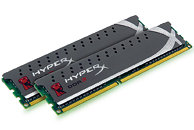 "The HyperX engineering team has been thoroughly innovative in designing a memory module that automatically raises performance with no overclocking steps required," said Mark Tekunoff, senior technology manager, Kingston. "By using JEDEC-compliant settings to create performance timings, enthusiasts can max out native frequencies on current Sandy Bridge systems and older DDR3 machines."
HyperX Plug and Play is available through Kingston's channel of authorized distributors, resellers, e-tailers and retailers. Kingston HyperX memory is backed by a lifetime warranty and free 24/7 technical support.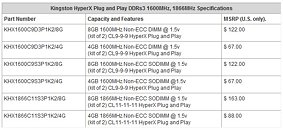
The modules are programmed using JEDEC-compliant settings, allowing 1600MHz and 1866MHz frequency support. It is as simple as plugging in the memory and turning on the machine, as the system automatically recognizes faster memory speed with no further BIOS settings required. Users will notice performance gains as overclocking is automatic with the HyperX Plug and Play modules. In addition, the modules are backwards compatible with previously released DDR3 systems on the market.

HyperX Plug and Play is available through Kingston's channel of authorized distributors, resellers, e-tailers and retailers. Kingston HyperX memory is backed by a lifetime warranty and free 24/7 technical support.

11 Comments on Kingston Technology Launches HyperX Plug and Play High Performance Memory
i once plugged in a hard drive and the system simply switched off.
i dont advertise it to do it tho, no guerantee for trying it :P