Tuesday, September 6th 2011
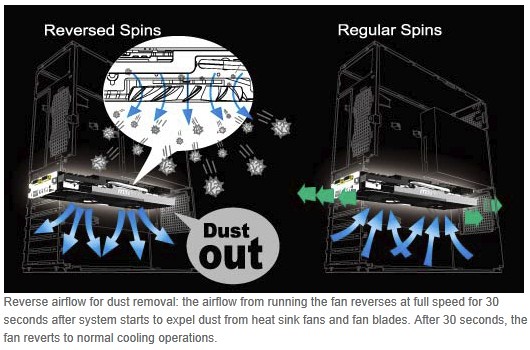
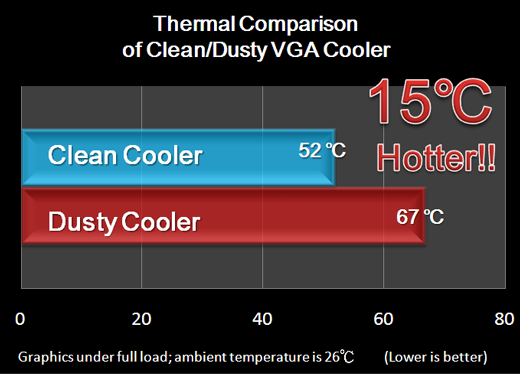
Of late, MSI has been at the forefront of graphics card innovations. The latest is what the company refers to as "Dust Removal Technology". Dust buildup on the surface of heatsink fins can reduce cooling efficiency. Without giving us too many details about its testing, MSI claims that a clean cooler can keep temperatures down by as much as 15°C. Dust Removal Technology uses a simple method of running fans in the opposite rotation, drawing air from the heatsink and pushing it out through its intakes, with 100% fan speed for 30 seconds at system startup can work to reduce dust accumulation in the tough to clean parts of the cooler. Since the "dust removal" happens on each system startup, cleaning happens on a very regular basis. MSI plans to implement the Dust Removal Technology on all its new and upcoming graphics cards.
posted by btarunr - 12:47 PM |  Related News

User comments
1 to 26 of 63 | Go to Page 1 2 3    Previous | Next
by Damn_Smooth (12:52 PM) - Reply
I'm not sure this will work. It will probably just build dust up on both sides of the fan. I could be completely wrong though, I spent approximately $0 researching it.
by Wyverex (12:56 PM) - Reply
Looks interesting, but I doubt it will be able to repel all the dust. If they don't increase the price of their cards because of this, it could be a nice little touch to make their cards a bit more wanted :)
by zsolt_93 (1:00 PM) - Reply
The Gigabyte Windforce coolers are also advertised as dustproof apart from being silent.I have a windforce gts450 right now so i'll probably find out if it's effective or was just pure advertising.
by sneekypeet (1:03 PM) - Reply
Only one real issue as I see it..."with 100% fan speed for 30 seconds at system startup" So this system only works for those who shut the PC off every night. Seems the longer it is between cleaning cycles, the less effective the system;)
by PHaS3 (1:08 PM) - Reply
by: sneekypeet
Only one real issue as I see it..."with 100% fan speed for 30 seconds at system startup" So this system only works for those who shut the PC off every night. Seems the longer it is between cleaning cycles, the less effective the system;)
It would probably happen whenever the PC restarts too, but as someone that leaves their PC on permanently, and only restart when i need to, this wouldn't work too well as you say...
by Shihabyooo (1:09 PM) - Reply
The problem isn't that normal fans can't suck out the dust, the problem is that dust particles stick to the heatsink's surface :rolleyes:. Could do better with inventing a paint that is 100% smooth and has the same electrical charge as the "dust". Physics one-oh-one, likes repel !
by: btarunr
Since the "dust removal" happens on each system startup, cleaning happens on a very regular basis. MSI plans to implement the Dust Removal Technology on all its new and upcoming graphics cards.
It's been ages since I shut down my PC. And I'm sure most enthusiasts keep theirs running for months !
by TheMailMan78 (1:10 PM) - Reply
So with this new technology my video card will now fart?
by PHaS3 (1:12 PM) - Reply
by: TheMailMan78
So with this new technology my video card will now fart?
:shadedshu
by erixx (1:18 PM) - Reply
nonsense on: no, unless you fart outside-in!? nonsense off: Asus latest cards also have it, maybe more silently.
by caleb (1:23 PM) - Reply
by: erixx
nonsense on: no, unless you fart outside-in!? nonsense off: Asus latest cards also have it, maybe more silently.
So Asus fart is more subtle?
by AnnCore (1:25 PM) - Reply
by: TheMailMan78
So with this new technology my video card will now fart?
Close. More like a cat trying to cough up a hair ball. And I agree it won't work unless the fans regularly reverse spin, like maybe every 12 hours?
by Jegergrim (1:29 PM) - Reply
100% fan speed for 30 seconds seem like taking drastic measures, usually the noise of a fan running at 100% is everything but quiet
by 95Viper (1:35 PM) - Reply
Won't work. Just blows dust back into case; deposits it in your other fans and components, it will suck it back up, eventually. Did they develop they DVD Rewinder, too? Now, when they enclose a maid in each box to do some case cleaning for me... That will work and I'll buy into it.;)
by Shihabyooo (1:36 PM) - Reply
by: Jegergrim
usually the noise of a fan running at 100% is everything but quiet
Who knows ? If it's running in reverse, it might suck noise as well :laugh: Speaking of reverse running, wouldn't this method only ditch the dust into the other components ? Would be a pain specially if you had a couple of cards on SLI/Crossfire. Dust sticking to the back of a PCB isn't a pleasant sight
by robal (1:39 PM) - Reply
Take experience from server systems... To be able to remove dust, you have to have huge airflow and pressure (server fans are capable of making a small hurricane). Running backwards at 100% is a good idea, but only if that 100% is really powerful. Cheers,
by btarunr (1:40 PM) - Reply
by: TheMailMan78
So with this new technology my video card will now fart?
Yes, it will fart dust. Good luck with that asthma.
by TheMailMan78 (1:52 PM) - Reply
To me its stupid unless it expels the dust OUT of my case. Not all over my mobo and CPU heat sink. I mean I don't need a GPU that just $h!ts dust all over the rest of my components. I would rather my GPU old the dust in like a tight sphincter until I clean it out as I see fit.
by PHaS3 (1:54 PM) - Reply
by: TheMailMan78
I don't need a GPU that just $h!ts dust all over the rest of my components.
:laugh::laugh: That's what i was thinking when i saw this hahahaha
by Th3pwn3r (1:56 PM) - Reply
by: 95Viper
Won't work. Just blows dust back into case; deposits it in your other fans and components, it will suck it back up, eventually. Did they develop they DVD Rewinder, too? Now, when they enclose a maid in each box to do some case cleaning for me... That will work and I'll buy into it.;)
EXACTLY. It's just going to blow all this dust and dirt all over the case and probably get sucked back into the video card. It might a bit but this is more of a selling point than anything. Keeping dust out of the case is a better investment than paying more for some feature like this. I guess if they're not charging any extra it's not an issue though. At least they're trying to improve things =/
by Zubasa (2:03 PM) - Reply
by: robal
Take experience from server systems... To be able to remove dust, you have to have huge airflow and pressure (server fans are capable of making a small hurricane). Running backwards at 100% is a good idea, but only if that 100% is really powerful. Cheers,
Yet people thinks the Fan on reference ATi cards are noisy :laugh: That is the kind of fan the work-station cards use. The fan on my 5870 only goes to 4800RPM, I have seen more powerful ones.
by ensabrenoir (2:03 PM) - Reply
Even if it does work it just blows dust into case and create more work for case fans.
by FreedomEclipse (2:07 PM) - Reply
as far as im concerned, there is no better way to deal with the dust problem then taking the graphics card out and giving it a few blasts with some compressed air. I'll stick to that approach.
by Mindweaver (2:18 PM) - Reply
by: TheMailMan78
So with this new technology my video card will now fart?
Not just fart, but fart dust... :roll::roll: I can hear it now.. Your video card is so old it farts dust! :roll: :roll: EDIT:I wonder does it sound like PEW PEW PEW?... LOL
by treehouse (2:36 PM) - Reply
by: FreedomEclipse
as far as im concerned, there is no better way to deal with the dust problem then taking the graphics card out and giving it a few blasts with some compressed air. I'll stick to that approach.
i concur :toast:
1 to 26 of 63 | Go to Page 1 2 3    Previous | Next
7201 Users online, 4.24 mbps
Quick Search
Already a member?
Username:
Password:
Register Here!
TechPowerUp on Facebook 
TechPowerUp on Google+ 
TechPowerUp Mobile App
New Forum Posts
13:13 by lilhasselhoffe...
Serious Giveaway (24)
13:00 by JrRacinFan
Nvidia GeForce 301.42 WHQL Driver (1)
12:53 by mtosev
Need a new router (1)
12:53 by trevormacro
3dfx Voodoo5 6000 Silver Edition (14)
12:50 by B0B
i7 960 too hot 80c (42)
12:48 by brandonwh64
We have sticks! (spoiler) (5)
Popular Reviews

Latest VGA Drivers

ATI Catalyst 12.4 WHQL

XP32 | XP64 | W7 32 | W7 64

NVIDIA GeForce 296.10 WHQL

XP32 | XP64 | W7 32 | W7 64