2462 Users online, 5.20 mbps
Quick Search
Already a member?
Username:
Password:
Register Here!
New Forum Posts
04:09 by BloodTotal
Psyko 5.1 Gaming Headphones (10)
04:08 by steelkane
Fit's current machine... always changing (1242)
04:06 by randomflip
Dead Space (2)
04:02 by suraswami
Phenom II 920 instock (3)
03:58 by trt740
motherboard for my yorkfield (13)
03:52 by Bytor
Q9550 at Antares... (16)
03:52 by newtekie1
[FS][US] Newtekie's For Sale Thread (32)


Last Articles


Popular Articles
Wednesday, October 15 2008
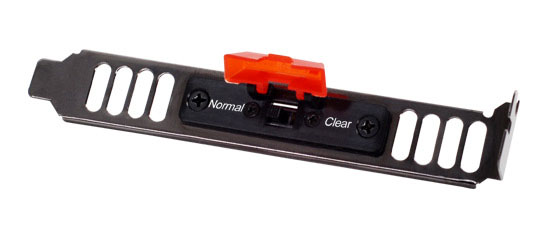
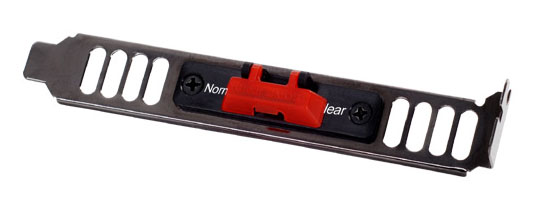
Coming out of nowhere I just found that SilverStone, a company that specializes in building high-end enclosures, has just launched a neat product that will certainly please all overclockers and computer enthusiasts. SilverStone SST-CLEARCMOS, as it is called, is an universal clear CMOS button on a backplate which works with every motherboard that has 3-pin clear CMOS pinouts. That allows you to quickly clear the CMOS for recovering from failed overclocking attempts, updating BIOS, or resetting BIOS without the need to open your PC. It's pretty cool, all you need to do is take away the CMOS jumper from your motherboard, connect the three SST-CLEARCMOS wires, and fix the backplate to a free PCI slot in your case.
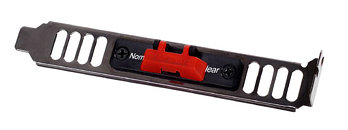
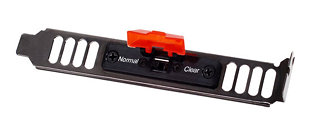
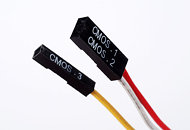

Source: Hardware Secrets
posted by malware - 12:00 AM |  Related News

User comments
by infrared (October 15th - 9:55 PM) - Reply
Looks good. Would be very useful if your cmos jumper is in an awkward location.
by ShadowFold (October 15th - 9:59 PM) - Reply
I hope these are around 10$, I want one!
by alexp999 (October 15th - 10:02 PM) - Reply
Nice, I'll defo be getting one of these, have been thinking about connecting up a switch to do the same thing, but this would be far neater. Such a PIA, when I want to clear CMOS, and I have to take the side panel off. So is it a button under the big red flap?

If it is pretty cool design, like a missile button on a fighter jet :D
by ASharp (October 15th - 10:07 PM) - Reply
Oh wow alright, that's awesome. I was reading about how to make one yourself but of course this is a lot easier and cleaner. If it's cheap, I definitely wouldn't mind picking one up. My clear CMOS jumper is right underneath my video card so it's a PITA to get to.
by Evo85 (October 15th - 10:08 PM) - Reply
Sweet idea. I foresee many of these being sold.
by MKmods (October 15th - 10:09 PM) - Reply
excellent post malware..This is gonna help lots of folks out. (lol, like me)
by alexp999 (October 15th - 10:11 PM) - Reply
I want one now :cry:

I wonder why they chose to make the sides vented?? Some closable vents would have really finished it off.
by vrm4 (October 15th - 10:13 PM) - Reply
they should offer one in a flooppy disc bezel as well.
by SpookyWillow (October 15th - 10:14 PM) - Reply
cant believe nobody has thought of this before tbh.
by Mistral (October 15th - 10:26 PM) - Reply
Ahh, a kill-switch for my PC... been dreaming about something like that...

I second the notion for a front panel variant, but I want it with two keyholes and a big red button...
by MKmods (October 15th - 10:34 PM) - Reply
by: alexp999;1018716
I want one now :cry:

I wonder why they chose to make the sides vented?? Some closable vents would have really finished it off.
Companies are slowly figuring out that modern comps produce 10X the heat of the ones when cases were first designed, Bout time.
by alexp999 (October 15th - 10:39 PM) - Reply
by: MKmods;1018777
Companies are slowly figuring out that modern comps produce 10X the heat of the ones when cases were first designed, Bout time.
Doesnt it mess with your airflow though? Or with modern PC's is it now better to have as many ventilation openings as possible?

If so I may get some of these along with it:

http://www.silverstonetek.com/products/p_contents.php?pno=aeroslots&area=usa
by soldier242 (October 15th - 10:42 PM) - Reply
pretty nice idea ihmo ... i think every overclocker thought of something like this
by warup89 (October 15th - 10:46 PM) - Reply
This is truly a great & simple idea, it reduces the chances of screwing up your PC while attempting to clear your BIOS ;). This is one of the main reasons i choose abit an mobo since they tried this first with the ix38 boards :).
by wolf2009 (October 15th - 10:52 PM) - Reply
Lets hope they price it right and not try to rip us off
by alexp999 (October 15th - 10:53 PM) - Reply
by: wolf2009;1018817
Lets hope they price it right and not try to rip us off
Silverstone stuff is usually quite reasonable considering their quality. I have two silverstone fans in my case, they are incredible, dead silent (no j/k) and move a decent amoutn of air, all at 12v! :eek:
by WarEagleAU (October 15th - 10:55 PM) - Reply
Very sweet
by batmang (October 15th - 10:56 PM) - Reply
That is rad.
by MopeyMartian (October 15th - 11:09 PM) - Reply
Is it weird that my BIOS resets itself when my OC attempt fails? Do most of you have to manually do it? :confused:
by alexp999 (October 15th - 11:11 PM) - Reply
by: MopeyMartian;1018844
Is it weird that my BIOS resets itself when my OC attempt fails? Do most of you have to manually do it? :confused:
No, mine resets itself. But, for e.g when I update my BIOS, I always like to clear the CMOS.
Or if you push get a setting wrong in the BIOS, or the auto-recovery doesnt work, its really handy to have an easily accessible clear cmos button.

Cant wait for these to become avaialbe, hope it wont be long! :D

EDIT: Cant believe I'm actually gettign excited over a button! :shadedshu
Why didnt someone think of it sooner! :rolleyes:
by spud107 (October 15th - 11:17 PM) - Reply
i made something similar on my socket a system, it would work for bios but i hooked it up to the safe mode jumpers instead, (3 pins 100fsb/user fsb)
didnt reset any settings that way, only a safe fsb setting was selected.
by Urbklr (October 16th - 12:02 AM) - Reply
Now that is wicked, I tend to use my Clear-CMOS a lot, that would make it pretty easy(once my comp is back in it's case that is). I would defiantly buy one!
by sneekypeet (October 16th - 12:11 AM) - Reply
Glad to see others are following in what DFI did a while back. My blood Iron and DK boh have 2 CMOS jumpers and one is in the I/O plate, makes it damn handy and convenient.
by Weer (October 16th - 12:24 AM) - Reply
by: MKmods;1018777
Companies are slowly figuring out that modern comps produce 10X the heat of the ones when cases were first designed, Bout time.
Companies have always known that. It's simple. The more heat, the more air-circulation needed to cool it down. But what you need for that aren't tiny vents, but a large amount of out-take fans, with exhaust greater than intake. This.. is mostly for look's sake.
by ASharp (October 16th - 12:26 AM) - Reply
Yeah the CMOS jumper on the I/O panel is handy but it's still tough as you actually still have to move the jumper to clear and then put it back. It takes a few seconds but no where near as easy as flipping a switch which literally takes a second or two. ;)
by KainXS (October 16th - 12:51 AM) - Reply
it looks convenient
by gvblake22 (October 16th - 1:14 AM) - Reply
What an idea! Props to Silverstone for coming up with this, I'm actually surprised it hasn't happened sooner.
by Sasqui (October 16th - 1:30 AM) - Reply
Oh for Christ's sake! I rigged this same thing in a build 8 years ago. Used a 3-pole temporary push button switch from Radio shack mounted to a PC plate.

Nice to see it as a product.
by CrAsHnBuRnXp (October 16th - 2:08 AM) - Reply
I loved how my DFI x38 had the feature that if you pressed the reset and power button (while pressing reset first) at pretty much the same time and held it there for 5 seconds, CMOS would clear. I miss that feature.
by panchoman (October 16th - 2:09 AM) - Reply
honestly guys, this think makes me think that you guys have to clear your bios 10 times a day :wtf:, i clear mine about twice a year -_-
by sneekypeet (October 16th - 2:11 AM) - Reply
by: panchoman;1019096
honestly guys, this think makes me think that you guys have to clear your bios 10 times a day :wtf:, i clear mine about twice a year -_-
thats what happens when you OC to extreme ends or push the ram just that much too far. Or hell for that matter anytime I update a bios. Some nights when Im on an OC kamakazee run I may have to jump it 10 times that night!
by CrAsHnBuRnXp (October 16th - 2:11 AM) - Reply
by: alexp999;1018788
Doesnt it mess with your airflow though? Or with modern PC's is it now better to have as many ventilation openings as possible?

If so I may get some of these along with it:

http://www.silverstonetek.com/products/p_contents.php?pno=aeroslots&area=usa
http://www.newegg.com/Product/Product.aspx?Item=N82E16811999181&Tpk=aero%20slots

:D

Wasnt aware of those. Might have to get some for my dad's computer.
by panchoman (October 16th - 2:12 AM) - Reply
by: sneekypeet;1019097
thats what happens when you OC to extreme ends or push the ram just that much too far. Or hell for that matter anytime I update a bios. Some nights when Im on an OC kamakazee run I may have to jump it 10 times that night!


what, am i the only one with a motherboard that resets when you have a failed oc? hell some days i'll do 20 oc'ing attempts and not even touch my cmos at all.
by CrAsHnBuRnXp (October 16th - 2:13 AM) - Reply
by: panchoman;1019096
honestly guys, this think makes me think that you guys have to clear your bios 10 times a day :wtf:, i clear mine about twice a year -_-
You have a lot of resets to go to catch up to me. :laugh:

I wonder when we can expect to see this out?
by sneekypeet (October 16th - 2:14 AM) - Reply
by: panchoman;1019100
what, am i the only one with a motherboard that resets when you have a failed oc? hell some days i'll do 20 oc'ing attempts and not even touch my cmos at all.
Try your hand at a DFI...and personally I would rather it not boot than have a false sence it worked until I got to windows:mad:
by panchoman (October 16th - 2:17 AM) - Reply
by: sneekypeet;1019106
Try your hand at a DFI...and personally I would rather it not boot than have a false sence it worked until I got to windows:mad:
lol, i'll gladly oc on a dfi with my x2 if you wanna send me up :p

as for the false sense, on my trusty biostar, whenever i have a failed oc, it just sits with a blank screen for a few seconds, the bios realizes that there was a failure, resets only the frequencies and what not (not the whole bios) and when i boot, after post, it tells me that that there was a failure and all of that good stuff.
by CrAsHnBuRnXp (October 16th - 2:20 AM) - Reply
Some motherboards have that feature pancho. Mine does to a degree. However if the OC is bad enough, it wont recover itself and I have to pull the battery which involves me taking out my video card since it sits right under neath it.
by panchoman (October 16th - 2:23 AM) - Reply
by: CrAsHnBuRnXp;1019118
Some motherboards have that feature pancho. Mine does to a degree. However if the OC is bad enough, it wont recover itself and I have to pull the battery which involves me taking out my video card since it sits right under neath it.


i mean sure, sometimes my board doesn't recover from somethings that like atrociously horrible, but seriously, for most people, how long does it take to open their case panels with thumb screws and move a jumper?

thats why i was saying, this thing makes it sound like people have to reset the cmos 10 times a day..

oh and btw, move the jumper, it does a better job then taking out the battery.
by Scrizz (October 16th - 2:26 AM) - Reply
this is sweet
by Scrizz (October 16th - 2:29 AM) - Reply
by: panchoman;1019122
i mean sure, sometimes my board doesn't recover from somethings that like atrociously horrible, but seriously, for most people, how long does it take to open their case panels with thumb screws and move a jumper?

thats why i was saying, this thing makes it sound like people have to reset the cmos 10 times a day..

oh and btw, move the jumper, it does a better job then taking out the battery.
for me to move the jumper I have to pull the case out of the corner it's in, take off the side panel, unplug the vid card, unplug the xfi, remove the vid card, etc..... :shadedshu
by panchoman (October 16th - 2:30 AM) - Reply
by: Scrizz;1019128
for me to move the jumper I have to pull the case out of the corner it's in, take off the side panel, unplug the vid card, unplug the xfi, remove the vid card, etc..... :shadedshu
to reach a jumper?
by sneekypeet (October 16th - 2:32 AM) - Reply
by: panchoman;1019129
to reach a jumper?
yup same on the DFI's I think thats why they put em in the I/O in the first place!
by panchoman (October 16th - 2:33 AM) - Reply
by: sneekypeet;1019132
yup same on the DFI's I think thats why they put em in the I/O in the first place!
got pics?
by sneekypeet (October 16th - 2:37 AM) - Reply
google images on the Blood Iron or the P35 DK.

B.I. : http://images.google.com/images?hl=en&q=blood+iron&gbv=2

DK :http://www.hydro-powered.co.uk/catalog2008/images/dfi/DK20P35-T2R-S.jpg

The DK is a bit more convenient, but if they are in the back why bother?
by panchoman (October 16th - 2:39 AM) - Reply


the only problem i would see would be if you have 2 long as pci xpress cards or an unfolded hr-03...
by sneekypeet (October 16th - 2:41 AM) - Reply
in a pic yes, but in reality its a PITA to get to with even a dual slot card, but I do think we may be drifting a bit off topic...slightly!?!?!

Case and point....find the jumper....lol http://img137.imageshack.us/img137/5334/p1010159js7.jpg
by panchoman (October 16th - 2:42 AM) - Reply
how does a dual slot cooler really interfere man? it's got a shit load of clearance....
ehh i dont really like how dfi does their shit anymore though.. they are cutting corners when it comes to quality.. i mean seriously.. a soldered bios chip?
by sneekypeet (October 16th - 2:43 AM) - Reply
by: panchoman;1019143
how does a dual slot cooler really interfere man? it's got a shit load of clearance....
ehh i dont really like how dfi does their shit anymore though.. they are cutting corners when it comes to quality.. i mean seriously.. a soldered bios chip?
Edited with image!^^
by Wile E (October 16th - 3:18 AM) - Reply
by: alexp999;1018788
Doesnt it mess with your airflow though? Or with modern PC's is it now better to have as many ventilation openings as possible?

If so I may get some of these along with it:

http://www.silverstonetek.com/products/p_contents.php?pno=aeroslots&area=usa

If you have solid plate covers, the air flow in the area of the expansion slots can stagnate. Vented covers are better.
by: Weer;1018973
Companies have always known that. It's simple. The more heat, the more air-circulation needed to cool it down. But what you need for that aren't tiny vents, but a large amount of out-take fans, with exhaust greater than intake. This.. is mostly for look's sake.
You do not have to have more exhaust power than intake power. Both methods have their pros and cons.
by panchoman (October 16th - 3:20 AM) - Reply
by: sneekypeet;1019142
in a pic yes, but in reality its a PITA to get to with even a dual slot card, but I do think we may be drifting a bit off topic...slightly!?!?!

Case and point....find the jumper....lol http://img137.imageshack.us/img137/5334/p1010159js7.jpg


i'd easily find it if you gave me another angle.. its almost 1/2 of the bios battery visible, and with another angle, i could find that jumper, which is on top of the battery, and a little to the right.
by Wile E (October 16th - 3:24 AM) - Reply
About jumper placement, my ECS KA3-MVP had terrible jumper placement. If I had my audio card installed, I had to use a pair of needle nosed pliers to get to it. Wish I would've thought of this back then.
by panchoman (October 16th - 3:25 AM) - Reply
wow, this makes my biostar feel very good :D
by marsey99 (October 16th - 3:26 AM) - Reply
this deserves an award, its about time you can buy these as i have broke 2 i made.

:toast:
by jbunch07 (October 16th - 4:14 AM) - Reply
Very good idea! I more than likely will be investing in one of those. :)
by CrAsHnBuRnXp (October 16th - 4:25 AM) - Reply
by: panchoman;1019122
i mean sure, sometimes my board doesn't recover from somethings that like atrociously horrible, but seriously, for most people, how long does it take to open their case panels with thumb screws and move a jumper?

thats why i was saying, this thing makes it sound like people have to reset the cmos 10 times a day..

oh and btw, move the jumper, it does a better job then taking out the battery.
Depends on where the jumper is at and how much crap is in the way. Id rather flip a switch on the back of my computer than dig inside my case 300+ times while going OC crazy.
by Mussels (October 16th - 4:45 AM) - Reply
Pity so many boards these days have a simple 2 pin CMOS clear....

oh well, a handy tool nonetheless :)
by Beertintedgoggles (October 16th - 4:46 AM) - Reply
http://www.frozencpu.com/cat/l3/g4/c153/s318/list/p1/Electronics-Switches-Military_Switches-Page1.html

Use one of these two throw switches and wire it up yourself.... very easy and looks a hell of a lot better. Maybe it's just me but I'd rather try to build most of my shit myself.
by Bjorn_Of_Iceland (October 16th - 6:02 AM) - Reply
Someone shouldve thought about this several years ago..
by OnBoard (October 16th - 6:41 AM) - Reply
by: Mussels;1019280
Pity so many boards these days have a simple 2 pin CMOS clear....

oh well, a handy tool nonetheless :)
It works in those too. Center pin is always connected it just switches the side one. So the connected side is hanging in the air while the other 2 are connected to the clear CMOS.

edit: doh, it's already designed for 2 pin use too :D Might just be that you have to connect the white and yellow wires and not the red/white part if you want the normal to be normal and not clear position. (or just change the wire positions, very easy)


In fact this would be more useful to those 2pin mobos like mine, as there is no jumper to begin with and shorting it with something metal is ghetto :) Although I didn't have any use for clearing CMOS is my previous motherboard and this one knows how to start after unsuccessful OC too. And for bios update load optimized defaults works fine.
by ArkanHell (October 16th - 1:19 PM) - Reply
OMG! I can belive howsimple is this artifact, the ugly Clear C-MOS had been there like forever, why no boy ever came with this idea!

I want one, and stop droping the jumper when y try to put it back so i wont be shacking my case upside down to bring it down.
by Weer (October 16th - 11:56 PM) - Reply
by: Wile E;1019190

You do not have to have more exhaust power than intake power. Both methods have their pros and cons.
Assuming the other method is having more intake or equal amounts of both, you are wrong.
There is no pro to having more air coming into the case, heating up and having no place to go. There is also no pro to having just as much air coming into the case as getting out, because cold air will get sucked into the case from any tiny spec of a hole.
Thus, the only method worthy is to have more exhaust than intake. Hopefully now you understand ;)
by Mussels (October 17th - 2:36 AM) - Reply
by: Weer;1020394

Thus, the only method worthy is to have more exhaust than intake. Hopefully now you understand ;)
That method causes excessive dust build up, and ruins airFLOW.

A properly setup case with airflow, does not suffer dust problems and gets the air in and out, passing over the needed areas and leaving.

Your method could well suck air in from the sides, ruin the flow and have it totally bypass hot components in the case.
by Wile E (October 17th - 3:01 AM) - Reply
by: Weer;1020394
Assuming the other method is having more intake or equal amounts of both, you are wrong.
There is no pro to having more air coming into the case, heating up and having no place to go. There is also no pro to having just as much air coming into the case as getting out, because cold air will get sucked into the case from any tiny spec of a hole.
Thus, the only method worthy is to have more exhaust than intake. Hopefully now you understand ;)

lol. I find it amusing that you think you have the answer to this locked up. Then tell me, why, in my Stacker 830, did having more intake air coming in than leaving, did I get better temps on my chipsets and gfx cards (to the order of 2-3C under load), all at the same ambient temperature?

All those little holes that can let air enter in a negative pressure case, can also let air exit in a positive pressure case. ;)

Using negative pressure is by no means the best for everyone in all situations. Both have pros and cons, and both methods vary depending upon your case setup. There have been many threads about this around here comparing both methods. Neither is better in all situations.

Seriously, start doing research on things before you come into threads trying to state claims as fact.
by panchoman (October 17th - 3:05 AM) - Reply
by: Weer;1020394
Assuming the other method is having more intake or equal amounts of both, you are wrong.
There is no pro to having more air coming into the case, heating up and having no place to go. There is also no pro to having just as much air coming into the case as getting out, because cold air will get sucked into the case from any tiny spec of a hole.
Thus, the only method worthy is to have more exhaust than intake. Hopefully now you understand ;)
i beg to differ. you get bad airflow because the exhaust fans have to create a crappy vaccumm, and the fans in the back of your case have to suck in air from the front of your case.. this causes dust buildup and horrible horrible airflow. its better to have a balanced flow, where the case is plentiful of air from the intake fans, which throw cool air on the hot components, and the exhaust fans blow out the hot air. if you must pick one, pick intake, because atleast you'll have cool air thats filling the case and cooling the components, the hot air will escape through the vents automatically.
by eidairaman1 (October 17th - 7:00 AM) - Reply
probably fabricate one for way less.
by alexp999 (October 17th - 10:29 AM) - Reply
just to put my 2p, into the exhaust/intake discussion. On my last case, I had 2x120mm intakes and 1x120mm exhaust. I got loads of dust was damn annoying. On this case, I have 2x120mm intake on 6v, and one 140mm intake on 12v, then 2x140mm exhausts on 12v, and a 120mm exhaust on 12v. (from what I worked out, I have more air pulling out than in), and I get virtually no dust now! :D
I think, case design, fan design, fan location, hardware location plays an important role, but probably the best method is to experiment, and see whats best for you.
Oh yeah, and with my gfx card in my new case and fan setup, gave me a 5-10*C drop in GPU temps :rockout:
by hayder.master (October 19th - 10:00 AM) - Reply
it is cool , but almost new mobo's now have reset switch
by OnBoard (October 19th - 10:32 AM) - Reply
by: hayder.master;1023619
it is cool , but almost new mobo's now have reset switch
Just the top of the spec ones. Not in any mainstream or cheap boards.
by CrAsHnBuRnXp (October 19th - 5:33 PM) - Reply
by: OnBoard;1023642
Just the top of the spec ones. Not in any mainstream or cheap boards.

And its still on the motherboard where you have to take the side panel off anyway. This switch makes it so that you dont have to do that.
Post your comment