Wednesday, May 13 2009
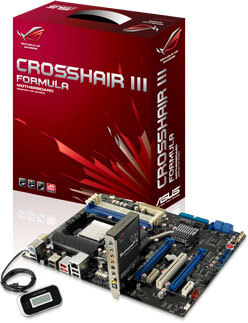
ASUS finally got generous with AMD enthusiasts seeking an avant-grade Republic of Gamers motherboard to drive the AMD Dragon platform. Enter Crosshair III. Traditionally, ASUS used the Crosshair name for high-end AMD motherboards based on NVIDIA nForce chipsets, but this time around, it will be using AMD's workhorse high-end desktop chipset: AMD 790FX coupled with SB750. The choice could have been influenced by two factors: reasonable demand for ATI Radeon graphics, and the Advanced Clock Calibration (ACC) feature vendors haven't been able to ship with nForce chipsets so far.

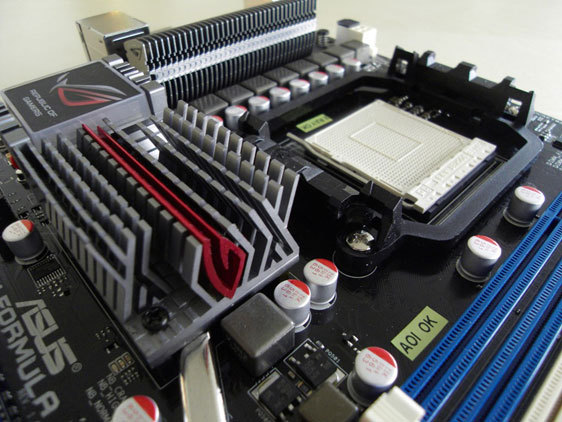
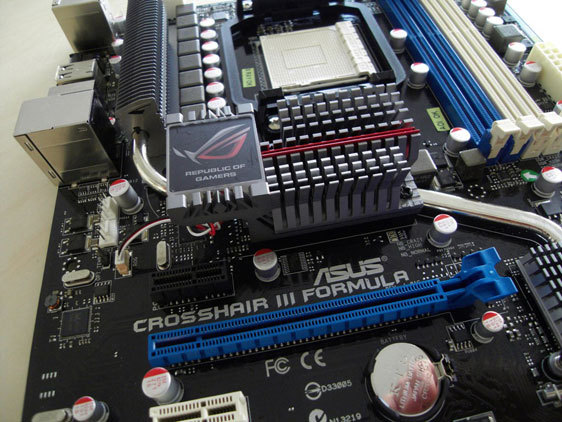
An 8+2 phase circuit powers the AM3 socket, which supports the latest processors from AMD, that support DDR3 memory. "Only" two PCI-Express x16 slots are provided, that support ATI CrossFireX. Other feature include ROG-exclusive LCD-poster, and the iROG overclocking management system. Audio is care of an ASUS SupremeFX X-Fi audio riser. While the board just may seem a little basic compared to the M4A79T Deluxe, you have to consider the fact that it carries the "Formula" sub-branding. If ASUS wants to sell a better board, there just could be a Crosshair III Extreme in the works. ASUS may use the upcoming Computex event to launch this. It is expected to be priced around US $200.


Source: Plaza.fi
posted by btarunr - 7:16 PM |  Related News

User comments
1 to 26 of 71 | Go to Page 1 2 3    Previous | Next
by erocker (May 13th - 7:17 PM) - Reply
That's how a high-end AMD board should look! :rockout: I want.
by Cold Storm (May 13th - 7:20 PM) - Reply
Wow! That board makes me want to price together a AM3 set up!!!
by crtecha (May 13th - 7:24 PM) - Reply
Just what I've been waiting for.
by aGeoM (May 13th - 7:29 PM) - Reply
Finally an AMD chipset for ROG, but it should be done with the next RD890 chipset.

Anyway better late than never. The board looks OK.:rockout:
by human_error (May 13th - 7:40 PM) - Reply
This board looks good (well, a LOT better than the other AMD high end boards).

Looking closer at it though i'm a bit dissapointed that it has 3x pci-e 1x slots, 1xpci and 2x pci-e 16x slots, i'd rather have had another 16x pci-e slot or another pci slot for those with a pci wireless card and a pci sound or tv tuner card and get rid of one of the pci-e x1 slots...

As for the location of the CMOS battery on a board which should be used with high-end dual slot graphics cards :shadedshu ....
by Evo85 (May 13th - 7:44 PM) - Reply
Bout F'in time!!!! :rockout:

But now I gotta get an AM3 CPU... :mad:
by Fitseries3 (May 13th - 7:47 PM) - Reply
I Demand Moar Pcie!!!!
by bogmali (May 13th - 7:57 PM) - Reply
by: Fitseries3
I Demand Moar Pcie!!!!

+1
by eidairaman1 (May 13th - 8:01 PM) - Reply
Must be Painful to NV to have Asus go with AMD this round on chipsets, Especially for the ROG series chipset, I suspect EVGA may eventually join in as the x58 SLI they have is an excellent choice for CFX/SLI3X. Seems NV can only sell SLI as a platform on AMD CPUs or CUDA anymore.
by Cold Storm (May 13th - 8:01 PM) - Reply
by: human_error
This board looks good (well, a LOT better than the other AMD high end boards).

Looking closer at it though i'm a bit dissapointed that it has 3x pci-e 1x slots, 1xpci and 2x pci-e 16x slots, i'd rather have had another 16x pci-e slot or another pci slot for those with a pci wireless card and a pci sound or tv tuner card and get rid of one of the pci-e x1 slots...

As for the location of the CMOS battery on a board which should be used with high-end dual slot graphics cards :shadedshu ....
Yeah, the location of the Cmos battery is a bit strange, but if you look around, a lot of companies have it right under teh first PCI-e slot, or the second.. I have to take my 2nd card out whenever I overclock, so if there is a error, and I need to take that battery out, I don't have to spend 5 mins taking the card out..
by Mike0409 (May 13th - 8:04 PM) - Reply
WOW! Nice looks! Finally AMD get's a good scheme! layout is kinda a bitch tho....=/
by sapetto (May 13th - 8:16 PM) - Reply
Nice, is it the first asus amd high-end mobo?
by aGeoM (May 13th - 8:19 PM) - Reply
by: Cold Storm
Yeah, the location of the Cmos battery is a bit strange, but if you look around, a lot of companies have it right under teh first PCI-e slot, or the second.. I have to take my 2nd card out whenever I overclock, so if there is a error, and I need to take that battery out, I don't have to spend 5 mins taking the card out..
The CLR button on the back of the board works, you will not need to remove BAT, at least with the Crosshair II, I never had to.
by johnnyfiive (May 13th - 8:19 PM) - Reply
Hell, I'm just now getting around to getting a CrossHair II, that is a nice looking board!
by cdawall (May 13th - 8:22 PM) - Reply
hello my new mobo
by Cold Storm (May 13th - 8:23 PM) - Reply
by: aGeoM
The CLR button on the back of the board works, you will not need to remove BAT, at least with the Crosshair II, I never had to.
It's a maybe on the thing... When you oc a processor to high, to where the bios deson't want to do a thing.. You'd have to take out the battery to reset it all.. Yeah, the Clear cmos button is additive to not have to do it, but it doesn't all ways go as planned.. I got stuck for teh first time with my 780i board last week. Was trying to hit 5ghz and bios wouldn't do a thing. Cmos button wouldn't clear it, so the battery was needed to be taken out..
by aGeoM (May 13th - 8:24 PM) - Reply
by: cdawall
hello my new mobo
Hi, I really would like to grab one, but... RD890 it's my gold ATM.

:toast:
by aGeoM (May 13th - 8:28 PM) - Reply
by: Cold Storm
It's a maybe on the thing... When you oc a processor to high, to where the bios deson't want to do a thing.. You'd have to take out the battery to reset it all.. Yeah, the Clear cmos button is additive to not have to do it, but it doesn't all ways go as planned.. I got stuck for teh first time with my 780i board last week. Was trying to hit 5ghz and bios wouldn't do a thing. Cmos button wouldn't clear it, so the battery was needed to be taken out..
Man I know what you mean ;), but as I said, I never needed, but in that case it's not a problem, the board it's on top of the desk, lol.
by Cold Storm (May 13th - 8:35 PM) - Reply
by: aGeoM
Man I know what you mean ;), but as I said, I never needed, but in that case it's not a problem, the board it's on top of the desk, lol.
Yeah, I've only had to remove the battery once on this board myself.. Just because I forgot to up the cpu volts from teh start.. lol..

But, the board does look good to think about soemthing AMD this time. I knew there was a reason I was sitting by to build a AM3 rig.. Even that MSI board is looking sweet... But, Gotta wait! lol
by freaksavior (May 13th - 8:52 PM) - Reply
by: cdawall
hello my new mobo
was waiting on you to say thtat.
by Evo85 (May 13th - 8:55 PM) - Reply
This WILL be my next build!!!

Just gotta figure out how to get it by my wife! :D :eek:
by WarEagleAU (May 13th - 8:58 PM) - Reply
Wow its about freaking time. I want one of these, extreme version and also one with the RD890 when it comes out! Looks freaking sweet!
by Mike0409 (May 13th - 9:02 PM) - Reply
by: Evo85
This WILL be my next build!!!

Just gotta figure out how to get it by my wife! :D :eek:
Lol buy her something shiney and distract her with it as you sneak the board into your rig!
by newtekie1 (May 13th - 9:23 PM) - Reply
by: Cold Storm
It's a maybe on the thing... When you oc a processor to high, to where the bios deson't want to do a thing.. You'd have to take out the battery to reset it all.. Yeah, the Clear cmos button is additive to not have to do it, but it doesn't all ways go as planned.. I got stuck for teh first time with my 780i board last week. Was trying to hit 5ghz and bios wouldn't do a thing. Cmos button wouldn't clear it, so the battery was needed to be taken out..
The CLR CMOS button or Jumper does the exact same thing as removing the bettery, it cuts power to the CMOS which causes it to go blank. Blank CMOS means the BIOS uses default settings.

On modern boards, you should never need to pull the battery, either use the button, or if the board doesn't have a button use the jumper. And you have to remember to cut power to the board, and hold the button down for 10 seconds, or move the jumper over for 10 seconds.
by cdawall (May 13th - 9:24 PM) - Reply
by: freaksavior
was waiting on you to say thtat.
even you liked my crosshair II
1 to 26 of 71 | Go to Page 1 2 3    Previous | Next
4883 Users online, 3.77 mbps
Quick Search
Already a member?
Username:
Password:
Register Here!
TechPowerUp on Facebook 
TechPowerUp on Google+ 
New Forum Posts
23:17 by pepsi71ocean
Facebook for search results? (11)
23:14 by petedread
P8P67 OC profiles won't load (1)
23:13 by LifeOnMars
[FS] (UK ONLY) Various Items (15)
23:12 by ThE_MaD_ShOt
New WCG-TPU team member welcome thread (110)
23:08 by AsRock
New ram? (1)
23:06 by Completely Bon...
excel cell formating (6)
23:05 by Velvet Wafer
The AMD Phenom II OC'ers Club (14091)
23:03 by Completely Bon...
Using a laptop as a repeater? (5)
Popular Reviews

Latest VGA Drivers

ATI Catalyst 12.1 WHQL

XP32 | XP64 | W7 32 | W7 64

NVIDIA GeForce 285.58 WHQL

XP32 | XP64 | W7 32 | W7 64