Thursday, May 21st 2009
Two new EVGA Core i7 motherboards are being worked out at the company's factories, we've learned. First on the list is the EVGA X58 SLI LE (141-BL-E757) motherboard, which will be placed directly under and priced lower than the current X58 SLI (141-BL-E758) model. This motherboard has four PCI-Express 2.0 slots that run at x16/x16/x8/x8, and also features a PCI-E x1 slot and single PCI slot. The new X58 SLI LE utilizes a 6-phase analog PWM design with a single EPS 12v connector. The board includes six triple-channel DDR3 1600 MHz slots, 6x SATA II 3.0 Gb/s slots, an onboard LED for POST codes and has a simple passive heatsink with no heatpipes.
Second in the list lines up EVGA X58 SLI Micro (141-BL-E756). One of its most notable features is that it boasts Micro-ATX form factor. The board features two PCI-Express x16 2.0 slots and one PCI-E x1 slot. It has a 6-phase analog PWM design, six triple-channel DDR3 1600 MHz slots, 6x SATA II 3.0 Gb/s slots, an onboard POST LED, and the same passive heatsink found on the X58 SLI LE mainboard.
Expect to find the new motherboards in stock soon.
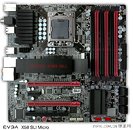


Source: HARDSPELL
posted by malware - 9:00 AM |  Related News

User comments
by fatguy1992 (9:03 AM) - Reply
I wonder how well they will overclock?
by WhiteLotus (9:04 AM) - Reply
I have no idea, but they look evil. That red and black one... any one else think a nice Terminator theme PC could use the board.
by alexp999 (9:06 AM) - Reply
I wouldnt have thought that cooling is adequate, unless its considerably taller than it looks.
by robert3892 (9:10 AM) - Reply
You can find some more info posted about these motherboards here in our EVGA forum: http://www.evga.com/forums/tm.asp?m=100682595 best regards rjohnson11 EVGA Forum Moderator
by Phaeton (10:24 AM) - Reply
Looks sweet, but the 8-pin needs to be moved before I consider buying either one.
by pentastar111 (10:30 AM) - Reply
the all black one is really nice looking.
by qwerty_lesh (10:34 AM) - Reply
Wow, they both looks absolutely awesome.
by pentastar111 (11:42 AM) - Reply
Although, after closer examination, both boards appear as though they have taken away the option of using a sound card if you go SLI. SLI will cover both the pcie and the pci slots. At least that's the way it looks to me. I am no designer or engineer, but this looks like this "issue" should be addressed BEFORE it goes on the shelf?
by alexp999 (12:23 PM) - Reply
by: pentastar111
Although, after closer examination, both boards appear as though they have taken away the option of using a sound card if you go SLI. SLI will cover both the pcie and the pci slots. At least that's the way it looks to me. I am no designer or engineer, but this looks like this "issue" should be addressed BEFORE it goes on the shelf?
You can put PCI-E x1 cards into the x16 slots But your right, the acual PCI and PCi-E x1 slots are covered if you have dual slot cards in SLI. Very bad design IMO
by Weer (12:53 PM) - Reply
This takes away the crown from my Gigabyte P45 board that overclocks like a dream.
by kyle2020 (12:56 PM) - Reply
by: Phaeton
Looks sweet, but the 8-pin needs to be moved before I consider buying either one.
+1. Cant be doing with running cables up the motherboard, it looks awful.
by h3llb3nd4 (3:28 PM) - Reply
DUDE! they look like they're craving for OCers!!
by AuDioFreaK39 (8:04 PM) - Reply
Source of this article is Fudzilla, not Hardspell. Look at their source. ;)
by Kitkat (8:04 PM) - Reply
by: h3llb3nd4
DUDE! they look like they're craving for OCers!!
not to rock the boat but this is why they needa make a amd chipset board too lol.. just because why not all theese "sides" u can open up a whole new window of profit and if anything intel owners would win too... just sayng.
by Hayder_Master (10:26 PM) - Reply
by: robert3892
You can find some more info posted about these motherboards here in our EVGA forum: http://www.evga.com/forums/tm.asp?m=100682595 best regards rjohnson11 EVGA Forum Moderator
welcome to our forums :toast: many people here EVGA and they get use of it
by pentastar111 (10:46 PM) - Reply
the color scheming is great on both boards. They look like military hardware. Simple dark colors. All of that flourescent coloring some of the other board manufactureres use( the bright oranges, greens, yellows) used by themselves they are not to bad, but some boards have all of the colors on them making them look like they were purchased at a carnival. these are very nice indeed. Cept for that pci-e issue.
by random (3:19 PM) - Reply
YAY more good boards that don't consider people who use pci/e sound cards and pci/e wireless ethernet. Tbh imo, layouts like these prevent people like me from ever considering getting one of those boards because obviously if you buy a board like that you'd want to keep upgrading until you reach 3 GPU's but obviously there's no point if your using wireless or have a sound card. I know you can work around the problem by going watercooling, but waterblocks for 3x GPU's is hardly worth it through my perspective.
by newtekie1 (3:34 PM) - Reply
by: pentastar111
Although, after closer examination, both boards appear as though they have taken away the option of using a sound card if you go SLI. SLI will cover both the pcie and the pci slots. At least that's the way it looks to me. I am no designer or engineer, but this looks like this "issue" should be addressed BEFORE it goes on the shelf?
On the SLI Micro, yes. But then again, it is a Micro-ATX board, you can't really configure the ports any differently. With only 4 expansion slots to work with, if you design a SLI capable board, this is essentially the only way to get it to work. MicroATX + SLi/Crossfire + Dual-Slot cards = No usable expansion slots. On the SLI LE, you are incorrect. If you want to use a PCI expansion card, then put put the graphics cards in slots 1 and 5(1 being the top slot), this will leave the PCI slot open for use. If you want to use a PCI-e expansion card, then you put the graphics cards in slots 1 and 3, and then use either of the two bottom PCI-e slots for your expansion slot.
by: randomflip
YAY more good boards that don't consider people who use pci/e sound cards and pci/e wireless ethernet. Tbh imo, layouts like these prevent people like me from ever considering getting one of those boards because obviously if you buy a board like that you'd want to keep upgrading until you reach 3 GPU's but obviously there's no point if your using wireless or have a sound card. I know you can work around the problem by going watercooling, but waterblocks for 3x GPU's is hardly worth it through my perspective.
As stated, the MicroATX board has to have this problem, it is a MicroATX issue. And as for the regular ATX board, the only way to avoid your issue with 3 graphics cards is to buy a board with a PCI-e x1 slot above the first PCI-e x16 slot. And then you get the use of one slot... There is no way to configure a board that can handle 3 dual-slot graphics cards, and still have usable PCI and PCI-e slots left over, with the exception of one PCI-e x1 slot as I alread mentioned. IMO, the layout on the ATX board is pretty good. It give you the flexibility of using two dual-slot graphics cards, while still having access to either 1 PCI slot and 1 PCI-E x16 slot(which can house any PCI-e card) or 2 PCI-E x16 slots. It is impossible to have an ATX board, that can hold 3 Dual-Slot graphics cards and 2 more expansion cards(either PCI or PCI-e), that ATX standard will not allow it.
by random (12:30 AM) - Reply
by: newtekie1
And as for the regular ATX board, the only way to avoid your issue with 3 graphics cards is to buy a board with a PCI-e x1 slot above the first PCI-e x16 slot.
Exactly! Hence why I can't buy regular ATX boards just as good as this one. I would for once love to have an EVGA motherboard without being heldback to which GPU I use because of the chipset and layout. This is why I'm sad :(. I've stayed away from Micro ATX boards because its obvious those boards aren't for me. I've seen some regular ATX boards come with PCIE and PCI slots (Sometimes 1 or 2) above the GPU's, I wasn't complaining about them not being able to add more slots, but I would complain that they're not EVGA :laugh:. Anyway imo the ATX board has the standard layout anyway for most enthusiast boards, if you look at it carefully its impossible for an enthusiast to have all 3 GPU's utilized while having a PhysX card if they are connecting through the internet via wireless card or have a sound card for personal use. I think at least 80% of the newly released mobos are quite identical in terms of layout. Through my eyes the only thing it looks good for are offline benching/gaming.
4412 Users online, 5.20 mbps
Quick Search
Already a member?
Username:
Password:
Register Here!
TechPowerUp on Facebook 
TechPowerUp on Google+ 
TechPowerUp Mobile App
New Forum Posts
00:57 by cmaxvt
Corsair 400R or 500R (12)
00:56 by cmaxvt
What brand of Gtx 670? (15)
00:56 by ThE_MaD_ShOt
TPU's Nostalgic Hardware Club (407)
00:47 by copenhagen69
Diablo III Clubhouse (1207)
00:46 by xxdozer322
Giveaway: Diablo 3 GUEST PASS (79)
00:43 by FordGT90Concep...
Quote button? This is funny.. kinda (38)
00:38 by Chewy
Win a Snail from Sapphire! (5)
00:15 by satindemon4u
Fail to boot (7)
Popular Reviews

Latest VGA Drivers

ATI Catalyst 12.4 WHQL

XP32 | XP64 | W7 32 | W7 64

NVIDIA GeForce 301.42 WHQL

XP32 | XP64 | W7 32 | W7 64