Wednesday, July 15th 2009
Active Media Products Delivers SaberTooth SSD Upgrades for ASUS Eee PC
Active Media Products, maker of unique storage solutions including the WWF endangered species USB drives, today announced immediate availability of their new SaberTooth SSDs that are custom designed for Asus Eee PC upgrades.
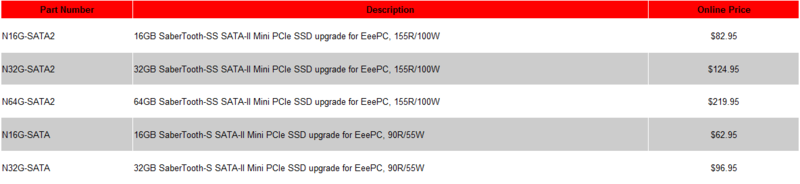
This new line of SaberTooth SSDs is built with MLC NAND flash to deliver exceptional performance. These SSDs have been tested with and are guaranteed to operate with Eee PC S101, 900, 900A and 901 models. The SaberTooth SS, offered in 16, 32 and 64GB capacities, is the fastest available SSD upgrade for the Eee PC, supporting sequential read speeds up to 155 MB/sec and write speeds up to 100 MB/sec. The SaberTooth S is offered in 16 and 32GB capacities, and supports sequential read speeds up to 90 MB/sec and write speeds up to 55 MB/sec. All these products use standard 3Gbps SATA-II signaling and a Mini PCI express connector, as used in compatible Eee PC models.
 These new SSDs are extremely reliable, incorporating enterprise-class features such as ECC, bad bit management and wear leveling. SSDs use less power, are more rugged and reliable, and are lighter weight than hard disk drives.
According to Jerry Thomson, vice president of marketing at Active Media Products, "SaberTooth SSDs deliver read and write speeds that are up to five times faster than stock storage devices in the Eee PC. Upgrading gives users a huge performance boost with lightning fast boot speeds and application load times. This is by far the easiest and most cost effective way to upgrade an Eee PC." Backed with a one year warranty, SaberTooth SSDs are available immediately through Amazon.
This new line of SaberTooth SSDs is built with MLC NAND flash to deliver exceptional performance. These SSDs have been tested with and are guaranteed to operate with Eee PC S101, 900, 900A and 901 models. The SaberTooth SS, offered in 16, 32 and 64GB capacities, is the fastest available SSD upgrade for the Eee PC, supporting sequential read speeds up to 155 MB/sec and write speeds up to 100 MB/sec. The SaberTooth S is offered in 16 and 32GB capacities, and supports sequential read speeds up to 90 MB/sec and write speeds up to 55 MB/sec. All these products use standard 3Gbps SATA-II signaling and a Mini PCI express connector, as used in compatible Eee PC models.


According to Jerry Thomson, vice president of marketing at Active Media Products, "SaberTooth SSDs deliver read and write speeds that are up to five times faster than stock storage devices in the Eee PC. Upgrading gives users a huge performance boost with lightning fast boot speeds and application load times. This is by far the easiest and most cost effective way to upgrade an Eee PC." Backed with a one year warranty, SaberTooth SSDs are available immediately through Amazon.
7 Comments on Active Media Products Delivers SaberTooth SSD Upgrades for ASUS Eee PC