Guide to Video BIOS flashing |
|
Making a bootable USB stick
The easiest way is to use the HP USB Stick format tool. It will work with any USB stick from any manufacturer.Use the settings "FAT" and "Create a DOS startup disk":

Extract this ZIP file and point the "using system files" location to it.
When the format is complete copy all files from that ZIP file onto the USB stick.
Additionally you need your flashing tools, just copy them onto the USB stick as well.
Booting from the USB stick
To actually boot from the USB stick you have to tell your motherboard BIOS to use it.In your BIOS you will find an option which controls in which order boot devices are tried, or which lets you select what to try 1st, 2nd, 3rd.
We created our USB stick in HDD mode, that's why you have to select Hard Disk for the device and make sure it tries your USB "Harddisk" before your regular HDD (look for "Hard Disk Boot Priority").
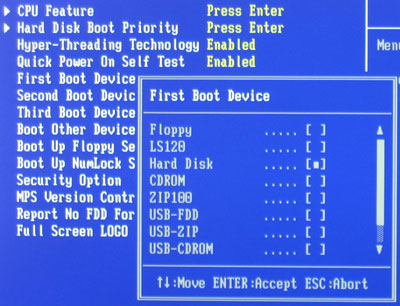
On some strange motherboards the USB stick is detected as floppy so if the Hard Disk setting does not work, try the other USB- settings and ultimately try disconnecting your HDD and selecting 'Hard Disk' as first boot device.

Jun 28th, 2025 17:19 CDT
change timezone
Latest GPU Drivers
New Forum Posts
- Best time to sell your used 4090s is now. (256)
- Bitlocker doesnt auto-unlock ext drive (2)
- SLI is really not Dead if you Have a SLI rig (116)
- What air cooler should I get for Jonsbo Z20-9800X3D? (5)
- X79 and/or rampage IV OC'ing thread for those of us still left.... (2418)
- Page loading issues from Russia (50)
- Can anyone recomend a video course on basic computer repair? (39)
- Kingston WI-Drive 128GB looking ill today!! (14)
- The TPU UK Clubhouse (26503)
- Can you guess Which game it is? (187)
Popular Reviews
- ASRock Phantom Gaming Z890 Riptide Wi-Fi Review
- Sapphire Radeon RX 9060 XT Pulse OC 16 GB Review - Samsung Memory Tested
- SCHENKER KEY 18 Pro (E25) Review - Top-Tier Contender
- Lexar NQ780 4 TB Review
- AMD Ryzen 7 9800X3D Review - The Best Gaming Processor
- Upcoming Hardware Launches 2025 (Updated May 2025)
- AVerMedia CamStream 4K Review
- Sapphire Radeon RX 9070 XT Nitro+ Review - Beating NVIDIA
- NVIDIA GeForce RTX 5060 8 GB Review
- Intel Core Ultra 7 265K Review
TPU on YouTube
Controversial News Posts
- Intel's Core Ultra 7 265K and 265KF CPUs Dip Below $250 (287)
- NVIDIA Grabs Market Share, AMD Loses Ground, and Intel Disappears in Latest dGPU Update (204)
- Microsoft Partners with AMD for Next-gen Xbox Hardware (105)
- NVIDIA Launches GeForce RTX 5050 for Desktops and Laptops, Starts at $249 (101)
- Intel "Nova Lake‑S" Series: Seven SKUs, Up to 52 Cores and 150 W TDP (100)
- Reviewers Bemused by Restrictive Sampling of RX 9060 XT 8 GB Cards (88)
- NVIDIA GeForce RTX 5050 Reportedly Scheduled for July Release (87)
- GPU IPC Showdown: NVIDIA Blackwell vs Ada Lovelace; AMD RDNA 4 vs RDNA 3 (79)