Guide to Video BIOS flashing |
|
Making a bootable CD/DVD
http://www.google.com/search?hl=en&q=how+to+make+a+bootable+cdBooting from the CD/DVD
On many systems the default boot order does not check the CD-ROM. To enable this, you go into your motherboard BIOS and find an option "First boot device" or similar. Change it to "CDROM", exit and save. Now the system should boot from your floppy.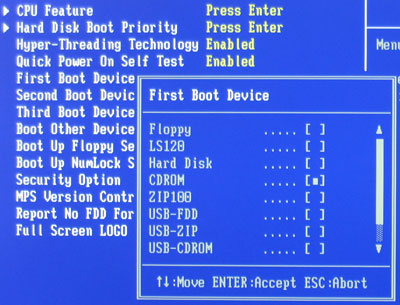
If you have a SCSI drive, you will have to enable the adapter's own BIOS (option ist often called 'enable host bios') and also select the drive as Bootup LUN.
Now you have to select 'Boot Other' / 'Add-in PCI' / 'SCSI' or similar in your motherboard BIOS.
May 8th, 2024 18:57 EDT
change timezone
Latest GPU Drivers
New Forum Posts
- Urgent: PC wont turn on with PSU connected to MOBO (28)
- Post your Cinebench R23 Score (2952)
- Flash VBIOS to turn RX 580 2048SP into RX 570 (17)
- im new to throttelstop and i think i messed it up by copying others any hints would be very much aprreciated (15)
- What's a good option for a digital touchless thermometer? (9)
- Does anyone here overclock their video cards? Is it really worth it? (72)
- Your way of cooling your PC? (35)
- TPU's Nostalgic Hardware Club (18503)
- Ubuntu 24.04 LTS released (3)
- POLL: Can you see the difference past 60fps (gaming/other) (58)
Popular Reviews
- CHERRY XTRFY M64 Pro Review
- Corsair iCUE Link RX120 RGB 120 mm Fan Review
- Finalmouse UltralightX Review
- Bykski CPU-XPR-C-I CPU Water Block Review - Amazing Value!
- Upcoming Hardware Launches 2023 (Updated Feb 2024)
- Cougar Hotrod Royal Gaming Chair Review
- Meze Audio LIRIC 2nd Generation Closed-Back Headphones Review
- AMD Ryzen 7 7800X3D Review - The Best Gaming CPU
- ASRock NUC BOX-155H (Intel Core Ultra 7 155H) Review
- ASUS Radeon RX 7900 GRE TUF OC Review
Controversial News Posts
- Intel Statement on Stability Issues: "Motherboard Makers to Blame" (261)
- AMD to Redesign Ray Tracing Hardware on RDNA 4 (206)
- Windows 11 Now Officially Adware as Microsoft Embeds Ads in the Start Menu (167)
- NVIDIA to Only Launch the Flagship GeForce RTX 5090 in 2024, Rest of the Series in 2025 (142)
- Sony PlayStation 5 Pro Specifications Confirmed, Console Arrives Before Holidays (119)
- AMD's RDNA 4 GPUs Could Stick with 18 Gbps GDDR6 Memory (114)
- NVIDIA Points Intel Raptor Lake CPU Users to Get Help from Intel Amid System Instability Issues (106)
- AMD Ryzen 9 7900X3D Now at a Mouth-watering $329 (104)