Radeon X800 Pro/XT/XT PE Voltmods |
|
Pencil Mods
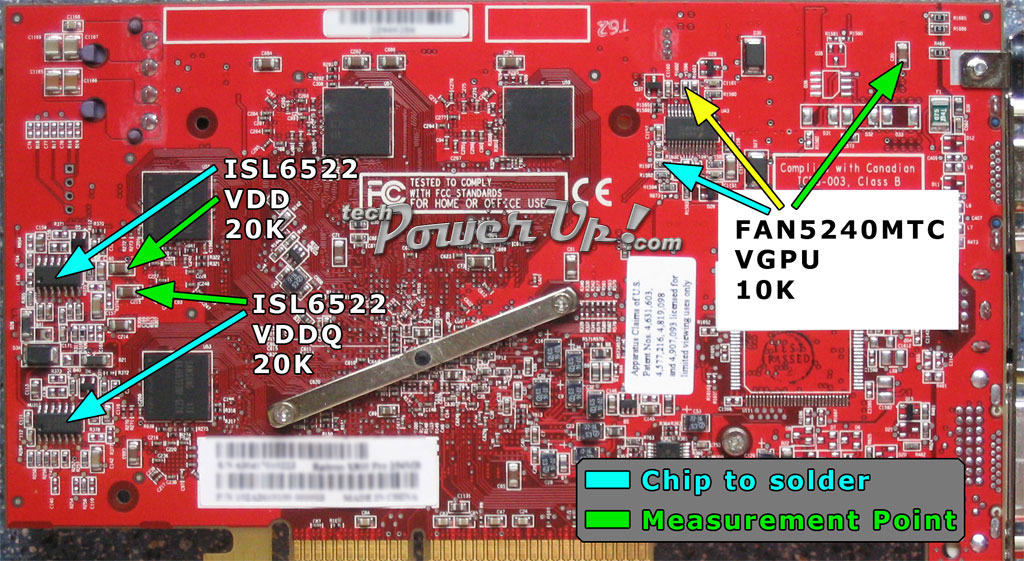
Image 1

Image 2

Image 3
Tools and Supplies
- Digital Multimeter (a must have to complete mod safely)
- Electrical Tape (get the color that matches your PCB)
- 2b Pencil (works the best, found one at Staples in Drafting Department)
Getting Started
Before we get down to work, lets run through the multimeter to make sure we're on the same page. You'll be using two different settings. One to check the voltage before and after we make our changes. The second to check the resistance in Ohms of the resistors we're using our 2b pencil on to safely lower their resistance to raise the voltage. To check the voltage for the VCore and VMem starting measurements set the multimeter to DCV 20v and to check Ohm resistance you'll set the meter to Ohms 2k or 20k depending on the resistor we're working with.I'd like to note that you don't need to do all of the next steps if you're not doing all of the vmods. Try the VCore vmod first then move on to the next one if you feel you need to.
So grab a pencil and paper (should already have a pencil) we're going to write down our starting voltages. Starting with Image 1 locate the green arrow pointing to the capacitor in the top right hand corner labeled C60. Now with the system running and the side cover off visually inspect the area to first locate the capacitor and making sure there isn't anything in the way. Set your meter to DCV 20 V before placing the black lead of your meter on the screw holding in the video card, this is ground. Important when touching card with a meter lead that you don't accidently ground something out. Carefully place the red lead on the top side of capacitor C60 (you're upsidedown from the pic facing the card). Your meter should be reading around 1.39v, cards vary from manufacture to manufacture. Write that VCore number down for future reference. There is not a measure point for the IGPU Vmod that I'm aware of at this time.
For the time being lets move on to the VDD (VMem) measure point. Again in Image 1 locate the green arrow pointing to our measure point, over to the left of the card labeled C213. A closer view in Image 3, it's the top capacitor in the top right hand corner. With the same steps we used in the previous measure point. Place the black lead on ground carefully placing the red lead on left side of C213 (you're upsidedown from the pic facing the card). Your meter should be reading around 2.00v. Write that VMem number down for future reference.
Next measurement we'll check before we start the mod will be VDDQ. Find the measure point in Image 1, green arrow pointing to capacitor C215. Right below the VDD capacitor, closer view in Image 3. Once more with the same steps as before place the black lead on ground carefully placing the red lead on the left side of C215 (you're upsidedown from the pic facing the card). Your meter should be reading around 2.08v. Write your VDDQ number down for, you guessed it, future reference.
Pencil Time
Time to shut down the system and take out the card, your work area should be static free. Yes, at this point you should be reading from a printed document. Basically what we are trying to do is use our 2b pencil to reduce resistance on the selected resistor. You'll need to measure the resistance in Ohms first, by placing the black lead on one side and the red lead on the other side of the resistor, write it down it's our starting Ohm reading. Then gently run your pencil along the side of the resistor from one end to the other. Do a couple swipes then check again with the meter. Using the number you've written down subtract the new reading. For example if your starting Ohm reading is .418k and your new ohm reading is .400k obviously it's a 18k ohm drop in resistance. If you go by the rule of 15k Ohms equals roughly .04 V to .06 Volts. Add the .04 V - .06 V to the reading that you saved for future reference, for example the VCore reading of 1.39 V your voltage should now be around 1.43 V - 1.45 V. A 10k variable resistor will give you around .04 Volts so again that's around 15 Ohms you need to reduce your resistor.Keep in mind that if you want your card to last awhile don't get greedy.
VCore Vmod
Using Image 2 as our guide locate the the resistor R1597 that is under the pencil labeled VGPU. This is the resistor you will use the 2b pencil on following the steps we went through above. Set your multimeter to 20k Ohms. A VCore voltage of 1.45v to 1.50v should work well. After you have reduced the resistance place the card back in and power up. Check your VCore voltage again to verify the amount of voltage you're now running at. Test the card for artifacts and lockups. If all is well, use a piece of electrical tape and cover the resistor you modded. Review the max voltages we suggested for cooling needs.GPU Over Current Protection Vmod
This mod is only needed if you are applying a high VCore vmod. This mod raises the limit that you can obtain with the VCore vmod. In Image 2we use a 20k Ohm reduction in resistance for OCP vmod, which is applied to resistor R1596. Since there isn't a measure point, remove the card and set your meter to 200k. Check the resistance on the resistor R1596 which should be around 40k Ohms. As \\mAr did lower the resistance by 20k Ohms. This one is in a tight spot so you may want to try to pencil the top of the resistor to make it easier.VDD (VMem) Vmod
In Image 3 locate the VDD labeled pencil above the resistor R311. This is the resistor you will use the 2b pencil on following the steps we went through above. Set your multimeter to 20k Ohms. A 20k variable resistor which will give you around .08v Volts, you'll need to reduce the resistance around 30 Ohms. A VMem voltage of 2.08 V to 2.12 V will work fine. After you reduce the resistance place the card back in and power up. Check your VMem voltage to verify the amount of voltage you're running your memory at. As we did in the VCore vmod, test the card for artifacts and lockups. If you're loving life, tape that bad boy up.VDDQ Vmod
This one will be a little tough given the resistor is in a tight spot. Looking at Image 3 the pencil labeled VDDQ above resistor R256, this is the one you'll need to pencil mod to increase VDDQ voltage. Set your meter to 2k Ohms this time. With the info of a 20k variable resistor giving .08 Volts we'll need to reduce resistance around 30 Ohms. A VDDQ voltage of 2.16 V to 2.18 V will help with both VCore and VMem. Check the voltage to verify the amount of voltage you're running at. Test for artifacts and lockups. Use the tape to keep the graphite in place.My 2 Cents
Before I go into using soldered VR vmods I wanted to finish the pencil vmod section with my 2 cents worth. I tried to write the pencil vmod with newbies or first time modders in mind. The pencil mod can be applied easily and be effective if you take your time. Don't get caught up in seeing someone else's speed and think you can do it too. Not all cards oc the same and along with cooling methods can determine your final outcome. The forums here at techPowerUp! are filled with people who will not hesitate to help by answering a question. Even still if it all seems like too much you can always send your video card to ViperJohn who does quality voltmodding work.
Apr 25th, 2025 14:53 EDT
change timezone
Latest GPU Drivers
New Forum Posts
- RX 9000 series GPU Owners Club (561)
- Are the 8 GB cards worth it? (204)
- I dont understand the phone OS world..... (65)
- What's your latest tech purchase? (23608)
- [Test Build] Fix for 576.02 Driver Install (60)
- Post Your TIMESPY, PCMARK10 & FIRESTRIKE SCORES! (2019) (291)
- Cracks in my cpu waterblock should I be concerned? (23)
- What are you playing? (23465)
- 5060 Ti 8GB DOA (278)
- Post your Cinebench R23 Score (3058)
Popular Reviews
- NVIDIA GeForce RTX 5060 Ti 8 GB Review - So Many Compromises
- Crucial CUDIMM DDR5-6400 128 GB CL52 Review
- Colorful iGame B860M Ultra V20 Review
- Clair Obscur: Expedition 33 Performance Benchmark Review - 33 GPUs Tested
- Upcoming Hardware Launches 2025 (Updated Apr 2025)
- Sapphire Radeon RX 9070 XT Pulse Review
- ASUS GeForce RTX 5060 Ti TUF OC 16 GB Review
- Sapphire Radeon RX 9070 XT Nitro+ Review - Beating NVIDIA
- AMD Ryzen 7 9800X3D Review - The Best Gaming Processor
- ASRock X870E Taichi Lite Review
Controversial News Posts
- NVIDIA GeForce RTX 5060 Ti 16 GB SKU Likely Launching at $499, According to Supply Chain Leak (182)
- NVIDIA Sends MSRP Numbers to Partners: GeForce RTX 5060 Ti 8 GB at $379, RTX 5060 Ti 16 GB at $429 (127)
- NVIDIA Launches GeForce RTX 5060 Series, Beginning with RTX 5060 Ti This Week (115)
- Nintendo Confirms That Switch 2 Joy-Cons Will Not Utilize Hall Effect Stick Technology (105)
- Nintendo Switch 2 Launches June 5 at $449.99 with New Hardware and Games (99)
- Sony Increases the PS5 Pricing in EMEA and ANZ by Around 25 Percent (84)
- NVIDIA PhysX and Flow Made Fully Open-Source (77)
- Windows Notepad Gets Microsoft Copilot Integration (75)