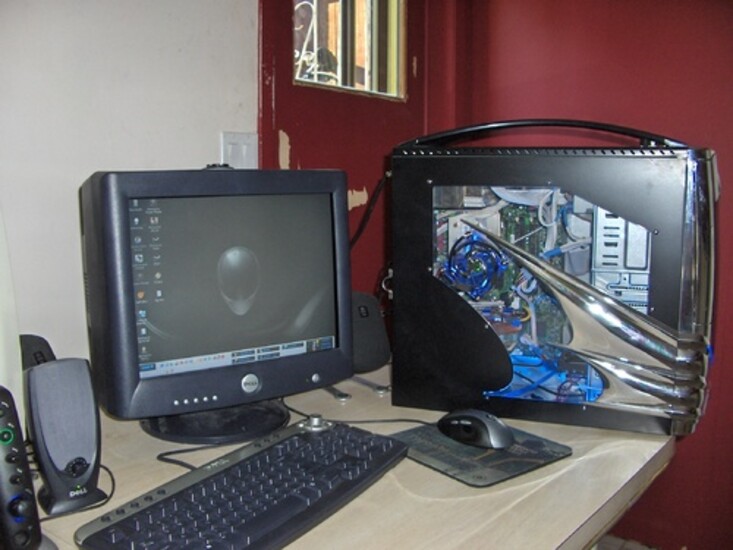
Modded Dell dimension 8400

« Previous ModReturn to Index Random Mod Next Mod »
Image

More images (click for bigger version):

Thumbnail 1 Thumbnail 2 Thumbnail 3
Owner: bootz23
Send email
Send private message
Posted: Oct 18, 2005
Last Update: Oct 18, 2005 15:13
Viewed: 19,651 times
Rating: Good (5.0)
Voting Graph
2 votes total
Submit vote:

and go to random case.
Please register on the forums & login to vote.
Keywords:
Intel
System Specs:
Intel p4 3.0, 2Gb of ddr 666Mhz ram, ATI x800xt, with Zalman pure coper GPU cooling kit, voltage modded to X850XT specs. Soundblaster audigy 2 sound card, 74Gb WD Raptor. 520 watt Antec PSU dual 80mm led fan cooled with speed control at rear.
Performed Mods:
The case is has all custom fitteg mounting holes, since not one screw hole lined up, lol. blue Cathrode Light at bottom, Dell 90mm Custom fitted CPU cooling fan that works as a sick ass Exaust fan as well.
I was simply sick of Dell's B.S customer support and Extremely over priced parts, so I took a chance and bought some High end components and made shit happen.

TPU's Case Mod Gallery is sponsored by Xoxide

User comments

Post your comment
by Dr.D (November 1st - 6:56 PM) - Reply
How did you get that PSU in there?
by wazzledoozle (November 1st - 7:55 PM) - Reply
How is it a dell....?
Looks pretty good though.
by AMDCam (November 2nd - 1:05 AM) - Reply
Lol dude, if you switched the case I'm sorry but that's the most pointless thing on earth to keep a Dell motherboard to still call it a Dell. Dell sucks in every way, I mean EVERY WAY. If I were you and switched out that whole motherboard into another (looks like alienware) case, I would have gotten a totally new motherboard. But anyway, if you did do that, it's very original, and it looks good. Nicely done man
by Polaris573 (November 2nd - 9:14 PM) - Reply
Are you still using the original dell moterboard? If so how did you get the third party heatsink on there? I bought a heatsink to replace the crappy dell one and when I tried to put it on I realized dell had made it so I could only use theirs.
by Thermopylae_480 (November 2nd - 10:06 PM) - Reply
You have already put so much money into making this a decent computer, why don't you just drop another $120-$150 and by a decent Abit or ASUS motherboard and be done with all that is Hell... I mean Dell?
by AMDCam (November 2nd - 10:13 PM) - Reply
Yeah man, really the biggest problem with Dell is how restricting the motherboards are. They're custom first of all so they're not really moddable, and they have overclocking locks. It's just stupid, I mean if you kept anything Dell, keep the processor or RAM, something that isn't modified by dell like the graphics card and motherboard.
by wtf8269 (November 2nd - 10:21 PM) - Reply
Not bad, I'm gonna assume this is your first "custom" PC, pretty good job all considered. Brand name PCs are only worth buying when you get those $200-$300 deals where you get a PC, monitor, keyboard, mouse, printer, speakers etc. I mean come on, most of us will spend that much on a single component.
by infrared (December 3rd - 2:47 PM) - Reply
by: wtf8269
Not bad, I'm gonna assume this is your first "custom" PC, pretty good job all considered. Brand name PCs are only worth buying when you get those $200-$300 deals where you get a PC, monitor, keyboard, mouse, printer, speakers etc. I mean come on, most of us will spend that much on a single component.


Not wanting to be harsh or upset you, but i agree. Get a decent motherboard, and graphics card to go in there, with a decent motherboard, you'll have some overclocking ability with the CPU, but dell usually uses crappy cpu's as well... God knows why they go to so much effort just to prevent modding and overclocking. Even the Dell XPS is completely impossible to overclock...

I just don't see what the advantage of having a decent case is, if you're not going to overclock or mod it... Usually we choose a case for it's cooling as well as it's looks.

Anyway. You've got a good starting step to make a decent rig now you've got the case ;) And you could also use the Graphics card if it's a genuine ATI instead of a Dell version
by sb85 (February 23rd - 7:46 PM) - Reply
i am trying to use my dell dim8400 cpu (p4 3.2ghz prescott) on the asus p5ld2 mobo. anyone know how to put the heatsink dell provided onto the mobo? i dont see the asus having the same retention clips:(
by infrared (February 24th - 6:45 AM) - Reply
Your best bet is to get an aftermarket heatsink. There is no way of making the crappy dell heatsink fit, and even if it did, you wouldn't want it in your system :lol

I recomend the arctic freezer 7 pro, by arctic-cooling.com]Arctic Cooling

Or the some of the zalman coolers are also very good.

Good luck :)
by sb85 (February 24th - 10:38 AM) - Reply
by: infrared
Your best bet is to get an aftermarket heatsink. There is no way of making the crappy dell heatsink fit, and even if it did, you wouldn't want it in your system :lol

I recomend the arctic freezer 7 pro, by arctic-cooling.com]Arctic Cooling

Or the some of the zalman coolers are also very good.

Good luck :)
hehe yeah, im getting the arctic freezer 7pro, its reasonably priced and seems good too. the zalmans are kinda pricey. i got it off zipzoomfly for 30$, so thats neat.

btw: that is one hell of an oc!!!
by infrared (February 24th - 10:57 AM) - Reply
hehe, thanks :) It's stable up to 4.65ghz, 4.9ghz was the maximum i reached in my 5ghz attempt :lol

Personally, i like it running at 4.6ghz, with the 14x multiplier and the fsb through the roof! :D

That's a very nice price you got that cooler for! Good find! ;)
by drade (February 24th - 11:19 AM) - Reply
Artic cooling would be your best, plus you should get a little better of a heatsink for your cpu as far as heat goes, i have a 478 prescott 3.0 havent over clocked it yet, but i have the thermaltake Bigwater SE, I use to have a zalman cooler, it was not good at all, then i moved to thermaltake, but my point is that the artic cooling heatsink is absolutely buitiful, id buy it if I didnt have my setup, go with with ac :-)
by sb85 (February 24th - 1:06 PM) - Reply
yep, what do you guys think about the asus p5nd2-sli mobo? i been reading around, it has a lot of good qlty's but some weird problems as well...any ideas?
by DiGiTaLdAzE (July 25th - 12:07 PM) - Reply
by: AMDCam
Lol dude, if you switched the case I'm sorry but that's the most pointless thing on earth to keep a Dell motherboard to still call it a Dell. Dell sucks in every way, I mean EVERY WAY. If I were you and switched out that whole motherboard into another (looks like alienware) case, I would have gotten a totally new motherboard. But anyway, if you did do that, it's very original, and it looks good. Nicely done man

I guess I'm not gonna win any applause by saying any positive about Dell in this forum--there are no doubt issues in the way they design components, etc. but I will say this--I have been using there tech support for over a year now, and have found service to be top notch. They don't always have the answer to a problem, but are friendly, and do their best to help.I am usinng Dell Support in Canada, and I think its' definitely better than dell Tech U.S. which I have also used.If anything, I'm by nature anti the i big corporate establishment world, but in this case felt the need to give the nod to the Dell techs I've gotten help from. ATI (whose products I like and use) on the other hand has lousy tech help by and large in my eexperience--condescending, and can't wait to get rid of you.Sorry, but I tell it like it is in my experience.
by Wolvyrine (November 8th - 4:32 PM) - Reply
I have a dimension 8400, and the case got WRECKED! My MB is one of their idiotic proprietary POS's. My pin outs for power and LED's are a 33pin ribbon that I cannot find ANY schematics for, nor any type of adaptor. If you had this, How did you get around it?? I REALLY want my computer running again! Any help appreciated
by oqsajec (March 18th - 1:58 PM) - Reply
well, nice alienware case, and nice effort. It shows your willing to work with what you got, I was given a hp pavilion that had a fried hd. I got it working and even modded it, but its for online tv and browsing, not gaming. If your looking to play some sick games, look up your specs and you'll see that the boards suck, the processors are not designed to handle gaming and the heatsinks suck even more. If your planning on upgrading, always look up what you want your rig to be; what cpu and heatsink, powersupply, gpu(s), RAM, DVD drive, motherboard (DDR2 or DDR3), case................if you know what you want, it'll save you a bundle. Do some research and look for sales. It took me 6 months to do a full upgrade on my oldest rig. again, nice effort but look into some upgrades if you want to do some gaming. 5/10 for effort and a cool looking pc.
by Polaris573 (March 18th - 4:45 PM) - Reply
This thread is 5 years old... I seriously doubt he has the computer anymore and if he did there would be little sense in upgrading it.
by oqsajec (March 19th - 11:38 AM) - Reply
by: Polaris573
This thread is 5 years old... I seriously doubt he has the computer anymore and if he did there would be little sense in upgrading it.
Wow, i didn't see that. Ha, funny sh!t......
by DOM (March 19th - 11:43 AM) - Reply
Last Activity: Apr 7, 2006 11:27 PM

LMAO XD
6663 Users online, 3.48 mbps
Quick Search
Already a member?
Username:
Password:
Register Here!
TechPowerUp on Facebook 
TechPowerUp on Google+ 
New Forum Posts
11:55 by 1Kurgan1
Blizzard Sues Valve over DOTA name (6)
11:53 by mstenholm
TPU's WCG/BOINC Team (14549)
11:51 by mightysi
Older high end GPU thread *Pics* (138)
11:50 by El_Mayo
Battlefield 3 Clubhouse (11451)
11:24 by r8er4ever
Flashing XFX 6850 (0)
11:21 by AussieDave
realtemp help needed (0)
Popular Reviews

Latest VGA Drivers

ATI Catalyst 12.1 WHQL

XP32 | XP64 | W7 32 | W7 64

NVIDIA GeForce 285.58 WHQL

XP32 | XP64 | W7 32 | W7 64