 13
13
Mountain Mods U2-UFO Choose Your Own Case Review
Value & Conclusion »Installation


To install the system into the Mountain Mods U2-UFO-CYO case, we started with the removable media drives and bay devices. The 5.25" module can be filled inside or out of the case. If components are installed with the module outside the case, it is very easy to place the entire unit into the case when done.

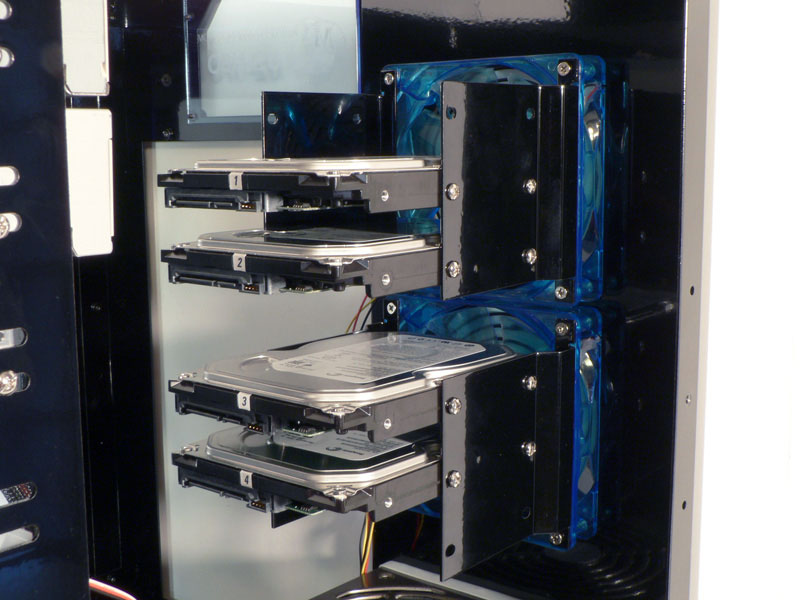
The hard drives get attached to matching brackets which mount on the back side of the case fans. As it comes from Mountain Mods, the case supports up to six 3.5" hard drives, with each set of brackets holding three drives. If the user requires more drive mounts, additional sets can be purchased and added to each 120mm fan used in the case.


The power supply mounts easily on the rear panel with four more thumbscrews, and its fan faces upward when installed in the lower position.


Installation of the motherboard tray and cabling was completed next. Surprisingly, the design allows for quite a bit of cable management possibilities.
Finished Look
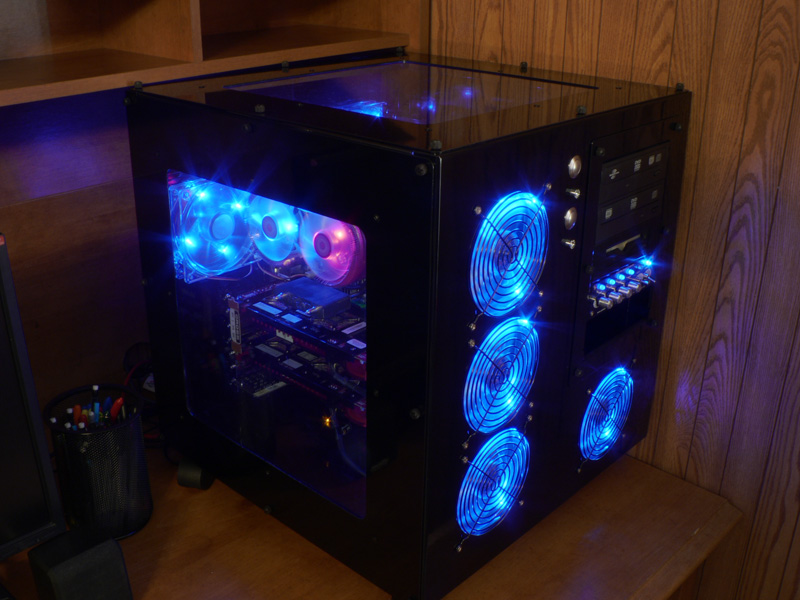
With the system installed and running, the Yate Loon fans and the other LEDs give the case a black and blue feeling. However, since the case has so many different possibilities, the end result depends solely on the imagination of the buyer.


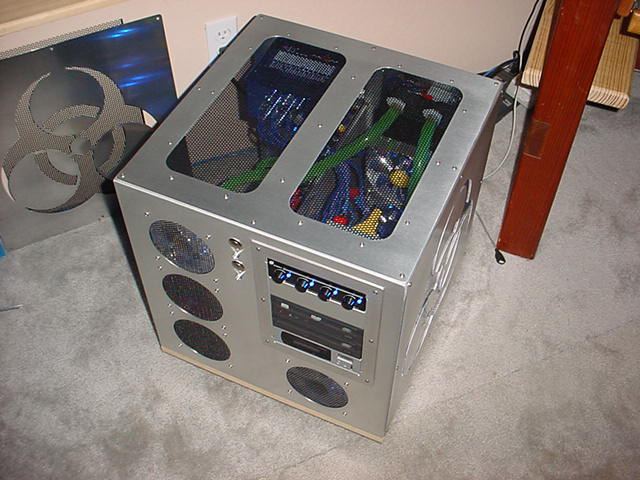

To give our readers some ideas of the possibilities of the case, I found these pictures in the Mountain Mods User Gallery.
Jul 29th, 2025 21:30 CDT
change timezone
Latest GPU Drivers
New Forum Posts
- What's your latest tech purchase? (24395)
- LCD IPS display (10)
- Windows 10 Vs 11, Which one to choose? (262)
- I stop using Windows as my main OS for like 4+ years (1)
- Post your JetStream 2 speeds! (167)
- Post your 7-Zip v22.01 scores (436)
- Browser Bechmark scores (115)
- SunSpider 1.0 JavaScript benchmark results (34)
- reinstalled kingdom come deliverance and getting very poor fps (13)
- TPU's Rosetta Milestones and Daily Pie Thread (2414)
Popular Reviews
- Herman Miller Logitech G Embody Review - No Pain, No Gain
- Lenovo Legion 5i (15IRX10) Review - Feature-Rich and Wallet Friendly
- MSI Claw 8 AI+ A2VM Review
- Lian Li O11 Dynamic Mini V2 Review
- Upcoming Hardware Launches 2025 (Updated May 2025)
- Noctua NF-A12x25 G2 PWM Fan Review
- Sapphire Radeon RX 9060 XT Pulse OC 16 GB Review - An Excellent Choice
- AMD Ryzen 7 9800X3D Review - The Best Gaming Processor
- AQIRYS Sirius Pro Review
- NVIDIA GeForce RTX 5050 8 GB Review
TPU on YouTube
Controversial News Posts
- AMD's Upcoming UDNA / RDNA 5 GPU Could Feature 96 CUs and 384-bit Memory Bus (134)
- AMD Radeon RX 9070 XT Gains 9% Performance at 1440p with Latest Driver, Beats RTX 5070 Ti (131)
- NVIDIA GeForce RTX 5080 SUPER Could Feature 24 GB Memory, Increased Power Limits (115)
- Intel "Nova Lake-S" Core Ultra 3, Ultra 5, Ultra 7, and Ultra 9 Core Configurations Surface (110)
- DDR6 Memory Arrives in 2027 with 8,800-17,600 MT/s Speeds (101)
- AMD Sampling Next-Gen Ryzen Desktop "Medusa Ridge," Sees Incremental IPC Upgrade, New cIOD (97)
- Intel CEO Confirms SMT To Return to Future CPUs (95)
- NVIDIA Becomes First Company Ever to Hit $4 Trillion Market-Cap (94)