 1
1
Zotac Nitro VGA Overclocking Controller Review
Value & Conclusion »Software

The software for the Nitro is called "FireStorm" and works without the Nitro too, then it is a normal overclocking utility. Once you attach the Nitro, FireStorm will detect its presence and send output to it.

The options are fairly basic but cover everything you would need to configure.
Testing


Whenever the Nitro is idle it will show the main menu. The three text strings at the bottom of the display refer to the action that is executed when the button below it is pressed.
Here you can go to "Set" - which allows changing clocks and fan speed, "Profiles" and to restore the BIOS default clocks of the VGA card.

The profiles management system is fairly basic (mainly because of the limited number of buttons). You can create a new profile which will take your current settings and store them away. By pressing the Next button you will cycle through your saved profiles. The profile's settings will be displayed on the main screen. Once you have the one you want, you just press the apply button and the profile's settings will be applied. Unfortunately naming the profiles is not possible.
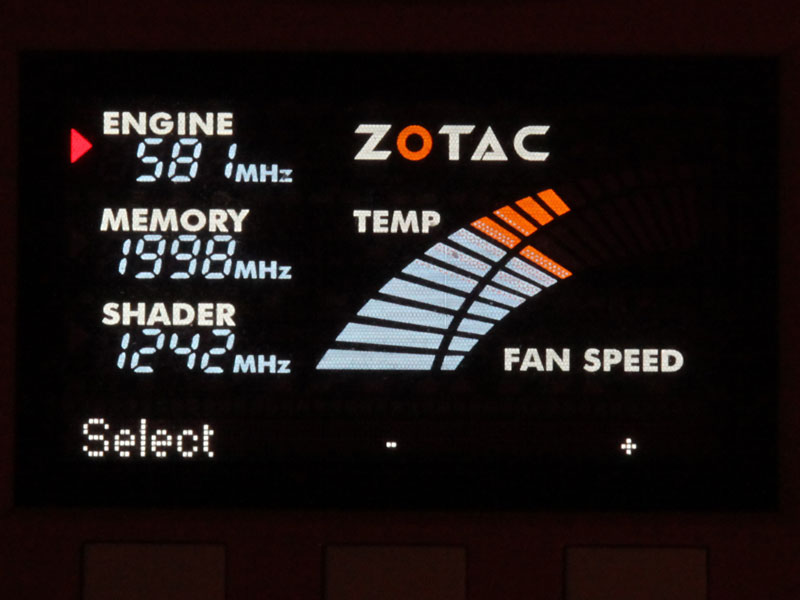
Every time you press the Set button, the red arrow will move one step forward. It starts at core clock, goes to memory clock, shader clock and fan speed. Then it starts at core clock again. This is a very intuitive system and easy to use.
Once you are at the desired setting that you want to change, you just press the + or - button to instantly change the setting.

Fan speed can be changed as well. The default is to use the automatic fan speed settings as defined in the BIOS. If you want more cooling performance or a quieter system you can select a fixed fan speed here.
Apr 27th, 2024 00:15 EDT
change timezone
Latest GPU Drivers
New Forum Posts
- Strange system crashes out of nowhere, help (11)
- Alphacool CORE 1 CPU block - bulging with danger of splitting? (33)
- hacked (78)
- 5800x (and other Zen 3 chips) PBO settings/Temperature fix (937)
- Is this a hardware problem ? Live kernel 193 (0)
- Help me to OC my 5700X (11)
- Realtek Modded Audio Driver for Windows 10/11 - Only for HDAUDIO (5690)
- What's your latest tech purchase? (20355)
- AAF Optimus DCH Audio Modded Driver for Windows 10/11 - For ALL HDAUDIO Enumerator Chips (654)
- Your PC ATM (34510)
Popular Reviews
- Ugreen NASync DXP4800 Plus Review
- HYTE THICC Q60 240 mm AIO Review
- MOONDROP x Crinacle DUSK In-Ear Monitors Review - The Last 5%
- Quick Look: MOONDROP CHU 2 Budget In-Ear Monitors
- Upcoming Hardware Launches 2023 (Updated Feb 2024)
- Thermalright Phantom Spirit 120 EVO Review
- Gigabyte Radeon RX 6600 Eagle Review
- NVIDIA GeForce RTX 4060 Ti 16 GB Review - Twice the VRAM Making a Difference?
- FiiO K19 Desktop DAC/Headphone Amplifier Review
- Alienware Pro Wireless Gaming Keyboard Review
Controversial News Posts
- Windows 11 Now Officially Adware as Microsoft Embeds Ads in the Start Menu (135)
- Sony PlayStation 5 Pro Specifications Confirmed, Console Arrives Before Holidays (117)
- NVIDIA Points Intel Raptor Lake CPU Users to Get Help from Intel Amid System Instability Issues (106)
- AMD "Strix Halo" Zen 5 Mobile Processor Pictured: Chiplet-based, Uses 256-bit LPDDR5X (103)
- US Government Wants Nuclear Plants to Offload AI Data Center Expansion (98)
- AMD's RDNA 4 GPUs Could Stick with 18 Gbps GDDR6 Memory (95)
- Developers of Outpost Infinity Siege Recommend Underclocking i9-13900K and i9-14900K for Stability on Machines with RTX 4090 (85)
- Windows 10 Security Updates to Cost $61 After 2025, $427 by 2028 (84)