Tuesday, February 3rd 2026

Firefox 148 Gets AI Killswitch After a Massive Community Backlash
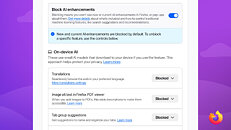
Mozilla's plans to make Firefox "a modern AI browser" have fallen flat on its face. When Anthony Enzor-DeMeo took over the Mozilla the new CEO, he announced plans to make the browser a modernized version of AI-first browsing experience. However, massive community backslash has resulted in the CEO quickly apologizing to the community and promising a killswitch. In the upcoming Firefox version 148, scheduled for a release on February 24, there will be an option to turn off AI features in the browser individually, or all at once. This includes AI-assisted translations, alt text in PDFs, AI-enhanced tab grouping, link previews, and an AI chatbot in the sidebar. Users can choose which features to enable or disable, and those who prefer not to use any AI functions can turn them off entirely with a single switch. This setting will persist even after future updates, ensuring that users who opt out will not encounter generative AI features.
Mozilla is fulfilling its earlier promise to implement an AI killswitch, an option increasingly sought after by many users. While some enjoy a web experience assisted by AI, many do not. Having an option to individually turn off specific features, or all at once, is the perfect solution. Interestingly, this is not the first time we are seeing features from companies that are marked as new updates, but instead delivering a shield from all the "AI enhancements." Users are clearly expressing a frustration of AI everywhere approach, and Mozilla is aiming to position Firefox right where the community wants it to be. For Firefox Nightly users, the feature is available right away. However, for Firefox stable, users must wait a few days until February 24 to install Firefox 148.
 Even companies like Microsoft are finally admitting that their AI efforts are not resonating with the PC enthusiasts, and the company is walking back on its AI efforts in Windows 11 to focus on core elements. While some AI features are good, forcing every user to use AI in every situation is counterproductive for many workloads, and a simple AI overload for an enthusiast.
Source:
Mozilla
Mozilla is fulfilling its earlier promise to implement an AI killswitch, an option increasingly sought after by many users. While some enjoy a web experience assisted by AI, many do not. Having an option to individually turn off specific features, or all at once, is the perfect solution. Interestingly, this is not the first time we are seeing features from companies that are marked as new updates, but instead delivering a shield from all the "AI enhancements." Users are clearly expressing a frustration of AI everywhere approach, and Mozilla is aiming to position Firefox right where the community wants it to be. For Firefox Nightly users, the feature is available right away. However, for Firefox stable, users must wait a few days until February 24 to install Firefox 148.


30 Comments on Firefox 148 Gets AI Killswitch After a Massive Community Backlash
If People want the AI Stuff, install the AI-Version! This kill switch thing seems inconsistent.
github.com/black7375/Firefox-UI-Fix