Monday, March 16th 2026

Creative Launches Sound Blaster Audigy FX Pro
Creative Technology today announced the Sound Blaster Audigy FX Pro, the newest addition to the Audigy FX series. Designed for PC builders and desktop users looking to move beyond standard onboard audio, it combines high-resolution playback, discrete 7.1 surround sound, built-in headphone amplification, and the debut of the all-new Creative Nexus app.
A Clear Upgrade for Modern Desktop Audio
In many desktop setups, audio remains one of the most overlooked upgrades. Users invest in graphics, displays, and peripherals, yet often continue relying on standard motherboard sound.


 The Sound Blaster Audigy FX Pro is built to change that—delivering a straightforward internal upgrade for users who want clearer playback, more immersive surround, stronger headphone performance, and smarter day-to-day audio control.
Whether for music, movies, gaming, or everyday listening, the Sound Blaster Audigy FX Pro is engineered to deliver a meaningful step up from onboard audio. It brings greater clarity, improved dynamic range, and more capable headphone drive in a compact PCIe form factor that keeps setups clean, integrated, and free from additional external hardware.
For movies, it creates a more cinematic surround experience with improved separation and spatial depth. For music, it delivers cleaner, more detailed playback with greater resolution. For gaming, it enhances positional precision for a more immersive soundstage. For headphone users, its built-in amplifier provides the added power and control needed to get more from demanding headphones.
Built for PC Builders and Desktop Users
As the latest model in the Audigy FX family, the Sound Blaster Audigy FX Pro is designed for users who want better desktop audio without the clutter or complexity of external gear. It is a straightforward upgrade for both new PC builds and existing desktops alike—ideal for users who want better sound, stronger headphone support, and more intuitive control from a single internal solution.
With the introduction of Creative Nexus alongside upgraded hardware capabilities, the Sound Blaster Audigy FX Pro represents a new chapter for the Audigy FX series—one defined not only by improved specifications, but by a more complete and more intuitive listening experience.
Proven Sound Blaster Performance
Built on Creative's long-standing Sound Blaster heritage, the Sound Blaster Audigy FX Pro supports playback up to 32-bit / 384 kHz, delivers up to 120 dB SNR, and features discrete 7.1 surround sound for immersive multi-channel audio. By combining high-resolution capability, dedicated audio processing, and integrated headphone amplification, the Sound Blaster Audigy FX Pro gives PC builders and desktop users a purpose-built internal audio solution that goes well beyond the limitations of onboard sound. Creative Nexus App: The Unified Dashboard for PC Audio
Debuting with the Sound Blaster Audigy FX Pro, Creative Nexus is Creative's all-new companion app designed to transform how users manage, personalize, and optimize their PC audio experience.
With a streamlined and intuitive interface, Creative Nexus makes advanced audio control more accessible and more rewarding in everyday use. Users can fine-tune playback settings, apply Auto EQ for quick sound optimization, customize Sound Blaster Acoustic Engine enhancements, and access essential controls from a single unified dashboard.
Creative Nexus introduces a new layer of intelligence and usability to the Audigy FX series - Auto EQ for quick sound optimization, and Sound Blaster Acoustic Engine enhancements to suit different content and listening preferences. This brings a new app experience to the lineup for the first time and elevates the Sound Blaster Audigy FX Pro from a traditional hardware upgrade into a modern, software-enabled audio solution.
Key Highlights
The Sound Blaster Audigy FX Pro is priced at US$79.99 and is available from now at creative.com/SBFxPro. For in-country retail store availability, please refer to authorized dealers.
Source:
Creative
A Clear Upgrade for Modern Desktop Audio
In many desktop setups, audio remains one of the most overlooked upgrades. Users invest in graphics, displays, and peripherals, yet often continue relying on standard motherboard sound.


Whether for music, movies, gaming, or everyday listening, the Sound Blaster Audigy FX Pro is engineered to deliver a meaningful step up from onboard audio. It brings greater clarity, improved dynamic range, and more capable headphone drive in a compact PCIe form factor that keeps setups clean, integrated, and free from additional external hardware.
For movies, it creates a more cinematic surround experience with improved separation and spatial depth. For music, it delivers cleaner, more detailed playback with greater resolution. For gaming, it enhances positional precision for a more immersive soundstage. For headphone users, its built-in amplifier provides the added power and control needed to get more from demanding headphones.
Built for PC Builders and Desktop Users
As the latest model in the Audigy FX family, the Sound Blaster Audigy FX Pro is designed for users who want better desktop audio without the clutter or complexity of external gear. It is a straightforward upgrade for both new PC builds and existing desktops alike—ideal for users who want better sound, stronger headphone support, and more intuitive control from a single internal solution.
With the introduction of Creative Nexus alongside upgraded hardware capabilities, the Sound Blaster Audigy FX Pro represents a new chapter for the Audigy FX series—one defined not only by improved specifications, but by a more complete and more intuitive listening experience.
Proven Sound Blaster Performance
Built on Creative's long-standing Sound Blaster heritage, the Sound Blaster Audigy FX Pro supports playback up to 32-bit / 384 kHz, delivers up to 120 dB SNR, and features discrete 7.1 surround sound for immersive multi-channel audio. By combining high-resolution capability, dedicated audio processing, and integrated headphone amplification, the Sound Blaster Audigy FX Pro gives PC builders and desktop users a purpose-built internal audio solution that goes well beyond the limitations of onboard sound.
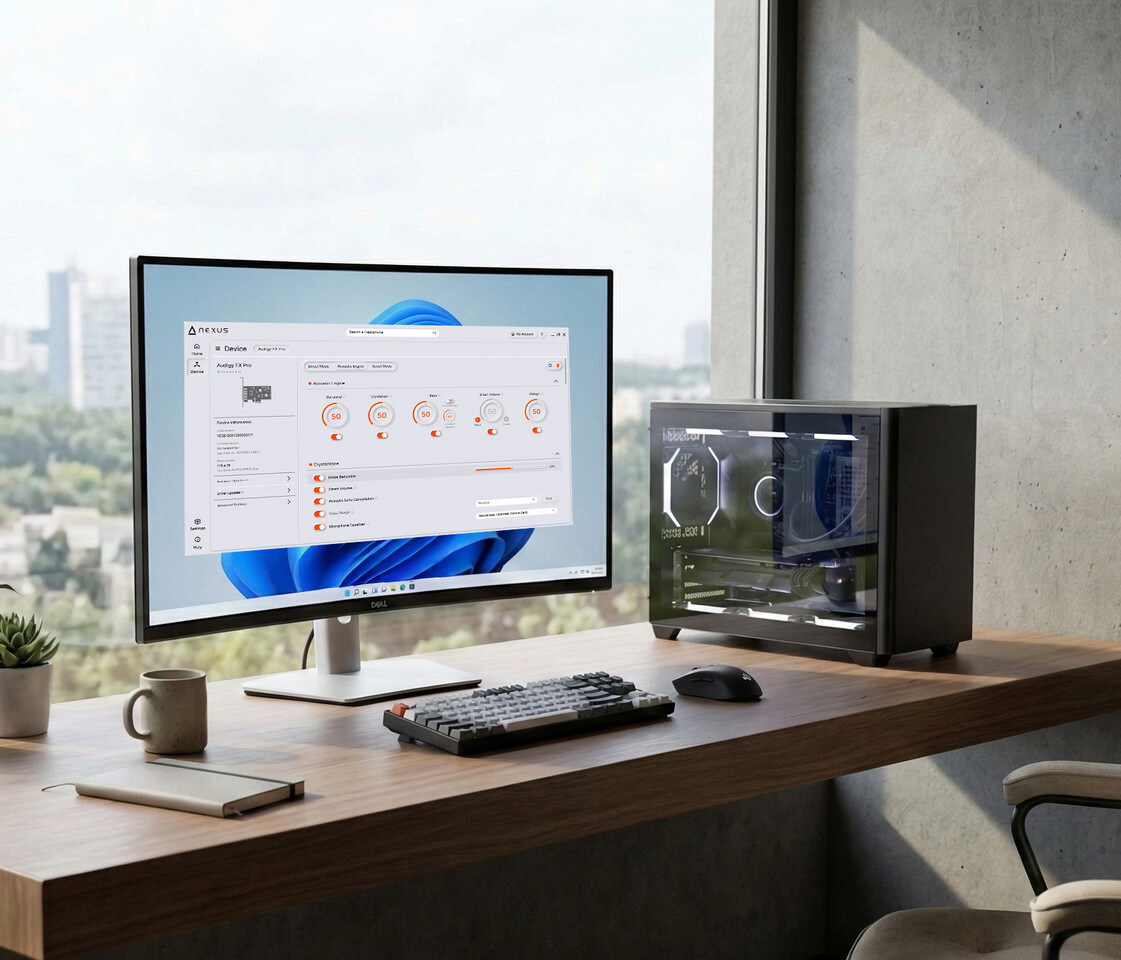
Debuting with the Sound Blaster Audigy FX Pro, Creative Nexus is Creative's all-new companion app designed to transform how users manage, personalize, and optimize their PC audio experience.
With a streamlined and intuitive interface, Creative Nexus makes advanced audio control more accessible and more rewarding in everyday use. Users can fine-tune playback settings, apply Auto EQ for quick sound optimization, customize Sound Blaster Acoustic Engine enhancements, and access essential controls from a single unified dashboard.
Creative Nexus introduces a new layer of intelligence and usability to the Audigy FX series - Auto EQ for quick sound optimization, and Sound Blaster Acoustic Engine enhancements to suit different content and listening preferences. This brings a new app experience to the lineup for the first time and elevates the Sound Blaster Audigy FX Pro from a traditional hardware upgrade into a modern, software-enabled audio solution.
Key Highlights
- Latest addition to the Audigy FX series
- Designed as a clear upgrade over standard onboard audio
- Supports high-resolution playback up to 32-bit / 384 kHz
- Delivers up to 120 dB SNR for greater clarity and detail
- Features discrete 7.1 surround sound
- Includes a built-in headphone amplifier for improved headphone performance
- First Creative product to feature the new Creative Nexus app
The Sound Blaster Audigy FX Pro is priced at US$79.99 and is available from now at creative.com/SBFxPro. For in-country retail store availability, please refer to authorized dealers.
60 Comments on Creative Launches Sound Blaster Audigy FX Pro
www.iis.fraunhofer.de/en/ff/amm/communication/lc3.html
www.techpowerup.com/344160/microsoft-updates-the-xbox-wireless-headset-with-bluetooth-le-audio
People who aren't aware of these differences are simply uninformed, and a basic audio interface for even just driving a pair of headphones is one of the cheapest quality of life upgrades a PC owner can do.
Regardless, I can respect your preference. A nice set of headphones can be handy when someone wants to crank up the volume without making enough noise to wake the dead..I've never had problems with Creatives driver & software.
Its like what being mentioned that SoundCore3D feeding through CS4398 is 'inferior' to this new ALC4082 because it spits out 32-bit/384kHz instead of 'just' 24-bit/192kHz at 120dB SNR, the truth is most PC audio is at at 16-bit 44.1kHz or 48kHz and audio cannot be compared purely by number as the CS4398, although is old, was their flagship DAC back then and sounded amazing with proper output circuit, same can't be said for any Realtek audio no matter how good it seems from datasheet.
Let me mention a very simple example of this;
A few weeks ago I brought my living room setup into my tiny home office for some audio testing, and this is some pretty good HiFi equipment; B&W CM5 S2(120W) and Nad 275BEE hooked up to my DacMagic Plus with an overpriced "audiophile" RCA cable. While testing I noticed a very high noise floor, hiss and other artifacts, extreme during gaming. Then I noticed my RCA cable between my DAC and power amp was next to the computer case. Moving it 20cm away, the clearly audible noise disappeared, and moving it back and forth clearly impacted the noise.
This serves as a clear example why the setup of the equipment is more important than the equipment itself. When running audio off an internal audio output of the computer, there will always a very high level of noise, the same kind of noise you'll get if the cable gets too close to an EMF source, even if it's a sound card with the best DAC imaginable. And if you use a typical front-panel connector, the resulting noise level will usually be significantly worse than a back connector, for very obvious reasons. The more powerful the computer is, the more chances of EMF noise to be picked up by the signal leaving the DAC. So discussing the signal-to-noise ratio of a "high-end" DAC vs. a "crappy" Realtek one is a moot point; as moving the signal away from sources of noise is magnitudes more significant, even if it means a very cheap external audio interface. If anything, then you need to compare the signal reaching the speaker, not the signal leaving the chip on the sound card.