
News Posts matching #AFMF 2

Return to Keyword Browsing

AMD Sneaks Out Fast Motion Response Feature for AFMF 2 in PyTorch Preview Driver

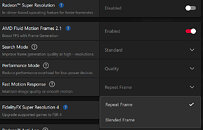
AMD on September 23 released AMD Software PyTorch on Windows Preview Edition 25.20.01.14, which most gamers on the regular WHQL or Beta trunks skipped. Those that did grab the driver and started poking around in the AMD Software application, discovered a feature not found in the gamer-focused regular releases—Fast Motion Response. This feature is a subset of AMD Fluid Motion Frames 2 (AFMF 2), the company's frame generation feature.

In the regular AMD Software driver, such as the latest Adrenalin 25.9.2, AFMF 2 offers two toggles, Search and Performance. The Search toggle prioritizes image-quality and smoothness for high-res displays (1440p and above), while the Performance toggle reduces the software overhead of AFMF on lower-spec hardware, such as mainstream GPUs and iGPUs. The PyTorch Preview driver adds the Fast Motion Response toggle with two options, Repeat Frame mode, and Blended Frame mode. In Repeat Frame mode, there is a brute interpolation of the output by simply repeating the previous frame. In Blended Frame mode, the GPU blends reconstructed frames to the output, which looks fluid in low- to mid-level action scenes, but could cause blur or ghosting in fast action scenes. Grab the PyTorch Preview Driver from here.

AMD Driver Leaks Fluid Motion Frames 3 Ahead of Official Announcement

Just last week, AMD announced that it has enabled PyTorch on Radeon RX 7000 and 9000 GPUs, allowing users to more easily run local LLMs on Windows. Now, however, it seems as though AMD may also introduce AFMF 3 (AMD Fluid Motion Frames 3) in an upcoming driver update. According to recent posts on the Guru3D forums by The Creator and ecffg2010, there is mention of AFMF 3 in the same 25.20.1 Windows Preview testing version of the AMD graphics driver. There is, at the time of writing, no mention of AFMF 3 on the official beta driver update notes or in the AMD Software GUI, but exporting the game profiles with the AMD GPU Profile Manager revealed the inclusion of the new frame generation version.

AMD first introduced AFMF 2 in July 2024, with version 2.1 launching in March 2025, so it is somewhat expected that AMD will soon launch AFMF 3, but it's unclear when the option will be exposed to the end user. So far, AFMF 2.1 has been available for AMD GPUs going all the way back to the Radeon RX 6000 series. PyTorch support, however, is currently only available for RX 7000 and 9000 series GPUs, so it remains to be seen if AMD will abandon the RX 6000 GPUs when it comes to AFMF 3. There is speculation that the driver will drop support for the RX 7000 series altogether, but several users on the forum note that they have installed the driver on their 7000 series GPUs without issue.

AMD Unveils Ryzen AI HX 300 Support for AFMF 2, VGM, and Releases a Preview Driver

AMD today released early driver support for the Radeon 800M series integrated graphics of Ryzen AI 300 series mobile processors to use AMD Fluid Motion Frames 2 (AFMF 2), and Variable Graphics Memory (VGM) technologies. The two technologies receive optimization for the RDNA 3.5 graphics architecture driving the iGPU of the "Strix Point" silicon on which the Ryzen AI 300 series processors are based on. AFMF 2 is the second generation of AMD Fluid Motion Frames, a technology that lets you nearly double frame-rates on any Direct3D 11 or later game, without the gaming having explicit support for a frame generation technology, such as FSR 3 Frame Generation. AFMF operates out of the game's graphics pipeline, which adds a tiny bit of system latency. AFMF 2 seeks to reduce this latency.

Variable Graphics Memory (VGM) is another interesting feature that builds on top of the UMA (unified memory architecture) implementation of AMD processors with iGPUs. Depending on a 3D application's demands, the technology dynamically allocates up to 75% of the system memory as video memory for the iGPU, while ensuring the game doesn't run into unintentional performance bottlenecks arising from paging main memory if too much of it is used up by the iGPU. For VGM to work, a system needs at least 16 GB of main memory. VGM is not meant to be confused with the shared memory area that the processor allots to the iGPU by default (which ranges between 512 MB and 2 GB), it's designed to augment to this by eating into the system memory.
Return to Keyword Browsing
Nov 17th, 2026 15:03 CST change timezone

New Forum Posts

Popular Reviews

TPU on YouTube

Controversial News Posts