HYTE Launches Nexus App to Unify PC Monitoring, RGB Control, and More
Today, HYTE officially launched the Nexus 3.1.0 desktop application, a completely rebuilt PC management tool that unifies hardware monitoring, lighting control, gaming statistics, and system customization into one package. The software is designed to reduce the need for multiple background utilities while keeping resource consumption low, with support for Windows, macOS, and Linux. Unlike its predecessor, Nexus 2.0, the new Nexus 3.1.0 has been rewritten from the ground up. HYTE claims the application occupies less than 50 MB at launch and uses just 0.1% to 1% of system resources across the CPU, GPU, and memory.
In our testing, we observed the application using about 142 MB of RAM and roughly 0.2%-0.5% of CPU resources, so HYTE's claims were not far off. Perhaps with a fresh reboot, things would be different. The software can monitor individual components, tracking temperatures, storage, memory, graphics hardware, fans, and liquid-cooling pumps in real time. It can also identify conflicting applications and close them, potentially helping users avoid running several overlapping utilities simultaneously. HYTE says the monitoring system will notify users when it detects issues that could require attention.
DOWNLOAD: HYTE Nexus 3.1.0
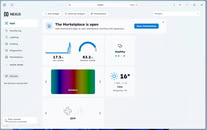
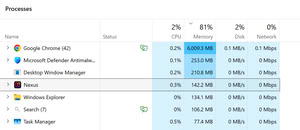
In our testing, we observed the application using about 142 MB of RAM and roughly 0.2%-0.5% of CPU resources, so HYTE's claims were not far off. Perhaps with a fresh reboot, things would be different. The software can monitor individual components, tracking temperatures, storage, memory, graphics hardware, fans, and liquid-cooling pumps in real time. It can also identify conflicting applications and close them, potentially helping users avoid running several overlapping utilities simultaneously. HYTE says the monitoring system will notify users when it detects issues that could require attention.
DOWNLOAD: HYTE Nexus 3.1.0