 14
Acer MA200 1 TB Review
Windows 11 Startup, Virtualization & File Compression »Thermal Throttling
Due to the compact form factor, M.2 drives lack the ability to actively cool themselves, usually having to rely on passive airflow instead. All vendors include some form of thermal throttling on their drives as a safeguard, which limits throughput once a certain temperature is exceeded.On this page, we will investigate whether the tested drive has such a mechanism, how high temperatures get, and what effect this has on performance. We will test the drive in a typical case, installed in the M.2 slot between the CPU and VGA card, while it's getting hammered by non-stop incoming writes. A first test run, to create a baseline, shows temperature and performance with a 120 mm fan directly blowing on the tested drive. In a second run we report thermal performance of the completely uncooled drive. Each of the charts has time moving from left to right, with the blue line displaying transfer speed in MB/s and the red line showing the temperature in degrees Celsius (measured using SMART).
Results from this test setup are not comparable to our older SSD benches because we're using a different case and an AIO watercooling unit, so there's very little airflow inside the case.
Bare Drive
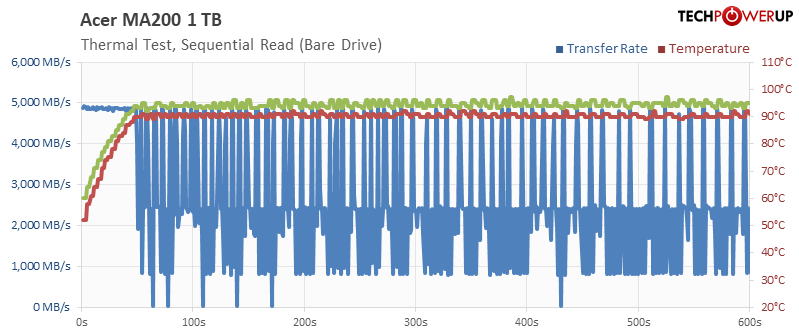
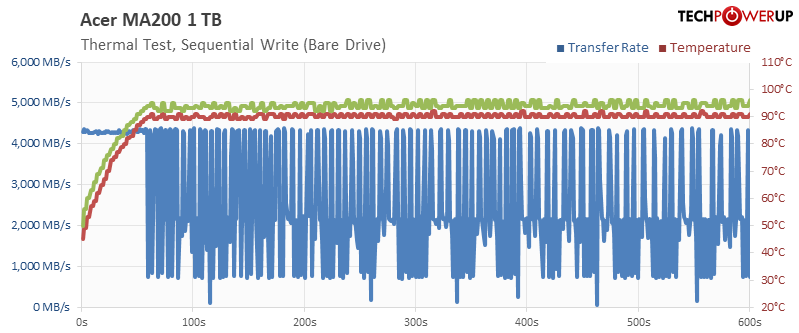
The drive throttles fairly quickly, due to the high heat output on a small surface area and the low thermal throttle point.
Drive with Fan blowing on Heat Spreader
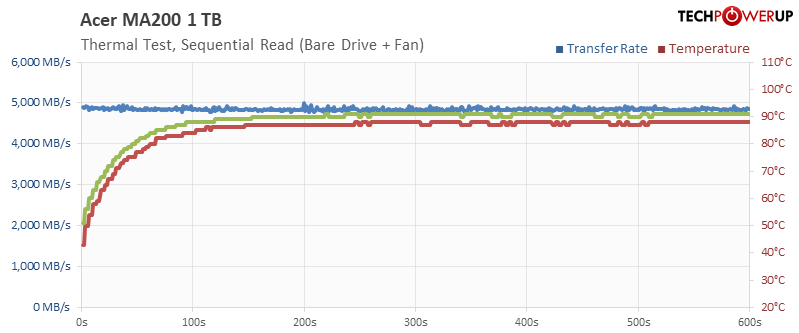
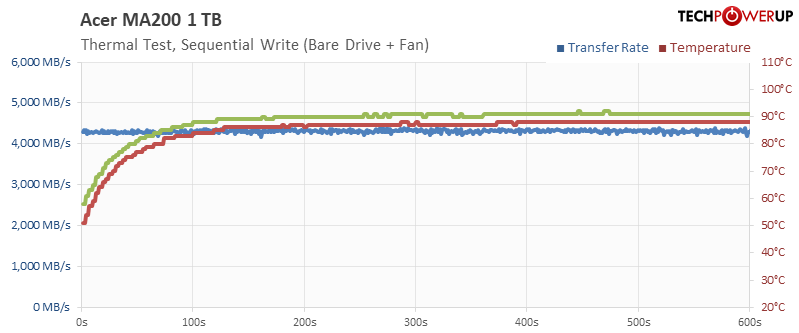
With a fan that's blowing right on the drive, there is no more throttling, but temperatures are still pretty high, close to the point of thermal throttle.
Thermal Image & Hot Spot
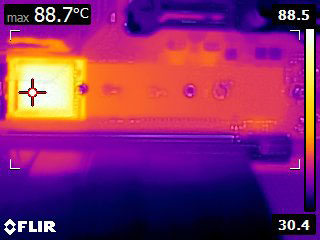
We recorded a thermal image of the running SSD as it was completing the write test. The surface temperature reached just 88°C, which suggests that the thermal throttle point is set pretty low.
Nov 27th, 2026 05:07 CST
change timezone
Latest GPU Drivers
New Forum Posts
- Mouse Pad advice - Shidenkai out of production? (9)
- What's your main Black Friday / Cyber Monday purchase? (28)
- Wireless Internet sharing between PC and router both-ways, is it possible? (31)
- Using sodimm+adapter instead of full size dimm DDR5? (103)
- SABRENT AIC's (no bifurcation) Black Friday deals (0)
- Found Out Why My FygoOS Transfers Were Stuck at 11 MB/s (0)
- X79 and/or rampage IV OC'ing thread for those of us still left.... (2461)
- Will zen 6 mobos have anything extra vs current ones? (63)
- Dell Dimension E510 Retro Gaming PC Upgrade & Modification (3)
- Gacha Games - Discussions, Pulls, Updates, etc. (1166)
Popular Reviews
- VZMORE AX9 Max Review
- Upcoming Hardware Launches 2027 (Updated Nov 2026)
- ASRock X870E Challenger Wi-Fi White Review
- AMD Ryzen 7 9800X3D Review - The Best Gaming Processor
- Microsoft Surface Laptop Ultra Review - The Next-gen Arm Laptop
- AMD Zen 6 Technical Deep Dive
- Montech CyberFlow ARGB 360 Review
- Phantom Blade Zero Performance Benchmark Review - 35 GPUs Tested
- Corsair RM1200e (Second Generation) Review
- ORICO Obook15 AI Review
TPU on YouTube
Controversial News Posts
- Jensen Huang Reinstated as CEO of NVIDIA (618)
- NVIDIA Co-Founder and CEO Jensen Huang Officially Resigns (492)
- Report: Jensen Huang Eyes NVIDIA Comeback (281)
- Open Letter Asking NVIDIA to Reinstate Jensen Huang Passes 115,000 Signatures (184)
- OpenAI CEO Argues Home PCs Waste the World's Limited DRAM Supply (152)
- NVIDIA Launches Investigation Into Jensen Huang's Relationship With Suspected Chinese Spy (136)
- Intel Razor Lake Gets a 12 P-Core bLLC Chip With No E-Cores, Per Leak (94)
- NVIDIA GeForce RTX 50-Series Scheduled for up to $500 Price Hike This Week (89)