 13
Acer Predator GM9000 2 TB Review
Windows 11 Startup, Virtualization & File Compression »Thermal Throttling
Due to the compact form factor, M.2 drives lack the ability to actively cool themselves, usually having to rely on passive airflow instead. All vendors include some form of thermal throttling on their drives as a safeguard, which limits throughput once a certain temperature is exceeded.On this page, we will investigate whether the tested drive has such a mechanism, how high temperatures get, and what effect this has on performance. We will test the drive in a typical case, installed in the M.2 slot between the CPU and VGA card, while it's getting hammered by non-stop incoming writes. A first test run, to create a baseline, shows temperature and performance with a 120 mm fan directly blowing on the tested drive. In a second run we report thermal performance of the completely uncooled drive. Each of the charts has time moving from left to right, with the blue line displaying transfer speed in MB/s and the red line showing the temperature in degrees Celsius (measured using SMART).
Results from this test setup are not comparable to our older SSD benches because we're using a different case and an AIO watercooling unit, so there's very little airflow inside the case.
Bare Drive without Heatsink
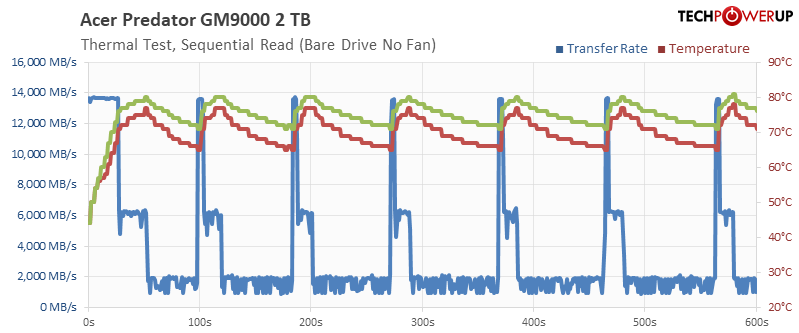
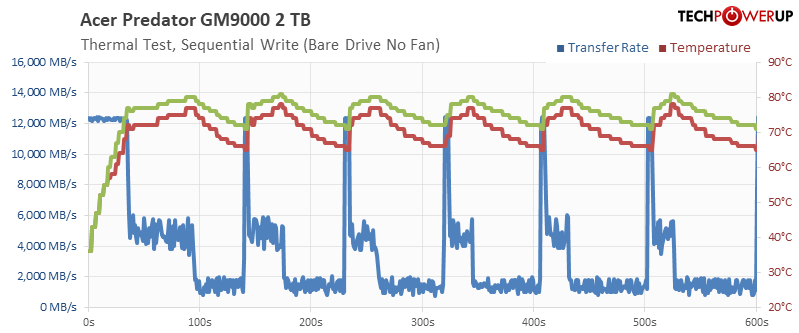
Acer ships their drive without heatsink, so I ran our first test without the heatsink, but with the heat spreader sticker installed, without any additional airflow. As you can see, the drive throttles fairly quickly. On the other hand, if you have only light workloads that last for just a few seconds, then throttling won't be an issue.
Drive with Thermalright Heatsink
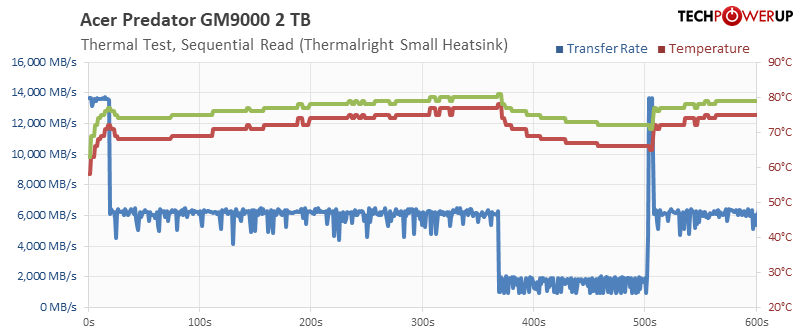
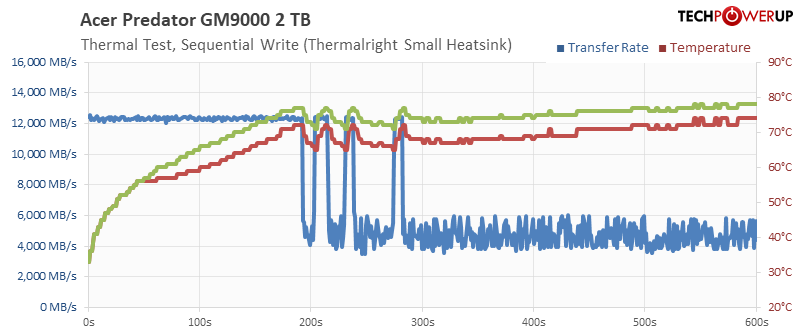
I also installed a Thermalright TR-M2, which is a compact full-metal heatsink. Still quite some throttling, but much better.
Drive with big Thermalright Heatsink
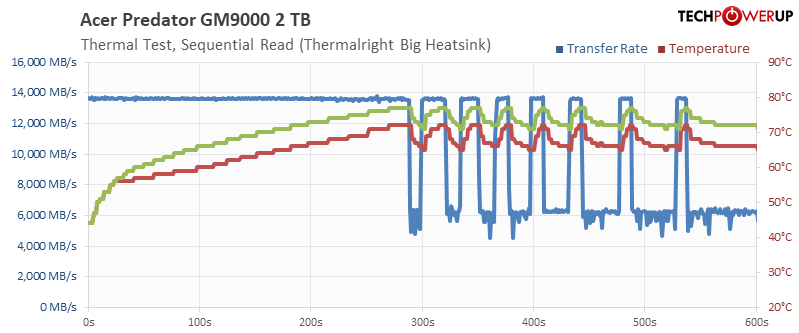
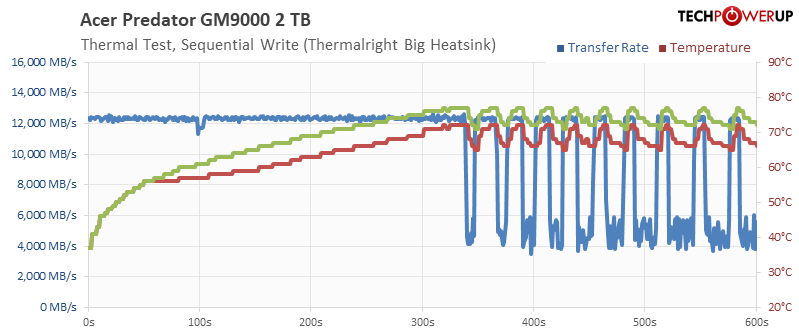
With the much bigger Thermalright HR-10, there is still a bit of thermal throttling, which got me thinking: maybe the sticker on the drive limits the heat transfer.
Drive with big Thermalright Heatsink and Sticker Removed
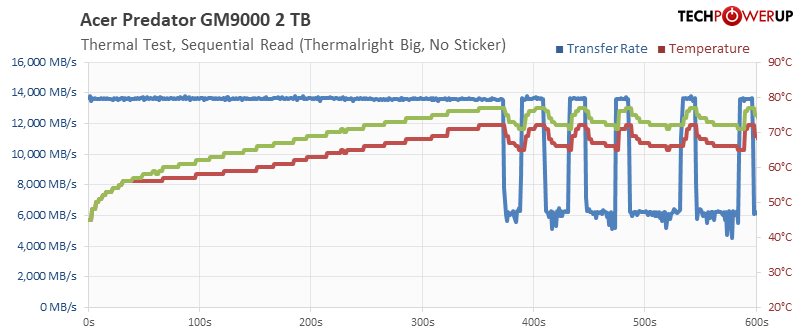
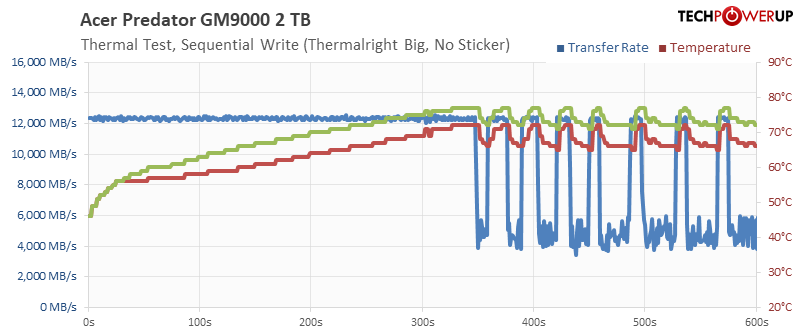
As you can see, removing the sticker helps avoid throttling for longer, but eventually the drive will hit its throttle state.
Drive with Fan
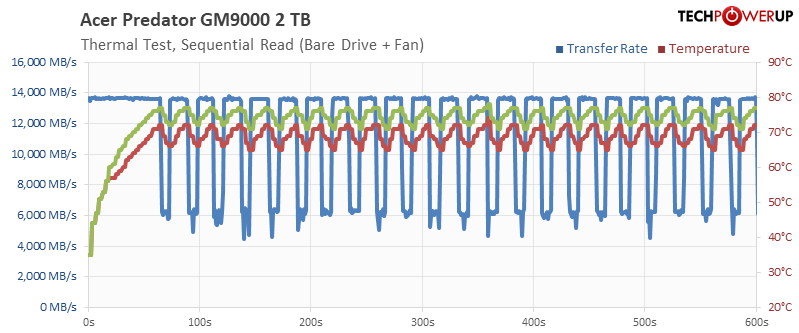
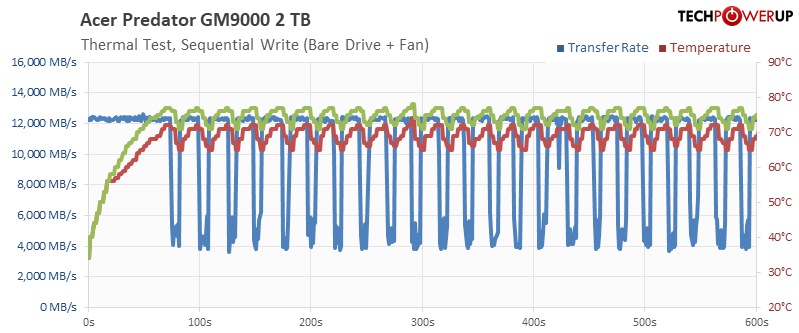
Finally, as control, I put a big 80 mm fan in front of the drive without heatsink, with sticker, you can still see some throttling here.
Thermal Image & Hot Spot
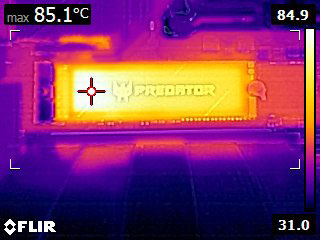
We recorded a thermal image of the running SSD as it was completing the write test. The surface temperature of the drive reached 85°C. This is surprisingly low for a drive in this performance class, and the reason why we're seeing this amount of throttling. Had they set a higher thermal limit like 95°C or 105°C (Samsung 9100 Pro), things would be much different.
Nov 13th, 2026 22:02 CST
change timezone
Latest GPU Drivers
New Forum Posts
- Tell me about your favourite graphics card (29)
- no "PhysX" workable (8)
- AI generated images... (224)
- Crimson Desert (31)
- RenoDX HDR - how to view the differnce Before&After in game? (0)
- Displayport DP80 3M (10ft) cable that can achieve 80gbps stable? (5)
- I'll flash a ASUS ROG Strix RX480 O8G in Cause of Code 43, as a Newbie (1)
- Opinion on Monitor Replacement (6)
- TMOG - post your benchmark results here (16)
- Microsoft Exchange/365 outages? (61)
Popular Reviews
- AMD Zen 6 Technical Deep Dive
- Corsair HX1000i Shift Crystal Review
- NZXT C1200 Platinum Review
- Upcoming Hardware Launches 2027 (Updated Nov 2026)
- ASUS ROG Strix B850-I Gaming Wi-Fi7 W Review
- Montech King 95 3D PRO Review
- NZXT H7 RGB+ Review
- NZXT H5 Review
- Phantom Blade Zero Performance Benchmark Review - 35 GPUs Tested
- XPG NIMBUS PLUS Review - Mid-range Chair With Strong Competitors
TPU on YouTube
Controversial News Posts
- NVIDIA Co-Founder and CEO Jensen Huang Officially Resigns (379)
- OpenAI CEO Argues Home PCs Waste the World's Limited DRAM Supply (152)
- NVIDIA Launches Investigation Into Jensen Huang's Relationship With Suspected Chinese Spy (136)
- Intel "Raptor Lake Next" 16-Core and 20-Core CPUs Surface (130)
- Legendary Game Studio BioWare Shuts Down Following EA Layoffs (104)
- Dell CEO Says the Memory Shortage Will Get Worse in 2027 (95)
- NVIDIA GeForce RTX 50-Series Scheduled for up to $500 Price Hike This Week (89)
- Modder Fits RTX 5090 With Four 8-Pin Connectors, Halving Current per Wire (80)