 14
ALLIWAVA GH9 Review
Value & Conclusion »Power and Noise Levels
Power and efficiency is as important as raw performance to many in a compact system, so I measured how much the GH9 Max draws at idle, under CPU stress, during GPU-heavy tests, and while gaming. I also measured its noise levels while in an idle state and when the system is under a heavy workload.Idle Power Draw
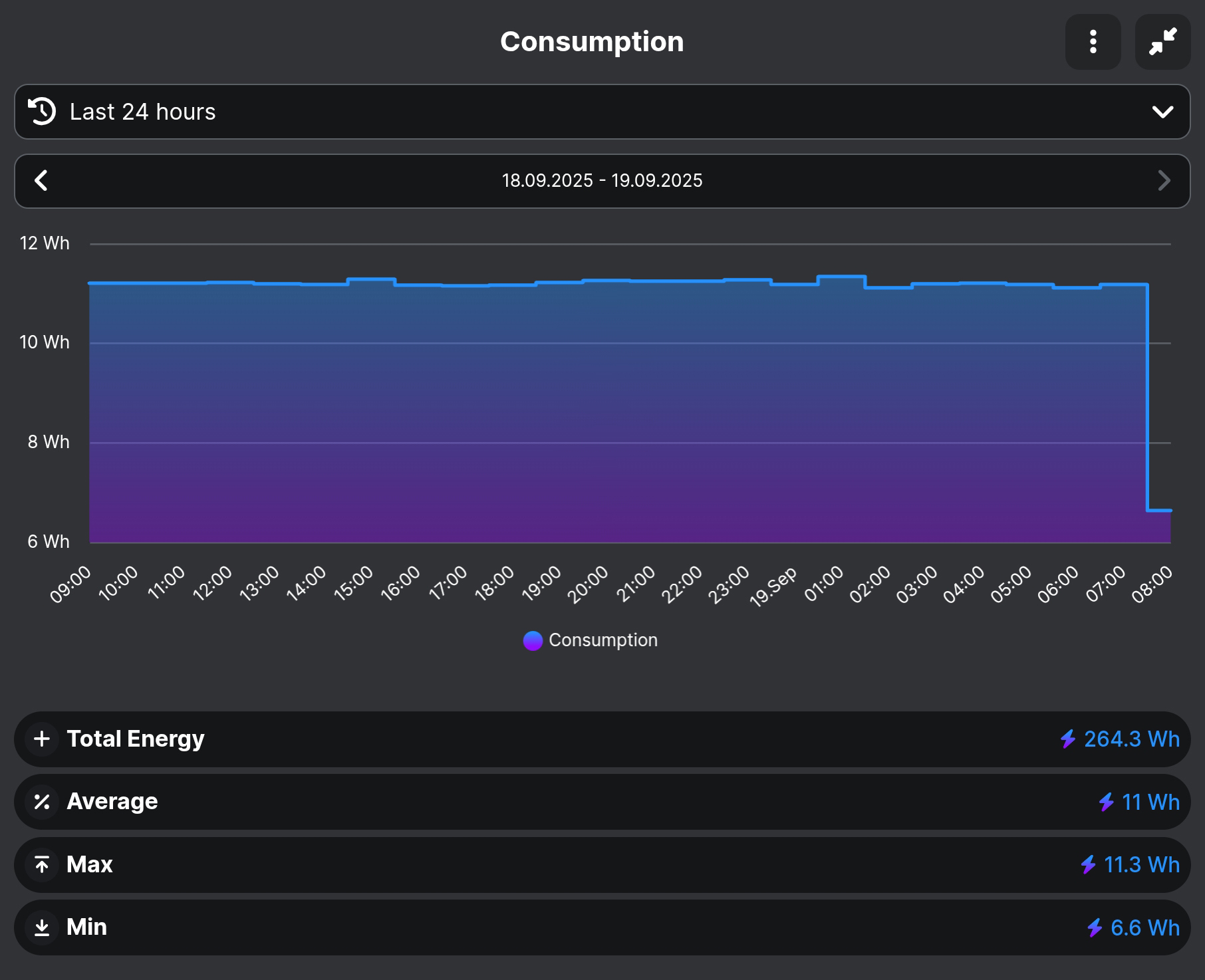
Over a continuous 24-hour idle window while it was just syncing and waiting, the ALLIWAVA GH9 consumed 0.264 kWh (264 Wh), with an average of 11 W. Power draw peaked at 11.3 W and dipped to 6.6 W, holding a steady, low-variance profile across the day. That is about the draw of a small LED bulb, which is quite efficient for a Mini-PC at idle. The graph stays flat and calm, so you are not paying for power swings, just a steady trickle while it sits ready for use.
CPU and GPU Power Draw
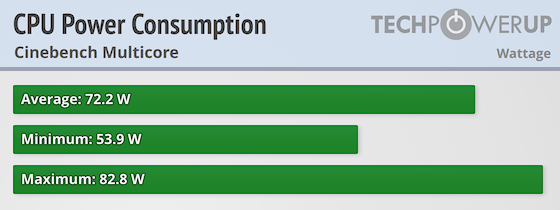
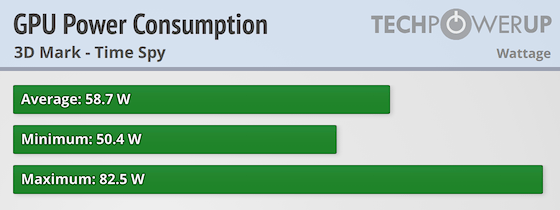
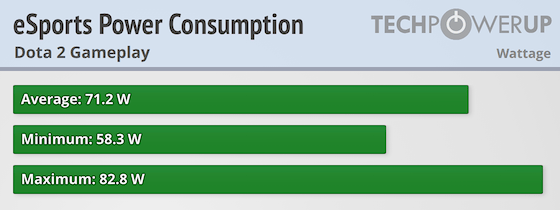
We also tested three real-world power profiles: an esports scenario like Dota 2 that reflects a steady mid-load with brief spikes during big fights, a GPU-intensive pass using Time Spy that stresses the graphics pipeline to reveal scene changes, memory pressure, and thermal headroom, and a CPU-intensive run with Cinebench that hammers all cores continuously to show sustained power delivery, cooling capacity, and how well boost holds over time.
CPU Load (Cinebench Multicore)
Numbers came in at 66.8 W min, 72.4 W avg, 88.0 W max for the GH9 during this bench. Cinebench is a steady all-core grind, so the average staying in the low 70s is what we want to see. The higher minimum tells us the system holds power consistently without big dips, and the peaks are short turbo bursts doing their job.
GPU Load (3D Mark – Time Spy)
Here, you're seeing 50.4 W min, 58.7 W avg, 82.5 W max, a pattern that fits Time Spy perfectly. It cruises in the mid-50s during the graphics scenes, spikes when the scene changes, then climbs near the end when the CPU test kicks in. In short, normal behavior with healthy headroom at the top.
eSports Gaming (Dota 2)
The Log shows 58.3 W min, 71.2 W avg, 82.8 W max, where gameplay sits near 70 W most of the time then pops higher during busy fights or quick loads. The lower minimum likely came from less battle-intensive moments. Overall, it looks stable and exactly in line with a light-to-moderate GPU load that occasionally ramps up.
Here's a full rundown of the power draw for all three profiles:
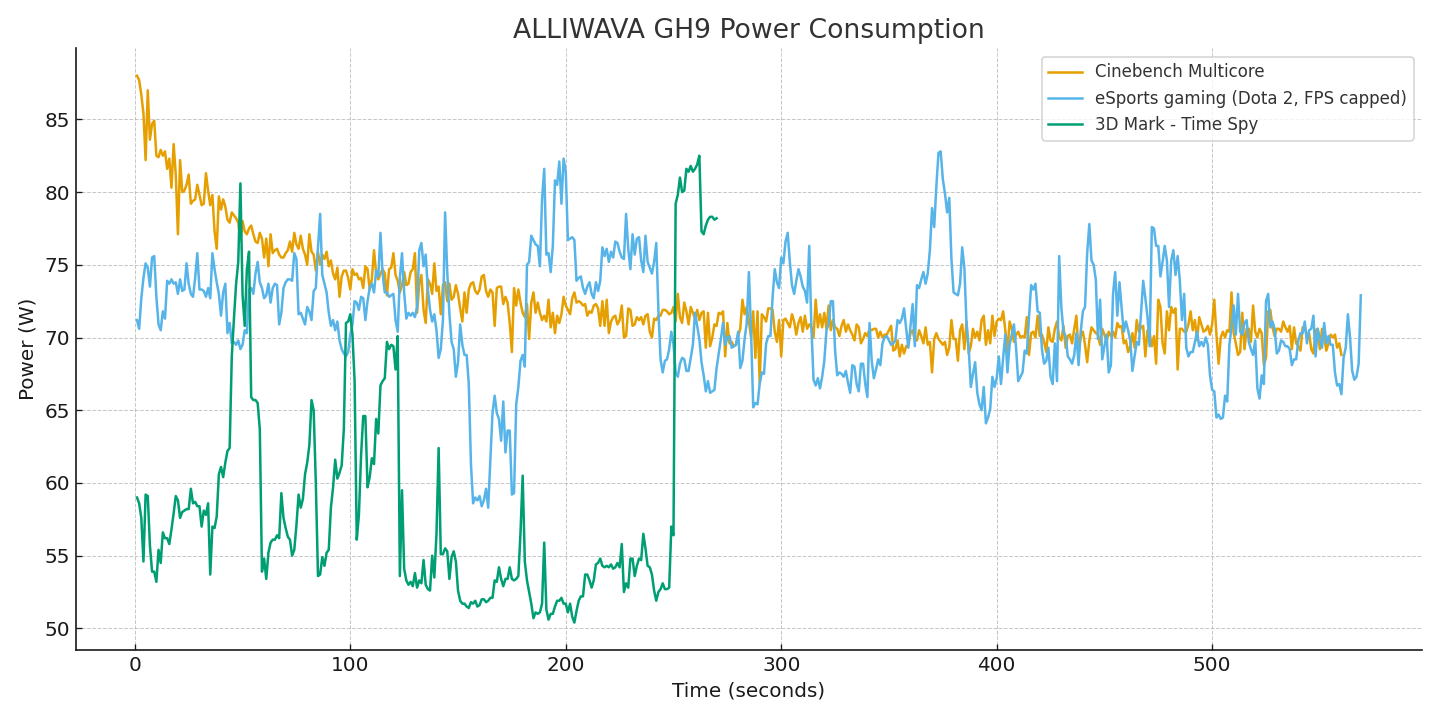
Overall, no surprises here: the three runs look healthy and power efficient for this class of mini PC. Time Spy shows normal scene-driven bumps, Cinebench holds a steady sustained load without wobble, and Dota 2 behaves like a typical game profile with brief upticks during busy moments. There are no signs of throttling or chaotic spikes, which tells me the platform is delivering consistent power and the cooler is keeping up. From a cost standpoint, each run is pennies at most, and even extended play sessions stay inexpensive. In short, the system is behaving as expected, is stable under both synthetic and real-world loads, and efficient enough that power use should not be a concern.
Noise Levels
At idle or under light loads, the system is near-silent, much like other Mini-PCs in this class. It will have marginal measurable fan noise in your workspace, which makes it easy to work or edit without distraction when the system is not running heavy workloads.When pushed into heavier workloads, however, the fans do spin up to keep thermals in check. With the Windows power plan set to Balanced and the system running on the default BIOS fan profile, noise levels peaked at 56.7 dB(A) (with the mic roughly 50 cm away).
Nov 24th, 2026 06:02 CST
change timezone
Latest GPU Drivers
New Forum Posts
- How to prevent OLED burn damage due to PC freezes or power outtages? (58)
- Strange PC issues with Z690 setup (1)
- Increasing Power Limit? (22)
- Which ryzen am5 cpu ? (201)
- Your PC ATM (36486)
- AI generated images... (234)
- Without Jensen, PC gaming will be (58)
- Strange case of Mini itx build with normal gpu, and atx psu (Build Log) (21)
- AMD ULL settings tinkering thread - post settings and Zen pics (87)
- Gacha Games - Discussions, Pulls, Updates, etc. (1163)
Popular Reviews
- Microsoft Surface Laptop Ultra Review - The Next-gen Arm Laptop
- ASRock X870E Challenger Wi-Fi White Review
- Upcoming Hardware Launches 2027 (Updated Nov 2026)
- Corsair RM1200e (Second Generation) Review
- AMD Ryzen 7 9800X3D Review - The Best Gaming Processor
- AMD Zen 6 Technical Deep Dive
- AMD Ryzen 7 7700X3D Review
- Pulsar Office Tour & First Look at P1 Dual-Sensor Mouse
- Phantom Blade Zero Performance Benchmark Review - 35 GPUs Tested
- Ugreen NASync DXP4800 GT Review
TPU on YouTube
Controversial News Posts
- NVIDIA Co-Founder and CEO Jensen Huang Officially Resigns (492)
- Jensen Huang Reinstated as CEO of NVIDIA (430)
- Report: Jensen Huang Eyes NVIDIA Comeback (281)
- Open Letter Asking NVIDIA to Reinstate Jensen Huang Passes 115,000 Signatures (184)
- OpenAI CEO Argues Home PCs Waste the World's Limited DRAM Supply (152)
- NVIDIA Launches Investigation Into Jensen Huang's Relationship With Suspected Chinese Spy (136)
- Intel "Raptor Lake Next" 16-Core and 20-Core CPUs Surface (130)
- NVIDIA GeForce RTX 50-Series Scheduled for up to $500 Price Hike This Week (89)