 2
AQIRYS Sirius Pro Review
Microphone Performance »Sound Quality

The AQIRYS Sirius Pro features oversized 53-millimeter titanium film dynamic speaker drivers. Their specified impedance is 32 Ω, and sensitivity is rated at 111 dB (±3 dB), making them very easy to drive—whether you're using the supplied sound card or any other source with a 3.5 mm analog output. During my time with the Sirius Pro, I used it almost exclusively as a USB headset, meaning the supplied sound card (an unspecified C-Media model) handled both audio output and microphone input. To start with the basics, the included sound card has more than enough power to drive the Sirius Pro and there's no chance you'll come anywhere near its maximum volume. It also operates with an inaudible noise floor, which is a good sign for AQIRYS, as many inexpensive USB headsets fall short here, often producing a faint but noticeable background hiss.
For gaming headset frequency response measurements I'm using the miniDSP EARSheadphone test fixture, probably the least expensive such device on the market. It consists of two miniDSP UMIK-1 microphones placed inside a pair of silicone ears and affixed to a steel headphone stand. It's a USB-powered device, perfectly integrated with the fantastic Room EQ Wizard (REW) software, which is used for headphone and microphone calibration, as well as doing the measurements themselves. Every single miniDSP EARS unit comes with its own microphone calibration files, which are loaded into REW before doing the measurements. The miniDSP EARS certainly has its quirks; the artificial ear canals aren't particularly deep, so I wouldn't consider it a viable option for IEM testing. The integrated microphones are exceptionally sensitive to headphone positioning, partially because of the screws affixing the silicone ears to the stand, which aren't perfectly flush with the silicone surface. Some users also claim that the fixture is too narrow for very large Hi-fi headphones, so they have to use rubber bands to tighten the clamping force. The latter isn't something I ever had an issue with, though; all my headsets and headphones fit perfectly.
Because of all that, the miniDSP EARS is prone to user error. Whoever is using it has to know how to interpret the results and, even more importantly, how to spot those that are clearly flawed. After getting rid of the bad data, assuming the initial configuration and calibration were done properly, the resulting frequency response measurements are usable and in line with what one would hear from the headphones (or headset) in question. My testing methodology mostly follows the best practices of using the miniDSP EARS as covered in great detail in this article on Headphonesty. The most significant difference is that I'm using the updated HEQ compensation, where a subjectively neutral headphone would measure approximately flat. To compensate for minor seal variances, I'm measuring each ear until I get 10 usable results and reseat the headphones, or headset, between runs. After I have my results for one ear, I apply a 1/12 octave smoothing and average the measured responses. I then repeat the process for the other ear for an idea of whether any channel imbalance exists. It's important to keep in mind that my results cannot be directly compared to anyone else's, as only an identical methodology conducted on my exact sample of the miniDSP EARS would yield directly comparable results.
For the AQIRYS Sirius Pro, I used the supplied USB sound card as the source when doing my frequency response measurements. Take a look at its frequency response plot, as well as a direct comparison to the wireless AQIRYS Andromeda Pro, which uses the same speaker drivers.
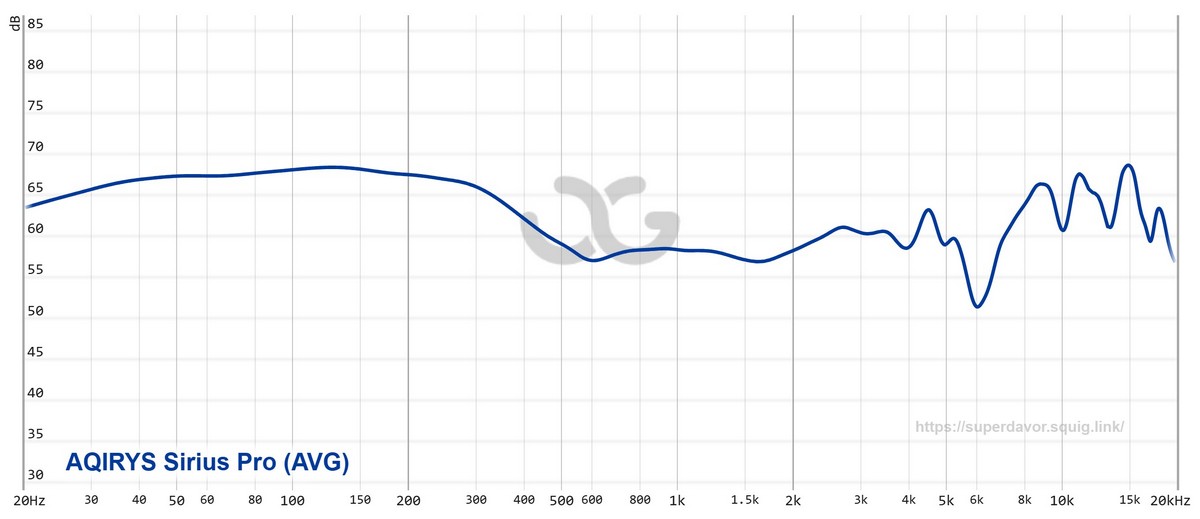
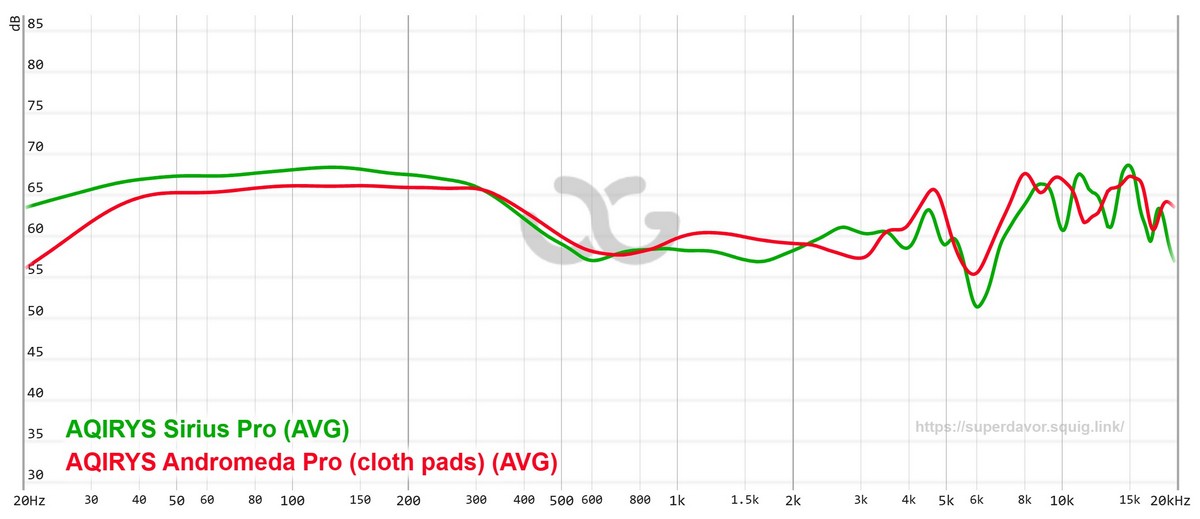
The sound profile of the AQIRYS Sirius Pro is a familiar one, as it reminded me of the wireless AQIRYS Andromeda Pro, although with even more bass energy (around +2 dB on average) and a comparatively subdued upper midrange (around -3 dB on average). Such voicing, that leans into bass emphasis, restrained midrange, and elevated treble energy, aims to sound engaging and lively, but it also carries tradeoffs in naturalness and overall balance.

If bass is what you like, the Sirius Pro will deliver it in heaps. Explosions in games, deep synths in electronic music, and cinematic scores will have a visceral presence, with sub-bass extension that adds weight and drama to the overall presentation. As seen on the frequency response graph, the bass elevation is generally smooth and not overly boomy, so a sense of control is maintained. The tapering of energy through the lower mids slightly reduces warmth and body, especially in instruments like bass guitars, lower strings, and male vocals. While the elevated sub-bass brings power and impact, this slight hollowing out of the low mids means the AQIRYS Sirius Pro may lack some fullness or richness in this region. It's a common tuning choice in gaming headsets, where clarity is often prioritized over musicality, so while you're not getting what I would call a Hi-fi experience, you're still getting served more than you might hope for when buying an inexpensive USB headset.
The midrange remains relatively neutral but subdued. There's a noticeable dip centered near 600 Hz, followed by a plateau that maintains a steady line through the vocal range. This contributes to a sense of separation between instruments and vocals, but may also make the latter sound slightly distant or recessed. Vocals won't dominate the mix; instead, they sit back slightly, allowing other frequency content—particularly bass and treble—to stand out more prominently. For dialogue clarity in gaming or media, this may be a benefit.
Past the 2 kHz point, the Sirius Pro begins to regain energy, restoring some vocal clarity and adding snap to snare drums and percussions, before dipping again in the 5-6 kHz region, which makes the sound smoother and less fatiguing—an important feature for long gaming sessions—but also somewhat veiled. The feeling of airiness definitely isn't present on the Sirius Pro; if anything, the headset leans toward sounding heavy and, if the content played has a lot of bass, even slightly congested.
The wireless Andromeda Pro fares better in terms of stereo separation and spatial awareness, most likely because of having more energy in the upper midrange, as visible on the comparison frequency response graph. The Sirius Pro is by no means bad in that regard, but it definitely didn't give me as much confidence on the virtual battlefield as its more expensive sibling.
7.1 Virtual Surround Sound
To activate the 7.1 virtual surround sound, you'll need to go to Windows Control Panel > Sound, find the AQIRYS Sirius Pro Headset in the "Playback" device list, open the "Custom" tab, and enable "Xear Surround Headphone". Or better yet—don't bother. C-Media's virtual surround sound technology alters the sound in a way that makes it feel heavily compressed. Xear Surround Headphone isn't even in the same conversation as DTS Headphone:X or Dolby Atmos for Headphones.To put it briefly and save you some time: treat the Sirius Pro as a stereo headset and forget about its 7.1 virtual surround sound functionality.
Nov 15th, 2026 12:59 CST
change timezone
Latest GPU Drivers
New Forum Posts
- What can the FX 8320 do today? Here is the answer. (58)
- WarpCoreBench scores! (49)
- What are you playing? (26221)
- How do you get games for PC? (59)
- WireView Pro II GPU Alignment: Wired | Variant: Black (5)
- What is the latest game you finished or 100% (202)
- Honestly, do you care about GTA VI? (61)
- Power supply noise stops when I move the mouse (7)
- HP Office Jet 7740 Pro - Supply system problem with replacement cartridge (1)
- Recommendations Wanted - Affordable Enterprise SSD for Boot (5)
Popular Reviews
- AMD Zen 6 Technical Deep Dive
- ASUS ROG Strix B850-I Gaming Wi-Fi7 W Review
- Corsair HX1000i Shift Crystal Review
- Upcoming Hardware Launches 2027 (Updated Nov 2026)
- Montech King 95 3D PRO Review
- NZXT C1200 Platinum Review
- NZXT H7 RGB+ Review
- NZXT H5 Review
- Phantom Blade Zero Performance Benchmark Review - 35 GPUs Tested
- AMD Ryzen 7 9800X3D Review - The Best Gaming Processor
TPU on YouTube
Controversial News Posts
- NVIDIA Co-Founder and CEO Jensen Huang Officially Resigns (416)
- Open Letter Asking NVIDIA to Reinstate Jensen Huang Passes 115,000 Signatures (163)
- OpenAI CEO Argues Home PCs Waste the World's Limited DRAM Supply (152)
- NVIDIA Launches Investigation Into Jensen Huang's Relationship With Suspected Chinese Spy (136)
- Intel "Raptor Lake Next" 16-Core and 20-Core CPUs Surface (130)
- Legendary Game Studio BioWare Shuts Down Following EA Layoffs (104)
- Dell CEO Says the Memory Shortage Will Get Worse in 2027 (95)
- NVIDIA GeForce RTX 50-Series Scheduled for up to $500 Price Hike This Week (89)