 15
ASRock Phantom Gaming B850 Riptide Wi-Fi Review - Amazing Price/Performance
Component Analysis »Board Layout


While there's a minimal amount of RGB lighting which sits under the large M.2 heatsink at the bottom of the PCB, ASRock has done a good job of jazzing up other heatsinks with some colorful designs to help the Phantom Gaming B850 Riptide Wi-Fi stand out from the crowd. The PCB has plenty of free space, but it's immediately obvious it lacks some premium testing and overclocking tools. There are no buttons for power, reset or clearing CMOS and no LED POST code display, which can be useful on AMD boards as they often take a while to boot so it can be reassuring to know everything is working.

With everything removed we can see the board is fairly basic, but does include underside cooling for the top M.2 port and also has an extended PCIe slot release mechanism. The overall layout doesn't seem to pose any issues and while it has only six 4-pin fan headers, these are spaced to give three to top right of the CPU socket, one below the I/O shroud that's useful for rear fans and another two at the base of the PCB.


The CPU fan header is limited to 1 A/12 W, but there's a total of 3 A/36 W available across the rest giving a little more scope for using single high-power devices such as fan header-powered pumps. As well as the RGB lighting under the lower M.2 port, there are plenty of RGB headers on the PCB, including two 3-pin ARGB headers in the top right corner that will be useful for case or cooler fans. Amazingly, ASRock has included a USB 3.2 Gen 2x2 20 Gbps Type-C front panel header, which is impressive for a $200 motherboard, and it also includes four SATA ports for those looking to transplant hard disks and older 2.5 inch SSDs.

A third 3-pin ARGB header and even a 4-pin RGB header are located on the lower edge of the PCB, so the Phantom Gaming B850 Riptide Wi-Fi is very capable when it comes to powering all sorts of RGB components across various channels. There's an increasing number of cases with base fans so having a fan header or two at the bottom of the PCB is useful, and you get two here. Another surprising feature is a 2-pin thermistor header, which you can either use with the included thermal probe to control fans based off its input or even hook up a coolant probe to a custom watercooling loop.

Some boards at this price do away with any GPU quick-release mechanisms and ASRock could probably have got away with it here too, but it's good to see it including what it calls Graphics Card Lite Release, which is essentially an extension of the usual release lever and simply opens to release your graphics card. It does make things a little easier, especially with a large graphics card that has a backplate sitting right next to the large M.2 heatsink. It's certainly less elaborate than other manufacturers efforts, but it does what it needs to do and does it well.

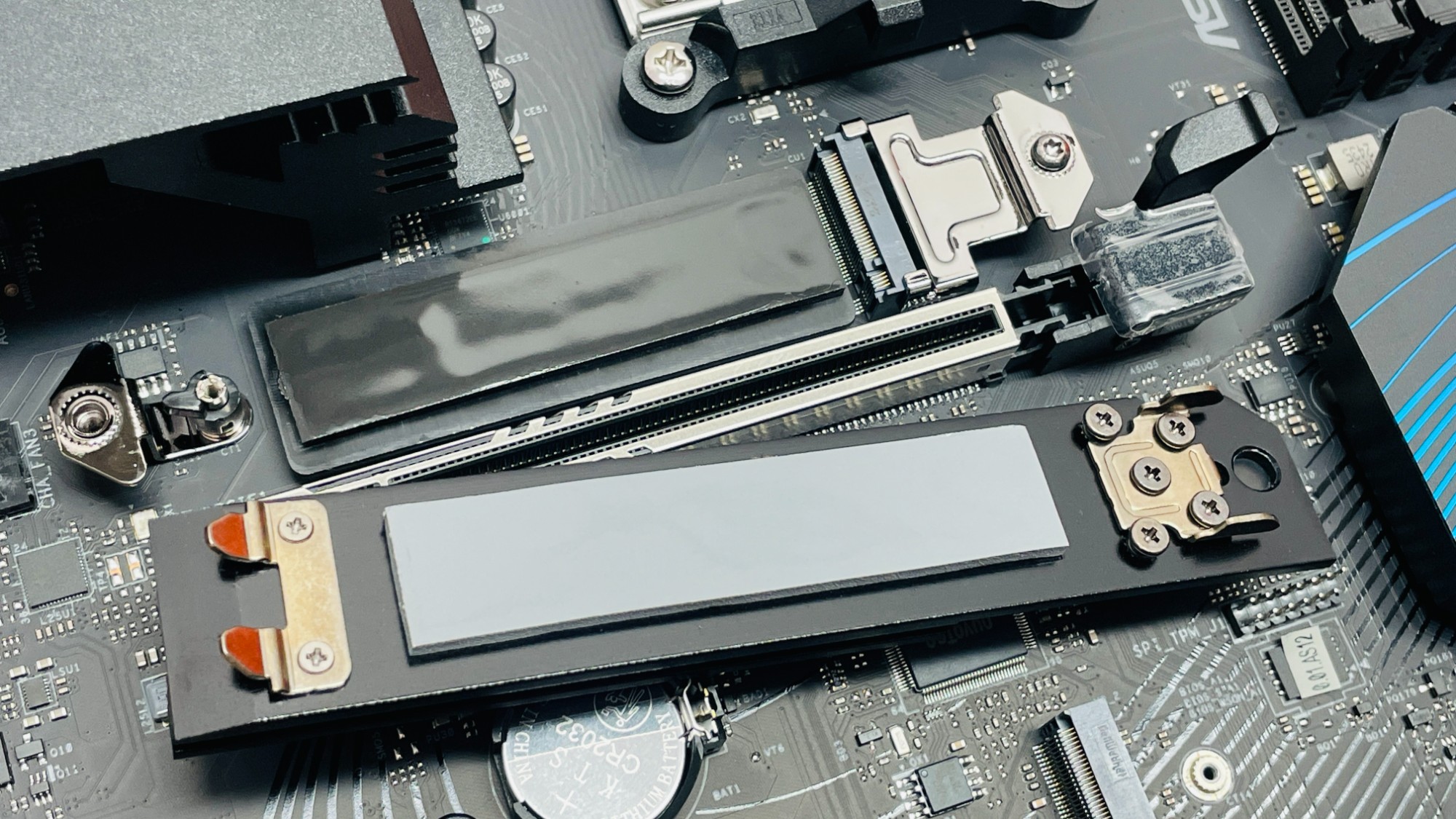
The top M.2 port supports up to PCIe Gen 5 SSDs and yet more surprising additions given the price are both top and underside cooling, which means this $200 motherboard might even be able to handle the current crop of toasty PCIe Gen 5 SSDs, but it also has a completely tool-free installation and heatsink. The heatsink itself does have a little snag, though, which is that it can be quite tricky to remove, with the far end getting stuck onto its support. Keeping it relatively flat was a partial solution, but then you also risk damaging the thermal pad, so be careful with this one.


The second slot is PCIe Gen 4 and like it's faster sibling, grabs its lanes directly from the CPU, but sadly lacks any cooling. The lower two slots both run off the chipset and share a large heatsink that will require a small screwdriver to install and can be a little fiddly. The slot on the left down here is the only one with shared bandwidth and using it will disable the second PCIe slot below it.

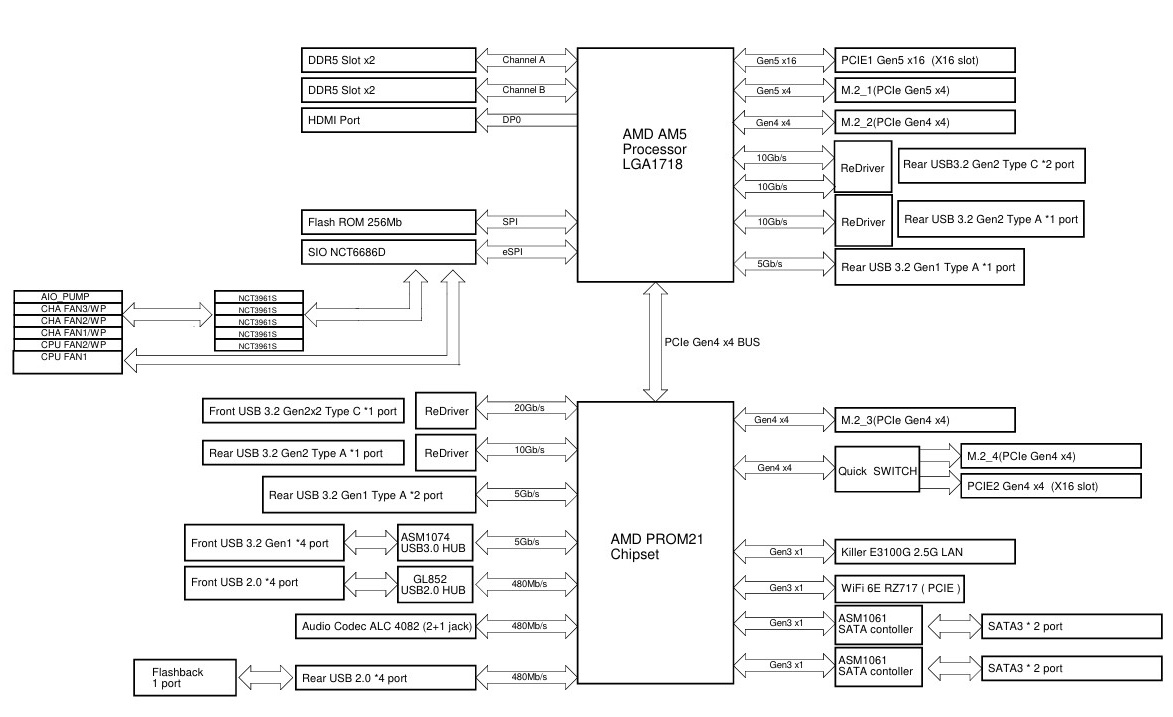
We don't have any complaints about the rear I/O panel either especially as it includes a generous nine Type-A USB ports and two USB 3.2 Gen 2 Type-C ports, with USB4 being the most significant feature to be cut from the specs. Still, with a pair of Type-C and Type-A USB 3.2 Gen 2 ports, it's not exactly devoid of high speed connectivity, plus there's 2.5 Gbps Ethernet and Wi-Fi 7 too and also a USB BIOS Flashback button. Overall ASRock hasn't made many wrong moves so far. For anyone wanting more details on lanes and sharing, the block diagram is above.
Nov 27th, 2026 11:57 CST
change timezone
Latest GPU Drivers
New Forum Posts
- The TPU UK Clubhouse (27297)
- Unigine Superposition on Linux (20)
- Making a game in Godot engine (23)
- What's your main Black Friday / Cyber Monday purchase? (33)
- TPU's WCG/BOINC Team (34814)
- Anthrophics IPO (41)
- Found Out Why My FygoOS Transfers Were Stuck at 11 MB/s (1)
- Dell Dimension E510 Retro Gaming PC Upgrade & Modification (4)
- WireView Pro II GPU Alignment: Wired | Variant: Black (11)
- Mouse Pad advice - Shidenkai out of production? (18)
Popular Reviews
- VZMORE AX9 Max Review
- Upcoming Hardware Launches 2027 (Updated Nov 2026)
- ASRock X870E Challenger Wi-Fi White Review
- AMD Ryzen 7 9800X3D Review - The Best Gaming Processor
- Microsoft Surface Laptop Ultra Review - The Next-gen Arm Laptop
- Montech CyberFlow ARGB 360 Review
- AMD Zen 6 Technical Deep Dive
- Phantom Blade Zero Performance Benchmark Review - 35 GPUs Tested
- Corsair RM1200e (Second Generation) Review
- ORICO Obook15 AI Review
TPU on YouTube
Controversial News Posts
- Jensen Huang Reinstated as CEO of NVIDIA (621)
- NVIDIA Co-Founder and CEO Jensen Huang Officially Resigns (492)
- Report: Jensen Huang Eyes NVIDIA Comeback (281)
- Open Letter Asking NVIDIA to Reinstate Jensen Huang Passes 115,000 Signatures (184)
- OpenAI CEO Argues Home PCs Waste the World's Limited DRAM Supply (152)
- NVIDIA Launches Investigation Into Jensen Huang's Relationship With Suspected Chinese Spy (136)
- Intel Razor Lake Gets a 12 P-Core bLLC Chip With No E-Cores, Per Leak (94)
- NVIDIA GeForce RTX 50-Series Scheduled for up to $500 Price Hike This Week (89)