 39
ASRock X870E Taichi White Review
(39 Comments) »Value and Conclusion
- The ASRock X870E Taichi White is available for US$450
- Attractive design with extensive white color scheme and RGB lighting
- Excellent VRM cooling with quiet fan assistance and controllable curve
- Excellent M.2 SSD cooling
- 10 Gbps Ethernet
- 10 Type-A USB ports
- Dual Type-C USB4 ports
- 36 W available over most fan headers
- USB 3.2 Gen 2x2 20 Gbps Type-C front panel header
- Two tool-free M.2 heatsinks
- Rear backplate aids VRM and chipset cooling
- Power, reset, CMOS clear and USB BIOS flashback buttons
- Three thermistor probe headers
- 512 Mbit (64 MB) BIOS
- Previous model is still available and significantly cheaper
- VRM fan lacks full control in the EFI, only in software
- No enhanced power delivery over Type-C header
- EFI and software are dated and lack features compared to competition
- Not all M.2 heatsinks are tool-free
- Case-limiting EATX form factor doesn't seem to add that many extra features
- Only three SATA ports
- 512 Mbit (64 MB) BIOS has few benefits for now
It's fantastic to see a refresh of one of our favorite motherboards as the Taichi's of the past have offered excellent value and ticked nearly every box when it comes to features, both new and those a little more established. When adding the EATX form factor too, they are imposing and bristling with features and feel every bit like they're worth their price tag, but is this still true with the new X870E Taichi White?
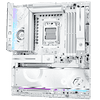
In many ways, this is its own motherboard and not a simple refresh. There are no tweaks to bandwidth sharing, because with only one PCIe Gen 5 M.2 slot and limited PCIe slots, there wasn't any sharing other than the usual split between the two PCIe slots on the previous model and isn't anything in addition to that again here. So unlike other refresh boards, you can populate the primary PCIe slot, USB4 ports and all M.2 ports and not see the USB4 ports disabled for example. Its primary goal is to nail that white color scheme, and it's succeeded. The board looks fantastic, and the white theme is as extensive as anything you'd see from the competition too, while it also helps the RGB lighting really pop. Other tweaks include a wired networking upgrade with 10 Gbps compared to 5 Gbps for the previous model as well as the usual doubling of BIOS size to 512 Mbit (64 MB) for future features and compatibility.
However, apart from this, there's nothing new, and we even see regression in areas too, such as a halving of the number of SATA ports from six to three. This, as far as can be seen, is for aesthetic reasons, allowing the M.2 heatsink to stretch across the PCB. While SATA storage is maybe less important than it was five years ago, it's fair to say that any EATX motherboard should come equipped with at least the usual four. ASRock often bucks trends such as these and continues to support features such as these even when others don't, so this Taichi board does feel like its form has come at the expense of function.
While the minimal bandwidth sharing is welcome, this does come at the expense of PCIe Gen 5-compatible M.2 ports. For the moment this isn't much of an issue, but given Socket AM5's apparent longevity, there's every chance that SSDs will become more affordable again and Gen 5 models the dominant type within that lifespan, potentially putting the board at similar disadvantage to early Socket AM4 models that only had one Gen 4 port, forcing additional PCB-mounted storage to be slower Gen 3. Something else that wasn't ideal was the fact full control of the VRM fan was possible in software, but not in the EFI. This is such a shame as plenty prefer not to install software, and this does feel like an oversight and something that could even be fixed with a BIOS update. You can still set specific fan profiles for it in the EFI, but a full fan curve would be far better. Thankfully, it didn't prove to be intrusive in the default silent mode, but full EFI fan curve control for a VRM fan should be standard for any board, and ASRock is far from the only one to do this.
As for other options, first and foremost is this board's predecessor, the X870E Taichi. Currently retailing for less than $290, that's a massive $160 saving, while only losing 10 Gbps Ethernet, the white color scheme and larger BIOS, you also gain three SATA ports. The two boards are otherwise mostly identical, posing an issue when it comes to recommending the X870E Taichi White. Just as much of an issue are more mainstream ATX options such as the Gigabyte X870E Aorus Pro X3D Ice. It might lack 10 Gbps Ethernet, but it offers two PCIe Gen 5 M.2 ports, four SATA ports and even has 60 W power delivery over its Type-C header, all while costing $50 less. If 10 Gbps Ethernet is a must-have and those added features on the Gigabyte board sound useful, then spending around $100 more will get you the Gigabyte X870E Aorus Master X3D Ice, which has even more features too. Both Gigabyte boards will age far more gracefully.
Ultimately, while the X870E Taichi White excelled in terms of VRM and SSD cooling, it doesn't seem to have the same wow factor in terms of features and value as its predecessor when it comes to comparing it against the competition. Even aside from the various niggles we've mentioned with its features, its EATX dimensions don't seem to offer more than ATX-size competition, and in some cases it offers fewer of the features you'd expect to see more of on a larger motherboard.
The sub $500 price tag is welcome, and the new white color scheme is stunning, as is the board overall, but competing boards simply offer more, often for less cash, also come in white, and its very similar predecessor is still available and costs significantly less too. As a result, while an attractive and very solid motherboard, it's hard to recommend.
In many ways, this is its own motherboard and not a simple refresh. There are no tweaks to bandwidth sharing, because with only one PCIe Gen 5 M.2 slot and limited PCIe slots, there wasn't any sharing other than the usual split between the two PCIe slots on the previous model and isn't anything in addition to that again here. So unlike other refresh boards, you can populate the primary PCIe slot, USB4 ports and all M.2 ports and not see the USB4 ports disabled for example. Its primary goal is to nail that white color scheme, and it's succeeded. The board looks fantastic, and the white theme is as extensive as anything you'd see from the competition too, while it also helps the RGB lighting really pop. Other tweaks include a wired networking upgrade with 10 Gbps compared to 5 Gbps for the previous model as well as the usual doubling of BIOS size to 512 Mbit (64 MB) for future features and compatibility.
However, apart from this, there's nothing new, and we even see regression in areas too, such as a halving of the number of SATA ports from six to three. This, as far as can be seen, is for aesthetic reasons, allowing the M.2 heatsink to stretch across the PCB. While SATA storage is maybe less important than it was five years ago, it's fair to say that any EATX motherboard should come equipped with at least the usual four. ASRock often bucks trends such as these and continues to support features such as these even when others don't, so this Taichi board does feel like its form has come at the expense of function.
While the minimal bandwidth sharing is welcome, this does come at the expense of PCIe Gen 5-compatible M.2 ports. For the moment this isn't much of an issue, but given Socket AM5's apparent longevity, there's every chance that SSDs will become more affordable again and Gen 5 models the dominant type within that lifespan, potentially putting the board at similar disadvantage to early Socket AM4 models that only had one Gen 4 port, forcing additional PCB-mounted storage to be slower Gen 3. Something else that wasn't ideal was the fact full control of the VRM fan was possible in software, but not in the EFI. This is such a shame as plenty prefer not to install software, and this does feel like an oversight and something that could even be fixed with a BIOS update. You can still set specific fan profiles for it in the EFI, but a full fan curve would be far better. Thankfully, it didn't prove to be intrusive in the default silent mode, but full EFI fan curve control for a VRM fan should be standard for any board, and ASRock is far from the only one to do this.
As for other options, first and foremost is this board's predecessor, the X870E Taichi. Currently retailing for less than $290, that's a massive $160 saving, while only losing 10 Gbps Ethernet, the white color scheme and larger BIOS, you also gain three SATA ports. The two boards are otherwise mostly identical, posing an issue when it comes to recommending the X870E Taichi White. Just as much of an issue are more mainstream ATX options such as the Gigabyte X870E Aorus Pro X3D Ice. It might lack 10 Gbps Ethernet, but it offers two PCIe Gen 5 M.2 ports, four SATA ports and even has 60 W power delivery over its Type-C header, all while costing $50 less. If 10 Gbps Ethernet is a must-have and those added features on the Gigabyte board sound useful, then spending around $100 more will get you the Gigabyte X870E Aorus Master X3D Ice, which has even more features too. Both Gigabyte boards will age far more gracefully.
Ultimately, while the X870E Taichi White excelled in terms of VRM and SSD cooling, it doesn't seem to have the same wow factor in terms of features and value as its predecessor when it comes to comparing it against the competition. Even aside from the various niggles we've mentioned with its features, its EATX dimensions don't seem to offer more than ATX-size competition, and in some cases it offers fewer of the features you'd expect to see more of on a larger motherboard.
The sub $500 price tag is welcome, and the new white color scheme is stunning, as is the board overall, but competing boards simply offer more, often for less cash, also come in white, and its very similar predecessor is still available and costs significantly less too. As a result, while an attractive and very solid motherboard, it's hard to recommend.
Nov 20th, 2026 15:07 PST
change timezone
Latest GPU Drivers
New Forum Posts
- WarpCoreBench scores! (82)
- RX 9000 series GPU Owners Club (2248)
- Honestly, do you care about GTA VI? (209)
- Logitech Headsets Modded Driver — Unlock Dolby in G HUB (23)
- 1 - 5 person file storage server equivalent accasible from anywhere + general VM server. (1)
- How to prevent OLED burn damage due to PC freezes or power outtages? (48)
- When you could finally run Crysis maxed out? (63)
- GTA VI (20)
- Anthrophics IPO (25)
- GeekMagic Ultra Smart WiFi Weather Station (8)
Popular Reviews
- AMD Zen 6 Technical Deep Dive
- Microsoft Surface Laptop Ultra Review - The Next-gen Arm Laptop
- Ugreen NASync DXP4800 GT Review
- Corsair RM1200e (Second Generation) Review
- Acemagic Retro X3 Review
- Upcoming Hardware Launches 2027 (Updated Nov 2026)
- Pulsar Office Tour & First Look at P1 Dual-Sensor Mouse
- Biwin Black Opal NV7400 2 TB Review
- AMD Ryzen 7 9800X3D Memory Performance Scaling
- AMD Ryzen 7 9800X3D Review - The Best Gaming Processor
TPU on YouTube
Controversial News Posts
- NVIDIA Co-Founder and CEO Jensen Huang Officially Resigns (490)
- Report: Jensen Huang Eyes NVIDIA Comeback (256)
- Open Letter Asking NVIDIA to Reinstate Jensen Huang Passes 115,000 Signatures (184)
- OpenAI CEO Argues Home PCs Waste the World's Limited DRAM Supply (152)
- NVIDIA Launches Investigation Into Jensen Huang's Relationship With Suspected Chinese Spy (136)
- Intel "Raptor Lake Next" 16-Core and 20-Core CPUs Surface (130)
- Legendary Game Studio BioWare Shuts Down Following EA Layoffs (104)
- Dell CEO Says the Memory Shortage Will Get Worse in 2027 (95)