 3
ASRock Z890 Steel Legend Wi-Fi Review
(3 Comments) »Value and Conclusion
- The ASRock Z890 Steel Legend Wi-Fi is available online for $238
- Excellent VRM cooling
- Great SSD cooling
- Dual tool-free SSD heatsinks
- Front USB 3.2 Gen 2×2 20 Gbps Type-C header
- Attractive design
- Overclockable
- No bandwidth sharing
- Dual Thunderbolt 4 40 Gbps Type-C ports
- Above average number of fan headers with good power output
- Wi-Fi 7
- PCIe Gen 5 SSD and GPU support
- Below par EFI features and layout
- Software is dated and lacks features
- Not as good value as some of ASRock's other mid-range boards
- Average number of Type-A USB ports
- No power, reset or CMOS clear buttons
- No LED POST code display
- No enhanced power delivery over Type-C front panel header
- Lower M.2 heatsink blocked by triple-slot graphics cards
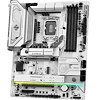
Let's start by saying there's a lot to like here with the ASRock Z890 Steel Legend Wi-Fi if you're looking for change from $250 for a white Z890 motherboard. At this price you want your pick to not just have a solid set of features, but also to be able to handle Intel's current flagship too.
The latter it certainly seemed at home with, keeping its power delivery components cool with some large heatsinks, paving the way for overclocking too. Cooling was also impressive when it came to handling PCIe Gen 5 SSDs, with the icing on the cake being that three of its four M.2 ports were equipped with tool-free heatsinks.
As well as the usual PCIe Gen 5 SSD and GPU support that you can expect on both Intel and AMD motherboards now, the Z890 Steel Legend Wi-Fi also ticks all other boxes in terms of creating a solid feature set. It has ALC1220 audio, Wi-Fi 7, dual Thunderbolt 4 ports and a USB 3.2 Gen 2x2 Type-C front panel header, as well as a thermistor header and eight fan headers, with most of those able to dish out up to 36 W too.
If you're worried about bandwidth sharing, you don't need to be, because all three PCIe slots and four M.2 ports can be occupied, each receiving full bandwidth, while also leaving the Thunderbolt 4 Type-C ports alone too. That's certainly a rare advantage Intel's current platform enjoys over its AMD counterpart, where there's usually some degree of PCIe lane sharing.
There are some significant niggles, though, and they come mainly from the price and the competition. However, some do relate to the board's features. For instance, ASRock's EFI is lacking both in terms of layout and features.
While its Intel boards don't suffer to the same extent as the AMD models with their missing fan control options, it still feels dated and clunky compared to the competition. The software is largely the same and just needs updating and perhaps a few more features, although it does the basics relatively well.
Starting with the competition with the negatives then, and this comes from other manufacturers as well as from within ASRock's own product ranges. For example, the ASRock Phantom Gaming Z890 Riptide Wi-Fi is pretty much the same board but costs $50 less, only really lacking the white color scheme. It also has an extra M.2 port and more of those are equipped with heatsinks too. Even costing the same you'd pick it over the Z890 Steel Legend Wi-Fi, so it's a no-brainer if the latter costs significantly more, albeit not being a great choice if you wanted a white PC.
Compared to other manufacturers the Z890 Steel Legend Wi-Fi seems to be priced a little too high too. The MSI MAG Z890 Tomahawk Wi-Fi outclasses the ASRock in a number of areas such as the EFI, having 27 W fast charging power delivery over its Type-C front panel header, more SSD heatsinks, 5 Gbps Ethernet, and sports a clear CMOS button, all for about the same price.
The ASUS TUF Gaming Z890-Pro Wi-Fi is worth considering too, again with a superior EFI and software and 30 W USB 3.2 Gen 2x2 20 Gbps Type-C front panel header, and slightly lower VRM temperatures. However, it couldn't match the ASRock's PCIe Gen 5 SSD temperature.
Perhaps even trickier for ASRock are boards such as the Gigabyte Z890 Aorus Elite X Ice. This does the white color scheme with a little more finesse and is better-looking, while benefitting from more USB ports, a LED POST code display, power and reset buttons, as well as enhanced GPU release and even a HDMI port for case display screens, all while undercutting ASRock by $10.
Options that are cheaper still include ASRock's own Z890 Pro RS, but as usual, the features start to drop off quite quickly, with inferior audio, smaller SSD heatsinks and no Wi-Fi 7. But if you can do without overclocking, B860 is by far the best way to save more cash as the ASRock B860 Steel Legend Wi-Fi, while it too lacks Wi-Fi 7, does at least stick with ALC1220 audio and otherwise has a very similar feature set to its Z890 sibling, but saves nearly $100, retailing for just $142.
It's clear, then, that the ASRock Z890 Steel Legend Wi-Fi is currently overpriced, but less so if you must have a white motherboard, where alternatives are scarce. Even with that criteria though, there are cheaper alternatives and if you're willing to go with standard colors, you can either get a lot more for your cash or save it and have similar hardware. The biggest issue of all is that the B860 model costs a whopping $100 less and apart from overclocking support, doesn't make significant compromises. It's worth adding to your shortlist, though, in case it pops up for under $200.
The latter it certainly seemed at home with, keeping its power delivery components cool with some large heatsinks, paving the way for overclocking too. Cooling was also impressive when it came to handling PCIe Gen 5 SSDs, with the icing on the cake being that three of its four M.2 ports were equipped with tool-free heatsinks.
As well as the usual PCIe Gen 5 SSD and GPU support that you can expect on both Intel and AMD motherboards now, the Z890 Steel Legend Wi-Fi also ticks all other boxes in terms of creating a solid feature set. It has ALC1220 audio, Wi-Fi 7, dual Thunderbolt 4 ports and a USB 3.2 Gen 2x2 Type-C front panel header, as well as a thermistor header and eight fan headers, with most of those able to dish out up to 36 W too.
If you're worried about bandwidth sharing, you don't need to be, because all three PCIe slots and four M.2 ports can be occupied, each receiving full bandwidth, while also leaving the Thunderbolt 4 Type-C ports alone too. That's certainly a rare advantage Intel's current platform enjoys over its AMD counterpart, where there's usually some degree of PCIe lane sharing.
There are some significant niggles, though, and they come mainly from the price and the competition. However, some do relate to the board's features. For instance, ASRock's EFI is lacking both in terms of layout and features.
While its Intel boards don't suffer to the same extent as the AMD models with their missing fan control options, it still feels dated and clunky compared to the competition. The software is largely the same and just needs updating and perhaps a few more features, although it does the basics relatively well.
Starting with the competition with the negatives then, and this comes from other manufacturers as well as from within ASRock's own product ranges. For example, the ASRock Phantom Gaming Z890 Riptide Wi-Fi is pretty much the same board but costs $50 less, only really lacking the white color scheme. It also has an extra M.2 port and more of those are equipped with heatsinks too. Even costing the same you'd pick it over the Z890 Steel Legend Wi-Fi, so it's a no-brainer if the latter costs significantly more, albeit not being a great choice if you wanted a white PC.
Compared to other manufacturers the Z890 Steel Legend Wi-Fi seems to be priced a little too high too. The MSI MAG Z890 Tomahawk Wi-Fi outclasses the ASRock in a number of areas such as the EFI, having 27 W fast charging power delivery over its Type-C front panel header, more SSD heatsinks, 5 Gbps Ethernet, and sports a clear CMOS button, all for about the same price.
The ASUS TUF Gaming Z890-Pro Wi-Fi is worth considering too, again with a superior EFI and software and 30 W USB 3.2 Gen 2x2 20 Gbps Type-C front panel header, and slightly lower VRM temperatures. However, it couldn't match the ASRock's PCIe Gen 5 SSD temperature.
Perhaps even trickier for ASRock are boards such as the Gigabyte Z890 Aorus Elite X Ice. This does the white color scheme with a little more finesse and is better-looking, while benefitting from more USB ports, a LED POST code display, power and reset buttons, as well as enhanced GPU release and even a HDMI port for case display screens, all while undercutting ASRock by $10.
Options that are cheaper still include ASRock's own Z890 Pro RS, but as usual, the features start to drop off quite quickly, with inferior audio, smaller SSD heatsinks and no Wi-Fi 7. But if you can do without overclocking, B860 is by far the best way to save more cash as the ASRock B860 Steel Legend Wi-Fi, while it too lacks Wi-Fi 7, does at least stick with ALC1220 audio and otherwise has a very similar feature set to its Z890 sibling, but saves nearly $100, retailing for just $142.
It's clear, then, that the ASRock Z890 Steel Legend Wi-Fi is currently overpriced, but less so if you must have a white motherboard, where alternatives are scarce. Even with that criteria though, there are cheaper alternatives and if you're willing to go with standard colors, you can either get a lot more for your cash or save it and have similar hardware. The biggest issue of all is that the B860 model costs a whopping $100 less and apart from overclocking support, doesn't make significant compromises. It's worth adding to your shortlist, though, in case it pops up for under $200.
Nov 20th, 2026 16:23 PST
change timezone
Latest GPU Drivers
New Forum Posts
- Without Jensen, PC gaming will be (51)
- WarpCoreBench scores! (86)
- Honestly, do you care about GTA VI? (213)
- What's your latest tech Freebie? (80)
- Nvidia GPU undervolting via MVolt+? (0)
- How to prevent OLED burn damage due to PC freezes or power outtages? (49)
- RX 9000 series GPU Owners Club (2249)
- Logitech Headsets Modded Driver — Unlock Dolby in G HUB (23)
- 1 - 5 person file storage server equivalent accasible from anywhere + general VM server. (1)
- When you could finally run Crysis maxed out? (63)
Popular Reviews
- Microsoft Surface Laptop Ultra Review - The Next-gen Arm Laptop
- Ugreen NASync DXP4800 GT Review
- Corsair RM1200e (Second Generation) Review
- Pulsar Office Tour & First Look at P1 Dual-Sensor Mouse
- Upcoming Hardware Launches 2027 (Updated Nov 2026)
- Acemagic Retro X3 Review
- Biwin Black Opal NV7400 2 TB Review
- AMD Ryzen 7 9800X3D Review - The Best Gaming Processor
- AMD Zen 6 Technical Deep Dive
- Chieftec Iceberg PRO 360 DARK Review
TPU on YouTube
Controversial News Posts
- NVIDIA Co-Founder and CEO Jensen Huang Officially Resigns (491)
- Report: Jensen Huang Eyes NVIDIA Comeback (256)
- Open Letter Asking NVIDIA to Reinstate Jensen Huang Passes 115,000 Signatures (184)
- OpenAI CEO Argues Home PCs Waste the World's Limited DRAM Supply (152)
- NVIDIA Launches Investigation Into Jensen Huang's Relationship With Suspected Chinese Spy (136)
- Intel "Raptor Lake Next" 16-Core and 20-Core CPUs Surface (130)
- Legendary Game Studio BioWare Shuts Down Following EA Layoffs (104)
- Dell CEO Says the Memory Shortage Will Get Worse in 2027 (95)