 2
Assassin's Creed Black Flag Resynced Handheld Performance Review
Out-of-Box Experience »Graphics Settings
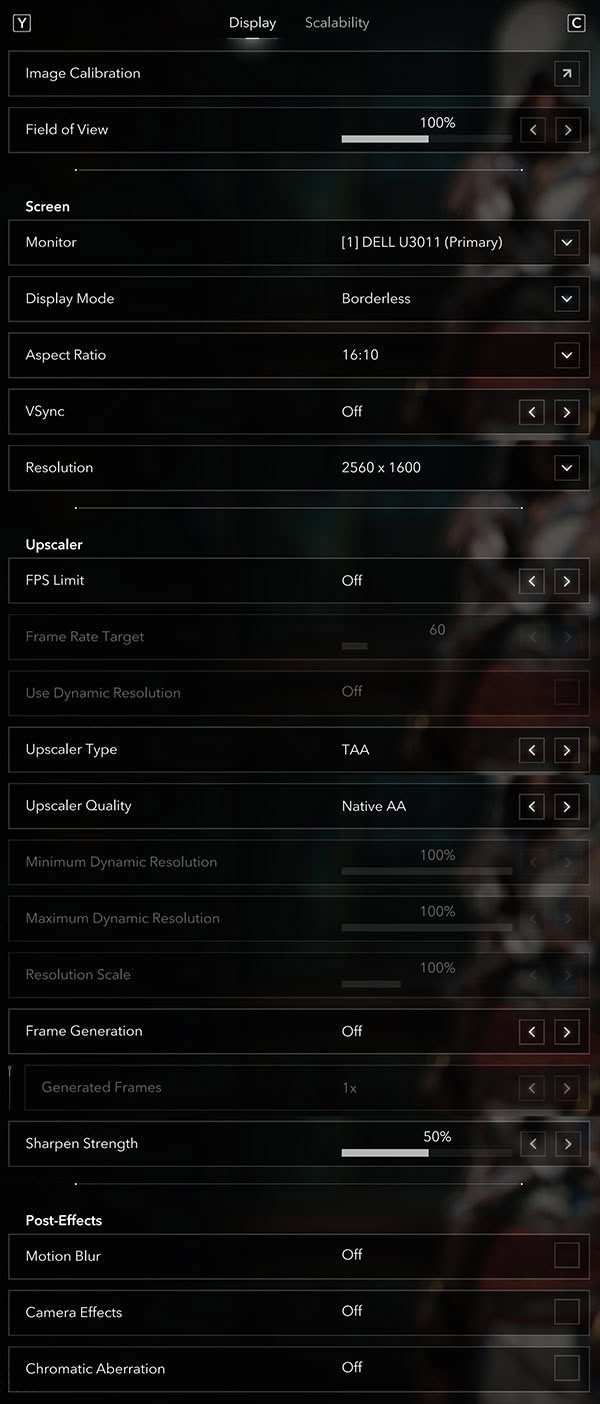
- Display Mode offers "Borderless" and "Windowed"—there is no dedicated exclusive fullscreen mode.
- A Field of View slider is available (default 100%), along with a monitor selector, an Aspect Ratio selector (ultra-wide 21:9 is supported) and an Image Calibration submenu.
- V-Sync can be fully disabled. An optional FPS Limit is available, with a Frame Rate Target adjustable from 20 FPS to 360 FPS.
- Dynamic Resolution is supported, with configurable minimum and maximum resolution scaling. There is also a fixed Resolution Scale—with TAA it can be pushed above 100%, up to 200% for supersampling.
- Upscaler Type options are TAA, NVIDIA DLSS, AMD FSR and Intel XeSS. Upscaler Quality ranges from a Native AA (DLAA-style) mode down through Quality, Balanced and Performance.
- Frame Generation is supported for all three vendors (DLSS, FSR and XeSS). The Generated Frames multiplier goes up to 6x with DLSS Multi Frame Generation and up to 4x with XeSS Multi Frame Generation.
- DLSS preset bug: DLSS Performance correctly uses the latest DLSS 4.5 preset (Preset K), but the DLAA/Native, Quality and Balanced modes fall back to Preset E (DLSS 3). This looks like a bug in the higher-quality modes rather than intended behavior.
- XeSS naming quirk: the in-game "Quality" step is actually XeSS "Ultra Quality," so it lands at the same performance level as FSR Quality—Ubisoft named the XeSS steps as if Intel's XeSS 1.3 renaming had never happened.
- Sharpen Strength is adjustable (default 50%).
- Post-Effects can be toggled individually—Motion Blur, Camera Effects and Chromatic Aberration can all be disabled.
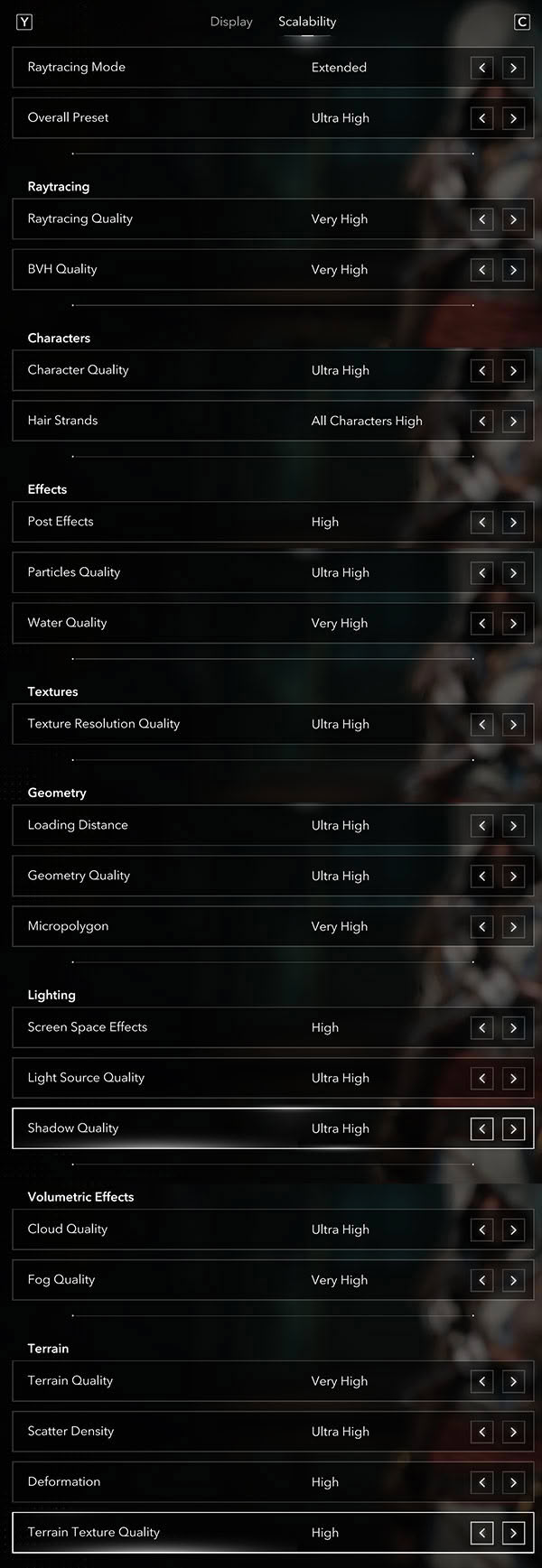
- At the top of the "Scalability" section are ray tracing Mode ("Off," "Standard" or "Extended") and the Overall Preset, which offers ten (!) levels—Ultra High, Very High, High, Medium, Low, Very Low, Ultra Low, plus Handheld High, Handheld Medium and Handheld Low (in this review I'll sometimes just write "Ultra," when I mean the game's "Ultra High").
- RT Mode "Standard" enables ray-traced global illumination (RTGI); "Extended" adds ray-traced reflections on top.
- Every quality setting can also be tuned individually, grouped into ray tracing (ray tracing Quality, BVH Quality), Characters (Character Quality, Hair Strands), Effects (Post Effects, Particles, Water), Textures, Geometry (Loading Distance, Geometry Quality, Micropolygon), Lighting (Screen Space Effects, Light Source Quality, Shadow Quality), Volumetric Effects (Cloud, Fog) and Terrain (Quality, Scatter Density, Deformation, Terrain Texture).
- Ray tracing Quality controls the density and number of rays/bounces, while BVH Quality controls the geometric detail of the Bounding Volume Hierarchy used to accelerate ray tracing—you can't really "see" it in-game, but it affects RT accuracy, performance and memory usage.
- Even at the "Ultra High" preset not everything is maxed out—several settings (ray tracing Quality, BVH Quality, Water, Micropolygon, Fog and Terrain Quality) sit at "Very High," and Post Effects, Screen Space Effects, Deformation and Terrain Texture Quality at "High"—so there is still some headroom above the preset.
Test Devices
We tested the public Steam version of Assassin's Creed Black Flag Resynced.- The Steam Deck LCD was running SteamOS version 3.8.14, build 20260703.1.
- Our ROG Xbox Ally X had Armoury Crate 2.2.10.0 installed along with BIOS 317.
- The ROG Ally X had the latest Armoury Crate version installed at the time of testing (2.2.10.0), along with BIOS 312.
- The MSI Claw 8 AI+ A2VM had MSI Center M 2.0.2605.1501 installed along with BIOS E1T52IMS.112.
- The MSI Claw 8 EX AI+ CG3EM had MSI Center M 2.0.2605.1501 installed along with BIOS E1T52IMS.112.
| Gaming Handhelds Used for Testing | |
|---|---|
| Steam Deck LCD | SteamOS version 3.8.14 build 20260703.1 |
| ASUS ROG Xbox Ally X | Armoury Crate 2.2.10.0 BIOS 317 GPU driver version: 32.0.31019.2002 Windows 11 Home 25H2 VBS disabled |
| ASUS ROG Ally X | Armoury Crate 2.2.10.0 BIOS 312 GPU driver version: 32.0.31007.6002 Windows 11 Home 25H2 VBS disabled |
| Claw 8 AI+ A2VM | MSI Center M 2.0.2605.1501 BIOS E1T52IMS.112 GPU driver version: 32.0.101.8861 Windows 11 Home 25H2 VBS disabled |
| Claw 8 AI+ EX CG3EM | MSI Center M 2.0.2605.1501 BIOS E1T52IMS.112 GPU driver version: 32.0.101.8861 Windows 11 Home 25H2 VBS disabled |
Nov 14th, 2026 00:22 CST
change timezone
Latest GPU Drivers
New Forum Posts
- Requesting original VBIOS for Gigabyte RX 5700 XT GAMING OC 8G Rev 2.0 (Micron) (1)
- Tell me about your favourite graphics card (35)
- What are you playing? (26216)
- no "PhysX" workable (9)
- AI generated images... (224)
- Crimson Desert (31)
- RenoDX HDR - how to view the differnce Before&After in game? (0)
- Displayport DP80 3M (10ft) cable that can achieve 80gbps stable? (5)
- I'll flash a ASUS ROG Strix RX480 O8G in Cause of Code 43, as a Newbie (1)
- Opinion on Monitor Replacement (6)
Popular Reviews
- AMD Zen 6 Technical Deep Dive
- Corsair HX1000i Shift Crystal Review
- NZXT C1200 Platinum Review
- Upcoming Hardware Launches 2027 (Updated Nov 2026)
- ASUS ROG Strix B850-I Gaming Wi-Fi7 W Review
- Montech King 95 3D PRO Review
- NZXT H7 RGB+ Review
- NZXT H5 Review
- Phantom Blade Zero Performance Benchmark Review - 35 GPUs Tested
- XPG NIMBUS PLUS Review - Mid-range Chair With Strong Competitors
TPU on YouTube
Controversial News Posts
- NVIDIA Co-Founder and CEO Jensen Huang Officially Resigns (380)
- OpenAI CEO Argues Home PCs Waste the World's Limited DRAM Supply (152)
- NVIDIA Launches Investigation Into Jensen Huang's Relationship With Suspected Chinese Spy (136)
- Intel "Raptor Lake Next" 16-Core and 20-Core CPUs Surface (130)
- Legendary Game Studio BioWare Shuts Down Following EA Layoffs (104)
- Dell CEO Says the Memory Shortage Will Get Worse in 2027 (95)
- NVIDIA GeForce RTX 50-Series Scheduled for up to $500 Price Hike This Week (89)
- Modder Fits RTX 5090 With Four 8-Pin Connectors, Halving Current per Wire (80)