 24
ASUS ROG Crosshair X870E Apex Review
Performance »SSD Temperatures
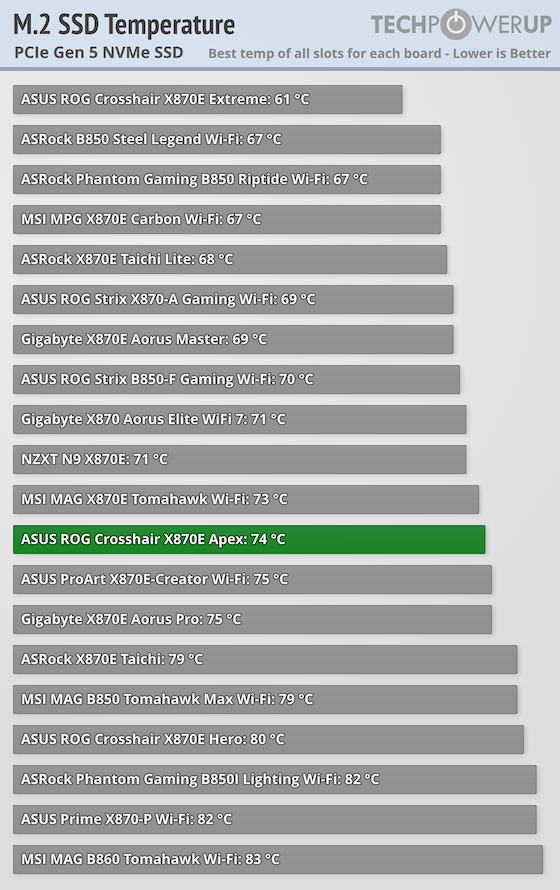
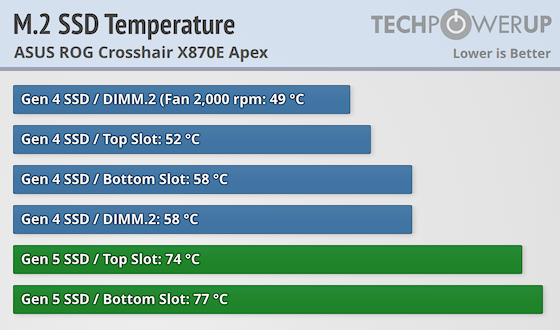
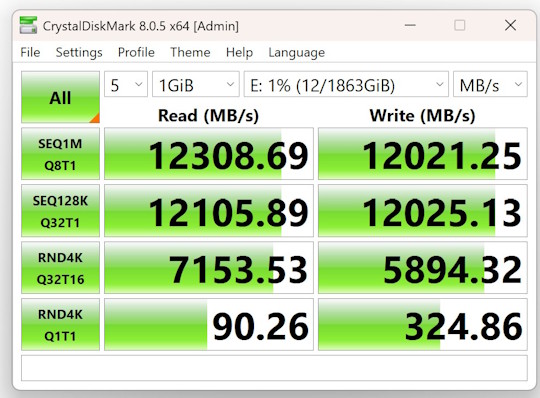
We have three M.2 heatsink locations to talk through here and starting with PCIe Gen 4, the best temperatures were achieved in the DIMM.2 module with the memory fan installed. We set the fan speed to the highest setting that resulted in no additional noticeable noise over the rest of our quiet system, this meant 2000 RPM. This saw an SSD temperature of 49°C, which is the joint best PCIE Gen 4 result. Without the fan the temperature was 58°C in the DIMM.2 module, the same as the lower heatsink, with the top heatsink offering a still decent 52°C.We've certainly seen better PCIe Gen 5 temperatures, but if you do use a Gen 5 drive, the top slot is where you'll want to have the SSD, with the lower one sitting a few degrees above it. These are worst case scenarios and neither slot resulted in throttling, although there was less headroom than many other boards we've tested.
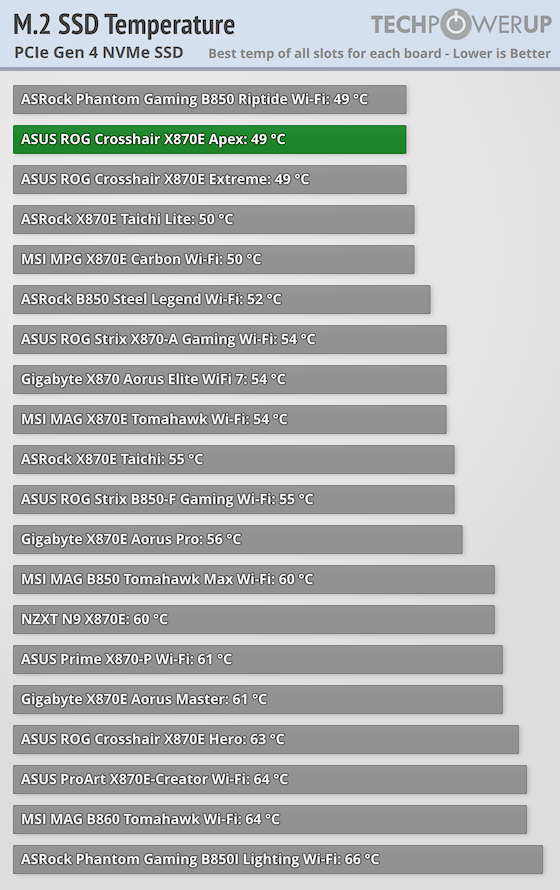
PCIe Gen 4 Performance (Samsung 990 Pro)
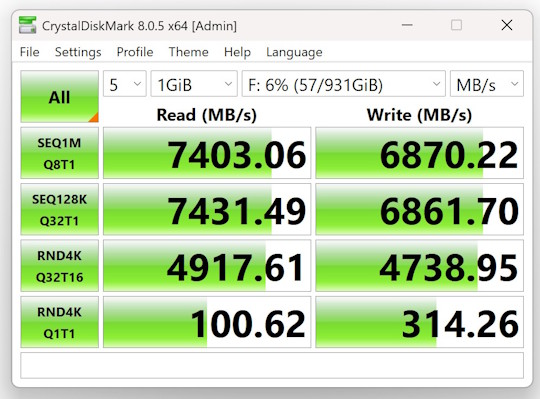
PCIe Gen 5 Performance (Team Group T-Force Z540)
Nov 24th, 2026 04:32 CST
change timezone
Latest GPU Drivers
New Forum Posts
- AI generated images... (234)
- Without Jensen, PC gaming will be (58)
- Your PC ATM (36483)
- Strange case of Mini itx build with normal gpu, and atx psu (Build Log) (21)
- AMD ULL settings tinkering thread - post settings and Zen pics (87)
- Gacha Games - Discussions, Pulls, Updates, etc. (1163)
- The time has come to upgrade...my desktop (2)
- GTA VI (28)
- Which ryzen am5 cpu ? (198)
- SATA drive 1.4 GBps with Intel X25-E on Windows 98! (42)
Popular Reviews
- Microsoft Surface Laptop Ultra Review - The Next-gen Arm Laptop
- ASRock X870E Challenger Wi-Fi White Review
- Upcoming Hardware Launches 2027 (Updated Nov 2026)
- Corsair RM1200e (Second Generation) Review
- AMD Ryzen 7 9800X3D Review - The Best Gaming Processor
- AMD Zen 6 Technical Deep Dive
- AMD Ryzen 7 7700X3D Review
- Pulsar Office Tour & First Look at P1 Dual-Sensor Mouse
- Ugreen NASync DXP4800 GT Review
- Phantom Blade Zero Performance Benchmark Review - 35 GPUs Tested
TPU on YouTube
Controversial News Posts
- NVIDIA Co-Founder and CEO Jensen Huang Officially Resigns (492)
- Jensen Huang Reinstated as CEO of NVIDIA (419)
- Report: Jensen Huang Eyes NVIDIA Comeback (280)
- Open Letter Asking NVIDIA to Reinstate Jensen Huang Passes 115,000 Signatures (184)
- OpenAI CEO Argues Home PCs Waste the World's Limited DRAM Supply (152)
- NVIDIA Launches Investigation Into Jensen Huang's Relationship With Suspected Chinese Spy (136)
- Intel "Raptor Lake Next" 16-Core and 20-Core CPUs Surface (130)
- NVIDIA GeForce RTX 50-Series Scheduled for up to $500 Price Hike This Week (89)