 8
ASUS ROG Keris II Origin Review
Value & Conclusion »Software
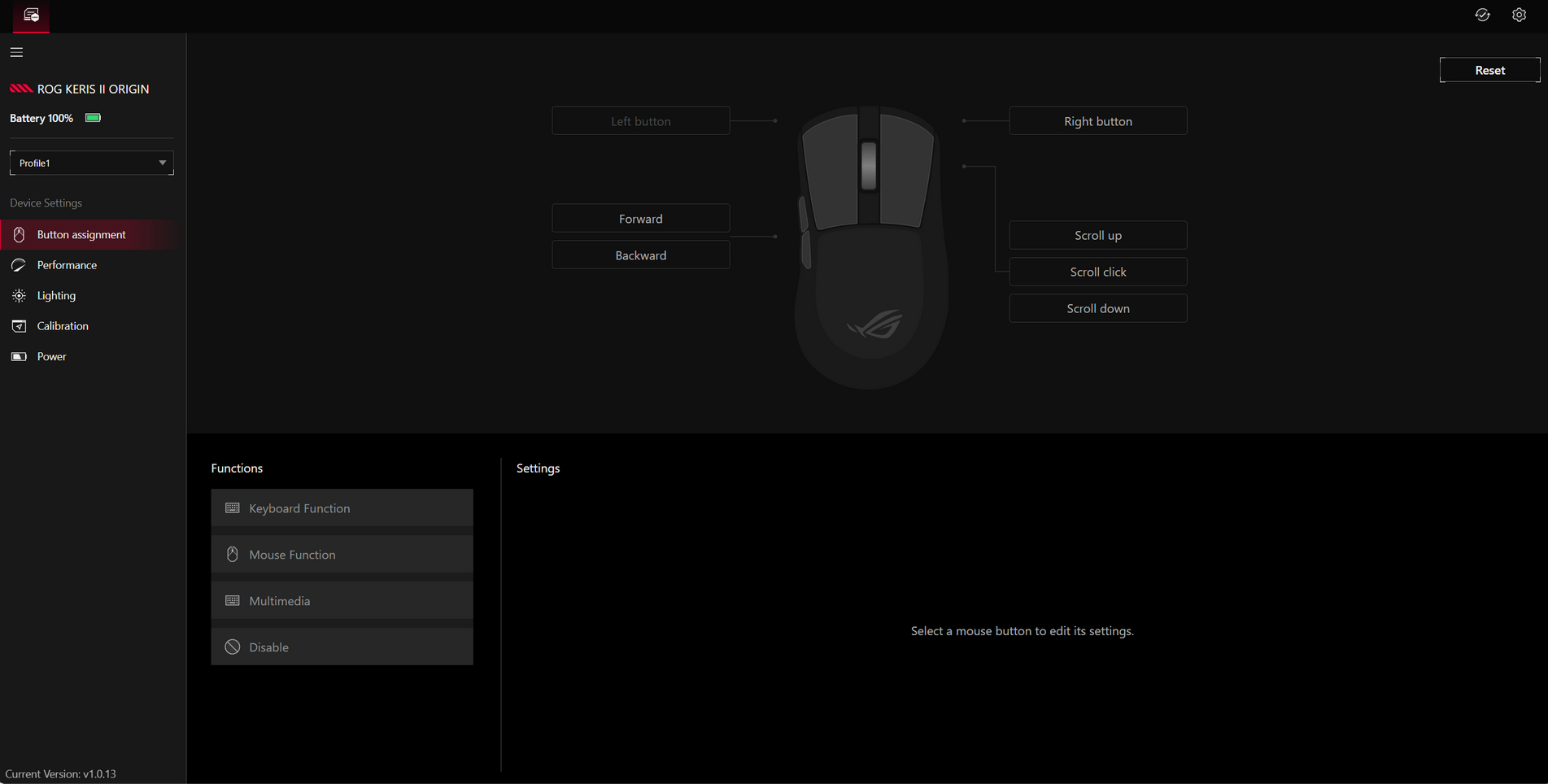
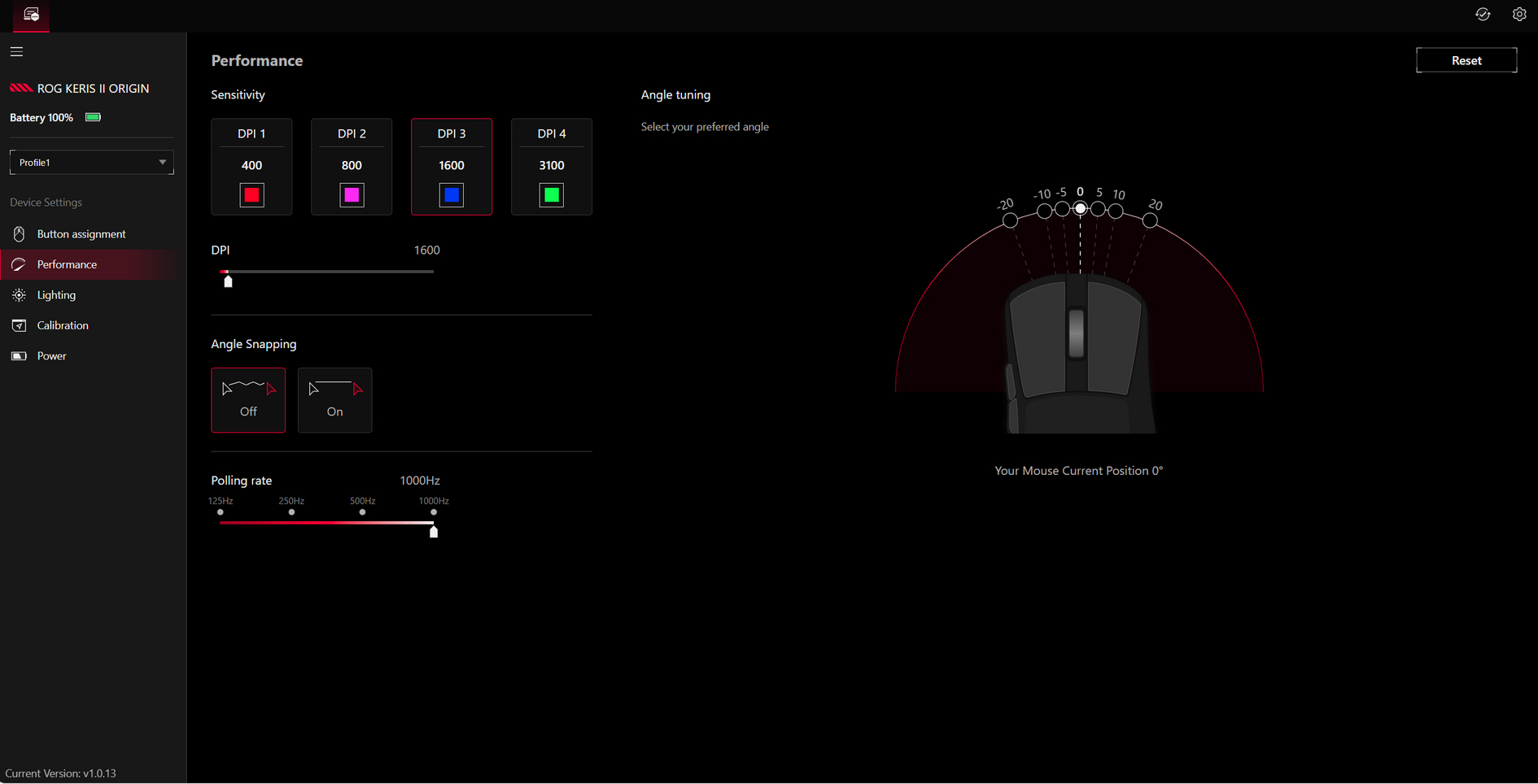


While the Keris II Origin is still supported by Armoury Crate, an alternative avenue for configuration is provided by ASUS in the form of GearLink. Much like other web drivers, this one connects through WebHID and therefore will—at least as of now—only work on Chromium-based browsers such as Chrome, Edge, and Opera (desktop). In terms of functionality, GearLink is roughly on par with Armoury Crate, though some teething issues are present still. Most notable is the CPI adjustment slider, which does not permit manual input, and arbitrarily limits adjustment to increments of 150, starting from 100. As such, setting certain common values, such as 500, is impossible, despite being supported natively by the sensor. In addition, the low/high-selection for lift-off distance appears to be broken, as both settings result in the same (low) lift-off distance.
All available settings are distributed across several tabs. The first page houses button remapping options, allowing one to rebind all but the left button to mouse, keyboard, multimedia, or macro functions. The second page includes options for CPI adjustment (100–42,000 CPI, increments of 150 starting with 100, four steps), polling rate (125, 250, 500, or 1000 Hz), and angle snapping (on/off). CPI adjustment is done exclusively through a slider. Furthermore, angle adjustment is possible, ranging from -30 to +30 degrees. The third page has lighting options and is detailed below. The fourth page houses LOD adjustment options. Several pre-calibrated surfaces are available to choose from, which then can be fine-tuned manually by adjusting the high/low-selection. Performing a manual calibration may lower LOD beyond the default. The fifth page gives access to several power-saving settings. One can set the minimum battery level at which a low battery warning is displayed, and define after how many minutes the mouse enters power-saving mode, which disables all illumination. Lastly, profile management and a macro editor are available as well.
All setting changes are saved live to the on-board memory, and the web driver is able to connect to both dongle and mouse.
Lighting
The Keris II Origin has three zones for RGB lighting: the scroll wheel, logo at the back, and lines on the left side. A total of five pre-defined lighting effects are available: Static, Pulsating, Color Cycle, Reactive, and Partition, along with the option to display battery status. Color and brightness can be adjusted on most effects. By reducing brightness to zero, the lighting may be disabled altogether.Color accuracy and vibrancy are very good throughout. Here's a short demonstration video of the Color Cycle and Pulsating lighting effects:
Battery Life
Without illumination, ASUS cites up to 192 hours of battery life using Bluetooth and up to 127 hours using 2.4 GHz at 1000 Hz. With illumination, up to 91 hours are cited using Bluetooth and up to 82 hours using 2.4 GHz at 1000 Hz. The software includes a percentage-based battery charge indicator with single-digit precision, which is reliable and accurate. For every hour of continuous usage with illumination enabled at default brightness (50%) at 1000 Hz, the indicator went down by 1%. As such, assuming linear consumption, the 82 hours cited by ASUS indeed appear to be the bare minimum of expected battery life.Sleep mode is entered after three minutes of inactivity by default, but can be adjusted within the software.
Using the included USB Type-A to Type-C charging cable, I measured the charging speed, which sits at 0.219 A when lifted and 0.204 A when not lifted. The battery has a capacity of 370 mAh (3.7 V) and utilizes a 3-pin JST connector.
Nov 26th, 2026 21:41 CST
change timezone
Latest GPU Drivers
New Forum Posts
- Dell Dimension E510 Retro Gaming PC Upgrade & Modification (3)
- X79 and/or rampage IV OC'ing thread for those of us still left.... (2460)
- What's your main Black Friday / Cyber Monday purchase? (24)
- Gacha Games - Discussions, Pulls, Updates, etc. (1166)
- Wireless Internet sharing between PC and router both-ways, is it possible? (27)
- WarpCoreBench scores! (116)
- Can you guess Which game it is? (371)
- ASUS Prime 5060 ti 16gb x4 instead of x8 PCIe (12)
- Kerbal Space Program Retooled (0)
- Exploring Local LLMs: Models, Hardware and Setup Experiences (6)
Popular Reviews
- VZMORE AX9 Max Review
- Upcoming Hardware Launches 2027 (Updated Nov 2026)
- ASRock X870E Challenger Wi-Fi White Review
- AMD Ryzen 7 9800X3D Review - The Best Gaming Processor
- Microsoft Surface Laptop Ultra Review - The Next-gen Arm Laptop
- AMD Zen 6 Technical Deep Dive
- Montech CyberFlow ARGB 360 Review
- Phantom Blade Zero Performance Benchmark Review - 35 GPUs Tested
- Corsair RM1200e (Second Generation) Review
- Pulsar Office Tour & First Look at P1 Dual-Sensor Mouse
TPU on YouTube
Controversial News Posts
- Jensen Huang Reinstated as CEO of NVIDIA (613)
- NVIDIA Co-Founder and CEO Jensen Huang Officially Resigns (492)
- Report: Jensen Huang Eyes NVIDIA Comeback (281)
- Open Letter Asking NVIDIA to Reinstate Jensen Huang Passes 115,000 Signatures (184)
- OpenAI CEO Argues Home PCs Waste the World's Limited DRAM Supply (152)
- NVIDIA Launches Investigation Into Jensen Huang's Relationship With Suspected Chinese Spy (136)
- Intel Razor Lake Gets a 12 P-Core bLLC Chip With No E-Cores, Per Leak (94)
- NVIDIA GeForce RTX 50-Series Scheduled for up to $500 Price Hike This Week (89)