 14
ASUS ROG Strix X870E-E Gaming Wi-Fi7 Neo Review
Performance »SSD Temperatures
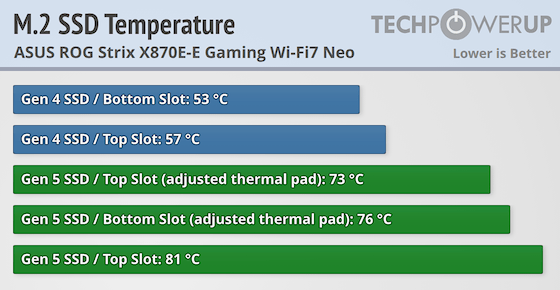
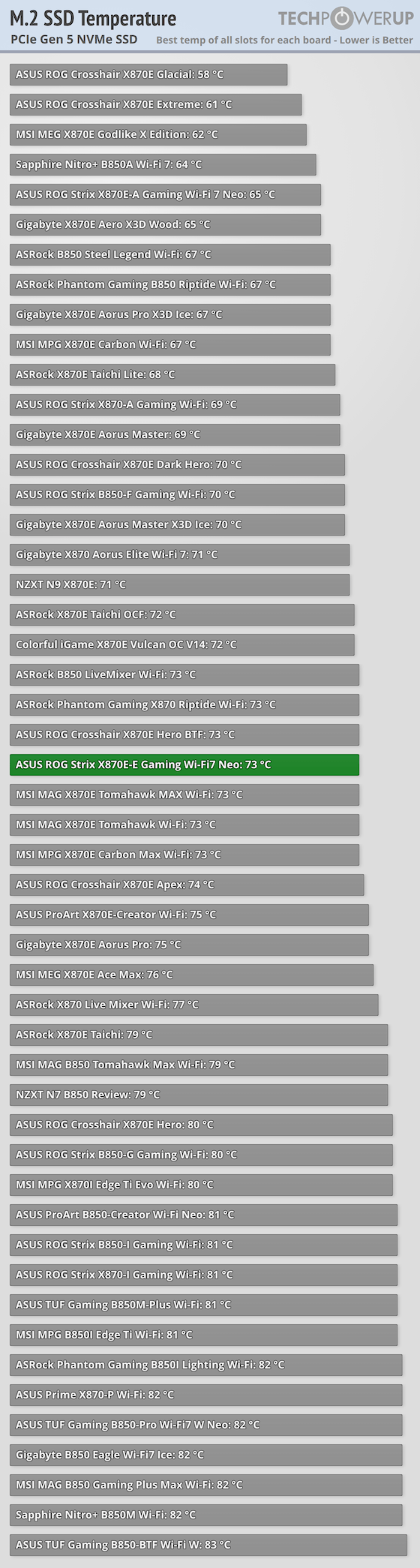
SSD cooling performance was good, but with some caveats. Using a single-sided SSD requires the use of included rubber supports to ensure the SSD doesn't bow under pressure and makes good contact with the heatsink above. These do make a noticeable difference to temperatures. Double-sided SSDs have their undersides cooled in two of the five M.2 ports, both of which are PCIe Gen 5-capable. However, you'll need to pay careful attention to the location of the included lower thermal pads. These didn't line up with the underside components on our PCIe Gen 5 SSD and as a result the peak temperature in both slots topped 80°C and saw our SSD throttle.Thankfully adjusting the pads to your SSD is simple and made a massive difference, seeing that peak temperature fall to just 73°C in the top slot and 76°C in the lower slot. This was with little to no airflow over the M.2 heatsinks in our worst case scenario. Many newer PCIe Gen 5 SSDs are single-sided, so won't likely suffer this problem. Our PCIe Gen 4 SSD was kept plenty cool enough, even though we've seen lower temperatures. The bottom slot proved better here, but given the lower heatsink is blocked by your graphics card, the priority in both case should be the top M.2 port, which is always accessible.
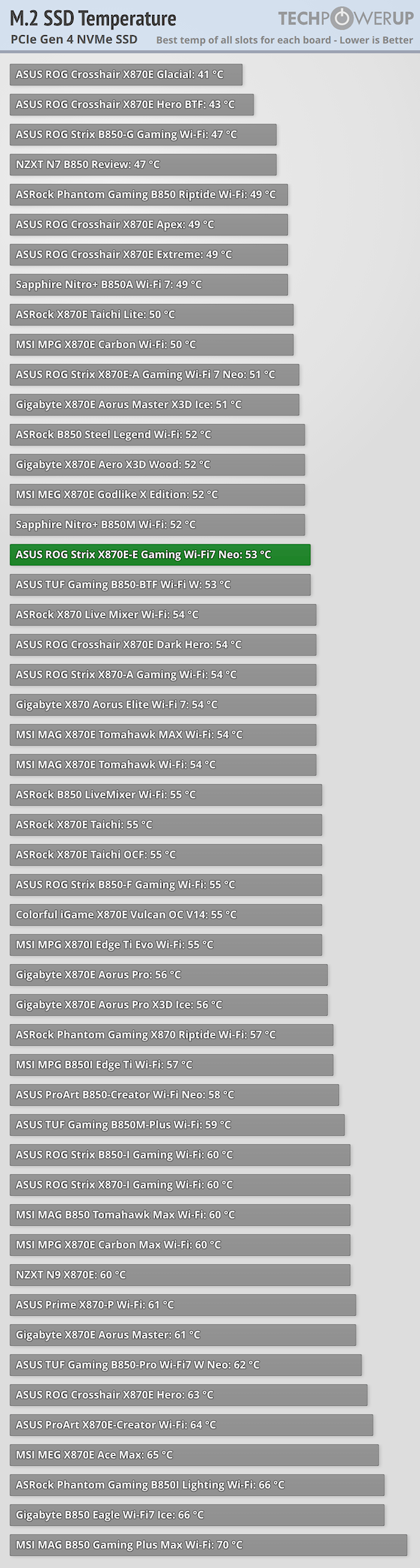
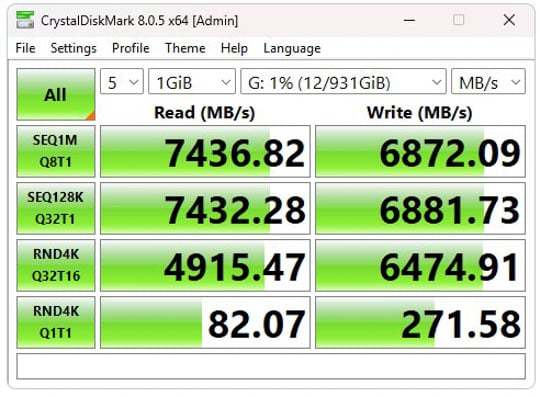
PCIe Gen 4 Performance (Samsung 990 Pro)
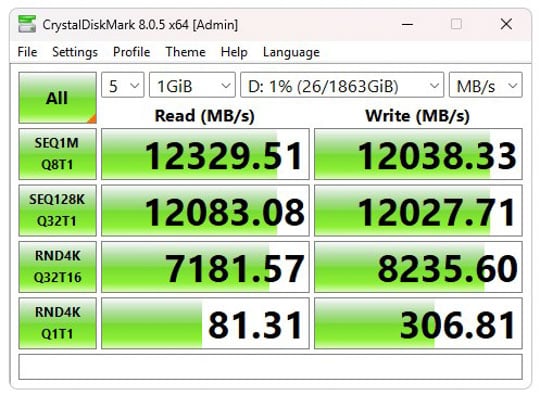
PCIe Gen 5 Performance (Team Group T-Force Z540)
Nov 26th, 2026 15:20 CST
change timezone
Latest GPU Drivers
New Forum Posts
- TPU's WCG/BOINC Team (34811)
- weird problem with Asus Maximus Hero z890 motherboard VRM (0)
- Wireless Internet sharing between PC and router both-ways, is it possible? (25)
- ASUS Prime 5060 ti 16gb x4 instead of x8 PCIe (10)
- Windows 10 Power save mode. See what program that cause sleep to fail. (1)
- Mouse Pad advice - Shidenkai out of production? (1)
- Can you guess Which game it is? (370)
- WarpCoreBench scores! (110)
- TechPowerUp Screenshot Thread (MASSIVE 56K WARNING) (4388)
- UPS what one to get? (75)
Popular Reviews
- ASRock X870E Challenger Wi-Fi White Review
- VZMORE AX9 Max Review
- Upcoming Hardware Launches 2027 (Updated Nov 2026)
- Microsoft Surface Laptop Ultra Review - The Next-gen Arm Laptop
- AMD Ryzen 7 9800X3D Review - The Best Gaming Processor
- AMD Zen 6 Technical Deep Dive
- Phantom Blade Zero Performance Benchmark Review - 35 GPUs Tested
- Corsair RM1200e (Second Generation) Review
- Montech CyberFlow ARGB 360 Review
- Pulsar Office Tour & First Look at P1 Dual-Sensor Mouse
TPU on YouTube
Controversial News Posts
- Jensen Huang Reinstated as CEO of NVIDIA (603)
- NVIDIA Co-Founder and CEO Jensen Huang Officially Resigns (492)
- Report: Jensen Huang Eyes NVIDIA Comeback (281)
- Open Letter Asking NVIDIA to Reinstate Jensen Huang Passes 115,000 Signatures (184)
- OpenAI CEO Argues Home PCs Waste the World's Limited DRAM Supply (152)
- NVIDIA Launches Investigation Into Jensen Huang's Relationship With Suspected Chinese Spy (136)
- Intel Razor Lake Gets a 12 P-Core bLLC Chip With No E-Cores, Per Leak (94)
- NVIDIA GeForce RTX 50-Series Scheduled for up to $500 Price Hike This Week (89)