 47
ASUS ROG Swift OLED PG27UCDM Review - 4K OLED Brilliance
Value & Conclusion »Gaming Performance
The ASUS ROG Swift OLED PG27UCDM features a 240 Hz, fourth-generation QD-OLED panel. It carries both the AMD FreeSync Premium Pro and NVIDIA G-SYNC Compatible badges, meaning adaptive synchronization is supported on all modern GPUs.ASUS has implemented OLED Anti-Flicker, a feature designed to reduce VRR-induced flicker—a common OLED issue where rapid refresh rate fluctuations (especially in darker scenes or demanding games) can cause visible flickering. OLED Anti-Flicker offers three settings: Off, Middle, and High. In practice, it works by locking the refresh rate to fixed steps (60, 100, 120, or 240 Hz), thereby eliminating fluctuation—but also disabling adaptive sync in the process. Because of that, it's better to simply cap your framerate or tune your settings for stable performance, rather than rely on this feature.
Also available in the OSD is ELMB (Extreme Low Motion Blur)—ASUS's version of black frame insertion (BFI), designed to reduce motion blur by briefly turning the screen black between frames (invisible to the naked eye). While effective in principle, ELMB comes with heavy limitations: it only works at 120 Hz, requires VRR to be disabled, disables HDR, and locks out brightness adjustment. Considering OLED panels already offer exceptional motion clarity and fast pixel response times, it's hard to justify using ELMB over simply enjoying the benefits of 240 Hz refresh rate and VRR.
Response Time and Overdrive
I tested the response time with the Open Source Response Time Tool Pro (OSRTT Pro), developed by Andrew McDonald of TechTeamGB. It's a nifty tool that, combined with the OSRTT Launcher app, measures panel response times and presents them through detailed graphs and easy-to-read heatmaps. You can find everything you might want to know about the OSRTT in its technical documentation and on the official website, where you can order your unit, too. The OSRTT Launcher gives us three interesting heat maps to observe.Perceived Response Time tells us how much time the panel took to transition from one color to another. This measurement is expressed in milliseconds and includes overshoot. In other words, if the panel exceeded the target value, the perceived response time also includes the time it took for the transition to recover from overshoot and stabilize on the target value. I'm running my tests with recommended settings, so with a fixed RGB 5 tolerance level and with gamma-corrected RGB values.
RGB Overshoot tells us how much a specific transition missed the target value. For example, if the panel was transitioning from RGB 51 to RGB 204, and it initially landed on RGB 212, the overshoot RGB value is 8. Overshoot can be both positive and negative, and it commonly occurs at extreme overdrive settings when pixels are driven by high voltage. In practice, an overshoot manifests as an afterimage or a halo around a moving object. It can be easily spotted even when doing something as basic as scrolling through a webpage.
Visual Response Rating is the most abstract heatmap generated by the OSRTT Launcher; in essence, it's an ever-evolving scoring system. To quote OSRTT's technical documentation, it is a finite score rather than a direct measurement. The calculation is pretty simple; it's: "100 – (Initial Response Time + Perceived Response Time)". Since both metrics use the same tolerance level, if a display doesn't overshoot, both times will be identical. This essentially rewards displays that are fast with a small amount of overshoot over displays that aren't as fast even if they don't overshoot at all – while still overall preferring ultra-fast, accurate monitors.
Here's how the ASUS ROG Swift OLED PG27UCDM fares in the pixel response time test.

The response time analysis of the ASUS ROG Swift OLED PG27UCDM confirms what we expect from a high-refresh QD-OLED: essentially instantaneous pixel transitions with no visible overshoot. The measured average initial response time is just 0.93 ms, with a complete transition time of 1.64 ms and an average perceived time of 1.18 ms, ensuring that the panel easily keeps up with its 240 Hz refresh rate. In fact, 93% of transitions fall comfortably within the 4.17 ms refresh window, which means motion clarity remains excellent even in the most demanding gaming scenarios. Rise and fall times are well-balanced at 1.31 ms and 1.04 ms, respectively, with no problematic asymmetry that could introduce smearing. Overshoot is a non-issue here, ensuring that no distracting inverse ghosting artifacts appear in fast-moving content. These results highlight why OLED is the current gold standard for gaming: transitions are so fast and consistent that motion clarity is effectively limited only by refresh rate and frame persistence, not pixel response speed.
Input Lag
To measure the input lag of a monitor, I switched from using the LDAT V2 (Latency Display Analysis Tool), which I've covered extensively in my NVIDIA Reflex review, to the OSRTT Pro Tool. The OSRTT Pro Tool and the accompanying software include a DirectX code developed by Andrew McDonald of TechTeamGB, which allows the OSRTT Launcher to track the events and capture the frame time, making it possible to isolate the monitor latency from other factors that come into play when using the click-to-photon testing methodology, namely the USB polling rate and game render time. For a deeper insight, I suggest you watch an excellent overview video made by Andy himself.Here's how the ASUS ROG Swift OLED PG27UCDM holds up in terms of input lag after doing 100 iterations of the input lag test.
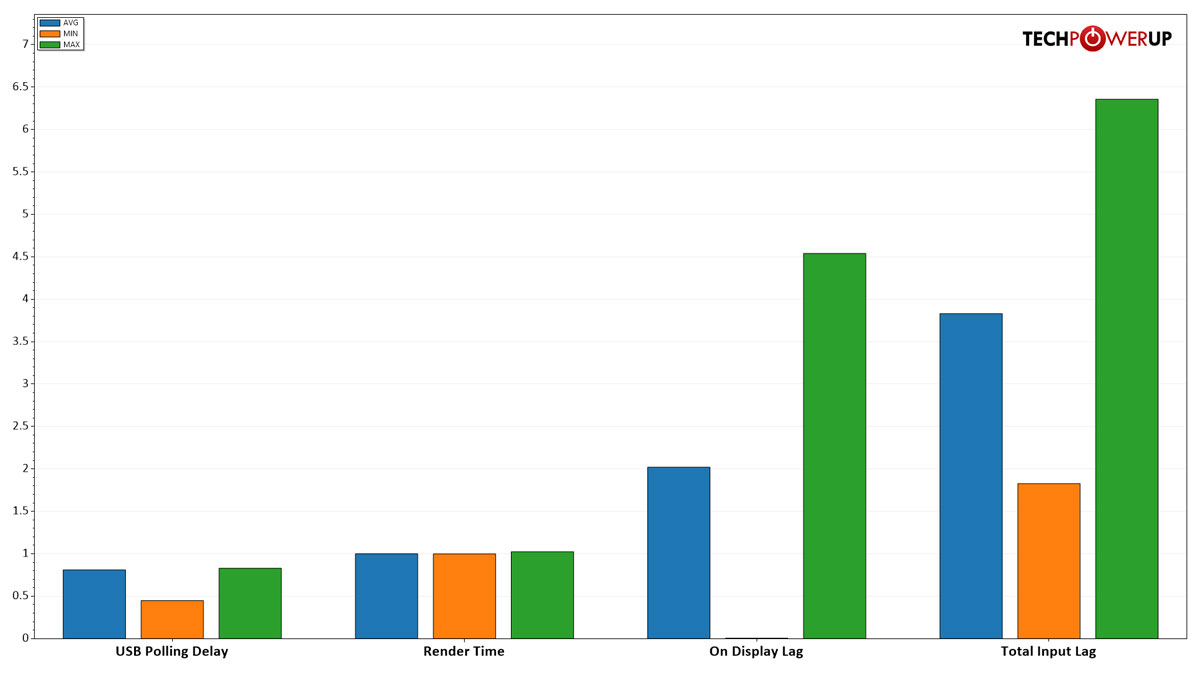
The on-display lag of the ASUS ROG Swift OLED PG27UCDM measures just about 2 ms on average, with a worst case slightly above 4.5 ms, which is an excellent result. This means the panel itself adds virtually no perceptible delay, making it well suited for competitive gaming where instantaneous visual feedback is critical.
Nov 17th, 2026 18:51 CST
change timezone
Latest GPU Drivers
New Forum Posts
- Honestly, do you care about GTA VI? (134)
- [testers wanted] Qsurfer My own QNAP Nas explorer/Search tool (7)
- Local LLM General Discussion (693)
- ProArt X870E-CREATOR WIFI - Bifurcation~Complication (14)
- Asus ProArt P14 (RTX Spark) linux so far (4)
- Without Jensen, PC gaming will be (34)
- 9070 GRE 3.9ghz validation reached. (18)
- Help with fixing Overclock (7)
- [Poll] 12V-2x6 Connector Protection: What Are You Using? (WireView / Ampinel / Equalizer / Other / Nothing) (27)
- What is the latest game you finished or 100% (204)
Popular Reviews
- Acemagic Retro X3 Review
- Upcoming Hardware Launches 2027 (Updated Nov 2026)
- AMD Zen 6 Technical Deep Dive
- ASUS ROG Strix B850-I Gaming Wi-Fi7 W Review
- Corsair HX1000i Shift Crystal Review
- Chieftec Iceberg PRO 360 DARK Review
- AMD Ryzen 7 9800X3D Review - The Best Gaming Processor
- Phantom Blade Zero Performance Benchmark Review - 35 GPUs Tested
- Montech King 95 3D PRO Review
- NZXT C1200 Platinum Review
TPU on YouTube
Controversial News Posts
- NVIDIA Co-Founder and CEO Jensen Huang Officially Resigns (460)
- Open Letter Asking NVIDIA to Reinstate Jensen Huang Passes 115,000 Signatures (184)
- OpenAI CEO Argues Home PCs Waste the World's Limited DRAM Supply (152)
- Report: Jensen Huang Eyes NVIDIA Comeback (137)
- NVIDIA Launches Investigation Into Jensen Huang's Relationship With Suspected Chinese Spy (136)
- Intel "Raptor Lake Next" 16-Core and 20-Core CPUs Surface (130)
- Legendary Game Studio BioWare Shuts Down Following EA Layoffs (104)
- Dell CEO Says the Memory Shortage Will Get Worse in 2027 (95)