 3
AVerMedia Live Gamer Ultra S (GC553Pro) Review
Value & Conclusion »Performance
I've tested the AVerMedia Live Gamer Ultra S across various supported capture and passthrough resolutions and frame rates to get a solid understanding of how it performs. For a comprehensive list of every possible combination of supported video formats, both in SDR and HDR, please refer to the tables on AVerMedia's support page.There are a few important things to note. First and foremost, although the Live Gamer Ultra S promises uncompressed RGB24 capture, this is only possible at 1440p30, 1080p60 and 1080p30—and only within Windows. The same restriction applies to HDR capture. Ultrawide capture is supported at 3440x1440 at 60 FPS, but you're limited to the MJPEG video format. For 2560x1080—another ultrawide resolution—60 FPS capture is supported using higher-quality formats, namely NV12 and YUY2. MJPEG is also the only available format for 144/120 FPS capture at 1440p, as well as for 240 FPS capture at 1080p.
There are some passthrough limitations to keep in mind, too. For 3440x1440 60 FPS ultrawide capture, passthrough options are 3440x1440 at 100 or 60 Hz. For 2560x1080 60 FPS capture, passthrough options include 3440x1440 at 60 and 100 Hz, as well as 2560x1080 at 60, 120, and 144 Hz. It's also worth noting that the resolutions and refresh rates listed on AVerMedia's support page are the only selectable options. For example, if you're using a 180 Hz Full HD monitor, you won't be able to passthrough 1080p 180 Hz—even though the card technically supports up to 1080p 240 Hz. The highest you can go in that case is the next lower supported passthrough option: 1080p 144 Hz.
That said, the Live Gamer Ultra S performed flawlessly in every test scenario I tried. To demonstrate its recording performance, I captured a segment of gameplay from my PC at 1080p60 using the RGB24 color format. While YouTube inevitably compresses uploaded footage, the video still serves as a relevant demonstration of AVerMedia's real-world capture performance, especially since content recorded with this device will often end up there anyway.
I've also checked if the capture card introduces significant input lag by measuring it with the PC directly connected to the monitor through HDMI, and then comparing it to when the monitor is receiving the video signal from the capture card via HDMI passthrough. Here are the results.
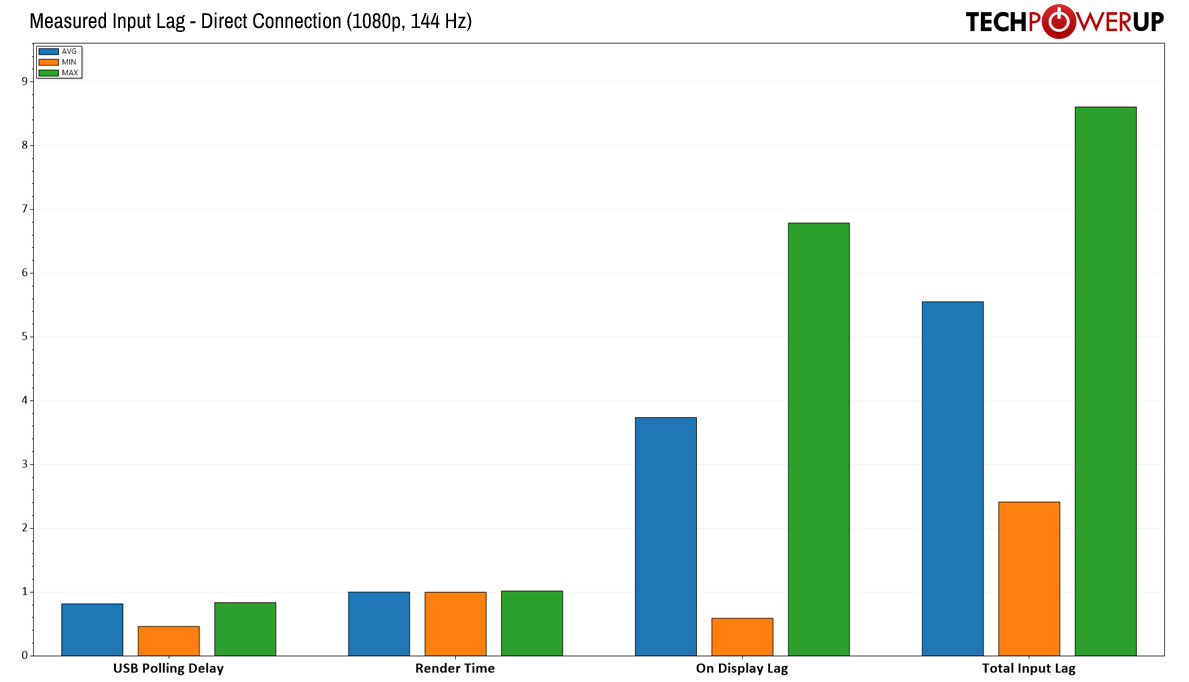
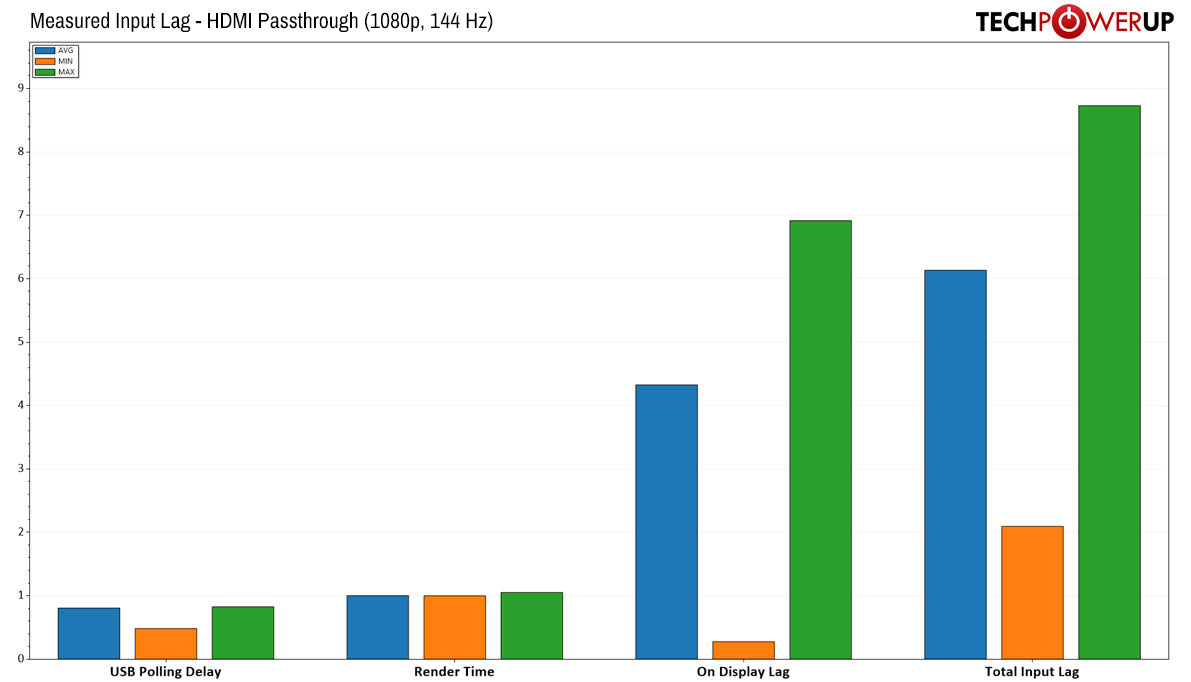
The average on-display lag jumped from 3.8 ms to 4.4 ms, which is within acceptable limits. There's virtually no chance most users will ever notice such a marginal difference.
Nov 26th, 2026 02:36 CST
change timezone
Latest GPU Drivers
New Forum Posts
- DTS DCH Driver for Realtek HDA [DTS:X APO4 + DTS Interactive] (2820)
- What's your main Black Friday / Cyber Monday purchase? (12)
- Claude credits purchased on or after Dec. 7 now have an expiry date (18)
- AI generated images... (239)
- TPU's Nostalgic Hardware Club (22209)
- Can you guess Which game it is? (365)
- Strange PC issues with Z690 setup (5)
- RTX 5080 problems, random troubleshooting "log" (8)
- Slow boot, can't launch monitoring software, general lag (38)
- Linpack Xtreme Released (512)
Popular Reviews
- ASRock X870E Challenger Wi-Fi White Review
- VZMORE AX9 Max Review
- Upcoming Hardware Launches 2027 (Updated Nov 2026)
- Microsoft Surface Laptop Ultra Review - The Next-gen Arm Laptop
- AMD Ryzen 7 9800X3D Review - The Best Gaming Processor
- AMD Zen 6 Technical Deep Dive
- Corsair RM1200e (Second Generation) Review
- Phantom Blade Zero Performance Benchmark Review - 35 GPUs Tested
- Pulsar Office Tour & First Look at P1 Dual-Sensor Mouse
- Ocypus lota P1000 Review
TPU on YouTube
Controversial News Posts
- Jensen Huang Reinstated as CEO of NVIDIA (574)
- NVIDIA Co-Founder and CEO Jensen Huang Officially Resigns (492)
- Report: Jensen Huang Eyes NVIDIA Comeback (281)
- Open Letter Asking NVIDIA to Reinstate Jensen Huang Passes 115,000 Signatures (184)
- OpenAI CEO Argues Home PCs Waste the World's Limited DRAM Supply (152)
- NVIDIA Launches Investigation Into Jensen Huang's Relationship With Suspected Chinese Spy (136)
- Intel "Raptor Lake Next" 16-Core and 20-Core CPUs Surface (130)
- Intel Razor Lake Gets a 12 P-Core bLLC Chip With No E-Cores, Per Leak (94)