 32
BIOSTAR X670E VALKYRIE Review
(32 Comments) »Introduction

The highly anticipated AMD Ryzen 7000 series is finally in public hands! Intel's release of the 12th Gen Core processors in late fall of 2021 had the privilege of being the first consumer product to offer both PCIe Gen 5.0 and DDR5 connectivity. Along with these additions was a new smaller "e" core, designed to offload smaller system tasks onto, while the bigger "p" cores dealt with priority heavy duty tasks.
AMD wasn't going to wait around forever, but also understood the newest technologies can come with unforeseen problems. Did AMD do the right thing by waiting until DDR5 and PCIe Gen5 matured over this past year, or was it a mistake to let Intel be left without a cutting edge contender? The answer depends on what AMD brings to the table in terms of performance, cost and availability. With that, make sure to read TechPowerUp's AMD Ryzen 7600X, 7700X, 7900X and 7950X reviews, for more in depth coverage.
With the new Ryzen processor series, comes a number of changes that may upset some long time AMD fans, shaking up the market. The first noteworthy change is the socket. All previous desktop Ryzen processors (1000, 2000, 3000, 5000 series, minus Threadripper) used the AM4 PGA (Pin Grid Array) socket. AMD has made the transition to LGA (Land Grid Array) for this new AM5 (LGA 1718) socket. AMD has historically proven it uses the same CPU socket for multiple generations, starting a fresh cycle with the Ryzen 7000 series and beyond. What this means for consumers is that there is no further Zen 4 upgrade path for AM4 based platforms. If you want these new processors, they require a brand new motherboard. The platform change also requires new memory too, since the AM5 socket exclusively uses DDR5 for its system memory, unlike Intel's 12th and 13th Gen, which support both DDR4 and DDR5.
This new AM5 socket carries a host of options for connecting high speed devices that just weren't previously available to AMD customers. As mentioned above, going forward, AMD Ryzen CPUs on this new platform will now support DDR5 memory, PCIe Gen 5.0 and M.2 Gen 5. With 24 PCIe Gen 5.0 lanes from the CPU available, motherboard manufacturers now have an opportunity to innovate and create products catered towards users with high bandwidth needs. Along with more PCIe lanes provided by the processors, are four different chipset configurations; B650, B650E, X670 and X670E. The B series, like in previous AM4 iterations, feature fewer connections for USB, M.2 and PCIe lanes, designed to be more budget friendly. There is still product segmentation however, the B650E features 20 additional PCIe Gen 5.0 lanes over the standard B650 chipset which is Gen 4 only, split into one PCIe Gen 5.0 x16 slot for a GPU and one M.2 Gen 5.0 slot for next gen SSDs. The X670 and X670E use the same chipset, with two X670 chips daisy-chained together, sharing a PCIe 4.0 x4 link to the CPU. X670E will offer the most high bandwidth lanes, storage options and external connections out of the available AM5 platform chipsets.

It today's review, we will be looking at the BIOSTAR X670E VALKYRIE. This is BIOSTAR's only motherboard for the AM5 platform so far. Looking at previous platforms, RACING and SILVER product lines were also available targeting different groups and price points. While those product lines are yet to be announced for AMD new platform, the VALKYRIE is BIOSTAR's motherboard series primarily targeting gamers, with slogans like "Valkyrie leads us to victory" and "Ready to win this battle".
BIOSTAR has been around for nearly 40 years, but is still relatively unknown in the western market. The company is refocusing efforts to strengthen its brand-name for the PC enthusiast. The X670E VALKYRIE is just that and offers DDR5 and PCIe 5.0-ready solutions for those looking for the newest technology. BIOSTAR has also added two M.2 Gen5 x4 sockets for when these next-gen NVMe drives reach the market in late 2022. Offering numerous USB 3.2 (10 Gb/s ports, 2.5G LAN and Wi-Fi ready, BIOSTAR has the answered the plea for more high-speed connections for all those devices. Using a 18+2+2 VRM configuration with 105 A smart power stages, the X670E VALKYRIE is ready for those long gaming sessions, all the while providing clean, continuous current. There is a lot to cover in this review, so let's take a closer look at what the BIOSTAR X670E VALKYRIE is all about!
Specifications
| Specifications | |
|---|---|
| CPU Support: | Supports AMD Socket AM5 Ryzen 7000 Series Processors |
| Power Design: | CPU Power: 18-phase (105 A) SoC Power: 2-phase (60 A) VDD_MISC: 2-phase (60 A) |
| Chipset: | AMD X670E |
| Integrated Graphics: | Dependent on installed CPU iGPU Video out from HDMI 2.1 / DP 1.4 |
| Memory: | Supports DDR5 non-ECC, un-buffered memory up to 6000+(OC) 4x DDR5 DIMM Slots Max. capacity of system memory: 128GB Each DIMM supports non-ECC 8/ 16/ 32 GB DDR5 module |
| BIOS: | (Windbond) 256Mb AMI UEFI BIOS |
| Expansion Slots: | 2x PCIe 5.0 x16 slots Supports x16 or x8/x8 modes 1x PCIe 4.0 x16 slot (Wired x4) |
| Storage: | 6x SATA 6 Gb/s ports 2x M.2 Sockets (PCIe Gen5 x4) 2x M.2 Sockets (PCIe Gen4 x4)/SATA |
| Networking: | 1x 2.5G Intel i225v LAN M.2 socket (Key-E) Wi-Fi Ready |
| Rear Ports: | 2x Antenna Ports 1x BIOS Flashback Button 1x HDMI Port (2.1) 1x DisplayPort 1.4 1x USB 3.2 Gen2 2x2 Type-C (20 Gb/s) 9x USB 3.2 Gen2 Type-A (10 Gb/s) 1x RJ-45 LAN Port 5x Audio Jacks |
| Audio: | Realtek ALC1220 |
| Fan Headers: | 1x CPU 4-Pin 1x CPU_OPT 4-Pin 4x System Fan 4-Pin |
| Form Factor: | ATX Form Factor: 305 mm x 244 mm 8-Layer PCB |
| Unique Features: |
|
Packaging and Contents


The first stop on the review train is all about the box. BIOSTAR keeps things straight forward with minimal upselling on the packaging. The front tells you that this is indeed the BIOSTAR X670E Valkyrie, and if you weren't convinced, AMD has its X670E Ryzen branding in the bottom right corner as well. Flip the box around and the motherboard details emerge. The top half has several selling points in the form of different features listed, while the important details are in the specifications on the bottom half, as well as a visual layout of the rear IO panel.
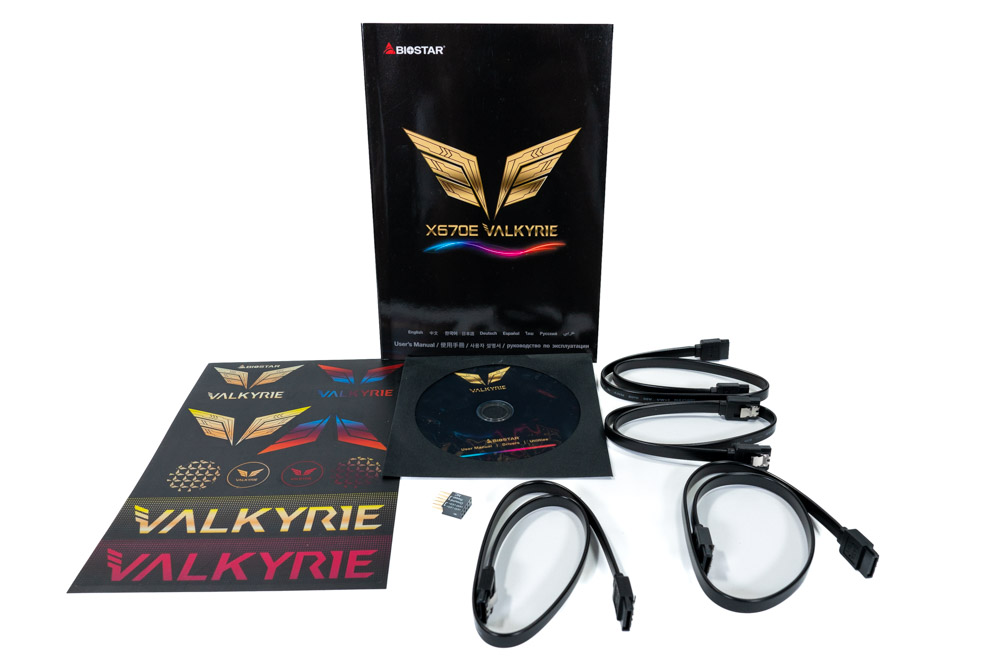
The X670E VALKYRIE accessories are just the absolute basics, with a manual, driver installation disk and SATA cables. A DVD driver disk is a bit outdated for 2022. Its very uncommon to see disc drives in newer computers, unless they are a workstation.
The full list of accessories includes:
- x4 Serial ATA Cables
- 1x Users Manual x1
- x1 Setup Driver DVD x1
- x1 System Header Smart Connector
- 4x M.2 Screws (Installed on motherboard already)
Board Layout


The Valkyrie motherboard line is only two years old at this point in 2022. This is BIOSTAR's first Valkyrie motherboard for AMD. Visually, BIOSTAR has toned down the neon colors in comparison to the Intel based Z690 and Z590 before it. By doing so, it will appeal to a wider market and gamers, though this doesn't mean it directly translates into more sales. Flair can backfire as well, because when a product stands out, it tends to get more attention that isn't always positive.
BIOSTAR was wise by sticking to the ATX form factor, as it greatly increases case compatibility. Along with a new, paired chipset, the CPU socket has physically changed. Together with firmware and design changes, this also physically prevents previously released Ryzen CPUs (Zen1, Zen2, Zen3) from being installed, which will not be compatible moving forward for a clean sheet generational leap.


AMD's changes to the socket also comes with some compatibility challenges. Many brands selling CPU coolers have already announced forwards compatibility. However, some will need an adapter, as the backplate that was previously removable for the AM4 (PGA) socket is now an integral part of this new AM5 (LGA) socket. BIOSTAR keeps the X670E VALKYRIE socket clear of obstructions too. Whether an All-In-One (AIO), custom CPU waterblock, or air-cooler is used, the BIOSTAR X670E VALKYRIE looks to have enough physical clearance around the socket to alleviate compatibility concerns for AIOs. Those with air-coolers may have a problem concerning the VRM heatsink on the left, depending on their cooler orientation and size.
AMD recommends 240-280 mm AIOs (or better) for the Ryzen R9 7950X/7900x, to keep the turbo frequency on target. Thermal observations from using the AMD Ryzen 7950X during this review place the CPU at 95°C, which is perfectly normal. The AIO solution isn't a requirement if heavy multi-threaded application performance is a priority, though it will provide the highest boost clocks overall. Undervolting and using PBO is also an option as well, to circumvent CPU cooler thermal limitations. AMD ECO Mode also is a option as it sets the target wattage to 90 and still performs quite well, matching the performance of an Ryzen 5950X in Cinebench R23. For more information regarding Ryzen 7000 cooling requirements, TechPowerUp has a great article covering this specific topic. Click THIS for Article LINK.

The BIOSTAR X670E VALKYRIE offers three PCI Express x16 slots, with all of them being reinforced for extra stress support. PCIe slot one and two are PCIe Gen5 certified, with a total of x16 lanes coming from the CPU. This means that slot one can either operate at x16 or x8. Slot 2 is wired for PCIe Gen5 x16 as well. Once either of these are populated it will split the available lanes with the other PCIe Gen5 slot. Unlike on the Intel Z690 platform, this second 16x PCIe slot will not become disabled if the M.2 Gen5 socket is populated. This is because the AMD 7000 series has 24 PCIe Gen5 lanes that can be divided into M.2 Sockets, USB4 and PCIe slots based on the motherboard implementation. The 3rd slot is physically and internally wired Gen4 x16 as well, but it will only run at Gen4 x4, as stated by the manual.
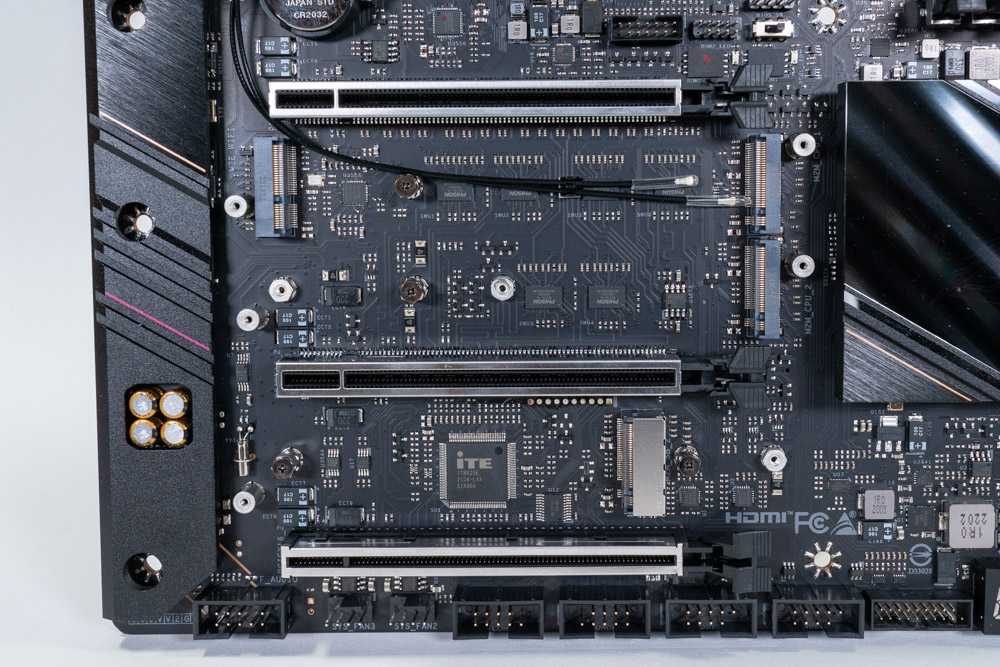
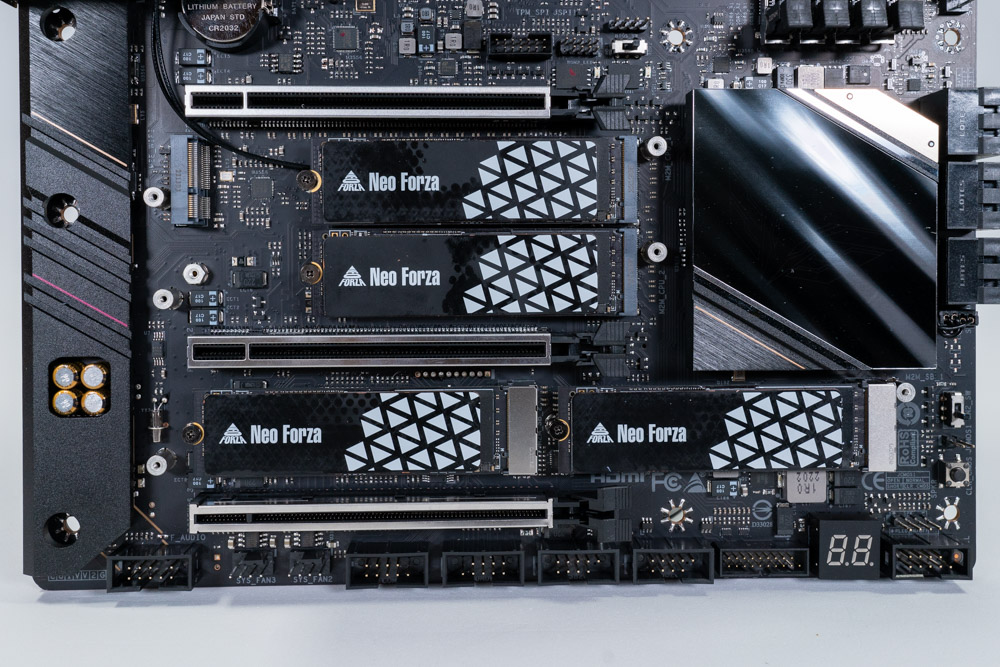
Because the Ryzen CPU provides 24 PCIe Gen5 lanes, motherboard vendors have the ability to include two M.2 Gen5 sockets as well, without losing the second PCIe Gen5 slot entirely, as seen on the Intel Z690 platform. Here BIOSTAR has implemented two M.2 Gen5 x4 sockets (labeled M2M_CPU_1 and M2M_CPU_2). These M.2 sockets bandwidth are provided by the CPU. The remaining two M.2 sockets are Gen4 x4, and get their bandwidth from the X670 chipset(s). All M.2 sockets have passive heatsink coverage as well.

BIOSTAR has an M.2 slot (Key-E) prepped for a Wi-Fi card. The Rear IO already has antennas, which makes the process a bit easier on the user. The Wi-Fi M.2 card shown in the photo is a Intel AX-200, which supports Wi-Fi 6 and was bought on Amazon e-tailer for $20.

In the top right corner are physical power and reset buttons. These buttons are helpful if you just want to power on the motherboard before you have everything connected up, or if it's on a test bench.

BIOSTAR includes a post code debugger for easier troubleshooting. Considering that the AM5 socket is new to everyone, it is always good to get a readout of what stage the boot process is on, or what it may be stuck on. First boot after clearing the CMOS or new memory will be anywhere from 2-6 minutes depending on the configuration.

In the bottom right below the SATA ports is the clear CMOS button. Next to that is a 2-pin jumper pad used for clearing the CMOS if ever the button stops functioning. Lastly is a switch labeled LN2. This type of switch can often be found on overclocking orientated motherboards, but the function is not always the same. BIOSTAR's implementation of this will bring the CPU down to 800 MHz if switched on.

Right below the socket is a BIOS switch which can be used if for any reason BIOS Flashback fails, and corrupts the data during a update. This can also be used to test out a newer BIOS, without giving up a previous stable one with all your saved settings. If you find for any reason this newer version isn't up to the standards of the last BIOS, you can just switch it back. No need to re-flash to a older BIOS version again.
Next to the BIOS switch is a Trusted Platform Module Header (TPM), along with two smaller headers that are unlisted in the manual.
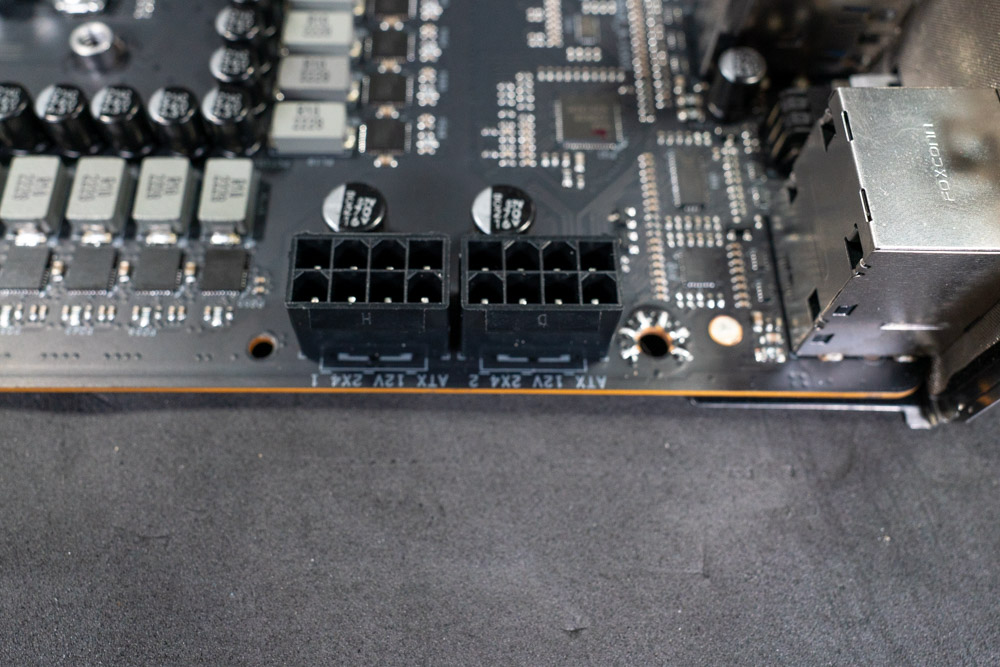
The BIOSTAR X670E VALKYRIE uses a two 8-Pin EPS connector for higher power management.
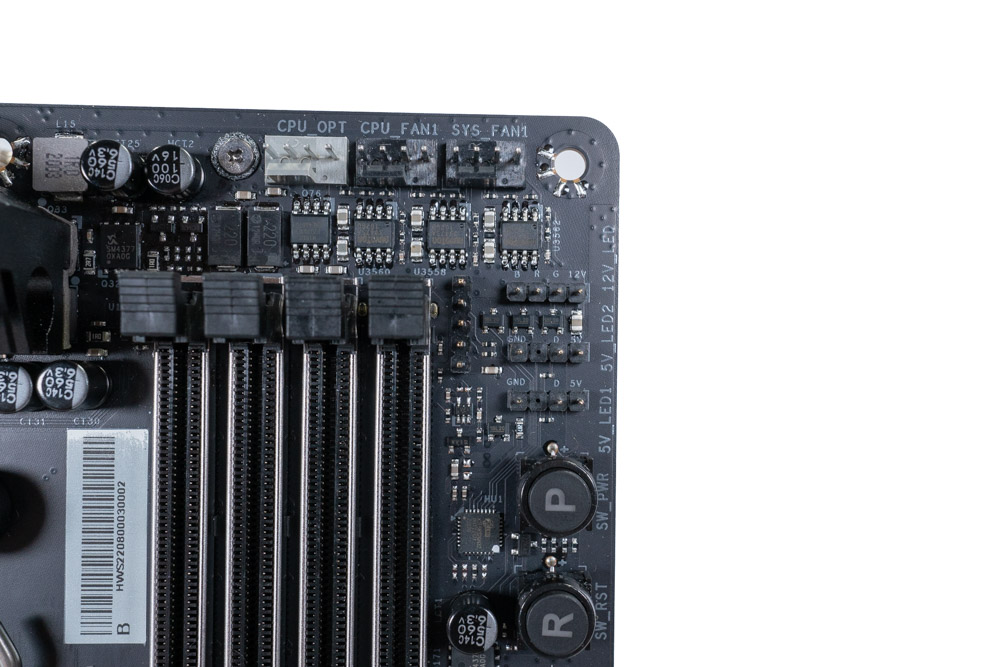
Next to the power buttons in the top right of the motherboard are three RGB LED Headers. One provides 12v (4-pins) while the other two are ARGB 5 V headers (3-pins).
Amp / Wattage per header not provided by BIOSTAR

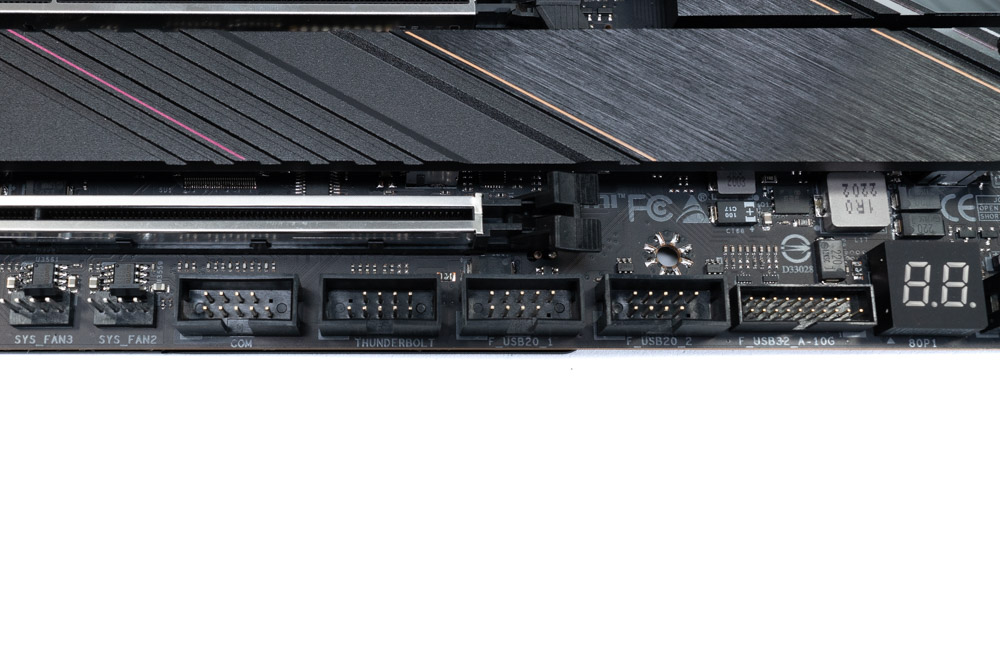
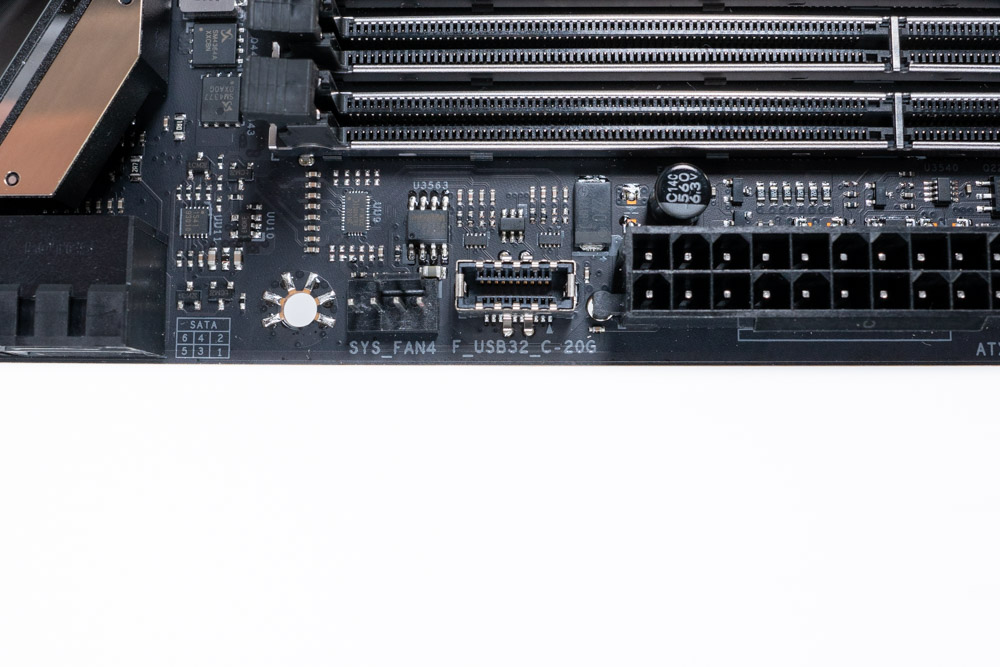
Included with the BIOSTAR X670E VALKYRIE are one USB 3.2 Gen2 Headers (10 Gb/s), two USB 2.0 headers and a single Type-E header for USB-C (20 Gb/s). A thunderbolt header is also present for use with a Thunderbolt add-on card.
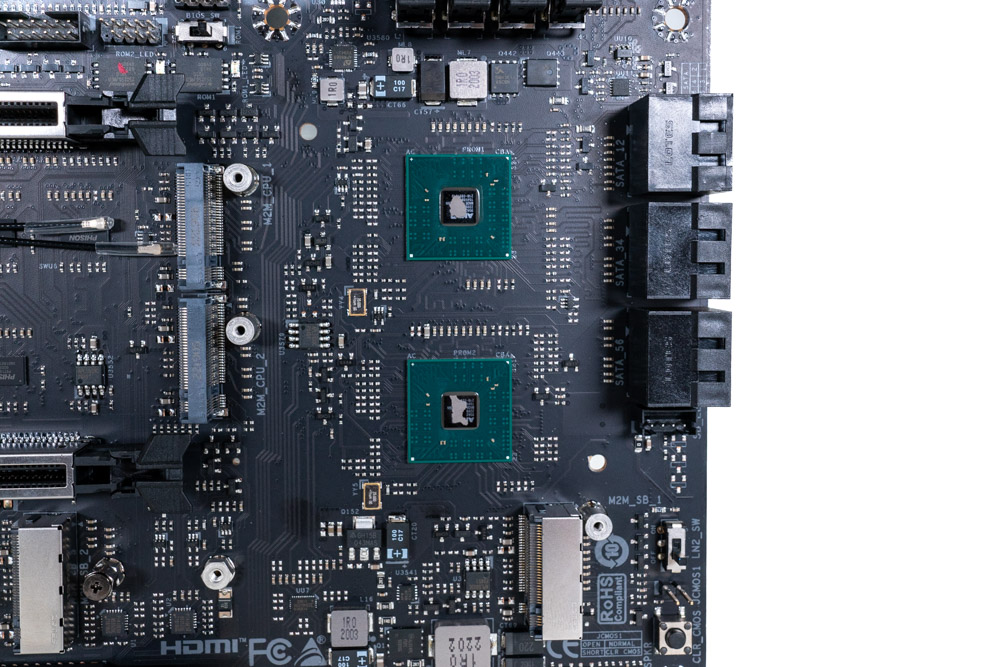
Here is a closeup of the X670 chipsets in tandem.
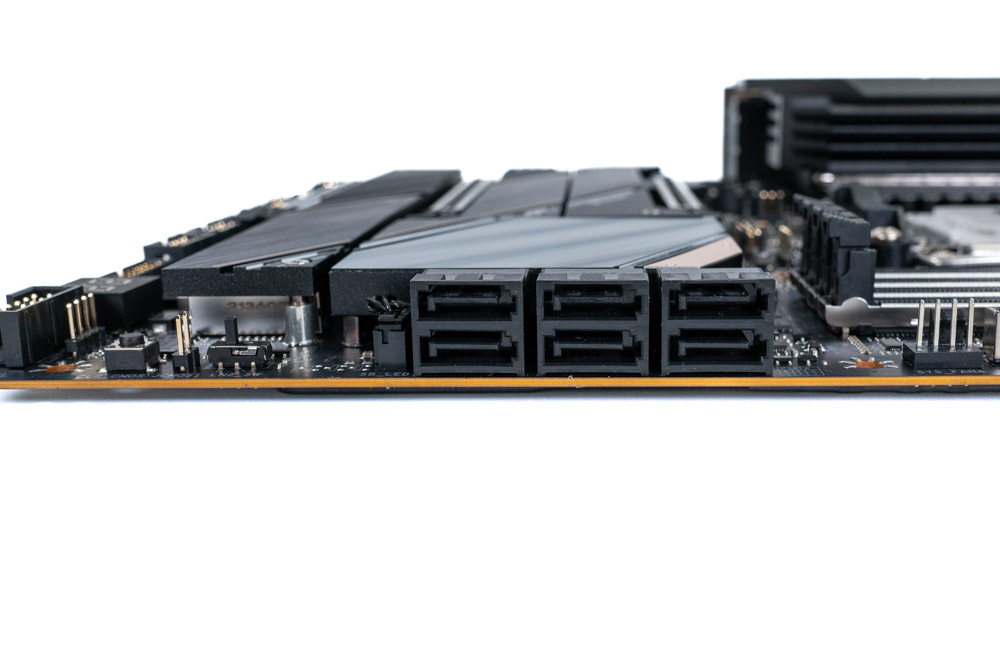
The X670E VALKYRIE motherboard has a total of six 6 Gbps SATA ports, each of which are connected to the X670 Chipset (PCH).
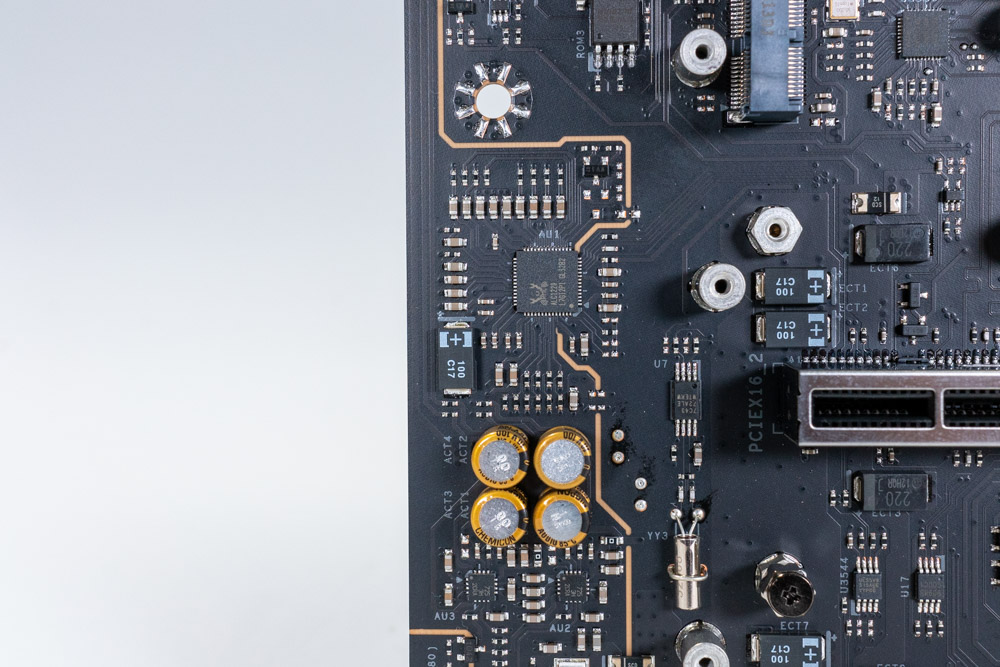
BIOSTAR has used the Realtek ALC1220 Codec for it's on-board audio solution.
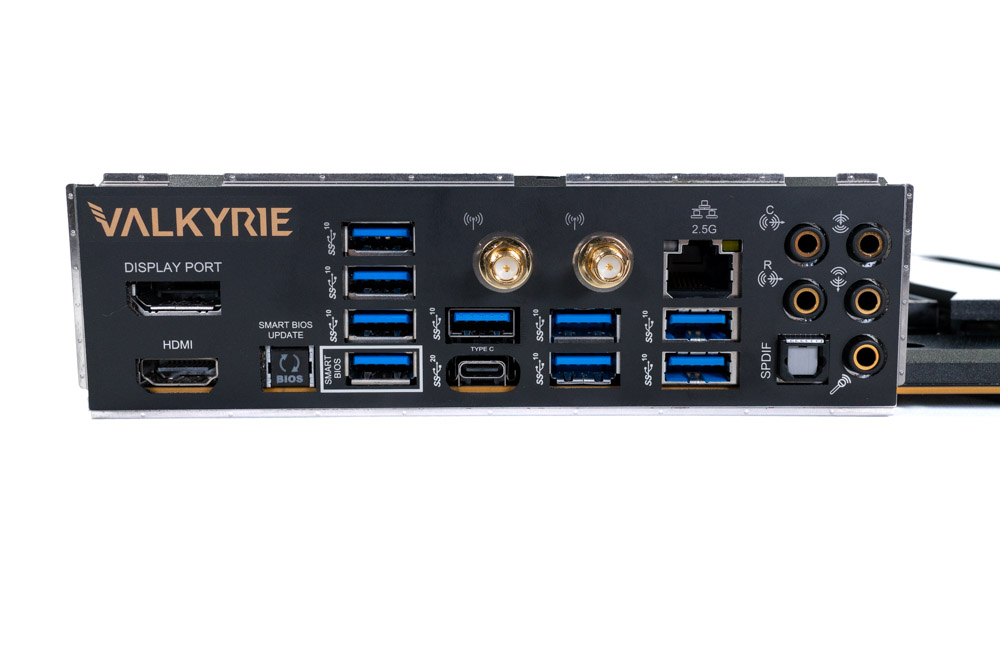
Getting a peek at the Rear IO, BIOSTAR is looking to accommodate a wide group of users with the X670E VALKYRIE. Since the AMD Ryzen 7000 series has onboard graphics, HDMI 2.1 and DisplayPort 1.4 are provided for video output from the CPU. On-board video output is always optional to use, but is a nice fallback for troubleshooting purposes nonetheless. Next up is a load of USB 3.2 Gen2 (10 Gb/s) ports. These are all 10 Gb/s and are high enough bandwidth for most users. In the event you need more throughput, a 20 Gb/s USB-C port is available as well.
BIOSTAR X670E VALKYRIE also includes a BIOS Flashback button for easy recovery, which is always nice to see.
- 2x Antenna Ports
- 1x BIOS Flashback Button
- 1x HDMI Port (2.1)
- 1x DisplayPort 1.4
- 1x USB 3.2 Gen2 2x2 Type-C (20 Gb/s)
- 9x USB 3.2 Gen2 Type-A (10 Gb/s)
- 1x RJ-45 LAN Port
- 5x Audio Jacks
Our Patreon Silver Supporters can read articles in single-page format.
Nov 19th, 2026 16:08 CST
change timezone
Latest GPU Drivers
New Forum Posts
- Honestly, do you care about GTA VI? (164)
- Windows 11 General Discussion (7736)
- Current Sales, Bundles, Giveaways (10448)
- Last game you purchased? (1409)
- WarpCoreBench scores! (76)
- Got the EOL 32GB TridentZ 6000 CL26 1.4V (12)
- Dell Workstation Owners Club (3516)
- Making a game in Godot engine (4)
- DTS DCH Driver for Realtek HDA [DTS:X APO4 + DTS Interactive] (2815)
- Security Apps (2)
Popular Reviews
- Acemagic Retro X3 Review
- Ugreen NASync DXP4800 GT Review
- Upcoming Hardware Launches 2027 (Updated Nov 2026)
- Pulsar Office Tour & First Look at P1 Dual-Sensor Mouse
- AMD Zen 6 Technical Deep Dive
- Biwin Black Opal NV7400 2 TB Review
- Sapphire Radeon RX 7700 XT Pure Review
- Sapphire Radeon RX 7700 XT Pulse Review
- AMD Ryzen 7 9800X3D Review - The Best Gaming Processor
- Chieftec Iceberg PRO 360 DARK Review
TPU on YouTube
Controversial News Posts
- NVIDIA Co-Founder and CEO Jensen Huang Officially Resigns (489)
- Report: Jensen Huang Eyes NVIDIA Comeback (223)
- Open Letter Asking NVIDIA to Reinstate Jensen Huang Passes 115,000 Signatures (184)
- OpenAI CEO Argues Home PCs Waste the World's Limited DRAM Supply (152)
- NVIDIA Launches Investigation Into Jensen Huang's Relationship With Suspected Chinese Spy (136)
- Intel "Raptor Lake Next" 16-Core and 20-Core CPUs Surface (130)
- Legendary Game Studio BioWare Shuts Down Following EA Layoffs (104)
- Dell CEO Says the Memory Shortage Will Get Worse in 2027 (95)