 23
Biwin Black Opal DW100 RGB DDR5-6000 32 GB CL28 Review
Intel Core 13900K Frametimes: Baldur's Gate 3 »Intel Core 13900K Frametimes: Counter-Strike 2
We present a more in-depth analysis than just average FPS to show how the framerate changes over time, which helps highlight FPS drops. Minimum FPS at both the 95th and 99th percentile are reported in these charts, too. A second chart, a histogram, shows shape and spread for the frametime data—how tightly grouped the measurements are. The "IQR" result is called "Interquartile Range," which is an outlier-resistant statistical value that tells us the range in the middle of the frametime distribution.In the following charts, we are comparing two retail memory kits. By doing so, the game benchmarks reveal where the limits lie for a top of the line AMD or Intel computer in 2025. For both memory kits, the respective EXPO/XMP profiles are loaded, and all sub-timings are based on those individual profiles. These are not adjusted further.
Tests are conducted with the following components:
CPU: Intel Core i9-13900K (Locked P-core 5.5 GHz, E-cores 4.3 GHz)
GPU: PNY GeForce RTX 4090 XLR8 VERTO
Memory (1): Biwin Black Opal DW100 RGB DDR5-6000 BXL53260DW1-D28FB (28-35-35-72) (XMP)
Memory (2): DDR5-7200 32 GB (34-46-46-116) (XMP)
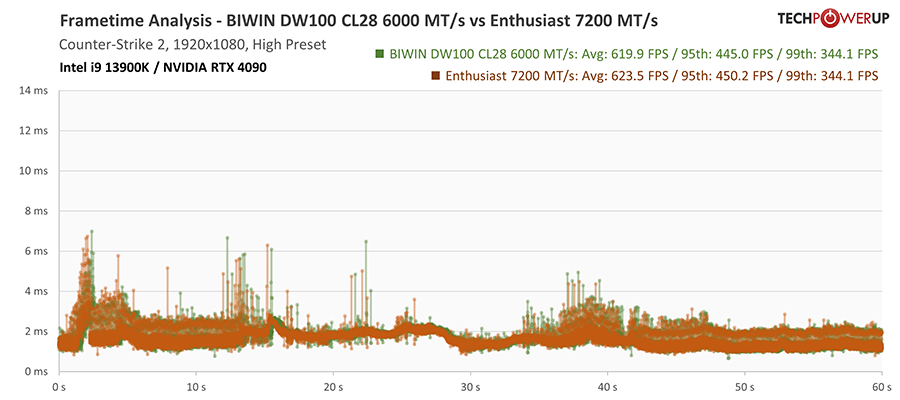
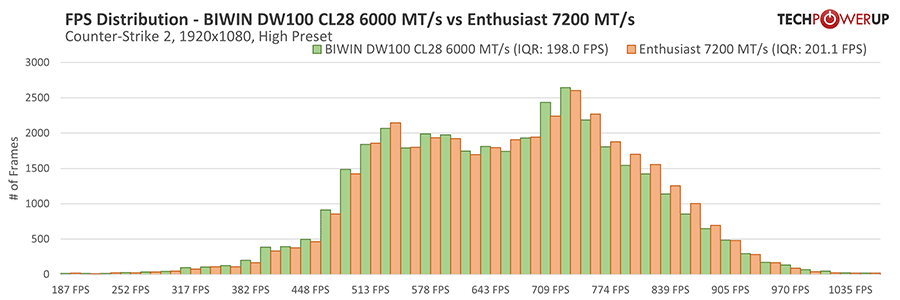
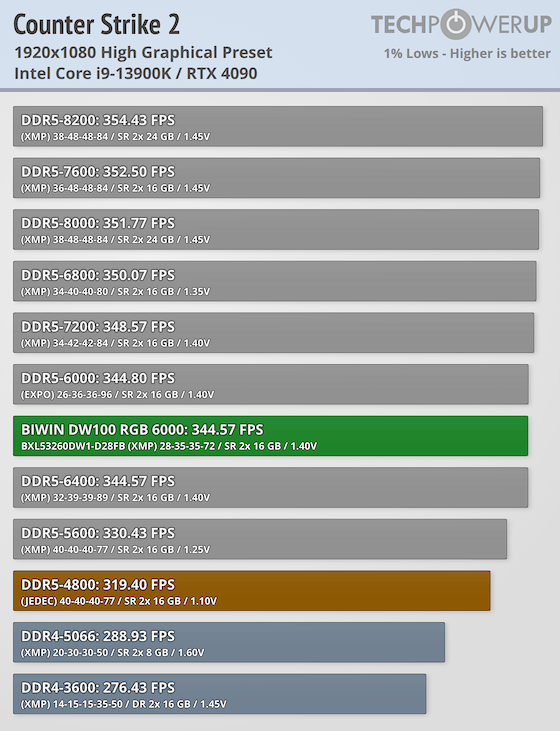
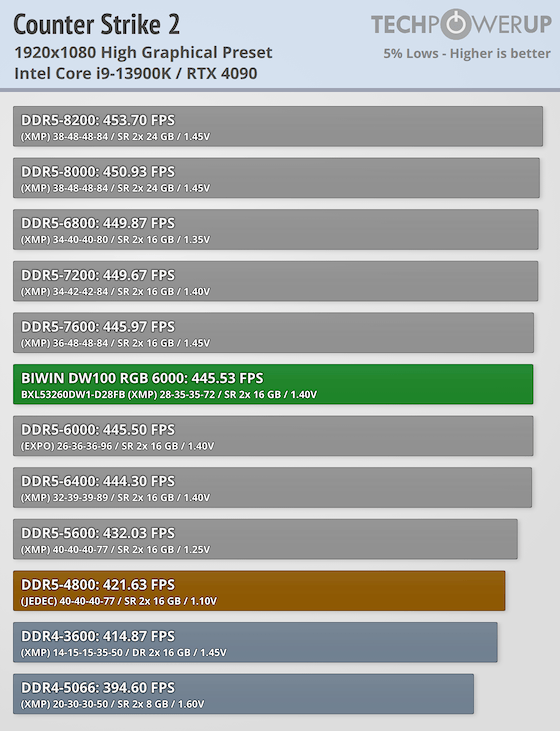
Counter-Strike 2 benefits significantly from higher bandwidth memory on the Intel (Socket 1700) platform. While average frame rates are mostly influenced by memory frequency rather than latency, the 95th and 99th percentile frame rates do improve with reduced latency. Interestingly, a memory kit with a lower frequency can outperform faster XMP memory kits if sub-timings are manually adjusted. For example, the BIWIN 6000 MT/s CAS 28 kit outperforms the 6400 MT/s CAS 32 option. However, without manual adjustments to secondary and tertiary timings, higher frequency memory generally delivers the best overall frame rates.
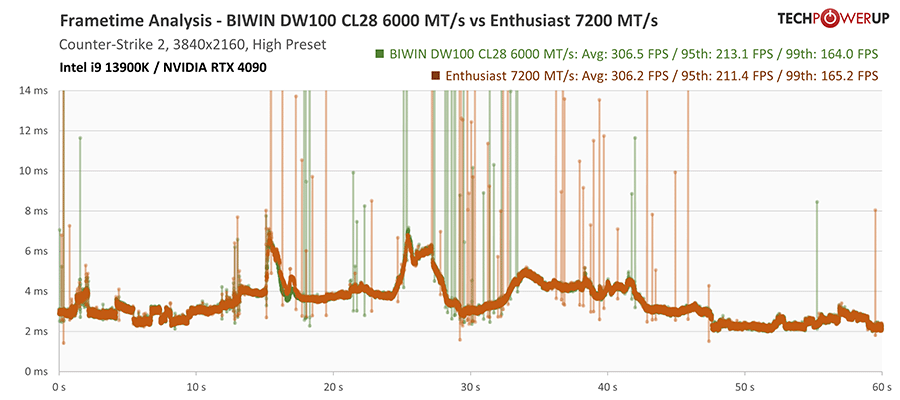
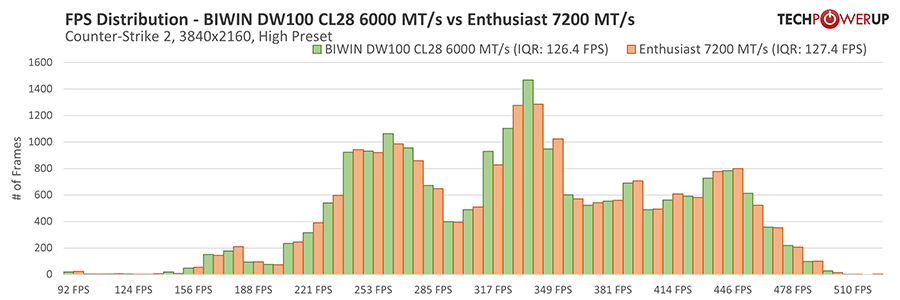
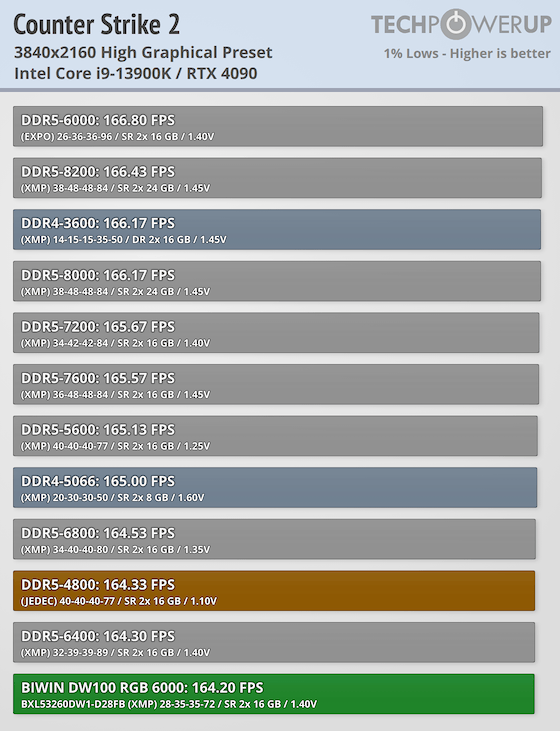
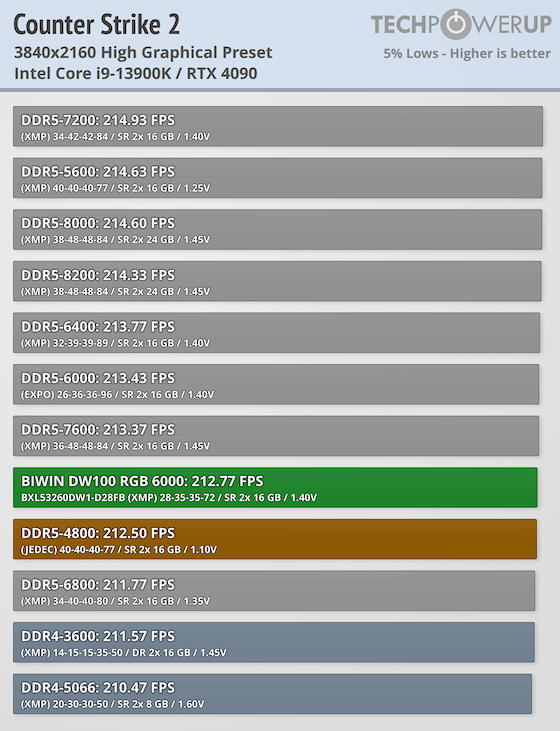
Lastly, at 4K, we start to become GPU-bound, putting all the memory kits within margin of error.
Nov 26th, 2026 12:28 CST
change timezone
Latest GPU Drivers
New Forum Posts
- ASUS Prime 5060 ti 16gb x4 instead of x8 PCIe (5)
- TPU's WCG/BOINC Team (34807)
- What's your main Black Friday / Cyber Monday purchase? (22)
- WarpCoreBench scores! (108)
- Radeon driver death (5)
- Making a game in Godot engine (22)
- Current Sales, Bundles, Giveaways (10452)
- Can you guess Which game it is? (368)
- Free Games Thread (5385)
- Post your CrystalDiskMark speeds (659)
Popular Reviews
- ASRock X870E Challenger Wi-Fi White Review
- VZMORE AX9 Max Review
- Upcoming Hardware Launches 2027 (Updated Nov 2026)
- Microsoft Surface Laptop Ultra Review - The Next-gen Arm Laptop
- AMD Ryzen 7 9800X3D Review - The Best Gaming Processor
- AMD Zen 6 Technical Deep Dive
- Corsair RM1200e (Second Generation) Review
- Phantom Blade Zero Performance Benchmark Review - 35 GPUs Tested
- Montech CyberFlow ARGB 360 Review
- Pulsar Office Tour & First Look at P1 Dual-Sensor Mouse
TPU on YouTube
Controversial News Posts
- Jensen Huang Reinstated as CEO of NVIDIA (596)
- NVIDIA Co-Founder and CEO Jensen Huang Officially Resigns (492)
- Report: Jensen Huang Eyes NVIDIA Comeback (281)
- Open Letter Asking NVIDIA to Reinstate Jensen Huang Passes 115,000 Signatures (184)
- OpenAI CEO Argues Home PCs Waste the World's Limited DRAM Supply (152)
- NVIDIA Launches Investigation Into Jensen Huang's Relationship With Suspected Chinese Spy (136)
- Intel Razor Lake Gets a 12 P-Core bLLC Chip With No E-Cores, Per Leak (94)
- NVIDIA GeForce RTX 50-Series Scheduled for up to $500 Price Hike This Week (89)