 12
Colorful iGame Shadow II DDR5-6000 32 GB CL28 Review
Value & Conclusion »AMD Memory Overclocking
Overclocking Tips and Tricks
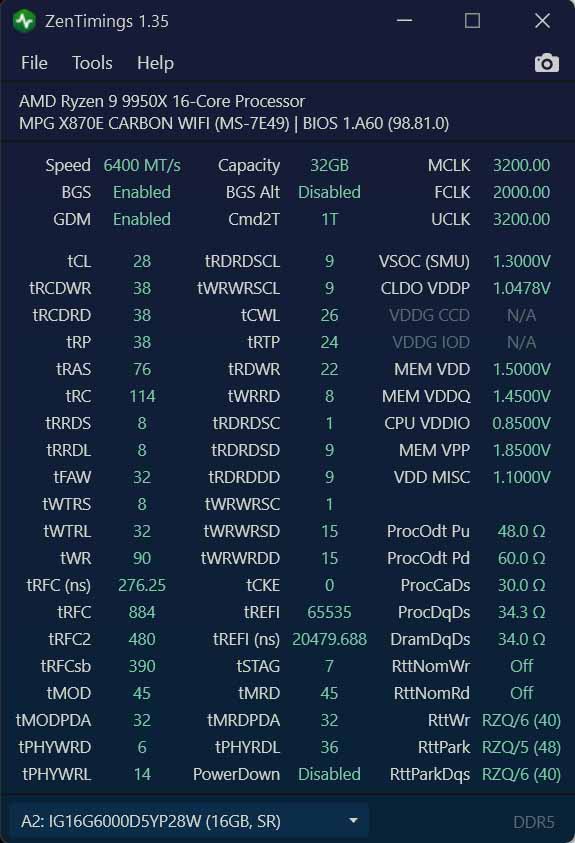
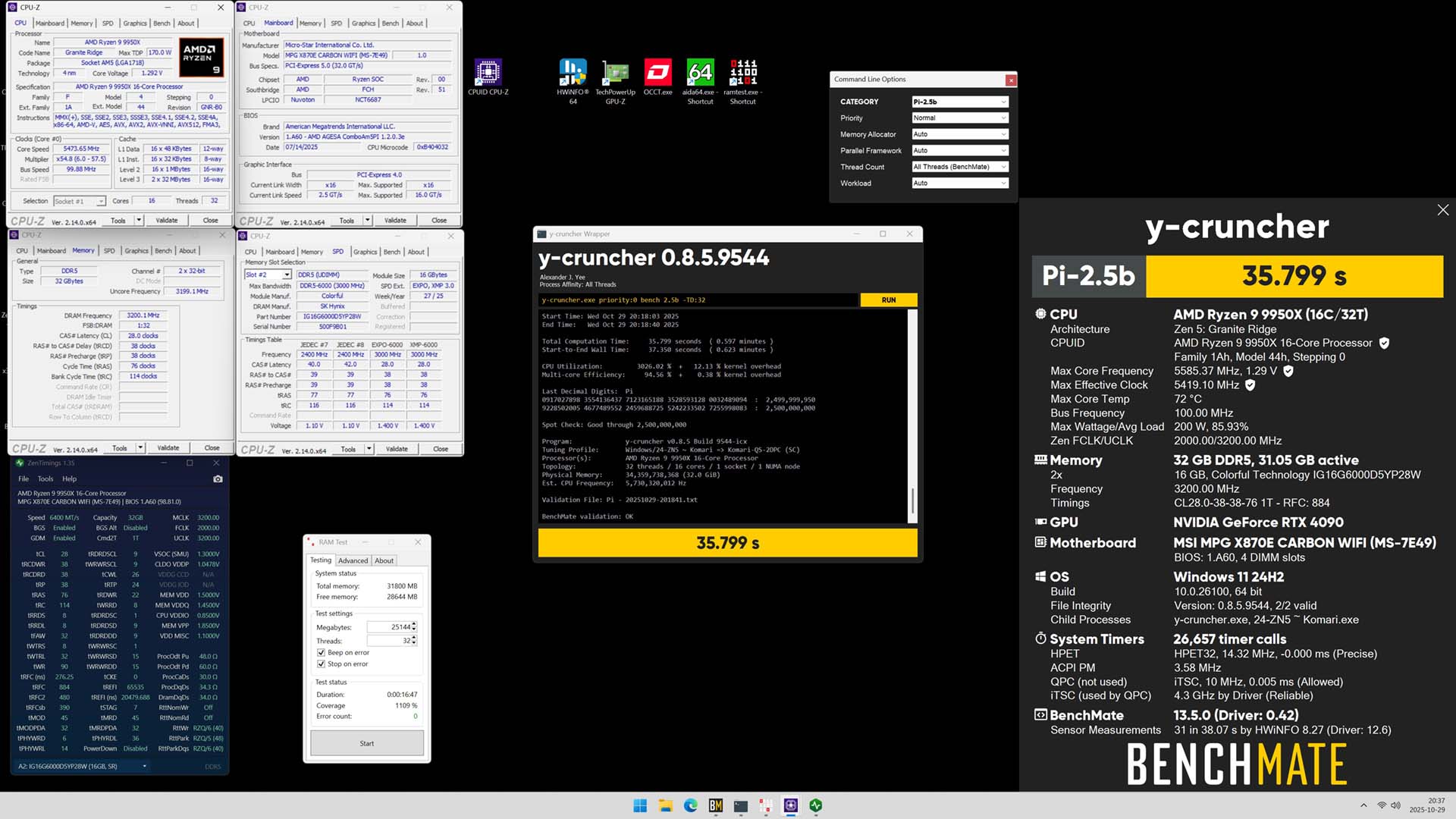
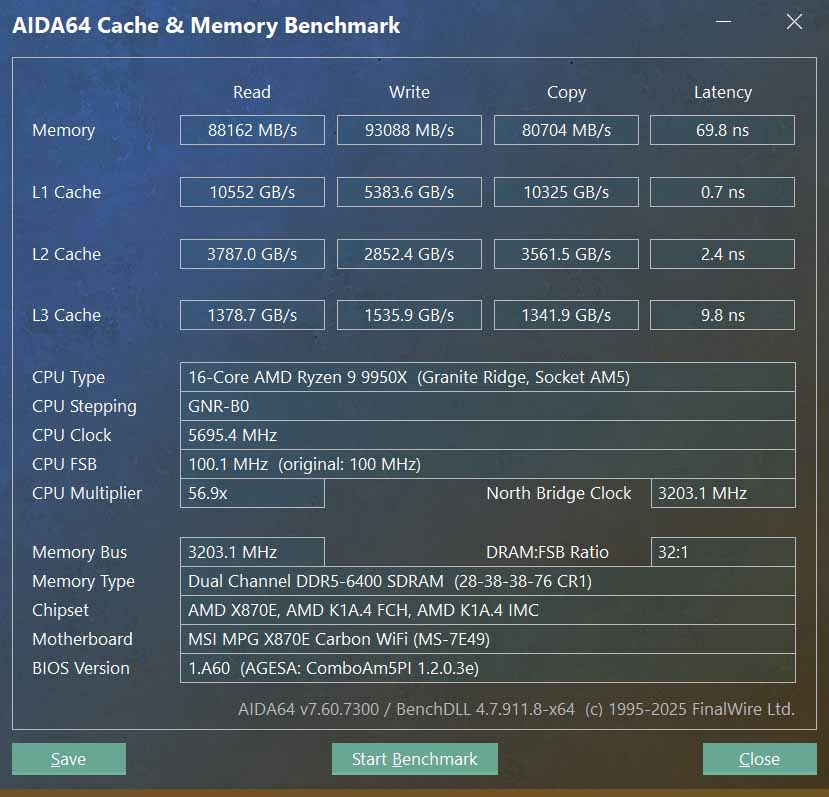
In the overclocking department, we aimed to push the limits and see what we could achieve. Our initial goal was to reach the lowest CAS latency for 6000 MT/s and then for 6400 MT/s. Our first attempt was made without adjusting the EXPO/XMP voltage from the default 1.40 V, which resulted in a failed boot for both 6000 MT/s CL26 and 6400 MT/s CL28. Increasing the voltage to 1.50 V brought stability to both previous attempts. However, a final attempt all the way up to 1.65 V failed to boot at 6000 MT/s CL24, and 6400 MT/s CL26 was on the verge of instability.
In our next step, we focused on fine-tuning the secondary and tertiary timings. We found that any modifications to tRCDWR or tRCDRD led to instability, so we had to tread carefully. For our AMD setup, we adjusted parameters like tRRDs, tRRDL, tRDRDSCL, tWRWRSCL, and tREFi to achieve a straightforward overclock. These tweaks were crucial in pushing the system's performance while maintaining stability. Of course more can be done, but this was our stopped point for the overclocking section.
AMD Results
DDR5-6400 CL28 y-cruncher 2.5B HWBot Submission
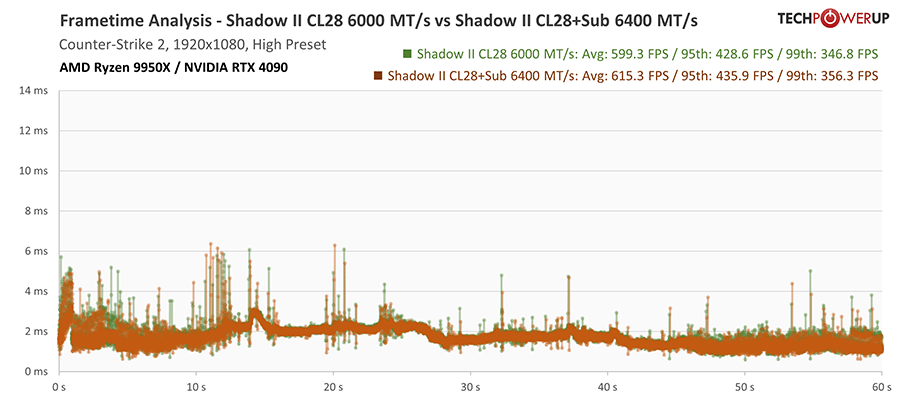
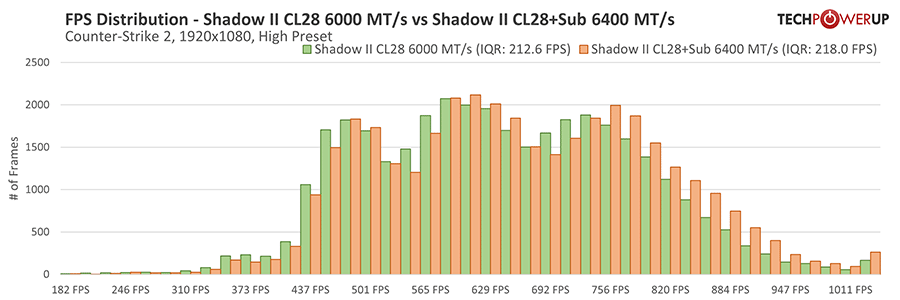
Counter-Strike 2 Overclocking Results
Nov 21st, 2026 12:54 PST
change timezone
Latest GPU Drivers
New Forum Posts
- Can you guess Which game it is? (345)
- GeekMagic Ultra Smart WiFi Weather Station (10)
- RX 580 2048SP 8GB - SK Hynix - Ardiyes - BIOS Needed (1)
- UPS what one to get? (22)
- Zen 3 IF/IMC degradation (243)
- State of the HPC-AI Market 2026: Processing Elements (0)
- 1 - 5 person file storage server equivalent accasible from anywhere + general VM server. (3)
- Honestly, do you care about GTA VI? (225)
- RX 9000 series GPU Owners Club (2251)
- Windows 11 General Discussion (7746)
Popular Reviews
- Microsoft Surface Laptop Ultra Review - The Next-gen Arm Laptop
- Ugreen NASync DXP4800 GT Review
- Corsair RM1200e (Second Generation) Review
- Pulsar Office Tour & First Look at P1 Dual-Sensor Mouse
- Upcoming Hardware Launches 2027 (Updated Nov 2026)
- Acemagic Retro X3 Review
- Biwin Black Opal NV7400 2 TB Review
- AMD Ryzen 7 9800X3D Review - The Best Gaming Processor
- AMD Zen 6 Technical Deep Dive
- Chieftec Iceberg PRO 360 DARK Review
TPU on YouTube
Controversial News Posts
- NVIDIA Co-Founder and CEO Jensen Huang Officially Resigns (492)
- Report: Jensen Huang Eyes NVIDIA Comeback (260)
- Open Letter Asking NVIDIA to Reinstate Jensen Huang Passes 115,000 Signatures (184)
- OpenAI CEO Argues Home PCs Waste the World's Limited DRAM Supply (152)
- NVIDIA Launches Investigation Into Jensen Huang's Relationship With Suspected Chinese Spy (136)
- Intel "Raptor Lake Next" 16-Core and 20-Core CPUs Surface (130)
- NVIDIA GeForce RTX 50-Series Scheduled for up to $500 Price Hike This Week (89)
- Intel Razor Lake Gets a 12 P-Core bLLC Chip With No E-Cores, Per Leak (86)