 11
Corsair K95 Platinum Keyboard Review
(11 Comments) »Introduction

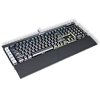
Corsair is not a new name to the PC DIY industry, having started with memory to then expand to cover almost everything one needs for a full PC build. Thanks to some partnerships and exclusives, especially with Cherry, PC enthusiasts around the world now look forward to what comes next, and it is impressive how far along Corsair has come despite their entry into the peripherals market having taken place just a few years ago. In 2014, they were the first to introduce RGB-per-key lighting on their keyboards, and now, it is a feature on most keyboards meant for gamers. They revamped the K65 and K70 lineup in 2016 by reintroducing a USB pass-through port and improving their hardware drivers to support full 16.8 M colors. Missing then was the update to their halo keyboard product - the K90/K95 class. Today, we get to finally see their update aptly named "K95 Platinum," and it will be Corsair's flagship keyboard for a while.

There are a few immediately noticeable changes here since there are six dedicated "G-keys" instead of the eighteen as before, and the USB pass-through port makes a comeback, a light bar adorns the top, and there is a profile-changing button at the top that hides a new feature with Corsair peripherals. More on that later, let's first take a look at the specifications.
Specifications
| Corsair K95 Platinum | |
|---|---|
| Layout: | 104 (+15) keys |
| Material: | ABS plastic casing and aluminum plate |
| Macro Support: | Yes |
| Weight: | 1.32 / 2.90 lbs. |
| Wrist Rest: | Yes (magnetic and reversible) |
| Anti-ghosting: | Full N-Key rollover via USB |
| Media Keys: | Dedicated |
| Dimensions: | 171(L) x 465(W) x 36(H) mm |
| Cable Length: | 2 M |
| Software: | Yes |
| Switch Type: | Cherry MX RGB Speed (Silver) or Brown RGB |
| Backlighting: | RGB |
| Interface: | USB |
| Warranty: | 2 years |
Packaging and Accessories


Corsair adopted their now standard black and yellow color scheme for gaming-branded products for the packaging. The K95 Platinum comes in a two-part package with an external sleeve for aesthetics, including an illustration of the product and a mention of its most salient technical specifications and marketing features. There are seals on either end to keep the contents inside in check.


Inside is a shaped cardboard layout with the keyboard itself on top of the accessories, which also come in their own separate compartments. Kudos to Corsair's packaging department here as this will help ensure the product arrives as intended. Let's now take a look at these accessories.


The wrist rest gets a revamped design here. You still have the same plastic tabs that click into place, but instead of a built-in resting surface there is now a reversible surface that is magnetically attached to the wrist rest base. You get your choice of smaller dimples or larger dimples on the resting surface, which affects people's comfort levels differently and also means dust and grime gets onto the surface's differences. Try both out and see how you like them. Another thing here is that the wrist rest no longer lays flat on your desk as there is a small elevation below. This helps with running cables underneath and was done so on purpose.


Another set of accessories is in a pouch with the warranty policy and user guide I always recommend going through. More relevant is the vacuum-sealed pouch inside that houses the replacement keycaps Corsair has been including with all their higher-end keyboards for a while now. These have a different profile and a soft rubber finish at the top, and the base is ABS plastic with pad-printed legends. You get a set of W-A-S-D and Q-W-E-R-D-F keys for FPS and MMO/RPG games. To help replace the keycaps, Corsair also includes a plastic ring keycap puller that works fairly well here.
Our Patreon Silver Supporters can read articles in single-page format.
Nov 20th, 2026 18:44 PST
change timezone
Latest GPU Drivers
New Forum Posts
- Honestly, do you care about GTA VI? (218)
- SATA drive 1.4 GBps with Intel X25-E on Windows 98! (37)
- DTS DCH Driver for Realtek HDA [DTS:X APO4 + DTS Interactive] (2816)
- Without Jensen, PC gaming will be (51)
- WarpCoreBench scores! (86)
- What's your latest tech Freebie? (80)
- Nvidia GPU undervolting via MVolt+? (0)
- How to prevent OLED burn damage due to PC freezes or power outtages? (49)
- RX 9000 series GPU Owners Club (2249)
- Logitech Headsets Modded Driver — Unlock Dolby in G HUB (23)
Popular Reviews
- Microsoft Surface Laptop Ultra Review - The Next-gen Arm Laptop
- Ugreen NASync DXP4800 GT Review
- Corsair RM1200e (Second Generation) Review
- Pulsar Office Tour & First Look at P1 Dual-Sensor Mouse
- Upcoming Hardware Launches 2027 (Updated Nov 2026)
- Acemagic Retro X3 Review
- Biwin Black Opal NV7400 2 TB Review
- AMD Ryzen 7 9800X3D Review - The Best Gaming Processor
- AMD Zen 6 Technical Deep Dive
- Chieftec Iceberg PRO 360 DARK Review
TPU on YouTube
Controversial News Posts
- NVIDIA Co-Founder and CEO Jensen Huang Officially Resigns (491)
- Report: Jensen Huang Eyes NVIDIA Comeback (256)
- Open Letter Asking NVIDIA to Reinstate Jensen Huang Passes 115,000 Signatures (184)
- OpenAI CEO Argues Home PCs Waste the World's Limited DRAM Supply (152)
- NVIDIA Launches Investigation Into Jensen Huang's Relationship With Suspected Chinese Spy (136)
- Intel "Raptor Lake Next" 16-Core and 20-Core CPUs Surface (130)
- Legendary Game Studio BioWare Shuts Down Following EA Layoffs (104)
- NVIDIA GeForce RTX 50-Series Scheduled for up to $500 Price Hike This Week (89)