 4
Corsair Scimitar Elite Wireless SE Review
Value & Conclusion »Software
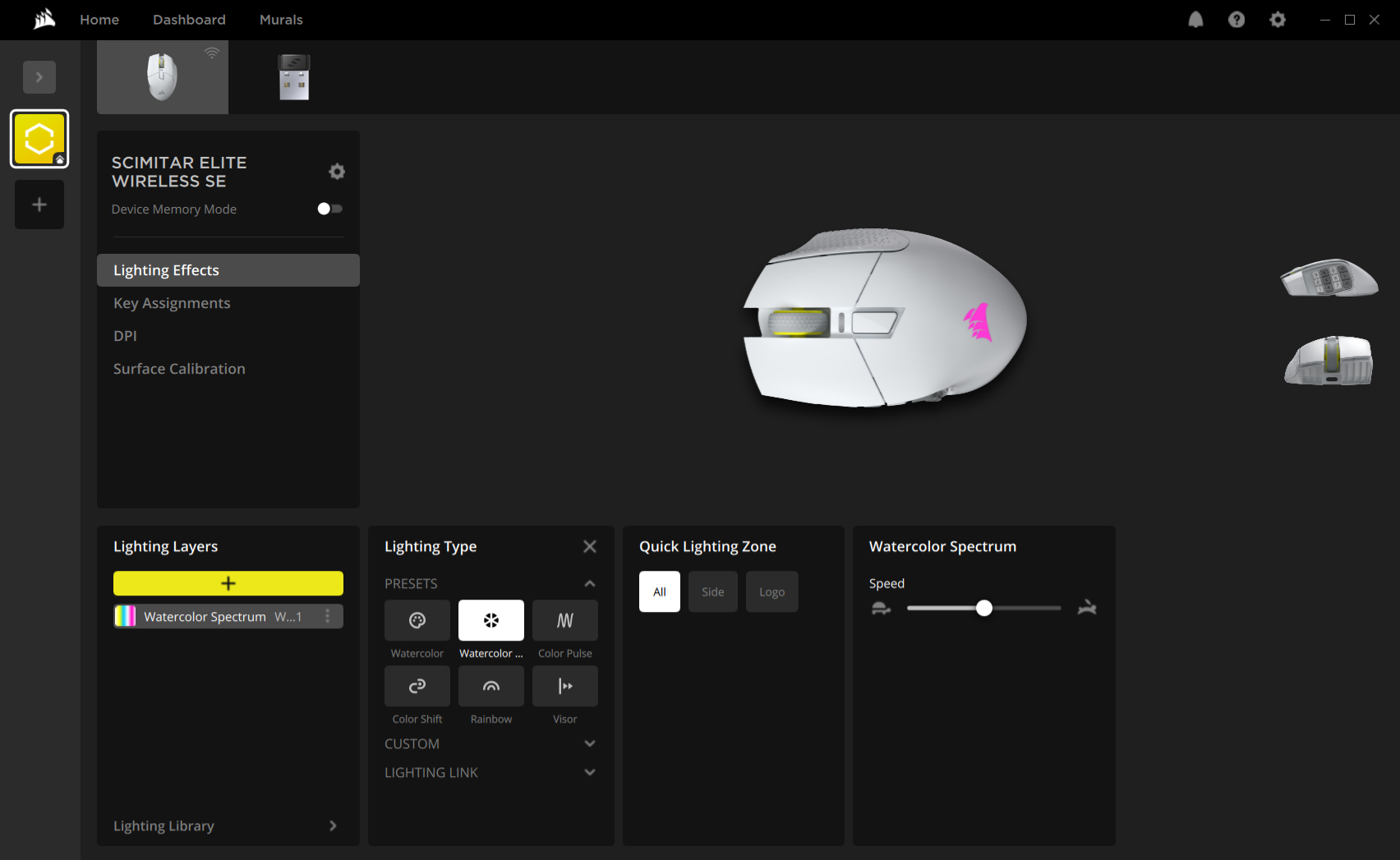


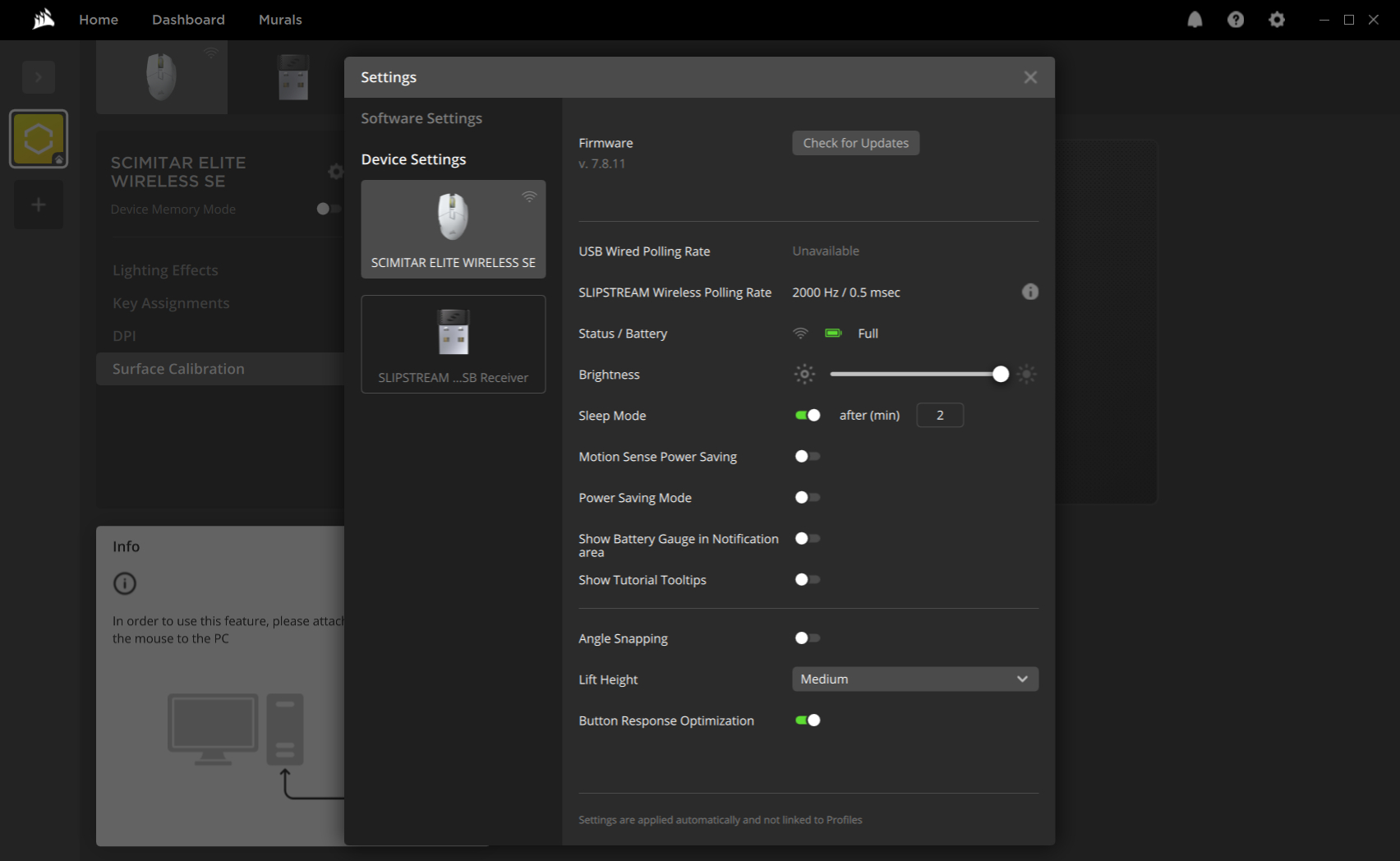
The Scimitar Elite Wireless SE is fully compatible with iCUE, Corsair's capable yet resource-hungry software. In contrast to older versions, iCUE 5 is modular now, significantly decreasing its footprint in terms of RAM and background processes. In addition, fewer driver packages are installed, and the infamous Corsair headset drivers are no longer automatically loaded, either. The UI is largely unchanged, which is why idiosyncrasies such as the distinction between software and device modes or the lighting brightness slider being hidden under device instead of lighting settings continue to be around. Of note is that the Elgato Virtual Stream Deck capability of the Scimitar Elite Wireless SE is not integrated in iCUE, requiring Elgato Stream Deck 7.0 instead, and it cannot be enabled through a plugin, either.
All options are available through multiple list entries. All buttons except the left main button can be remapped to mouse, keyboard, media, or macro functions. CPI can be set for up to five levels, ranging from 100 to 33,000 CPI in increments of 1 CPI. Additionally, a surface calibration can be performed to lower the lift-off distance beyond the default level. Further LOD adjustment options are present under device settings, allowing one to choose between three presets (low, medium, and high). Polling rate adjustment (125/250/500/1000 Hz) too is found under device settings, and the device is restarted on every change, as instead of report rate, the setting actually changes polling rate (bInterval). Much like on other Corsair wireless mice, the polling rate has to be adjusted under device settings of the dongle if the mouse isn't plugged in. Somewhat curiously, the now-defunct 2000 Hz setting is still shown as a separate entry under the polling rate selection despite the fact that it cannot be enabled. Under device settings, one also finds a setting called "Button Response Optimization." With it set to on, proper debouncing is performed, increasing click latency but reducing the likelihood of so-called slam-clicking. By setting it to off, debouncing is no longer performed, which lowers the click latency, but introduces slam-clicking. I'm unable to determine what "Motion Sense Power Saving" does. "Power Saving Mode" disables illumination and sets sleep mode to five minutes. Lastly, angle snapping can be turned on or off.
Much like on previous versions of iCUE, setting changes are either saved to a software or a hardware profile, depending on which menu entry is chosen. On my system, the software has a RAM footprint of 336 MB on average when running in the foreground, along with considerable CPU and GPU time cost, which go down slightly when minimized to the system tray to a RAM footprint of 196 MB on average. Upon exiting the application, all processes are terminated, as they should be.
Lighting
The Scimitar Elite Wireless SE has two lighting zones, which are the logo at the back and the 12-button side panel. Without iCUE running, five different lighting effects can be set up and saved to the on-board memory: Rainbow, Color Pulse, Color Shift, Watercolor, and Static Color. While running iCUE, a whole slew of lighting effects is available, including shift, blink, gradient, and pulse effects, many of which can be further adjusted in terms of transition speed, direction, and color palette, not to mention the ability to synchronize them with other Corsair devices. Of course, the lighting can also be disabled altogether.Color accuracy and vibrancy are very good throughout, though the 12-button side panel isn't as bright as the logo. Here's a short demonstration video in which I go through the Rainbow, Color Pulse, and Watercolor Spectrum lighting effects. Please note that brightness has been set to 100%:
Battery Life
Without illumination, Corsair cites up to 500 hours of battery life using Bluetooth and up to 150 hours using 2.4 GHz at 1000 Hz. Corsair iCUE includes a basic battery life indicator, but instead of being percentage-based, it merely discriminates between descriptions (I only got to see "High"), which are essentially useless. As such, I'm unable to gauge anything.Within iCUE, one can enable sleep mode and define after which period of inactivity sleep mode is entered. By default, this is set to 15 minutes, which is way too high and thus should be lowered to a more reasonable figure such as two minutes.
Using the included USB Type-A to Type-C charging cable, I measured the charging speed, which sits at around 0.870 A on a USB 2.0 port and around 1.070 A on a USB 3.x port. The battery has a capacity of 875 mAh (3.8 V) and utilizes a 3-pin JST connector.
Nov 26th, 2026 02:44 CST
change timezone
Latest GPU Drivers
New Forum Posts
- DTS DCH Driver for Realtek HDA [DTS:X APO4 + DTS Interactive] (2820)
- What's your main Black Friday / Cyber Monday purchase? (12)
- Claude credits purchased on or after Dec. 7 now have an expiry date (18)
- AI generated images... (239)
- TPU's Nostalgic Hardware Club (22209)
- Can you guess Which game it is? (365)
- Strange PC issues with Z690 setup (5)
- RTX 5080 problems, random troubleshooting "log" (8)
- Slow boot, can't launch monitoring software, general lag (38)
- Linpack Xtreme Released (512)
Popular Reviews
- ASRock X870E Challenger Wi-Fi White Review
- VZMORE AX9 Max Review
- Upcoming Hardware Launches 2027 (Updated Nov 2026)
- Microsoft Surface Laptop Ultra Review - The Next-gen Arm Laptop
- AMD Ryzen 7 9800X3D Review - The Best Gaming Processor
- AMD Zen 6 Technical Deep Dive
- Corsair RM1200e (Second Generation) Review
- Phantom Blade Zero Performance Benchmark Review - 35 GPUs Tested
- Pulsar Office Tour & First Look at P1 Dual-Sensor Mouse
- Ocypus lota P1000 Review
TPU on YouTube
Controversial News Posts
- Jensen Huang Reinstated as CEO of NVIDIA (574)
- NVIDIA Co-Founder and CEO Jensen Huang Officially Resigns (492)
- Report: Jensen Huang Eyes NVIDIA Comeback (281)
- Open Letter Asking NVIDIA to Reinstate Jensen Huang Passes 115,000 Signatures (184)
- OpenAI CEO Argues Home PCs Waste the World's Limited DRAM Supply (152)
- NVIDIA Launches Investigation Into Jensen Huang's Relationship With Suspected Chinese Spy (136)
- Intel "Raptor Lake Next" 16-Core and 20-Core CPUs Surface (130)
- Intel Razor Lake Gets a 12 P-Core bLLC Chip With No E-Cores, Per Leak (94)