 17
Crimson Desert Handheld Performance Review
Conclusion »ASUS ROG Xbox Ally X and ASUS ROG Ally X Optimized Settings
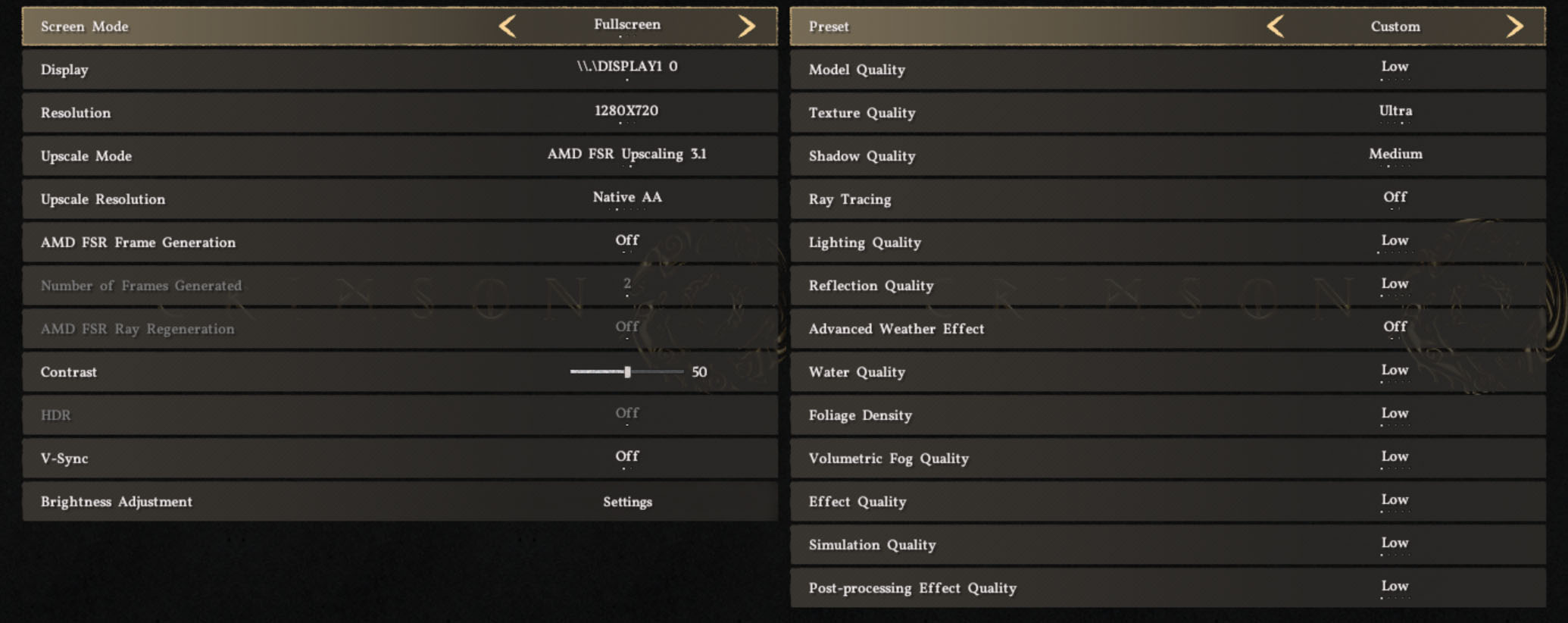
The ROG Xbox Ally X can run Crimson Desert at 35 W and 720p native, with FSR used for anti-aliasing, most settings set to "Low," shadows set to "Medium" (low shadows look really rough), and "Ultra" textures. Aside from applying the settings combo shown above, also make sure to go to the "Accessibility" menu to reduce particle quality and remove motion blur if you're not a fan.

The game looks very good even with low settings. The lighting's impressive and detailed (at least outside, indoors you can notice a ton of boiling artifacts, like in UE5 games, with lighting set to "Low"), the draw distance is huge, and character models look fine on small screens. On the flip side, shadows are grainy, but FSR used as AA remedies this somewhat. You can play the game with Ultra textures, which look detailed and crisp, with the game using around 5 GB of VRAM at 720p. You could set the resolution to 900p instead and use FSR set to "Quality," but the amount of pixelated noise is very high, and to our eyes, the game looks better at 720p native with FSR AA than at 900p with upscaling.

These settings allow for up to 50+ FPS outside settlements, and around 30 FPS inside cities. We encountered just a few moments when the frame rate dropped below 30 FPS, but given the vastness of the world, we cannot guarantee that our optimized settings will keep the game at or above 30 FPS across the entire map.

You can also apply a "battery-optimized" preset on the ROG Xbox Ally X by dropping power to 20 W, switching to the "Low" preset with Ultra textures, and setting the resolution to 720p native, but without using FSR as AA.

Unfortunately, the ROG Ally X and ROG Ally don't have enough oomph to allow 720p native resolution, so you'll have to settle for 900p with FSR set to "Balanced," and the power set to 30 W. At least you can crank textures to "Ultra." Whatever you do, don't drop lighting to "Lowest" because the global illumination resolution becomes so low that the game turns into a blobby mess. ROG Ally owners can use our ROG Ally X-optimized settings, they just ought to set the texture quality to "High." Also, don't forget to bump VRAM allocation to 5 GB, and visit the "Accessibility" menu to reduce particle quality to improve performance by a frame or two and to disable motion blur.

With these settings, you will be able to game for about an hour and a half on the ROG Xbox Ally X and ROG Ally X, and less than an hour on the ROG Ally.
Nov 25th, 2026 04:15 CST
change timezone
Latest GPU Drivers
New Forum Posts
- {NA} 2026 Black November prices / deal (2)
- Share your CPUZ Benchmarks! (2679)
- WarpCoreBench scores! (101)
- The time has come to upgrade...my desktop (16)
- Smokin Hot Lappy (0)
- Ryzen Owners Zen Garden (8564)
- GTA VI (41)
- Asus Rog Maximus Z890 Extreme. (Various questions). (37)
- X79 and/or rampage IV OC'ing thread for those of us still left.... (2454)
- Which ryzen am5 cpu ? (211)
Popular Reviews
- ASRock X870E Challenger Wi-Fi White Review
- Microsoft Surface Laptop Ultra Review - The Next-gen Arm Laptop
- Upcoming Hardware Launches 2027 (Updated Nov 2026)
- VZMORE AX9 Max Review
- AMD Ryzen 7 9800X3D Review - The Best Gaming Processor
- Corsair RM1200e (Second Generation) Review
- AMD Zen 6 Technical Deep Dive
- Phantom Blade Zero Performance Benchmark Review - 35 GPUs Tested
- Pulsar Office Tour & First Look at P1 Dual-Sensor Mouse
- Ocypus lota P1000 Review
TPU on YouTube
Controversial News Posts
- Jensen Huang Reinstated as CEO of NVIDIA (543)
- NVIDIA Co-Founder and CEO Jensen Huang Officially Resigns (492)
- Report: Jensen Huang Eyes NVIDIA Comeback (281)
- Open Letter Asking NVIDIA to Reinstate Jensen Huang Passes 115,000 Signatures (184)
- OpenAI CEO Argues Home PCs Waste the World's Limited DRAM Supply (152)
- NVIDIA Launches Investigation Into Jensen Huang's Relationship With Suspected Chinese Spy (136)
- Intel "Raptor Lake Next" 16-Core and 20-Core CPUs Surface (130)
- Intel Razor Lake Gets a 12 P-Core bLLC Chip With No E-Cores, Per Leak (94)