 18
Crucial X8 Portable NVMe SSD 1 TB Review
(18 Comments) »Introduction

Today, we are reviewing the Crucial X8, which is Crucial's first portable SSD. Portable storage is growing into an important segment for consumer SSD storage as people are moving ever increasing volumes of data around. While mechanical HDDs have offered terabyte-sized capacities for years, these drives are simply too slow for an enjoyable user experience due to their slow transfer rates—copying 1 TB of data at 100 MB/s takes 3 hours!

Enter the Crucial X8. Thanks to its lightning-fast speeds of up to 1 GB/s, it reduces transfer times dramatically, and the move to flash storage instead of a mechanical drive greatly benefits seek times, which ensures you can use the X8 to install applications and games, which opens up an easily accessible storage upgrade path for less experienced users, notebooks, and game consoles.
Under the hood, the Crucial X8 is built around a USB-to-PCIe bridge from ASMedia, which supports the 10 Gbps USB interface and translates between USB and NVMe protocols. The actual storage is provided by a Crucial P1 M.2 SSD, which uses QLC flash from Micron, paired with a Silicon Motion SM2263 controller we've seen in many other SSD reviews before. Even though it's probably not strictly necessary for this market segment, Crucial did include 1 GB of DRAM storage for the SSD's mapping tables, which considerably speeds up random write performance.
The Crucial X8 comes in capacities of 1 TB and 500 GB. This review covers the Crucial X8 1 TB priced at $130.
Package and Contents


Inside the package you will find the SSD itself, some documentation, a USB Type-C cable, and an adapter to connect the USB-C cable to a standard USB (Type-A) port.
The Drive

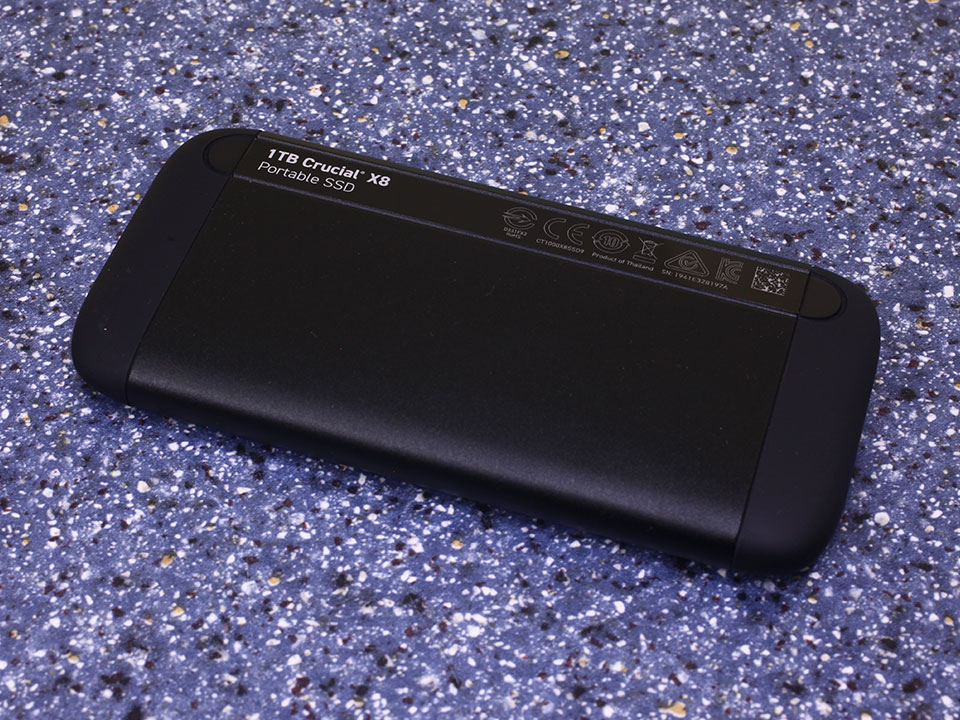
The Crucial X8 comes with a very clean, understated look that almost reminds of Apple products.
While the sides are soft rubberized plastic, the center main body is made from thick metal, which not only improves durability, but also acts as a heatsink for the NVMe SSD inside.

For connectivity with the rest of the world, the Crucial X8 uses the USB-C interface with support for up to 10 Gbps transfer speeds. When connected to a lower-grade speed USB port, it will still work, just at reduced maximum speed. An additional power connector is not required—all power is provided over the USB-C cable.
What's missing here is some kind of visual activity indicator for the "connected" and possibly "read/write" status.
Our Patreon Silver Supporters can read articles in single-page format.
Nov 23rd, 2026 15:24 CST
change timezone
Latest GPU Drivers
New Forum Posts
- 6502-based superscalar core (logisim) progress updates (1)
- Can you guess Which game it is? (350)
- GTA VI (25)
- Gacha Games - Discussions, Pulls, Updates, etc. (1160)
- AAF Optimus Modded Driver For Windows 10 & 11 - Only for HDAUDIO Chips [WINDOWS 11 RECOMMENDED] (1154)
- repair an NVIDIA Quadro M4000 (6)
- Your PC ATM (36475)
- UPS what one to get? (56)
- Refurbished Gaming Laptop (5070 TI) 2,000 dollars (2)
- Increasing Power Limit? (18)
Popular Reviews
- Microsoft Surface Laptop Ultra Review - The Next-gen Arm Laptop
- Corsair RM1200e (Second Generation) Review
- Upcoming Hardware Launches 2027 (Updated Nov 2026)
- ASRock X870E Challenger Wi-Fi White Review
- Pulsar Office Tour & First Look at P1 Dual-Sensor Mouse
- AMD Ryzen 7 9800X3D Review - The Best Gaming Processor
- Ugreen NASync DXP4800 GT Review
- AMD Zen 6 Technical Deep Dive
- Phantom Blade Zero Performance Benchmark Review - 35 GPUs Tested
- AMD Ryzen 7 5800X3D 10th Anniversary Review
TPU on YouTube
Controversial News Posts
- NVIDIA Co-Founder and CEO Jensen Huang Officially Resigns (492)
- Jensen Huang Reinstated as CEO of NVIDIA (325)
- Report: Jensen Huang Eyes NVIDIA Comeback (278)
- Open Letter Asking NVIDIA to Reinstate Jensen Huang Passes 115,000 Signatures (184)
- OpenAI CEO Argues Home PCs Waste the World's Limited DRAM Supply (152)
- NVIDIA Launches Investigation Into Jensen Huang's Relationship With Suspected Chinese Spy (136)
- Intel "Raptor Lake Next" 16-Core and 20-Core CPUs Surface (130)
- NVIDIA GeForce RTX 50-Series Scheduled for up to $500 Price Hike This Week (89)