 1
Cyber Snipa Intelliscope Laser Gaming Mouse Review
(1 Comment) »Introduction

I would like Cyber Snipa for supplying the review sample.
To give you an idea about the company behind the brand, their website has a Link to their Mission Statement:
Our philosophy is simpleToday we get to take a look at the Cyber Snipa Intelliscope Gaming Mouse. The mouse specifications are:
- To build a leading brand that represents PC modification and gaming accessory products of the highest quality and innovation.
- To provide our global partners with a level of service that is consistent with our premium product range.
- To help our global partners grow, through reliable service, quality products, flexibility and co-operation.
- Package: 260 x 260 x 45mm
- Laser: 2400dpi (blue), 1000dpi (red)
- Frame Rate: over 10,800fps
- Connection: USB
- System: Win XP,2000,ME & OS 9+
- Weight: 130/390 grams (excl/incl packaging)
Packaging & Contents


The packaging is kept in the same format as most other mice. It is square with a window to let you take a close look at the mouse. The window is big enough for you to grab the mouse, to get a feel for the shape and size of the gaming device. The front of the package notes the two DPI settings, while the back lists all the features in multiple languages with a few pictures to emphasize major functions.
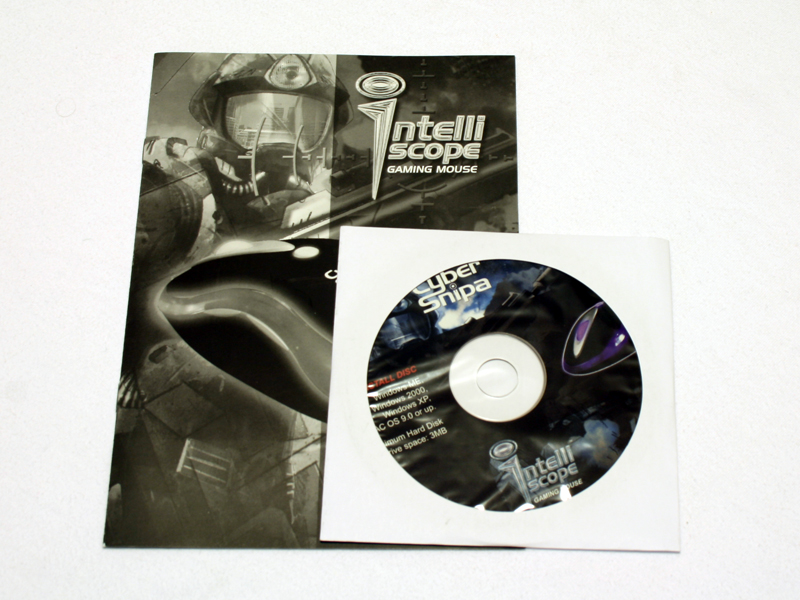
Besides the Intelliscope, you will find a manual and a Software CD inside the package.
A Closer Look


The shape of the Intelliscope is symmetrical. This means, it can be used by right handed gamers as well as left handed players. The software actually has a function to set the mouse up right instantly. There is a large crosshair at the back of the mouse. The main buttons are part of the back cover, which is kept in a matte black. The left side of the Intelliscope features two buttons, which are used to navigate back and forth in Windows. The left side features a long, very slim button, which simply brings you to the end of a page by default. This function does not seem to be of much use, but can be changed with the included software. On top you will find the usual left and right buttons, as well as the scroll wheel, which acts as the middle mouse button if pressed. Below this, there is a round button with an "i" on it. This switches the DPI settings between 1000 and 2400 DPI.


While it may not seem so at first look, the mouse has 12 embedded LEDs as well as two additional ones under the scroll wheel. Half of these are blue and light up when the mouse is set at 2400 DPI while the red ones are active when you are using 1000 DPI.

Placing the mouse on a mouse pad, you may notice how strong the blue light is. Naturally it is brighter than red light, but I did not even need to turn off or dim the surrounding lights to take the above pictures. The Intelliscope has by far the brightest LEDs I have seen in any such device and will certainly draw a lot of attention at dark LAN parties.


The overall size of the Intelliscope is well balanced. Neither too large nor too wide for smaller hands, while just long enough to accomodate most gamers. The bottom of the mouse features six skid pads. Four of these are in form of circles with a 5-6 mm diameter, while two are in a very long shape on the side of the mouse. It would have been better to use a bit larger ones on top and bottom.
There is a safety sticker on the laser unit as well. The Saitek GM3200 is the only other mouse, which has a protecting sticker on the bottom and it looks exacly the same as well. This may just be two different manufacturers using the same sticker, or both mice being produced at the same location.
Our Patreon Silver Supporters can read articles in single-page format.
Nov 15th, 2026 08:19 CST
change timezone
Latest GPU Drivers
New Forum Posts
- What generation of Wi-Fi do you use at home (98)
- I'll flash a ASUS ROG Strix RX480 O8G in Cause of Code 43, as a Newbie (5)
- Honestly, do you care about GTA VI? (58)
- Recommendations Wanted - Affordable Enterprise SSD for Boot (4)
- Is this anyhow possible, that a GPU (ROG Strix RX480 O8G) can crash the whole PC after "ReFlash" in normal Mode? (2)
- WarpCoreBench scores! (47)
- So where’s y’all’s lowbie or noob finds? Do you think Amazon is to blame for spending 64 dollars on a 35 dollar R36S klone? Is it good or bad? (0)
- Optical Disc Drive owners club (216)
- Planning for Prolonged High Prices and Maintaining What You Already Have (73)
- What can the FX 8320 do today? Here is the answer. (55)
Popular Reviews
- AMD Zen 6 Technical Deep Dive
- ASUS ROG Strix B850-I Gaming Wi-Fi7 W Review
- Corsair HX1000i Shift Crystal Review
- Upcoming Hardware Launches 2027 (Updated Nov 2026)
- Montech King 95 3D PRO Review
- NZXT C1200 Platinum Review
- NZXT H7 RGB+ Review
- NZXT H5 Review
- Phantom Blade Zero Performance Benchmark Review - 35 GPUs Tested
- AMD Ryzen 7 9800X3D Review - The Best Gaming Processor
TPU on YouTube
Controversial News Posts
- NVIDIA Co-Founder and CEO Jensen Huang Officially Resigns (411)
- OpenAI CEO Argues Home PCs Waste the World's Limited DRAM Supply (152)
- NVIDIA Launches Investigation Into Jensen Huang's Relationship With Suspected Chinese Spy (136)
- Intel "Raptor Lake Next" 16-Core and 20-Core CPUs Surface (130)
- Legendary Game Studio BioWare Shuts Down Following EA Layoffs (104)
- Open Letter Asking NVIDIA to Reinstate Jensen Huang Passes 115,000 Signatures (98)
- Dell CEO Says the Memory Shortage Will Get Worse in 2027 (95)
- NVIDIA GeForce RTX 50-Series Scheduled for up to $500 Price Hike This Week (89)