 14
Ducky One X Inductive Keyboard Review
Value & Conclusion »Lighting and Performance


The Ducky One X supports N-key rollover USB, which tested successfully using Aqua's test. Switch Hitter confirmed no chatter with these keys either, and seen above are all the functions with dedicated keys on the base layer. This keyboard in the full-size US ANSI layout has 108 keys and R. Win is replaced by the Fn key which is used for the Fn layer itself.

The Fn layer typically makes or breaks a smaller form factor keyboard, and indeed Ducky has more pre-programmed functions built into the 60% version of the One X that seems to be referred to as the One X Mini. With the full-size version, you obviously get all the keys expected and then some too—there are four extra keys here for dedicated volume control and a calculator shortcut similar to a few other Ducky keyboards before. I suspect most would have preferred a volume knob, but these keys work plenty fine for me. The Fn layer also provides hotkeys to quickly check the battery level in that you press Fn + B that lights up the number keys in the alphanumeric section to a static red, with the numbers corresponding to 10% battery increment. So for reference, if 1–0 keys all light up, the keyboard battery is at 100% capacity. Inductive switches are inherently more efficient than magnetic ones, again owing to the lack of an individual sensor per switch. However, Ducky decided to only pack a 2000-2500 mAh battery—I heard both numbers from Ducky, although the most recent one mentioned 2000 mAh for what it is worth. This means that battery life is again not on par with many wireless mechanical keyboards these days—I have seen 60% keyboards incorporate a 4000+ mAh battery inside, so this is once again me complaining about Ducky leaving easy points on the table. Ducky rates the battery life between 12 and 38 hours on the One X 100% version based on the LED brightness and lighting effects, as well as Bluetooth or 2.4 GHz mode used. I consistently got the keyboard to go from 100% to asking for a battery charge with all LEDs set to white at 100% within 25 hours using 2.4 GHz mode, so take that for what you will. Charging the battery takes ~3 hours—fairly decent, but only because the battery capacity is on the lower side to begin with.
Using the 2.4 GHz mode is as simple as inserting the pre-paired USB dongle in your PC. I had no issues using the One X this way, with one of the lower latencies rated by Ducky for all wireless keyboards too. In fact, while I won't go into the details here, Ducky merits props for taking the time to ensure the One X has flawless performance when used wirelessly this way. Bluetooth pairing is done via the Fn layer, allowing you to connect the One X with up to three clients simultaneously, albeit with one active connection at a given time as usual with Bluetooth. Win key lock and a factory reset is also possible here, although no doubt people are going to laugh about "Duck" mode which might be handy for some people in certain situations. There's not much else going on here, and here is perhaps where Ducky could have again added hardware controls over actuation distance, rapid trigger, on-the-fly macro recording, and profile selection to add to the user experience.


Surprisingly, there are no hardware lighting controls either—something pretty much any keyboard I've reviewed in the last few years have adopted. This means you are unable to change the LED brightness, color, lighting effect, speed, direction or even toggle the LEDs on/off by default. Again, these could be easily added via a firmware update later on, and you can certainly use the web configurator, but I want to see Ducky at least offer these as options for key mapping to add to the Fn layer sooner than later. This is all the more relevant because the One X, at least in this US ANSI version, has backlit keycaps for a welcome change. Indeed, the keycap legends are quite clearly seen under low light conditions thanks to the LEDs on board, with some of the available lighting effects seen above. There's no side/bottom lighting here, yet this is one of the brighter all-black keyboards I've tested. I will also give credit to Ducky for managing to put out a very accurate white from the RGB LEDs too.

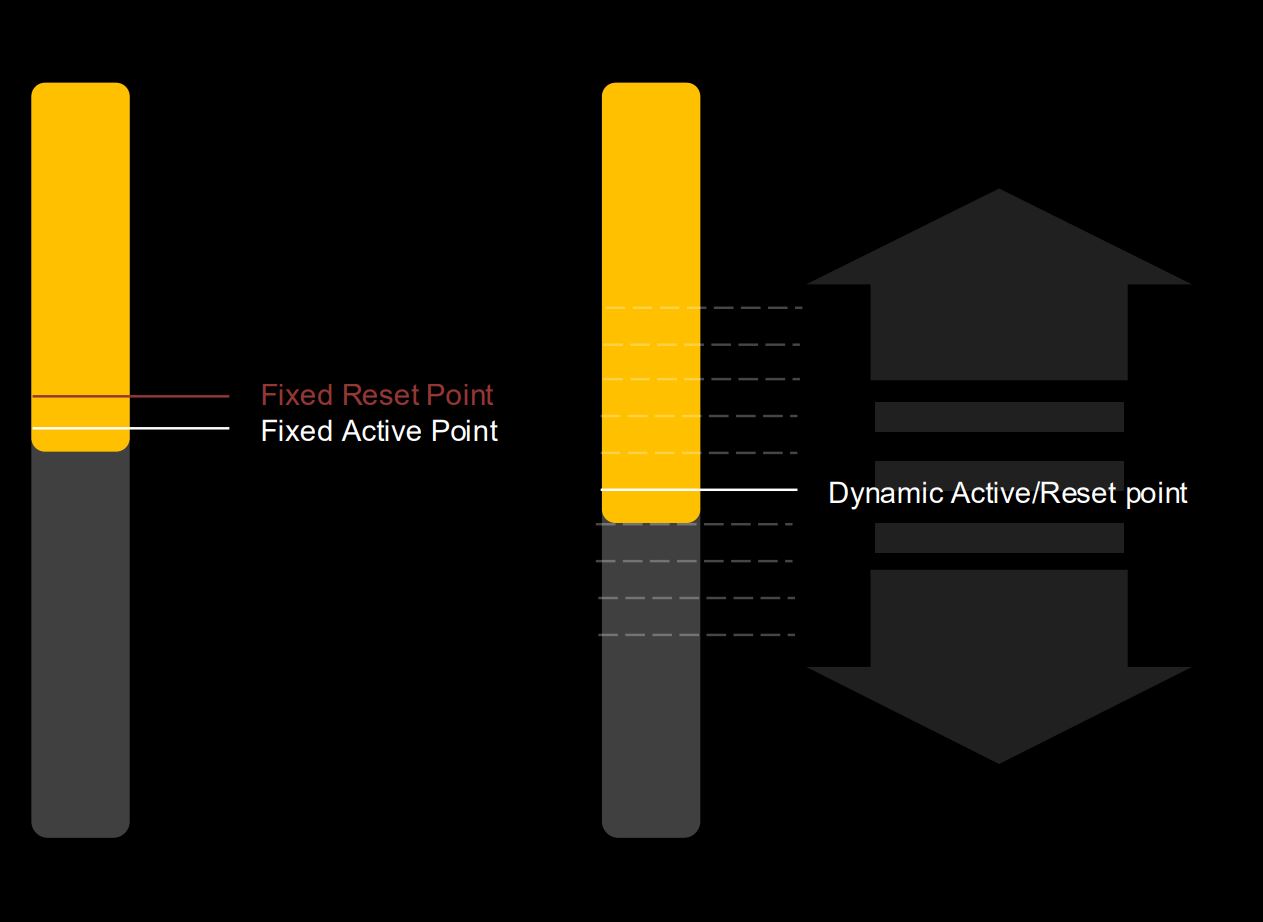

The biggest thing with magnetic switches is the ability to customize the actuation distance. We've got to the point now where pretty much any HE keyboard offers this, and it does so by relying on third-party switches and sensors which tend to be shared by the vast majority of keyboards. Ducky, as I am sure will be the case with other brands sooner than later, has decided to opt for inductive switches which can simplify things in not needing to have an individual sensor per switch, as opposed to a few induction coils in the PCB as a whole. The number of coils used depends on the keyboard size as well as accuracy/precision parameters desired, but overall there is lots of potential for inductive switches to not only lower the cost entry barrier to features that were a trademark of magnetic/optical switches while also allowing switch manufacturers more freedom to play around with the feedback mechanism and typing feel. Whether we will see these realized will depend on how successful the first few inductive switch keyboards are, with the Ducky One X effectively having a lot of pressure on it. We saw before how you get customizable actuation distance here on a per-key basis, with a long range of 0.1 to 3.5 mm in 0.1 mm steps. There's also rapid trigger, which allows for a dynamic actuation and reset point depending on the switch travel and when you pull your finger off the switch. This can be handy if you don't believe your fingers can be precise enough to make full use of the actuation range and travel distance, which in turn does reward you with multi-point trigger (dynamic keystroke) where you can assign multiple functions per key/switch depending on the travel distance and path up or down. I do think these features alone will satisfy the vast majority of end users, yet we are in an era of magnetic switch keyboards where not having continuous rapid trigger and SOCD (Simultaneous Opposing Cardinal Directions), among other things, can be a dealbreaker regardless of whether you plan to use them, or can even use them without being banned in some online multi-player games. Again, these are things which can be added in the future, yet I can only review the keyboard in its current state.


The Ducky One X only comes with Ducky-branded inductive switches, which should be no surprise given this is the key selling point of the keyboard. These are linear switches using nylon housing and a POM stem, and all I can tell you is this feels to be a medium force switch in terms of actuation and peak force when bottomed out. Ducky does not provide a force-travel diagram or rated actuation force at specific travel distances, which of course is less standard for these switches given you can change the actuation distance. By default, the switches actuate at just 0.6 mm travel, making them extremely "speedy" in comparison to mechanical switches that typically actuate further down. This is no different from how a magnetic switch would work too, and I would say the Ducky inductive switches are quite smooth in travel, especially with minimal friction of the stem gliding down the housing walls. The only issue is there is more switch wobble in the absence of any support pin, so you would want to have deliberate keystrokes with the fingers pressing down in the center of the keycaps whenever possible. The stabilizers are some of the best on pre-built keyboards in the price range this keyboard operates in, as well as slightly higher too. They feel consistent without any mushy feedback, and the lube applied is optimal throughout.
As always, the sound of a keyboard is based on more than just the switch type. So when comparing sound clips, consider the keyboard as a whole. In this case, I have provided above an example sound clip of me typing on the Ducky One X keyboard sample at ~105 WPM as it comes out of the box with the Ducky inductive switches. For context, you can find sound clips from other keyboards here, including those with linear switches. I did bottom out here, which you are probably going to do as well during regular typing unless you really practice making the most of the rapid trigger and/or multi-point trigger features. I wish the spring was heavier to help out, yet that would have made this less attractive for gamers who generally prefer a lighter and snappier typing experience. The keyboard has pretty good sound dampening in general, with various layers of foam and silicone used as previously discussed. In general, my keystrokes also feel more supported than some keyboards that claim to have a gasket mount too, showing once again that the mount type itself only makes a difference if it is well implemented. There were no pings or high-pitched reverberations thus, although I will say the stabilizers are not very uniform in sound even if they feel similar enough in use.
Nov 19th, 2026 15:27 CST
change timezone
Latest GPU Drivers
New Forum Posts
- Windows 11 General Discussion (7736)
- Current Sales, Bundles, Giveaways (10448)
- Last game you purchased? (1409)
- WarpCoreBench scores! (76)
- Got the EOL 32GB TridentZ 6000 CL26 1.4V (12)
- Dell Workstation Owners Club (3516)
- Making a game in Godot engine (4)
- DTS DCH Driver for Realtek HDA [DTS:X APO4 + DTS Interactive] (2815)
- Security Apps (2)
- How to prevent OLED burn damage due to PC freezes or power outtages? (28)
Popular Reviews
- Acemagic Retro X3 Review
- Ugreen NASync DXP4800 GT Review
- Upcoming Hardware Launches 2027 (Updated Nov 2026)
- Pulsar Office Tour & First Look at P1 Dual-Sensor Mouse
- AMD Zen 6 Technical Deep Dive
- Biwin Black Opal NV7400 2 TB Review
- Sapphire Radeon RX 7700 XT Pure Review
- Sapphire Radeon RX 7700 XT Pulse Review
- AMD Ryzen 7 9800X3D Review - The Best Gaming Processor
- Chieftec Iceberg PRO 360 DARK Review
TPU on YouTube
Controversial News Posts
- NVIDIA Co-Founder and CEO Jensen Huang Officially Resigns (486)
- Report: Jensen Huang Eyes NVIDIA Comeback (223)
- Open Letter Asking NVIDIA to Reinstate Jensen Huang Passes 115,000 Signatures (184)
- OpenAI CEO Argues Home PCs Waste the World's Limited DRAM Supply (152)
- NVIDIA Launches Investigation Into Jensen Huang's Relationship With Suspected Chinese Spy (136)
- Intel "Raptor Lake Next" 16-Core and 20-Core CPUs Surface (130)
- Legendary Game Studio BioWare Shuts Down Following EA Layoffs (104)
- Dell CEO Says the Memory Shortage Will Get Worse in 2027 (95)