 3
ECS PF5 Extreme Review
Value & Conclusion »Overclocking
Overclocking is a pain with this board. Every time the board doesn't complete the POST the CMOS checksum will be invalid, which means you have to redo all settings in the BIOS. This also happens sometimes when the board crashes in Windows, for example during a stability test.The next issue is that manual memory timings are not possible, because of a BIOS bug, which is fixed now. Let's hope ECS gets the update out fast.
Another issue I had was with the BIOS flashing. Every time I updated the BIOS using the flashing utility in DOS, I would get "CMOS checksum failure" on every reboot after the update, not only the first one. This basically left me with a non-booting motherboard: CMOS checksum failure, hit F1 to enter BIOS. F1. Save. Reboot. CMOS checksum failure, hit F1 to enter BIOS, and so on ...
The only way to get a working system was using the ECS Top Hat Flash and use the BIOS flashed on it to boot. Then remove the Top Hat Flash and flash the original BIOS back.
After getting the first board replaced by ECS, and seeing the same issue again, I found out that you MUST use the Windows flashing tool to update your BIOS. The DOS tool does not seem to write to all areas.
Next issue: the TRCD and TRP settings are not correctly applied. If you set 4-3-3-8, it becomes 4-4-4-8. 5-3-3-9 becomes 5-4-4-9. This can be changed with SysTool in Windows though. I think the BIOS always uses TRCD and TRP from the memory's SPD info.
Last but not least, the i945 overclocking lock is in effect. The chipset compares the PCI-Express clock and the FSB clock. If the difference is too high, the system will not start (more details in our ABIT AL8 review). In order to get around this, the "PCIE CLK Synchronize" setting in the BIOS exists. When it is enabled, any increase to the FSB will also increase the PCI-E clock a bit. A distinct setting where you can freely pick the frequency would be better (the clock generator does support it). The problem with the linked setting of the PF5 is that you can't just indefinitely increase the PCI-E frequency. At some point the SATA drives are no longer detected, and a bit further the video card does not initialize right.
With all these issues and gotchas I could still get the board to run at 241 FSB = 3618 MHz. One MHz more and the SATA drives were gone.
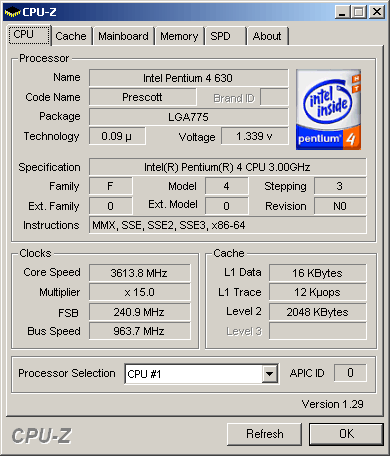
With the BIOS set to 241 FSB booting into Windows works fine and the system is stable all day. Next I used SysTool to reprogram the motherboard's clock generator, which let me use frequencies up to 293 FSB = 4395 MHz. Any higher setting would not apply to the clock generator and the clock would not change.
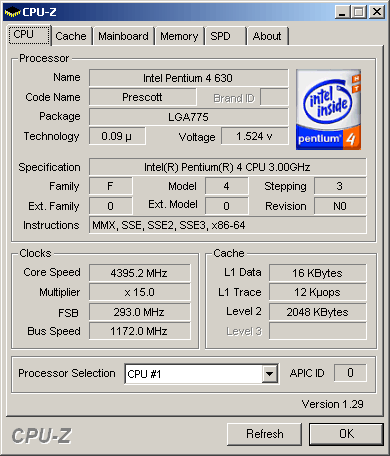
The benchmarks were run at 3618 MHz and at 4395 MHz as well. Some benchmark results do not seem to improve because changing the clock within Windows affects of how some benchmarking program measure time.
Nov 19th, 2026 18:26 CST
change timezone
Latest GPU Drivers
New Forum Posts
- Building a hardware monitor, diagnostics and benchmark tool – would you use it? (29)
- Dual B70 or Dual R9700 Pro on Linux (11)
- How to prevent OLED burn damage due to PC freezes or power outtages? (30)
- TPU's Nostalgic Hardware Club (22170)
- Security Apps (3)
- Got the EOL 32GB TridentZ 6000 CL26 1.4V (12)
- Honestly, do you care about GTA VI? (167)
- Dell Workstation Owners Club (3517)
- Making a game in Godot engine (6)
- Introducing DST Bench : one of the most advanced disk benchmark and storage analyzer real-time software (6)
Popular Reviews
- AMD Zen 6 Technical Deep Dive
- Ugreen NASync DXP4800 GT Review
- Acemagic Retro X3 Review
- Upcoming Hardware Launches 2027 (Updated Nov 2026)
- Pulsar Office Tour & First Look at P1 Dual-Sensor Mouse
- Corsair RM1200e (Second Generation) Review
- Biwin Black Opal NV7400 2 TB Review
- Chieftec Iceberg PRO 360 DARK Review
- AMD Ryzen 7 9800X3D Memory Performance Scaling
- AMD Ryzen 7 9800X3D Review - The Best Gaming Processor
TPU on YouTube
Controversial News Posts
- NVIDIA Co-Founder and CEO Jensen Huang Officially Resigns (489)
- Report: Jensen Huang Eyes NVIDIA Comeback (223)
- Open Letter Asking NVIDIA to Reinstate Jensen Huang Passes 115,000 Signatures (184)
- OpenAI CEO Argues Home PCs Waste the World's Limited DRAM Supply (152)
- NVIDIA Launches Investigation Into Jensen Huang's Relationship With Suspected Chinese Spy (136)
- Intel "Raptor Lake Next" 16-Core and 20-Core CPUs Surface (130)
- Legendary Game Studio BioWare Shuts Down Following EA Layoffs (104)
- Dell CEO Says the Memory Shortage Will Get Worse in 2027 (95)