 57
G.SKILL Trident Z5 NeoX RGB 6000 CL30 32 GB Review - EXPO ULL
AMD Ryzen 9950X: CPU Benchmarks »What is EXPO ULL?
AMD introduced EXPO (Extended Profiles for Overclocking) in late 2022 with the launch of the AM5 platform and Ryzen 7000 series processors, which supported DDR5 memory. The goal of EXPO is to provide an overclocking profile standard similar to Intel's XMP (Extreme Memory Profile), but tailored specifically for AMD's Infinity Fabric, CCD architecture, and memory controller. This optimization is a key point in AMD's marketing materials, emphasizing the benefits of using EXPO with their latest hardware.With the release of AMD AGESA 1.3.0.1b BIOS update, official support for EXPO 1.2 profiles was introduced, which includes the new optional EXPO ULL memory profile and the groundwork for future CUDIMM support. ULL stands for Ultra Low Latency, a special designation that helps ensure enhanced stability when operating at tighter sub-timing parameters beyond the standard EXPO specifications for a given frequency. EXPO ULL represents premium-certified memory profiles that guarantee out-of-the-box binned stability. While all memory adheres to standard JEDEC specifications, both EXPO and XMP provide tight timings for specific memory frequencies (Memory Profiles). AMD EXPO ULL goes a step further with an additional certification, giving users confidence in overclocked memory performance while maintaining reliability. To achieve the base EXPO certification, memory must pass MemTest86 (all tests) for 24 hours and Prime 95 Large FFT torture test for 12 hours. EXPO ULL adds another layer of stability with the Phoenix: Row Hammer test (1-Pass).
While we refer to EXPO here as a "guarantee" of a stable binned memory kit, it's important to note that this is more of a broad assurance that the memory has been EXPO "certified" by the vendor. However, AMD's EXPO Whitepapers do not specify the testing environmental constraints. This implies that memory tested in a climate-controlled room, such as a standard engineering laboratory with a fan directed at the memory, will likely pass these tests more easily. In contrast, a user at home with poor case airflow or a powerful graphics card that expels hot air near the memory might encounter systems errors. This situation remains the same whether the memory is EXPO certified or not, as it's simply the nature of memory overclocking.
Below is a table detailing each timing in relation to the profile. Those familiar with whitepapers will recognize that the names differ slightly (tAA vs CAS), and tWTR_L and tCCD_L_WTR are essentially the same, just with different naming conventions. We've opted to include both in the table for clarity. Other values in specifications, such as tCK, have been omitted for simplicity. These values are present across all three profiles but are not necessary to display.
A final note is that the JEDEC and XMP profiles include sub-timings that are typically not visible in other software like AIDA64, CPU-Z, and HWinfo. If any secondary timing is left blank (00), the motherboard vendor will use their own values. In some cases, even if the timings are present in the DRAM SPD, motherboard vendors might choose to set their own values instead. For EXPO ULL, the AMD motherboard is expected to respect all populated SPD values, though this isn't a requirement listed anywhere in the whitepapers. Similar to JEDEC and XMP, the motherboard vendors ultimately decide what "auto" settings truly to populate with the SPD data.
| JEDEC | XMP | EXPO | DDR5-6000 NeoX ULL | ||
|---|---|---|---|---|---|
| CAS (CL) | CAS (CL) | CAS (CL) | 30 | ||
| tRCD | tRCD | tRCD | 38 | ||
| tRP | tRP | tRP | 38 | ||
| tRAS | tRAS | tRAS | 32 | ||
| tRC | tRC | tRC | 68 | ||
| tWR | tWR | tWR | 48 | ||
| tRFC1 | tRFC1 | tRFC1 | 501 | ||
| tRFC2 | tRFC2 | tRFC2 | 402 | ||
| tRFCsb | tRFCsb | tRFCsb | 300 | ||
| tRRD_L | tRRD_L | tRRD_L | 8 | ||
| tCCD_L | tCCD_L | tCCD_L | 0 | ||
| tCCD_L_WR | tCCD_L_WR | tCCD_L_WR | 0 | ||
| tCCD_L_WR2 | tCCD_L_WR2 | tCCD_L_WR2 | 0 | ||
| tFAW | tFAW | tFAW | 20 | ||
| tCCD_L_WTR | tCCD_L_WTR | ||||
| tWTR_L | 16 | ||||
| tCCD_S_WTR | tCCD_S_WTR | ||||
| WTR_S | 6 | ||||
| tRTP | tRTP | tRTP | 12 | ||
| Intel XMP Only | |||||
| Command Rate | |||||
| AMD EXPO ULL Only | |||||
| tRRD_S | 4 | ||||
| tREFi | 46847 | ||||
How will I know if EXPO ULL is enabled?
How will I know if EXPO ULL is enabled? This is a valid question to ask regardless of your technical knowledge. Just imagine you get this new memory kit installed, and the gaming performance doesn't seem to change. It makes you wonder, is the EXPO ULL profile even enabled, or did I just waste money?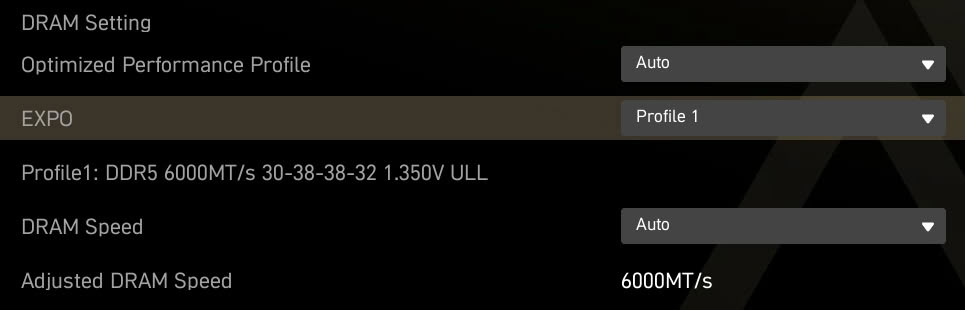
For our MSI X870E ACE MAX motherboard, when selecting Profile 1, "ULL" appears at the end. Nowhere else in the BIOS does it list the SPD timings. For now, you will have to rely on programs like Zentimings or HWInfo to see what is actually loaded.
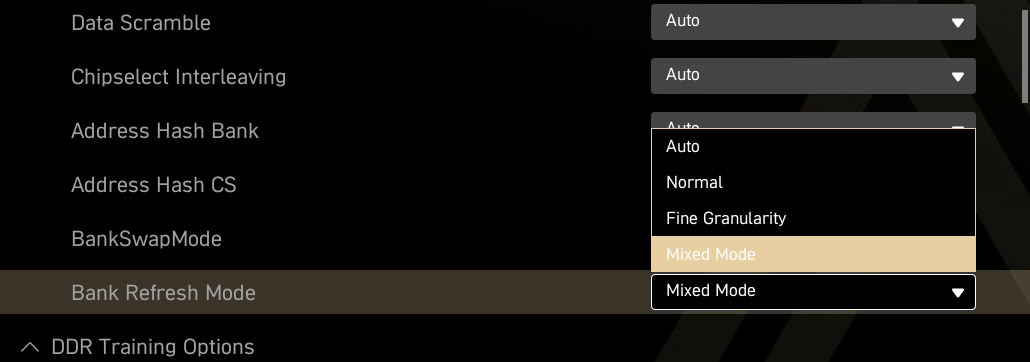
While not directly connected to EXPO ULL, when you have the AGESA 1.3.0.1b BIOS for ULL support you also get Refresh Management (RFM) BIOS option. This has moved out of its "beta" status and will automatically enable when ULL flagged memory is selected. Something to keep in mind is that this may have to be manually set to Mixed mode for XMP and EXPO (non-ULL).
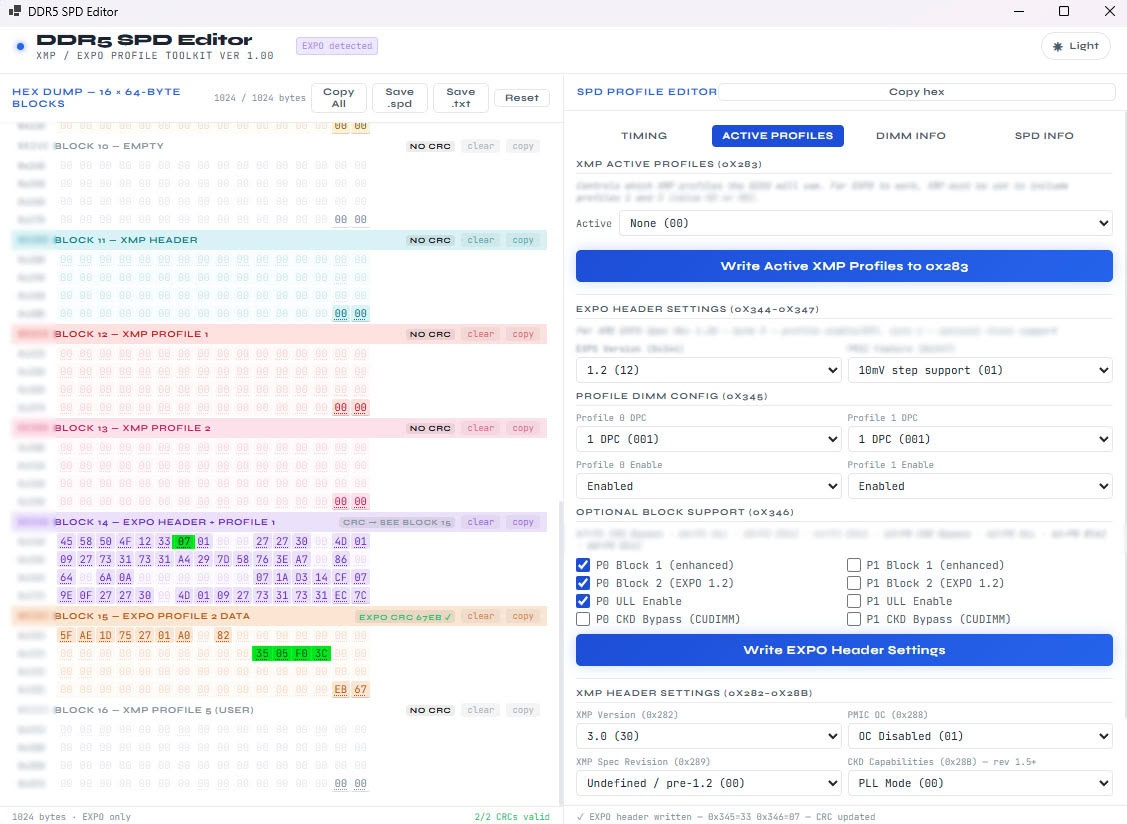
The RAW SPD data using our in-house SPD editor reveals that the ULL flag is enabled for Profile 1 (as expected), with the additional timings clearly highlighted in green. For enthusiasts interested in creating custom profiles, you only need to modify the hex code or use a program that handles the calculations for you, eliminating the need to manually work out the math.
Nov 22nd, 2026 00:34 PST
change timezone
Latest GPU Drivers
New Forum Posts
- Honestly, do you care about GTA VI? (239)
- How to prevent OLED burn damage due to PC freezes or power outtages? (53)
- Your PC ATM (36447)
- SATA drive 1.4 GBps with Intel X25-E on Windows 98! (41)
- TPU's Nostalgic Hardware Club (22191)
- Ryzen or Intel system (11)
- AI generated images... (231)
- RX 9000 series GPU Owners Club (2252)
- Introducing DST Bench : one of the most advanced disk benchmark and storage analyzer real-time software (7)
- UPS what one to get? (26)
Popular Reviews
- Microsoft Surface Laptop Ultra Review - The Next-gen Arm Laptop
- Corsair RM1200e (Second Generation) Review
- Pulsar Office Tour & First Look at P1 Dual-Sensor Mouse
- Upcoming Hardware Launches 2027 (Updated Nov 2026)
- Ugreen NASync DXP4800 GT Review
- AMD Ryzen 7 9800X3D Review - The Best Gaming Processor
- Biwin Black Opal NV7400 2 TB Review
- AMD Zen 6 Technical Deep Dive
- Phantom Blade Zero Performance Benchmark Review - 35 GPUs Tested
- AMD Ryzen 7 5800X3D 10th Anniversary Review
TPU on YouTube
Controversial News Posts
- NVIDIA Co-Founder and CEO Jensen Huang Officially Resigns (492)
- Report: Jensen Huang Eyes NVIDIA Comeback (262)
- Open Letter Asking NVIDIA to Reinstate Jensen Huang Passes 115,000 Signatures (184)
- OpenAI CEO Argues Home PCs Waste the World's Limited DRAM Supply (152)
- NVIDIA Launches Investigation Into Jensen Huang's Relationship With Suspected Chinese Spy (136)
- Intel "Raptor Lake Next" 16-Core and 20-Core CPUs Surface (130)
- NVIDIA GeForce RTX 50-Series Scheduled for up to $500 Price Hike This Week (89)
- Intel Razor Lake Gets a 12 P-Core bLLC Chip With No E-Cores, Per Leak (86)