 17
Gigabyte B850I Aorus Pro Review
Performance »SSD Temperatures
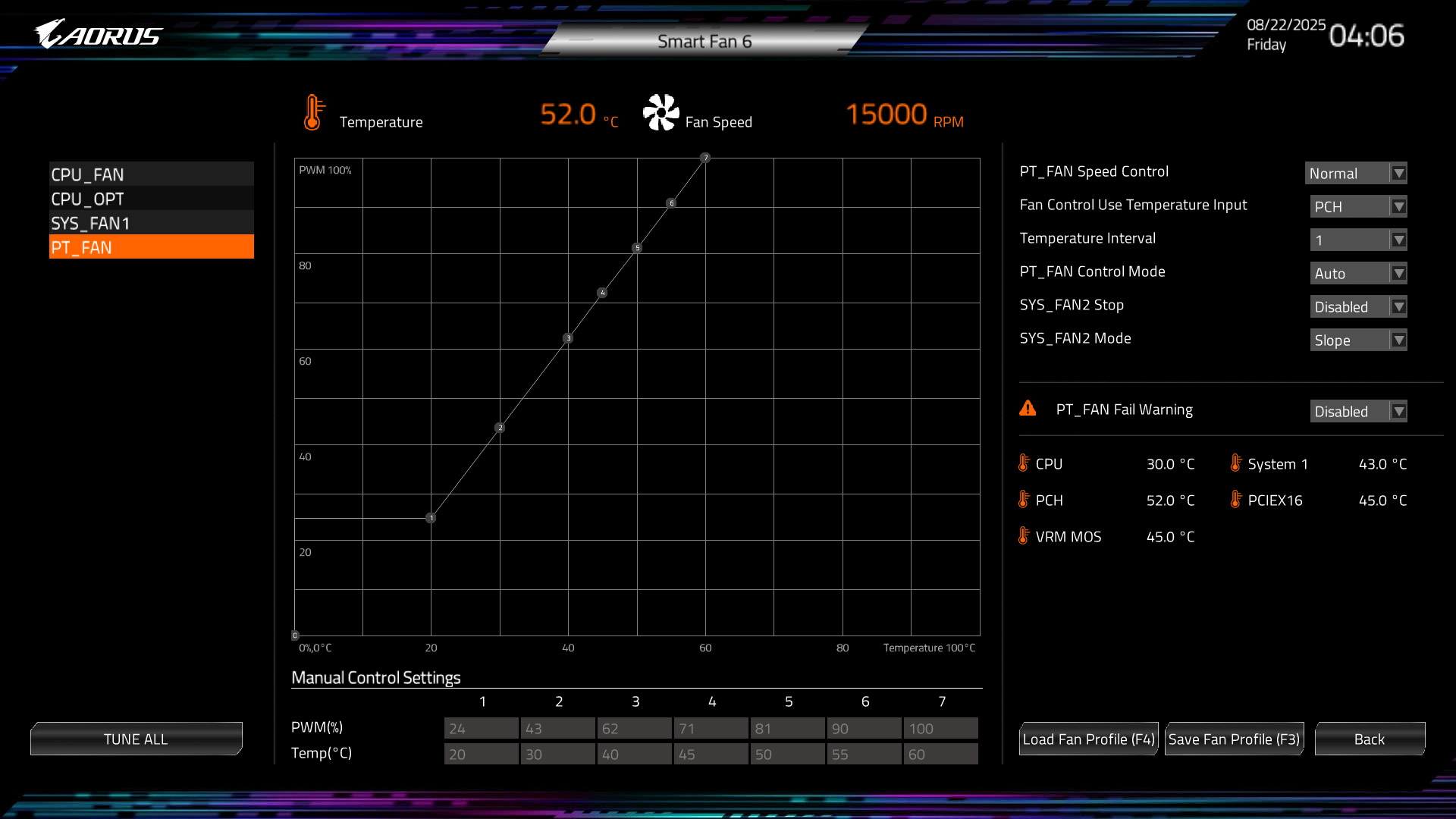
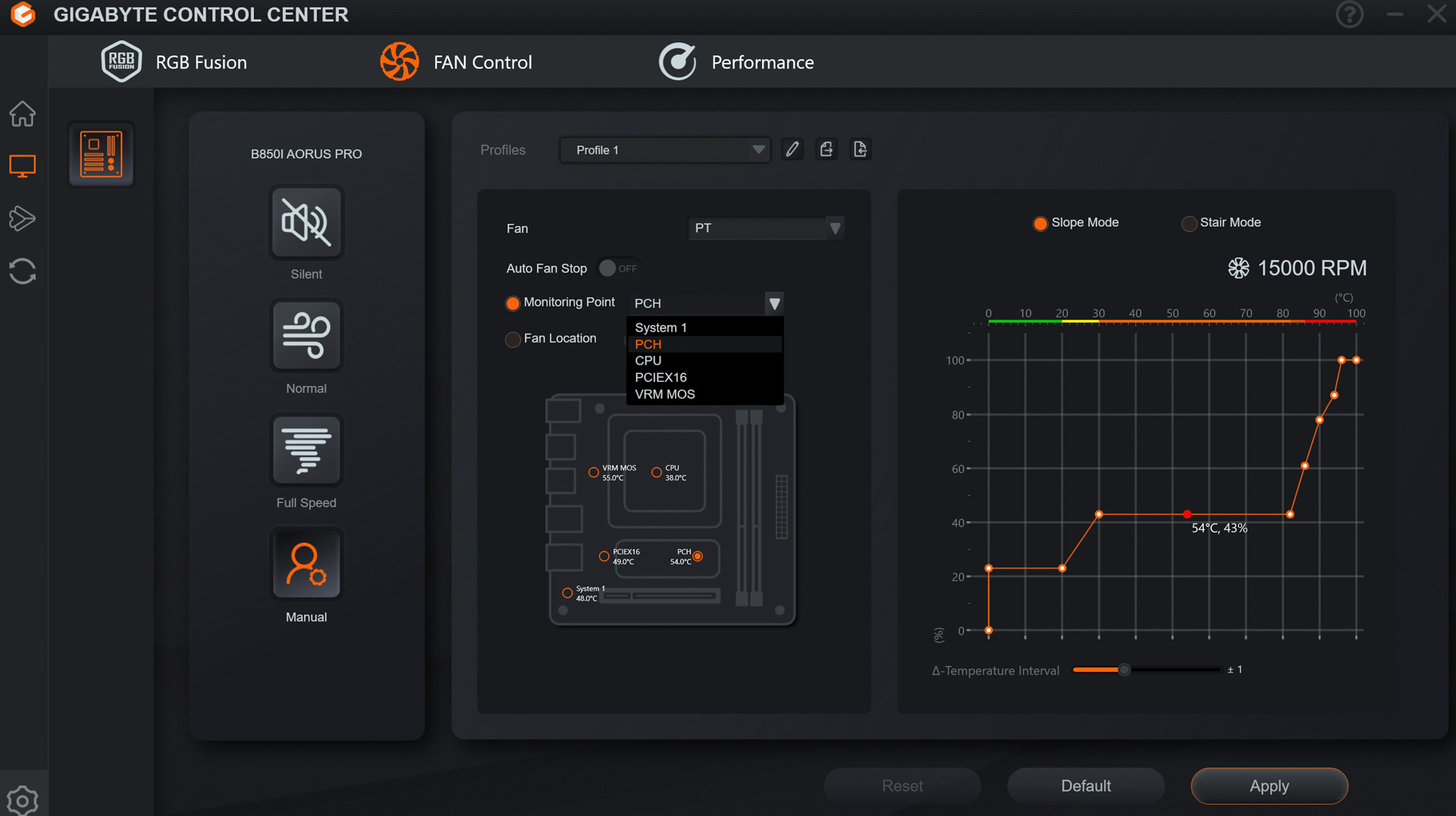
So, what is that M.2 fan actually like? Well, sadly, it's extremely noisy and also the fascia on top massively impedes airflow to it, as we'll see in a moment. The aggressive default fan curve sees it ramp up well above 10,000rpm quickly, but the PCH temperature input remained somewhat high—with a PCIe Gen 5 SSD sat above the heatsink—resulting in noise levels that were intrusive almost from the start. Both EFI and software do give you control over the fan and the software does allow you to switch inputs, but as we mentioned previously this isn't particularly useful. The main issue is noise, as the fan is a lot smaller than others we've seen, such as that on the MSI MPG B850I Edge Ti Wi-Fi, and anything above 7,000rpm is absolutely hideous to sit next to for more than a few moments.
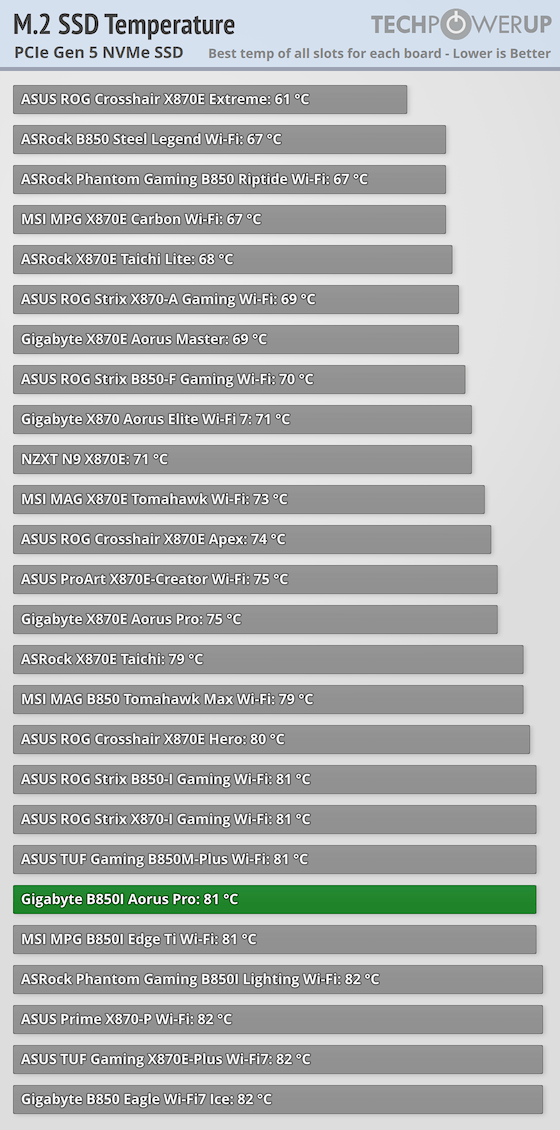
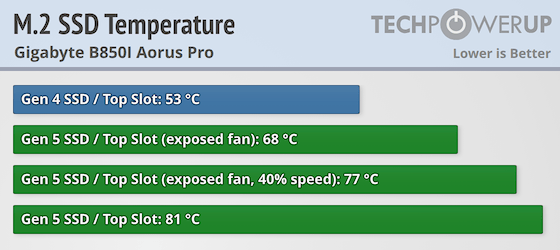
The sweet spot is at 40 percent speed, where there's enough airflow to make a difference, but noise levels are low enough to mostly be drowned out by other sources in your system, although this is obviously subjective. Starting with our PCIe Gen 5 SSD, out of the box things weren't great, with the SSD eventually topping 80°C and showing signs of throttling. This was the case despite the fan hitting a deeply unpleasant 15,000 rpm.
Clearly, dropping the speed from here wouldn't solve anything, so acting on a hunch that the fascia was affecting airflow, it was removed and this saw the temperature fall from 81°C to 68°C at default settings. Much better, but still noisy. Finally, the fan speed was cut to 40 percent and with the fan at much improved noise levels, the temperature was just about out of the danger zone at 77°C. The PCIe Gen 4 SSD was more than cool enough as usual, at just 53°C, which was amongst the lowest we've seen, but even disabling the fan entirely only saw a Gen 4 SSD temperature of 65°C and PCH temperature of 56°C, and this was with the fascia attached. Thankfully, the fascia is just held on with adhesive tape and is easy to remove. Removing it is essential for PCIe Gen 5 SSD owners in our opinion.

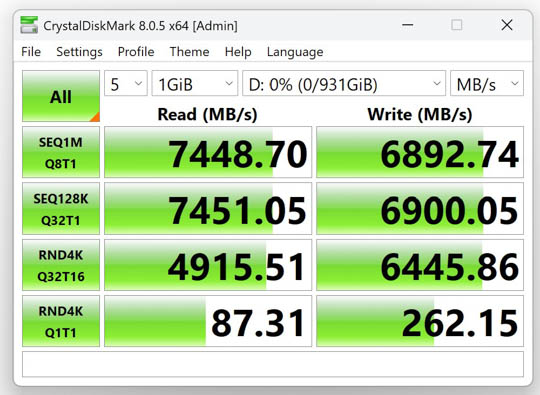
PCIe Gen 4 Performance (Samsung 990 Pro)
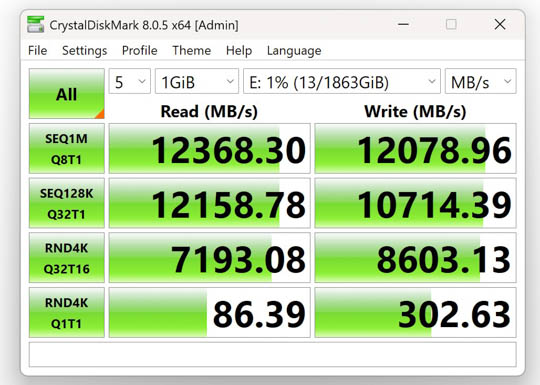
PCIe Gen 5 Performance (Team Group T-Force Z540)
Nov 19th, 2026 17:18 CST
change timezone
Latest GPU Drivers
New Forum Posts
- TPU's Nostalgic Hardware Club (22170)
- How to prevent OLED burn damage due to PC freezes or power outtages? (29)
- Security Apps (3)
- Got the EOL 32GB TridentZ 6000 CL26 1.4V (13)
- Honestly, do you care about GTA VI? (167)
- Dell Workstation Owners Club (3517)
- Making a game in Godot engine (6)
- Introducing DST Bench : one of the most advanced disk benchmark and storage analyzer real-time software (6)
- Windows 11 General Discussion (7736)
- Current Sales, Bundles, Giveaways (10448)
Popular Reviews
- Acemagic Retro X3 Review
- Ugreen NASync DXP4800 GT Review
- Upcoming Hardware Launches 2027 (Updated Nov 2026)
- Pulsar Office Tour & First Look at P1 Dual-Sensor Mouse
- AMD Zen 6 Technical Deep Dive
- Biwin Black Opal NV7400 2 TB Review
- Sapphire Radeon RX 7700 XT Pure Review
- Sapphire Radeon RX 7700 XT Pulse Review
- Corsair RM1200e (Second Generation) Review
- AMD Ryzen 7 9800X3D Review - The Best Gaming Processor
TPU on YouTube
Controversial News Posts
- NVIDIA Co-Founder and CEO Jensen Huang Officially Resigns (489)
- Report: Jensen Huang Eyes NVIDIA Comeback (223)
- Open Letter Asking NVIDIA to Reinstate Jensen Huang Passes 115,000 Signatures (184)
- OpenAI CEO Argues Home PCs Waste the World's Limited DRAM Supply (152)
- NVIDIA Launches Investigation Into Jensen Huang's Relationship With Suspected Chinese Spy (136)
- Intel "Raptor Lake Next" 16-Core and 20-Core CPUs Surface (130)
- Legendary Game Studio BioWare Shuts Down Following EA Layoffs (104)
- Dell CEO Says the Memory Shortage Will Get Worse in 2027 (95)