 32
Gigabyte GO27Q24G Review - Borderless by Design, Gaming by Nature
Value & Conclusion »Gaming Performance
The GO27Q24G features a 240 Hz WOLED panel. Adaptive synchronization is supported on all modern GPUs within the 48 to 240 Hz range, with both FreeSync Premium and G-Sync Compatible certifications.Response Time and Overdrive
I tested the response time with the Open Source Response Time Tool Pro (OSRTT Pro), developed by Andrew McDonald of TechTeamGB. It's a nifty tool that, combined with the OSRTT Launcher app, measures panel response times and presents them through detailed graphs and easy-to-read heatmaps. You can find everything you might want to know about the OSRTT in its technical documentation and on the official website, where you can order your unit, too. The OSRTT Launcher gives us three interesting heat maps to observe.Perceived Response Time tells us how much time the panel took to transition from one color to another. This measurement is expressed in milliseconds and includes overshoot. In other words, if the panel exceeded the target value, the perceived response time also includes the time it took for the transition to recover from overshoot and stabilize on the target value. I'm running my tests with recommended settings, so with a fixed RGB 5 tolerance level and with gamma-corrected RGB values.
RGB Overshoot tells us how much a specific transition missed the target value. For example, if the panel was transitioning from RGB 51 to RGB 204, and it initially landed on RGB 212, the overshoot RGB value is 8. Overshoot can be both positive and negative, and it commonly occurs at extreme overdrive settings when pixels are driven by high voltage. In practice, an overshoot manifests as an afterimage or a halo around a moving object. It can be easily spotted even when doing something as basic as scrolling through a webpage.
Visual Response Rating is the most abstract heatmap generated by the OSRTT Launcher; in essence, it's an ever-evolving scoring system. To quote OSRTT's technical documentation, it is a finite score rather than a direct measurement. The calculation is pretty simple; it's: "100 - (Initial Response Time + Perceived Response Time)". Since both metrics use the same tolerance level, if a display doesn't overshoot, both times will be identical. This essentially rewards displays that are fast with a small amount of overshoot over displays that aren't as fast even if they don't overshoot at all - while still overall preferring ultra-fast, accurate monitors.
Here's how the Gigabyte GO27Q24G fares in the pixel response time test.
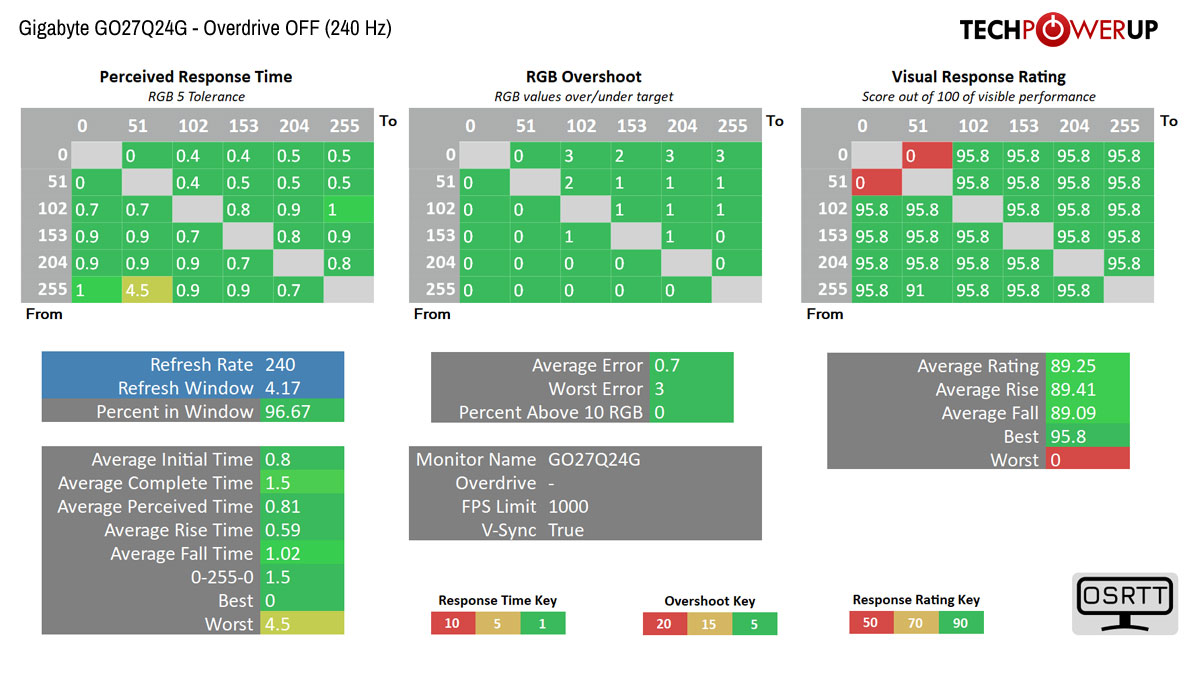
The results are exactly what a well-implemented 240 Hz OLED panel should produce. Average perceived response time comes in at 0.81 ms, with average complete time at 1.5 ms. Rise and fall transitions are both fast, averaging 0.59 ms for rising and 1.02 ms for falling. The full 0 to 255 and 255 to 0 swing measures 1.5 ms, well inside the 4.17 ms refresh window at 240 Hz. Overall, 96.67% of transitions complete within the frame time. The worst single transition clocked at 4.5 ms, still very fast by any standard.
Overshoot is essentially absent. Average error across all transitions is 0.7 RGB levels, and the worst single deviation is 3. No transitions exceed the 10 RGB overshoot threshold. This is OLED behaving as it should, achieving fast transitions through inherent material properties rather than aggressive voltage overdrive that would introduce inverse ghosting artifacts. In practice, motion clarity at 240 Hz is excellent. The panel keeps up with the refresh rate effortlessly, and residual blur is dominated by eye tracking rather than pixel persistence.
Gigabyte's Ultra Clear mode, effectively a black frame insertion implementation, is one of those features whose practical relevance is considerably narrower than its presence in the OSD might suggest. It can only be enabled at 120 Hz, disables variable refresh rate support, and in testing reduced peak brightness to just 141 cd/m², a substantial compromise for everyday use. Its theoretical benefit lies in improved motion clarity through reduced sample-and-hold blur, which may appeal to a niche of motion-purity enthusiasts or competitive players willing to lock gameplay at 120 FPS. For most users, however, the tradeoff is difficult to justify, particularly on a 240 Hz OLED panel that already delivers exceptional motion performance without such sacrifices. Ultra Clear is therefore better viewed as a specialist option than a feature likely to see widespread real-world use.
Input Lag
To measure the input lag of a monitor, I switched from using the LDAT V2 (Latency Display Analysis Tool), which I've covered extensively in my NVIDIA Reflex review, to the OSRTT Pro Tool. The OSRTT Pro Tool and the accompanying software include a DirectX code developed by Andrew McDonald of TechTeamGB, which allows the OSRTT Launcher to track the events and capture the frame time, making it possible to isolate the monitor latency from other factors that come into play when using the click-to-photon testing methodology, namely the USB polling rate and game render time. For a deeper insight, I suggest you watch an excellent overview video made by Andy himself.Here's how the Gigabyte GO27Q24G holds up in terms of input lag after doing 100 iterations of the input lag test.
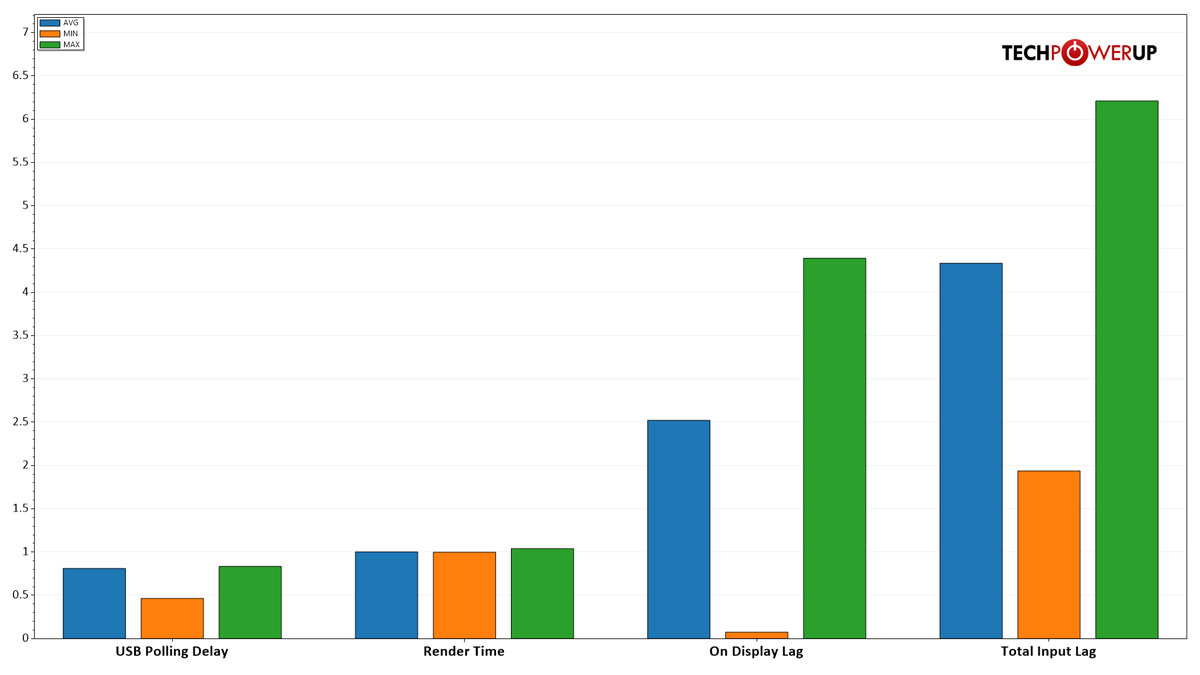
Input lag is very low. On-display lag averages approximately 2.52 ms, with the fastest sample measuring under 0.1 ms and the slowest at around 4.4 ms. At 240 Hz, one full frame interval is 4.17 ms, so the average on-display lag of 2.52 ms represents well under one frame time of processing delay. That is excellent for a gaming display and places the GO27Q24G firmly in the range where the monitor adds no perceptible latency to the rendering pipeline. Competitive players will not find the display a limiting factor.
Other Notable Gaming Features
Gigabyte's VRR Anti-Flicker aims to address a well-known weakness of OLED gaming monitors, visible brightness or gamma fluctuations that can occur during variable refresh operation, particularly at lower frame rates and in dark scenes. Unusually, Gigabyte exposes the behavior to the user through Off, Middle and High settings, rather than treating it as a hidden firmware-level mitigation. Based on Gigabyte's documentation and the behavior implied by its OSD graphics, the feature appears to reduce flicker at least partly by constraining or remapping the effective lower portion of the VRR range, likely invoking compensation earlier in problematic scenarios. That suggests a tradeoff may exist between flicker suppression and the breadth of native VRR operation, although in practice the feature is valuable precisely because it gives users control over that balance. Its presence is noteworthy, as few monitors currently offer this degree of user-adjustable OLED VRR flicker mitigation.Tactical Switch lets you bind a key to instantly switch between resolution and display size presets without entering the OSD. The menu offers two display size options—24" and 27"—each with five resolution choices: 2560×1440 and 1920×1080 in 16:9, 1280×960 and 1024×768 in 4:3, and 1280×1024 in 5:4. The 4:3 and 5:4 options are primarily relevant to Counter-Strike players, where running a non-native aspect ratio is a long-standing competitive preference—character models appear wider and therefore easier to hit at lower resolutions, and some players find the narrower field of view helps focus attention toward the center of the screen. Having that switch bound to a hardware key means you can flip between your desktop resolution and your competitive layout in a single press rather than navigating menus, which is a practical convenience for anyone who regularly moves between gaming and other use. Flash Dimming reduces brightness during sudden bright events such as explosions or screen flashes to limit eye discomfort. Game Info puts an on-screen overlay showing a game timer, current refresh rate, or a custom info position, selectable depending on what you want visible during play. The Crosshair overlay offers four style options with independent offset adjustment for fine-tuning the reticle position. Black Equalizer, found in the main Gaming menu rather than Game Assist, lifts shadow detail to improve target visibility in dark environments.
Nov 18th, 2026 09:35 CST
change timezone
Latest GPU Drivers
New Forum Posts
- Time to upgrade CPU and MOBO (24)
- WarpCoreBench scores! (61)
- X99 Club (188)
- Wireless Internet sharing between PC and router both-ways, is it possible? (16)
- Last game you purchased? (1403)
- Without Jensen, PC gaming will be (43)
- [Poll] 12V-2x6 Connector Protection: What Are You Using? (WireView / Ampinel / Equalizer / Other / Nothing) (35)
- Help with fixing Overclock (10)
- GIGABYTE - H55N-USB3 ITX Upgrade experience (4)
- Honestly, do you care about GTA VI? (137)
Popular Reviews
- Acemagic Retro X3 Review
- Upcoming Hardware Launches 2027 (Updated Nov 2026)
- AMD Zen 6 Technical Deep Dive
- ASUS ROG Strix B850-I Gaming Wi-Fi7 W Review
- Corsair HX1000i Shift Crystal Review
- Biwin Black Opal NV7400 2 TB Review
- Chieftec Iceberg PRO 360 DARK Review
- AMD Ryzen 7 9800X3D Review - The Best Gaming Processor
- Phantom Blade Zero Performance Benchmark Review - 35 GPUs Tested
- Montech King 95 3D PRO Review
TPU on YouTube
Controversial News Posts
- NVIDIA Co-Founder and CEO Jensen Huang Officially Resigns (472)
- Open Letter Asking NVIDIA to Reinstate Jensen Huang Passes 115,000 Signatures (184)
- Report: Jensen Huang Eyes NVIDIA Comeback (177)
- OpenAI CEO Argues Home PCs Waste the World's Limited DRAM Supply (152)
- NVIDIA Launches Investigation Into Jensen Huang's Relationship With Suspected Chinese Spy (136)
- Intel "Raptor Lake Next" 16-Core and 20-Core CPUs Surface (130)
- Legendary Game Studio BioWare Shuts Down Following EA Layoffs (104)
- Dell CEO Says the Memory Shortage Will Get Worse in 2027 (95)