 34
Gigabyte X570S AERO G Review
(34 Comments) »Introduction

In today's review, we will be taking an up close look at Gigabyte's X570S AERO G motherboard for the AMD based systems. This also may very well be the last chipset for the long standing AMD AM4 socket. We were first introduced to the Ryzen Zen CPU in 2017. This was quickly followed up by Zen+ based processor. Next, with the Zen 2 launch, using the same X naming convention as the follow-up to X470 came a new X570 chipset to extend the AM4 socket lifespan once again. Its largest change overall came in the form of a new x4 PCIE 4.0 uplink to the CPU. This upgrade allowed for more USB ports, M.2 sockets, and PCIE slots using the X570 chipset.
After the highly successful B550 chipset launch in 2020, marketed and priced to be more budget friendly. Waiting for the perfect moment to upgrade can pay off, especially as prices decrease and bugs are worked out over multiple revisions. AMD X570 (S) is the latest revision from AMD this the AM4 socket. "S" being for silent as the chipset fan has been removed.
AMD's Computex 2022 press conference revealed the company's plans for the new AM5 socket and new Zen 4 processors. In additional news, the company has not ruled out extended support for its current AM4 socket. With strong sales and a competitive advantage in gaming and production workflows, those looking for a mature platform will find AM4 something that shouldn't be written off just yet. With AMD long-term support the AM4 socket, motherboard manufacturers have an opportunity to refresh the X570 lineup yet again with new features, including Wi-FI 6E, USB 3.2 connectivity, Thunderbolt 4, and higher supported memory frequencies that just weren't available three years ago.

Gigabyte uses the AERO naming convention to market it towards content creators. These can be strictly for work or a bit of gaming on the side as well. The AERO branded motherboards coincide with other content creation oriented products like Vision and Designare that are marketed towards the same targeted audience. Some of which have been discontinued due to being only created for a certain chipset that often overlap in features and suggested price points. The X570S AERO G is designed to be used in a work computer with an emphasis on increase storage options, lots of external connectivity points and a beefy power delivery system for maximum uptime. Understanding that this motherboards focus on the workforce, we will take a closer look at the features that will help aid in that viewpoint throughout this review. Now let's get started.
Specifications
| Specifications | |
|---|---|
| CPU Support: | AMD Ryzen 5000 Series, 5000 G-Series, 4000 G-Series, 3000 Series, 3000 G-Series, 2000 Series and 2000 G-Series desktop processors |
| Power Design: | CPU Power: 12-phase SoC Power: 2-phase |
| Chipset: | AMD X570S |
| Integrated Graphics: | Dependent on installed CPU 1x USB Type-C® port, supporting USB Type-C 1x HDMI port, supporting a maximum resolution of 4096x2160@60 Hz |
| Memory: | 4x DIMM 128GB dual-channel DDR4-5400+ (OC) |
| BIOS: | UEFI BIOS 256 Mbit Flash |
| Expansion Slots: | 1x PCIe Gen4 x16 Slot 1x PCIe Gen4 x16 Slot (wired for x8) 1x PCIe Gen4 x16 Slot (x4 PCIe from X570S) |
| Storage: | 6x SATA 6 Gb/s ports 2x M.2 Sockets (PCIe Gen4 x4) 2x M.2 Socket (SATA/PCIe Gen4 x4) |
| Networking: | 1x Intel 2.5 Gb Ethernet 1x Intel Wi-Fi 6 AX200 |
| Rear Ports: | 2x USB 2.0/1.1 ports 2x SMA antenna connectors (2T2R) 1x HDMI port 1x DisplayPort In port 1x USB Type-C® port, with USB 3.2 Gen 2x2 support 1x USB Type-C® port, with USB 3.2 Gen 1 support 4x USB 3.2 Gen 2 Type-A ports (red) 2x USB 3.2 Gen 1 ports 1x RJ-45 port 1x optical S/PDIF Out connector 5x audio jacks |
| Audio: | 1x Realtek AL1220-VB Codec |
| Fan Headers: | 8x 4-pin |
| Form Factor: | ATX Form Factor: 12.0 x 9.6 in.; 30.5 x 24.4 cm |
| Exclusive Features: |
|
Packaging and Contents


Gigabyte is taking a different approach and breaks away from the norm of using a flashy box. Instead, this isn't marketed towards gamers, so a flashy box is unnecessary. The front has the product name in bold lettering. This gives a clear indication of what it is before opening.
The back of the box keeps simple and straight forward as well. It highlights being a reliable product with connectivity being the other main focus. A depiction of the Rear IO and motherboard specifications can be found on the back as well. This will be helpful for those DIY prosumer who rather take it upon themselves and build a system that which caters to their specific needs.

The included accessories consist of everything necessary, to get started with the manual, SATA and Wi-Fi antenna, to name a few. It seems Gigabyte only included the basics here.
The full list of accessories includes:
- 4x SATA 6 Gb/s cable
- Wi-Fi Antenna
- 1x ARGB Extension cable
- 1x Speaker
- Manual
- CD Drivers
Board Layout


Now that it is out of the box, we can get a closer look the Gigabyte X570S AERO G. First thing that sticks out the most may be the overall design. Sometimes a motherboard can fall into the trap of form over function. Here however, Gigabyte understands this isn't just to be shown off, as it still needs to provide a solid user experience. Therefore, it has no lighting implemented into the motherboard. The thought process here is that you shouldn't be staring at a light show, instead work should be the focus. The blue sections over the Rear IO and chipset can also be a bit deceiving into thinking it is lit up, but it is just blue plastic with a reflective coating and not illuminated.

The Gigabyte X570S AERO G offers two x16 slots, both of which are reinforced for extra stress support from heavy graphic cards. One additional x16 slot is placed at the bottom that is for less heavy add-on cards. Because the AM4 platform has a set number of PCIe lanes provided by the CPU, many compromises had to be made here, which will become apparent further along. It is not unique to this motherboard at all and echoed throughout this review.
Going down from the top, the first PCIe x16 is the only one truly internally wired for x16 PCIe Gen4. The second slot shares the same PCIe lanes and is physically wired for x8 PCIe Gen4. When the second slot is populated, the first will drop to x8 PCIe Gen4 as well due to sharing the same PCIe lanes from the CPU. The last x16 slot, may be able to hold a full-size add-on card as well, but is internally wired for x4 PCIe Gen4. This slot also becomes disabled when the third M.2 socket is populated.


Gigabyte deploys four M.2 Gen4 x4 sockets on the AERO G motherboard. Depending where each M.2 drive is installed determines what else on the motherboard gets disabled. When all the M.2 sockets are populated, The 3rd PCIe slot (For M.2C) and SATA 6 Gb/s 4-5 ports (For M.2D) become disabled due to the PCIe lanes being repurposed for two of these M.2 sockets.


The Gigabyte X570S AERO G has two USB 3.2 Gen 1 (5 Gbps) and two USB 2.0 headers. An internal USB 3.2 Gen 2x1 (10 Gbps) Type-E header is included as well. Gigabyte also has included a Thunderbolt header (THB_C) for the Gigabyte Thunderbolt Add-in card(s) as well. Note; this will still require the use of a x4 PCIe slot.

The Gigabyte X570S AERO G uses debug LEDs to troubleshoot boot problems. A Debug post-code display is missing, which is helpful for technical troubleshooting, but unnecessary for basic common issues. As the system goes through the startup, each LED will turn on indicating what part of the startup process it is on. If say for example the motherboard is having an issue with the memory, it will stop on the memory LED indefinitely until the system is power cycled (consult the manual for more information).

This motherboard has an 8-pin EPS and a 4-pin EPS power connector. Above the EPS connectors is a plastic cover that can be easily removed and is only to hide the cables for a cleaner look.

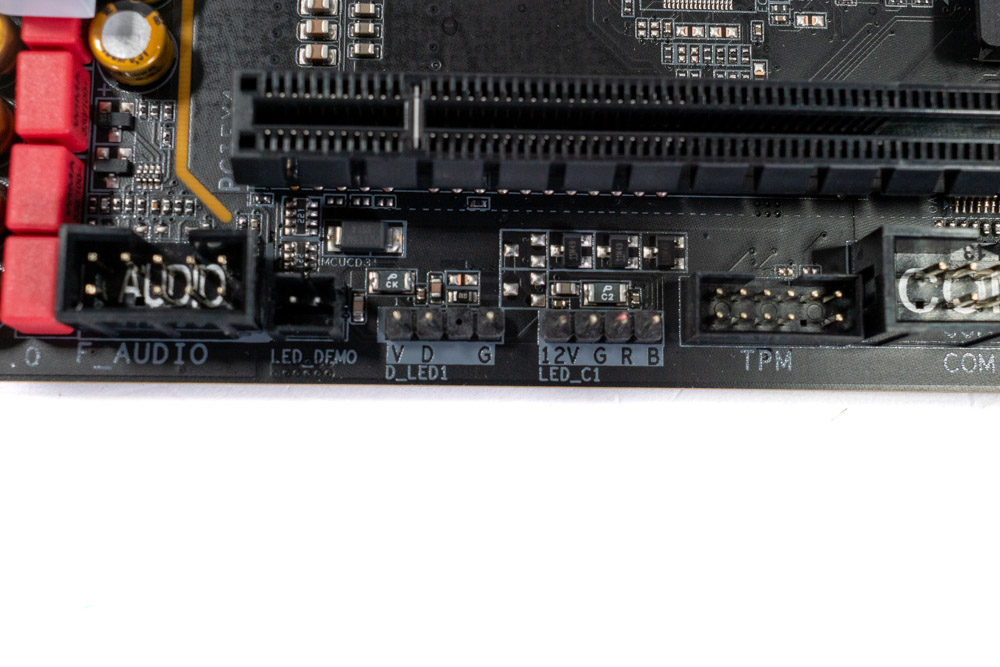

While the motherboard itself has no RGB LEDs to speak of, it does include five headers to connect these types of devices. Whether that is case fans, CPU cooler or case lighting, the X570S AERO G has the ability to connect to these devices for full RGB control. One 12 V header is placed near the CPU socket. At the point and bottom two RGB headers can be found as well. One is 5 V while the other is 12 V compliant per set.
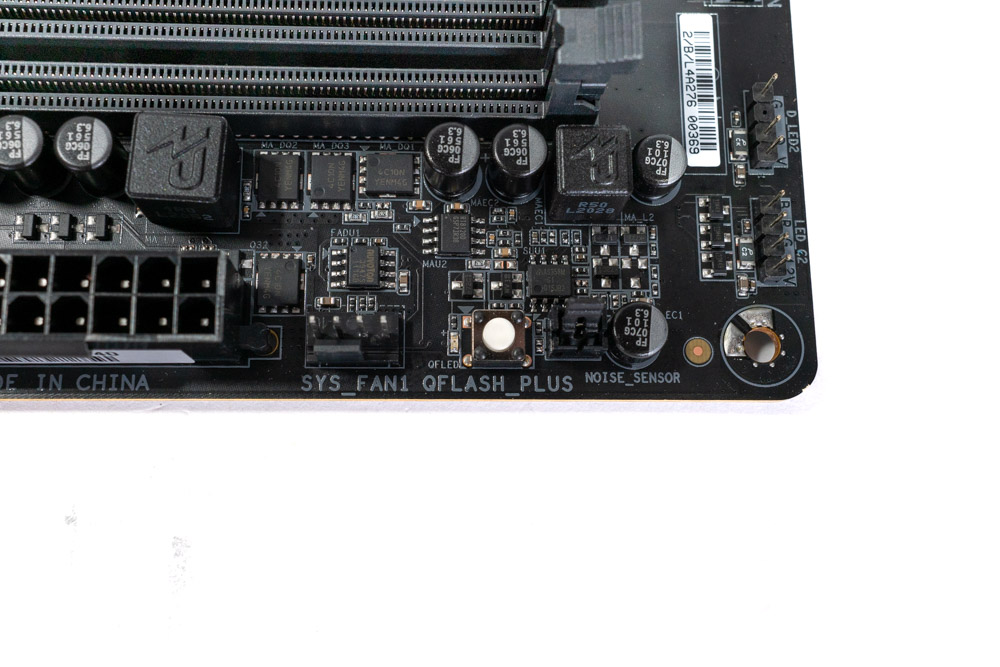
Often this little white button can be found on the Rear IO panel. It goes by many different names as each motherboard vendor comes up with a new one for marketing purposes. But it functions the same none the less. Gigabyte calls this button Q-Flash Plus. It is pretty straight forward once you know what it is. Q-Flash allows you to update the BIOS when your system is off (while the motherboard is still powered). Put a USB flash in the corresponding USB port with the AERO G BIOS, press the button and wait until the LED stops flashing. It is that simple and easy.
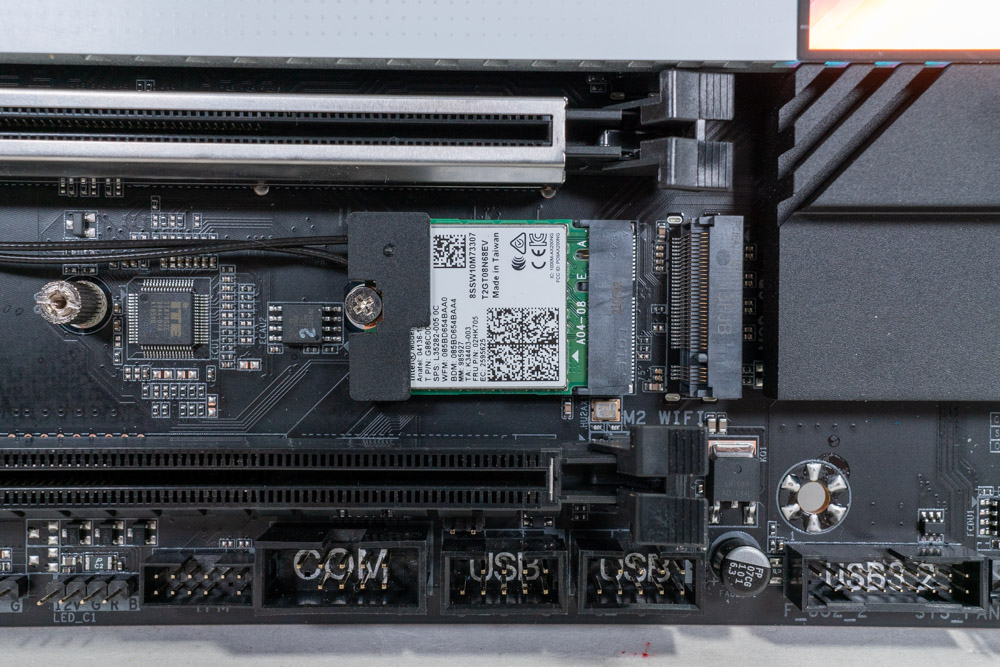
Gigabyte has placed the Wi-Fi card separate from the Rear IO. This is much more common in laptops due to space restrictions, but can be designed this way on the desktop as well.
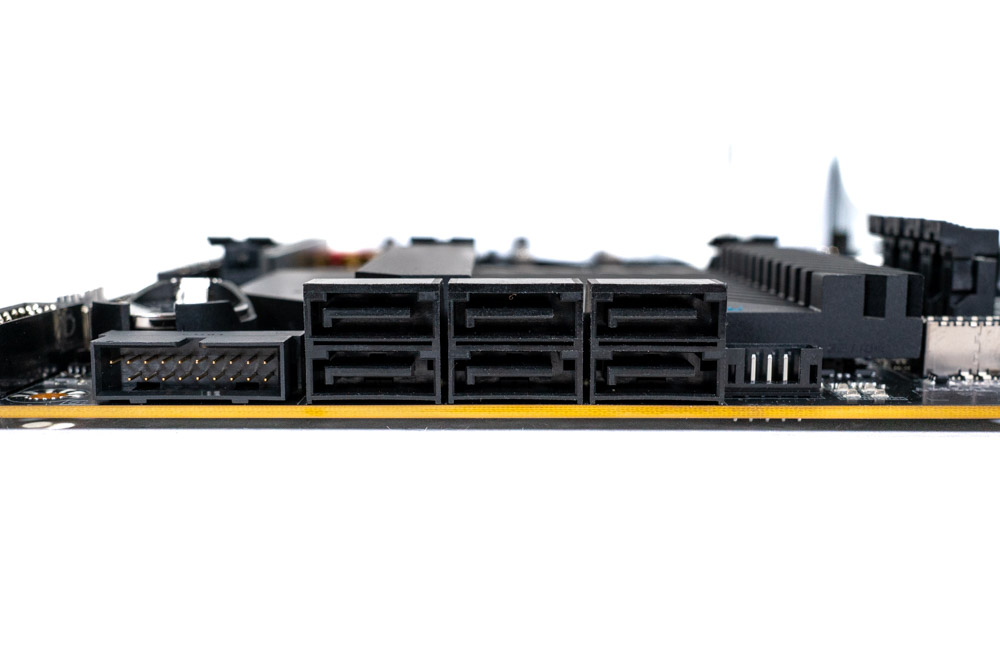
The board has a total of six SATA 6 Gb/s ports on the side, angled 90 degrees from the board. Two of these ports become disabled once a M.2 NVMe SSD is installed in the 4th M.2 socket (M.2D).

The Gigabyte X570S AERO G has an assortment of ports that should provide enough bandwidth for a majority of content creators. Absent is the inclusion of Thunderbolt 4, which is often found on motherboards marketed towards prosumers. Instead a single USB 3.2 Type-C (20 Gbps) port is available to be used with a USB hub and can carry a display signal up to 4096x2304@60 Hz. If that isn't enough bandwidth, four USB 3.2 Gen 2 10 Gbps ports (Red) and two USB 3.2 Gen 2 5 Gbps (Blue) ports is available as well.
An HDMI port that supports 4096x2304@60 Hz and a DisplayPort (In) port is present as well. The DisplayPort is a bit confusing because it is for input only. It allows any DisplayPort video signal to be routed through the motherboard to the USB-C port as stated in the manual. Last up on the panel is the antenna for Wi-Fi 6, S/PDIF Out, and 2.5 GbE LAN.
- 2x USB 2.0/1.1 ports
- 2x SMA antenna connectors (2T2R)
- 1x HDMI port
- 1x DisplayPort In port
- 1x USB Type-C® port, with USB 3.2 Gen 2x2 support
- 1x USB Type-C® port, with USB 3.2 Gen 1 support
- 4x USB 3.2 Gen 2 Type-A ports (Red)
- 2x USB 3.2 Gen 1 ports (Blue)
- 1x RJ-45 port
- 1x optical S/PDIF Out connector
- 5x audio jacks
Our Patreon Silver Supporters can read articles in single-page format.
Nov 19th, 2026 16:08 CST
change timezone
Latest GPU Drivers
New Forum Posts
- Honestly, do you care about GTA VI? (164)
- Windows 11 General Discussion (7736)
- Current Sales, Bundles, Giveaways (10448)
- Last game you purchased? (1409)
- WarpCoreBench scores! (76)
- Got the EOL 32GB TridentZ 6000 CL26 1.4V (12)
- Dell Workstation Owners Club (3516)
- Making a game in Godot engine (4)
- DTS DCH Driver for Realtek HDA [DTS:X APO4 + DTS Interactive] (2815)
- Security Apps (2)
Popular Reviews
- Acemagic Retro X3 Review
- Ugreen NASync DXP4800 GT Review
- Upcoming Hardware Launches 2027 (Updated Nov 2026)
- Pulsar Office Tour & First Look at P1 Dual-Sensor Mouse
- AMD Zen 6 Technical Deep Dive
- Biwin Black Opal NV7400 2 TB Review
- Sapphire Radeon RX 7700 XT Pure Review
- Sapphire Radeon RX 7700 XT Pulse Review
- AMD Ryzen 7 9800X3D Review - The Best Gaming Processor
- Chieftec Iceberg PRO 360 DARK Review
TPU on YouTube
Controversial News Posts
- NVIDIA Co-Founder and CEO Jensen Huang Officially Resigns (489)
- Report: Jensen Huang Eyes NVIDIA Comeback (223)
- Open Letter Asking NVIDIA to Reinstate Jensen Huang Passes 115,000 Signatures (184)
- OpenAI CEO Argues Home PCs Waste the World's Limited DRAM Supply (152)
- NVIDIA Launches Investigation Into Jensen Huang's Relationship With Suspected Chinese Spy (136)
- Intel "Raptor Lake Next" 16-Core and 20-Core CPUs Surface (130)
- Legendary Game Studio BioWare Shuts Down Following EA Layoffs (104)
- Dell CEO Says the Memory Shortage Will Get Worse in 2027 (95)