 79
Intel Core Ultra 5 250K Plus Review - Disrupting AMD's Entry-Level
Temperatures »Intel APO and Binary Optimization Tool
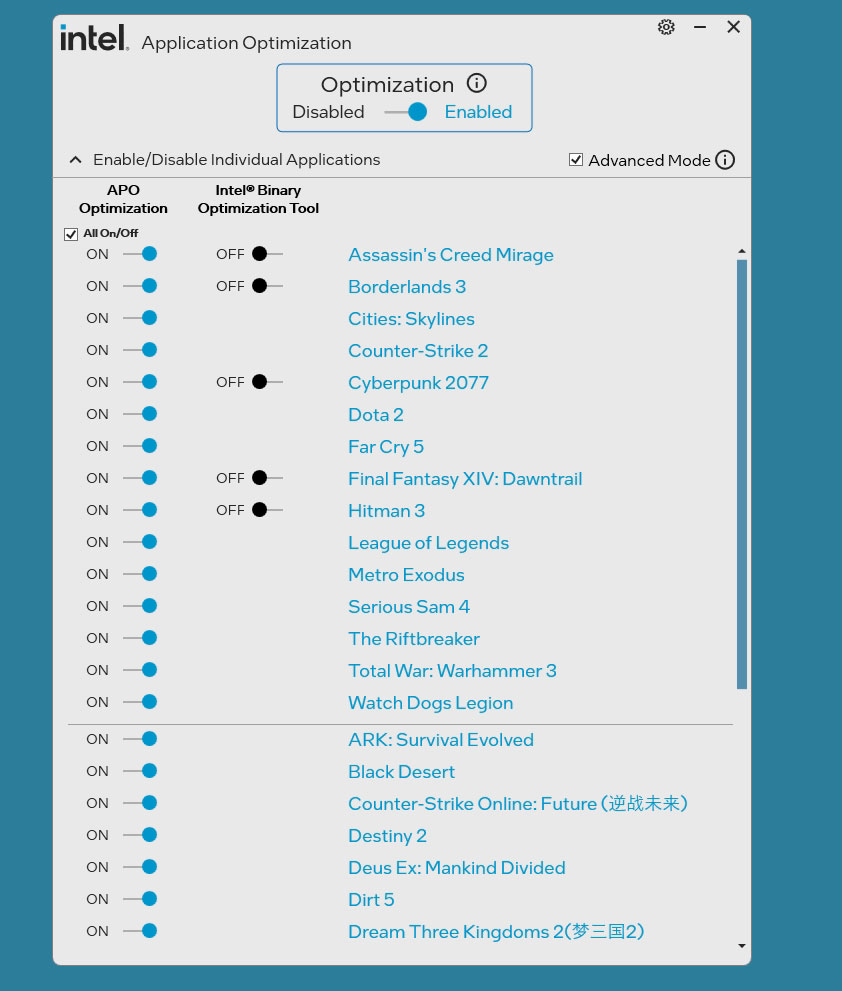
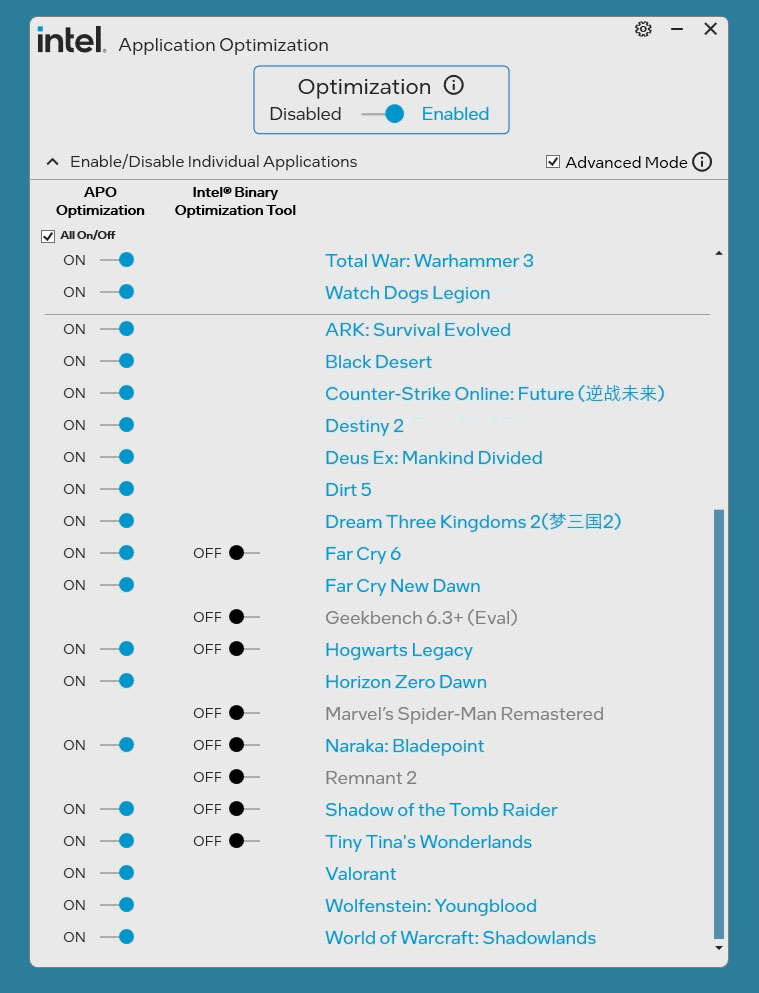
With this launch, Intel is introducing a "Binary Optimization" feature as part of its chipset driver. This software enhancement is available for the 270K Plus and 250K Plus models and builds upon Intel Application Performance Optimization (APO).
The "PC" is really a wide variety of x86 architectures—competing platforms, consoles, older CPU generations. Developers often only have time to optimize for one or two microarchitectures, or don't optimize much at all, which means some processors never reach their full IPC potential. Intel's Binary Optimization is designed to close that gap. Think of it as a translation layer: not for compatibility (the code already runs), but for performance. Intel takes pieces of the machine code of the .exe you're running and restructures it to flow more efficiently through the CPU pipeline.
Under the hood, Intel's toolchain profiles a workload at the microarchitectural level to find where compiled code is leaving IPC on the table. This happens in Intel's labs, not on your PC. If the binary isn't reaching peak efficiency, Intel uses post-link optimization to produce restructured machine code with better instruction density. No source code is involved, no decompilation or reverse engineering occurs, the developer doesn't have to get involved, and the original binary on disk is never modified. Instead, when you enable a profile and reboot, a user-mode service watches for the relevant binaries and virtually redirects execution to the optimized paths—similar to GPU shader replacement where the GPU driver ships optimized shaders for many games, and they get swapped out in real-time. To be clear: the workload still calculates everything it originally did—nothing is omitted or shortcut. The work is simply reorganized to better utilize the available hardware execution units.

Initially only 12 games are supported—not much. Across these, Intel claims an average 8% FPS improvement, with gains up to 22% in select titles like Shadow of the Tomb Raider. 99th percentile frame times see similar improvements. These gains are independent of APO and stack on top of APO. Also included is a proof-of-concept Geekbench 6.3+ profile that demonstrates Binary Optimization isn't gaming-specific—it can improve IPC in any workload built with suboptimal compiler targets or flags for the Intel pipeline. Multiplayer titles are not yet supported due to anti-cheat compatibility concerns, but Intel says they are actively working with developers to bring those games on board.
The feature is disabled by default and entirely opt-in. To enable it, open the Intel Application Optimization interface (part of the Platform Performance Package), check "Advanced Mode," toggle Binary Optimization on, and reboot. Intel claims that a reboot is required. My testing suggests that you can switch this live and the optimizations get enabled immediately, at least in my limited testing.
On backward compatibility: According to Intel, the 200S Plus (Arrow Lake-S Refresh) has "architectural dependencies" that "specifically enable or support some of the performance modules Intel has developed for Binary Optimization Technology", Intel is exploring the "possibility of backporting Binary Optimization to the original Arrow Lake-S processors" and they "cannot guarantee that the performance or the functionality would be the same. Furthermore, we have no specific timeline or schedule to disclose concerning a backport, and it remains under investigation. We cannot commit to a specific timetable or outcome due to the nature of this exploration".
I did some quick testing with Cyberpunk and Geekbench. Results are nice and promising. Let's hope Intel can scale this to cover a wide range of games.

Nov 16th, 2026 08:18 CST
change timezone
Latest GPU Drivers
New Forum Posts
- What storage medium you lost the most data thus far from failure? HDD/SSD Flash, etc (52)
- need an ide to sata adapter that lets me burn cds on an ide cdrw drive (that doesn't power down while burning or copying) (54)
- Samsung MZ-HPU256T/004 (12)
- Recommendations Wanted - Affordable Enterprise SSD for Boot (10)
- Samsung 860 Evo MZ-76E2TO 2tb. 2018-10 (1)
- no "PhysX" workable (16)
- What can the FX 8320 do today? Here is the answer. (64)
- Without Jensen, PC gaming will be (4)
- Folding Pie and Milestones!! (10206)
- The Official Linux/Unix Desktop Screenshots Megathread (915)
Popular Reviews
- ASUS ROG Strix B850-I Gaming Wi-Fi7 W Review
- Corsair HX1000i Shift Crystal Review
- AMD Zen 6 Technical Deep Dive
- Upcoming Hardware Launches 2027 (Updated Nov 2026)
- Montech King 95 3D PRO Review
- NZXT C1200 Platinum Review
- Phantom Blade Zero Performance Benchmark Review - 35 GPUs Tested
- AMD Ryzen 7 9800X3D Review - The Best Gaming Processor
- NZXT H7 RGB+ Review
- NZXT H5 Review
TPU on YouTube
Controversial News Posts
- NVIDIA Co-Founder and CEO Jensen Huang Officially Resigns (431)
- Open Letter Asking NVIDIA to Reinstate Jensen Huang Passes 115,000 Signatures (184)
- OpenAI CEO Argues Home PCs Waste the World's Limited DRAM Supply (152)
- NVIDIA Launches Investigation Into Jensen Huang's Relationship With Suspected Chinese Spy (136)
- Intel "Raptor Lake Next" 16-Core and 20-Core CPUs Surface (130)
- Legendary Game Studio BioWare Shuts Down Following EA Layoffs (104)
- Dell CEO Says the Memory Shortage Will Get Worse in 2027 (95)
- NVIDIA GeForce RTX 50-Series Scheduled for up to $500 Price Hike This Week (89)