 6
KiiBOOM Loop75 Wireless Mechanical Keyboard Review
Value & Conclusion »Lighting and Performance
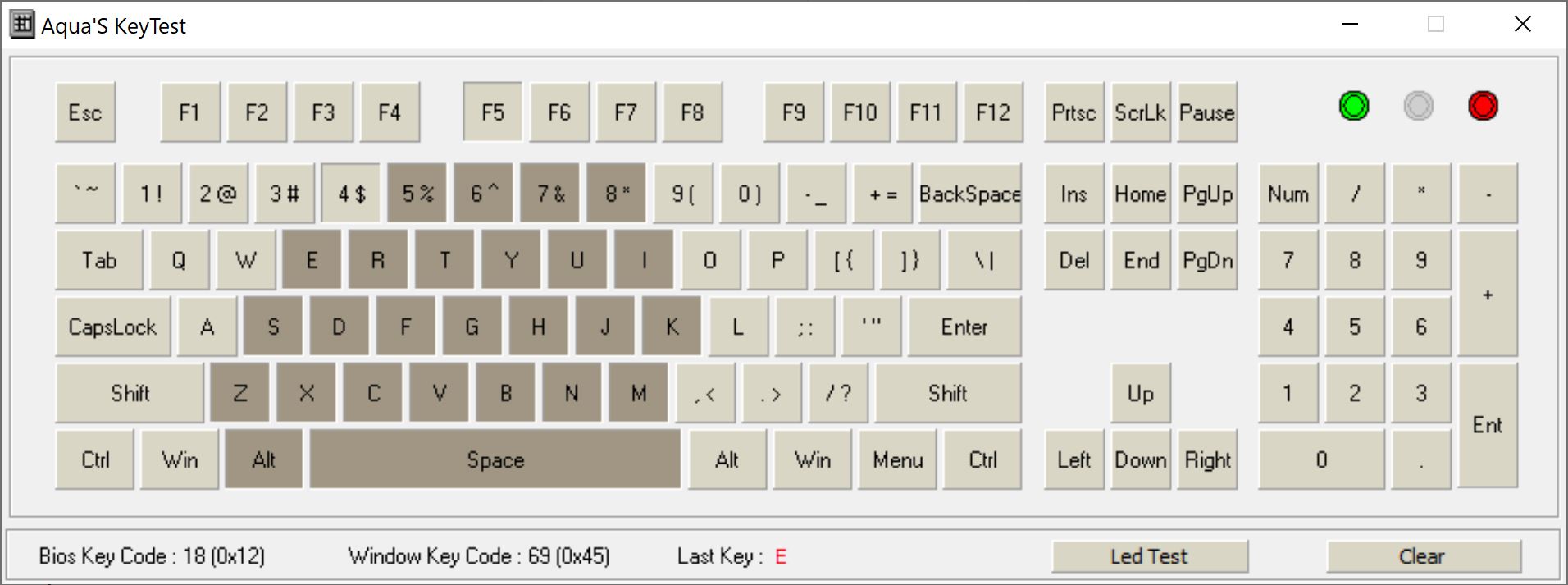

The KiiBOOM Loop75 supports N-key rollover USB and 2.4 GHz which tested successfully using Aqua's test. It defaults to 6KRO with Bluetooth as expected, and note that the polling rate also goes from 1000 Hz over USB/2.4 GHz to 125 Hz with Bluetooth. Switch Hitter confirmed no chatter with these keys either, and seen above are all the functions with dedicated keys on the base layer. This 82-key unit gives you most of the functionality of a TKL keyboard, missing out on Print Screen, Scroll Lock, Pause/Break, Menu, and Insert, with the R. Win key is replaced by a Fn key as usual.


The Fn layer is handy to access the pre-programmed functions on the keyboard, which are neatly illustrated in the quick start guide for both Windows and macOS. There are a lot of them too, including for media playback controls, in addition to shortcuts to pull up common programs, as well as for onboard control over the LED and wireless connectivity as seen above. As such, it would have been nice to see some keyboard-specific legends on the specific keycaps used. We also get dedicated volume control with the rotary knob in the top right corner, although here there is some scope for improvement in using a better quality potentiometer which feels smoother in rotation, or even going for a multi-functional rotary knob with various operating modes as we've seen done by a few other brands lately.


Seen above is the KiiBOOM Loop75 lit up in a few different lighting effects. Given the keycaps are opaque, I think it's fair to say anyone wanting an impressive light show is probably going to look elsewhere. It's also not practical to assume you can read the legends in a dimly lit environment either, and I suspect the red/black color version will be even worse in this regard, so some gamers and/or programmers might want to think about this too. I would have liked to see dedicated indicator LEDs here, with KiiBOOM instead using the LEDs associated with the switches for some functions—Caps Lock is an obvious one. The Fn key LED also serves as a battery indicator, flashing red when the battery is low, a static red when charging, and joining up with the rest of the lighting effect used when fully charged. But given the opaque keycaps, I suggest you to just turn the LEDs off to preserve battery life—especially in 2.4 GHz mode where you can expect ~25-28 hours with the LEDs on, and going up to nearly 200 hours with them off. Bluetooth raises the battery life slightly, although I had the occasional lag here to where I wasn't going to use it again. This could be a result of the metal chassis, and your mileage may also vary. There's some preset sleeping and LEDs off functions built into the keyboard to further help, although I will again mention keyboards are lacking fast charging compared to most other devices these days.


I mentioned before how the KiiBOOM Loop75 forces you into a single switch for use, which is a shame given KiiBOOM has several other 1st-party switches sold separately. Having more options was also what helped differentiate the Asian keyboard brands from others, and it does seem we are sadly moving away from this. The KiiBOOM Matcha Latte V2 is a linear switch that sells for $16 for a set of 75 switches, which is quite reasonable for what you get. Its selling point, besides the color scheme that you won't really see once the keycaps are installed in this chassis, is the self-lubricating LY stem and the polycarbonate housing. KiiBOOM, as with many others are aiming to market LY as this wondrous material with its low coefficient of friction, even compared to POM (polyoxymethylene) that a lot of mechanical keyboard enthusiasts swear by. The goal here is to have an extremely smooth stem travel, although whether you perceive it being smoother than a POM switch also depends on the housing. I've found all-POM switches to be noticeably smoother than the Matcha Latte V2, although they also tend to be a lot more expensive. I'm also not a fan of the marketing in general, since LY us just another UHMWPE (ultra-high molecular weight polyethylene) blend made to actually reduce the base softness to prevent deforming with use/moving surfaces in contact. Functionally, this switch is a full-size mechanical switch with rated actuation at 2.0 mm and total travel of 3.8 mm compared to the standard 4.0 mm. It is slightly heavier than the likes of the Cherry MX Red, with a rated actuation force of 53 gf compared to ~45 gf, although the peak force is just 58 gf meaning you will almost certainly bottom out here past actuation.
As always, the sound of a keyboard is based on more than just the switch type. So when comparing sound clips, consider the keyboard as a whole. In this case, I have provided above an example sound clip of me typing on the KiiBOOM Loop75 keyboard sample at ~100 WPM as it comes out of the box with these KiiBOOM Matcha Latte V2 switches. For context, you can find sound clips from other keyboards here, including those with linear switches. I did bottom out constantly here for reasons mentioned above, although this helps demonstrate the extent of dampening employed here, which I would say is more to my liking with a fairly crisp sound on the FR4 plate. This is not a thocky sound thus, and certainly not muted either if you want something quieter. There are no reverberations or high-pitched pings, and the stabilizers are fairly uniform in feel and sound too, although I do wish the gaskets were of better quality to more uniformly support my typing.
Nov 26th, 2026 02:11 CST
change timezone
Latest GPU Drivers
New Forum Posts
- What's your main Black Friday / Cyber Monday purchase? (12)
- Claude credits purchased on or after Dec. 7 now have an expiry date (18)
- AI generated images... (239)
- TPU's Nostalgic Hardware Club (22209)
- Can you guess Which game it is? (365)
- Strange PC issues with Z690 setup (5)
- RTX 5080 problems, random troubleshooting "log" (8)
- Slow boot, can't launch monitoring software, general lag (38)
- Linpack Xtreme Released (512)
- Exploring Local LLMs: Models, Hardware and Setup Experiences (1)
Popular Reviews
- ASRock X870E Challenger Wi-Fi White Review
- VZMORE AX9 Max Review
- Upcoming Hardware Launches 2027 (Updated Nov 2026)
- Microsoft Surface Laptop Ultra Review - The Next-gen Arm Laptop
- AMD Ryzen 7 9800X3D Review - The Best Gaming Processor
- AMD Zen 6 Technical Deep Dive
- Corsair RM1200e (Second Generation) Review
- Phantom Blade Zero Performance Benchmark Review - 35 GPUs Tested
- Pulsar Office Tour & First Look at P1 Dual-Sensor Mouse
- Ocypus lota P1000 Review
TPU on YouTube
Controversial News Posts
- Jensen Huang Reinstated as CEO of NVIDIA (573)
- NVIDIA Co-Founder and CEO Jensen Huang Officially Resigns (492)
- Report: Jensen Huang Eyes NVIDIA Comeback (281)
- Open Letter Asking NVIDIA to Reinstate Jensen Huang Passes 115,000 Signatures (184)
- OpenAI CEO Argues Home PCs Waste the World's Limited DRAM Supply (152)
- NVIDIA Launches Investigation Into Jensen Huang's Relationship With Suspected Chinese Spy (136)
- Intel "Raptor Lake Next" 16-Core and 20-Core CPUs Surface (130)
- Intel Razor Lake Gets a 12 P-Core bLLC Chip With No E-Cores, Per Leak (94)