 30
Kingston Fury Renegade CUDIMM DDR5-8400 48 GB CL40 Review
Value & Conclusion »Intel Memory Overclocking
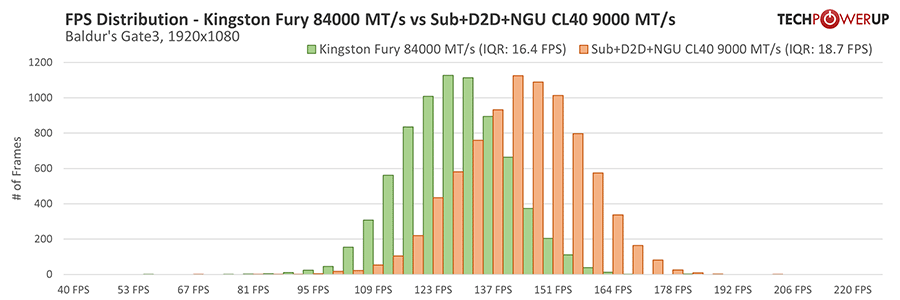
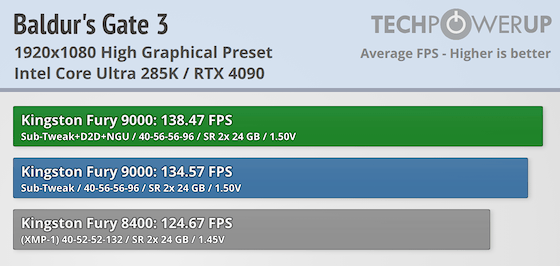
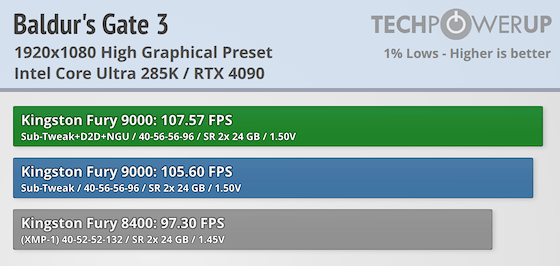
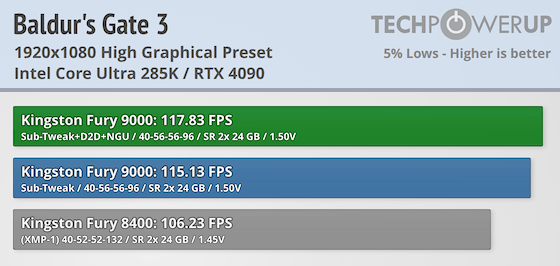
After a year of using Intel's Ultra 285K CPU, we've gained a solid grasp of memory overclocking and the platform's specific quirks. This overclocking section will focus on a combination of adjusting the memory frequency and fine-tuning the primary, secondary, and tertiary timings, alongside increasing the CPU Ring Cache, Die-to-Die (D2D), and NGU (Next-Generation Uncore) to extract maximum performance without pushing the voltages too far. Our goal is to achieve an overclock suitable for long-term use, not world records.Intel's 1-Click 200S Boost feature is set to a maximum frequency of 8000 MT/s to accommodate varying silicon quality and anything above this frequency must be manually configured in the BIOS. During our testing, we observed that the maximum stable Ring Cache, D2D, and NGU ratios could be achieved without increasing stock voltage stopped around 8000 MT/s. For instance D2D 32x ratio running DDR5-9000 required 0.89 V (VNNAON), while DDR5-8000 maintained stability at the stock value of 0.772 V. We found that increasing the Ring Cache above default settings for 9000 MT/s resulted in instability (even with more voltage). Further observations during our memory overclocking session indicated minimal performance gains from increasing the NGU ratio, with most improvements stemming from the D2D ratio and timings adjustments, Lastly to a lesser extent, the Ring Cache ratio. The use of four different overclocks into the overclocking equation only extended the validation process and ultimately proved to be an inefficient use of time. It is highly suggested to work on maximum frequency and timings first before changing the Ring Cache, D2D, and NGU ratios.
The MSI Z890 Unify-X has some quirks to deal with, but just like any motherboard, once you know the routine, it becomes much easier to guess what will and will not work. Still, we took the tedious, methodical process of changing each value and validating if, in fact, it was stable for long periods of time. This does not guarantee 24/7 stability, but it is enough for a normal home computer use-case. These results below were validated to pass y-cruncher 2.5B and reach 6000% or higher in the memory stress testing software Karhu. Because of this longer stability test, temperatures can become a big factor and this required a fan placed on top of the memory to minimize issues. Lots of additional small adjustments could have been made to the secondary and tertiary timings, but would likely be harder and more tedious to stabilize in the long run. Overall a minor voltage increase to 1.50 V gave a tremendous overclock from 8400 MT/s 40-52-52-132 to 9000 MT/s 40-56-56-96.
After wrapping up all the OC benchmarks for this review, we revisited the settings and adjusted the tRFC2 and tRFCsb to 160/130 ns. Utilizing the TPU DRAM Latency Calculator, we configured it to 720/585 for DDR5-9000 and conducted a quick validation test to ensure it passed y-cruncher 2.5B and hit 1000%. While these results are not part of this review, they are certainly worth mentioning.
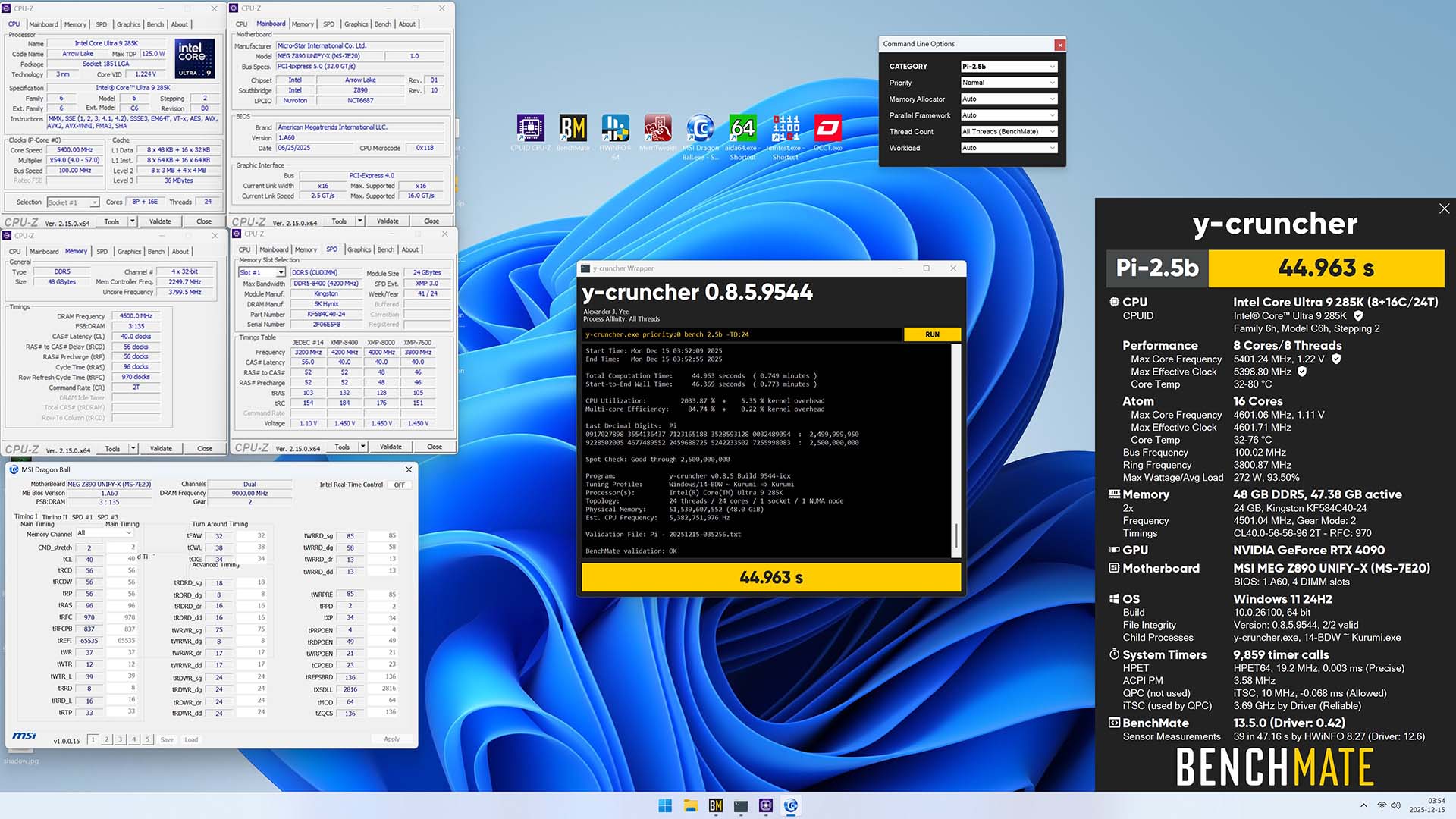
DDR5-9000 CL40 y-cruncher 2.5B HWBot Submission
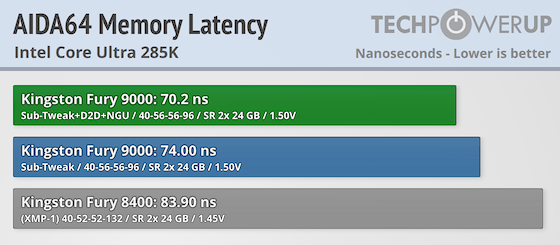
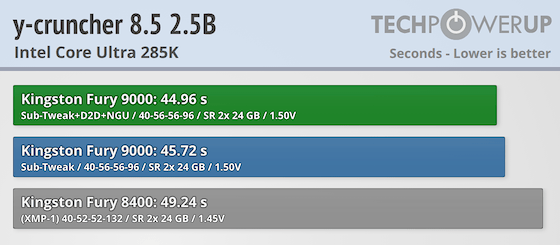
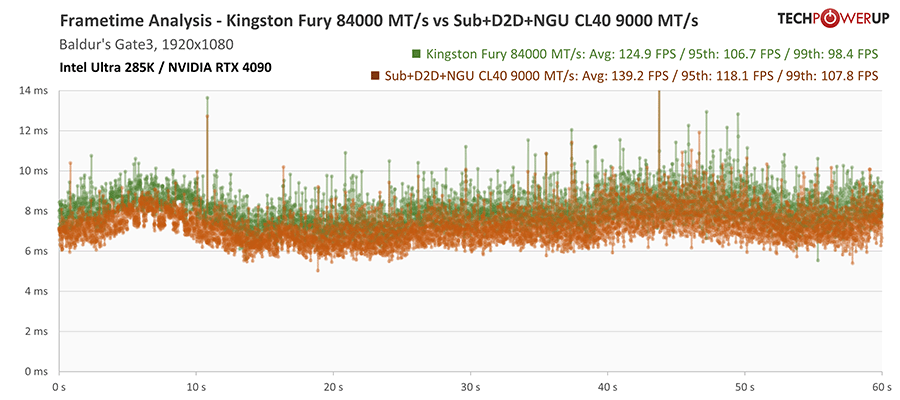
Baldur's Gate 3 Results
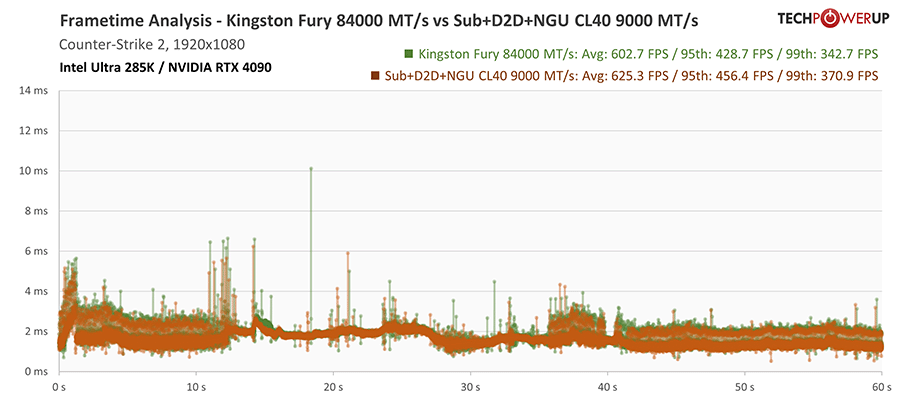
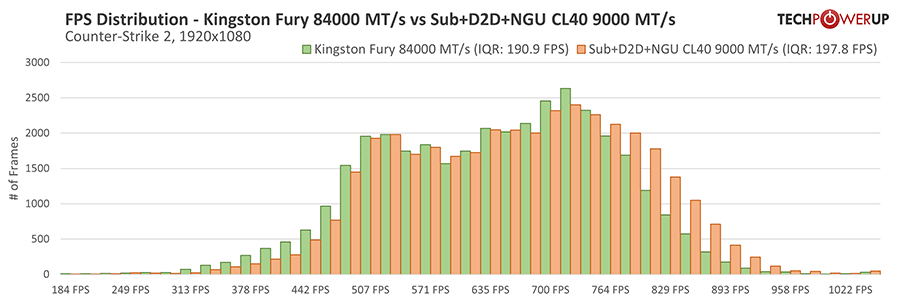
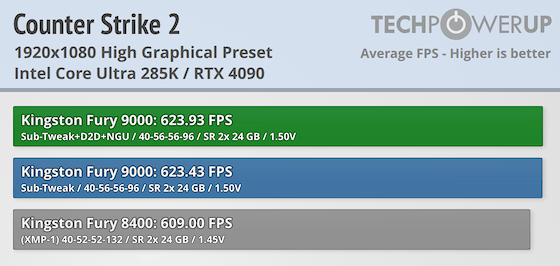
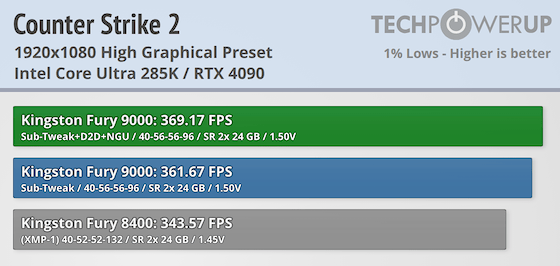
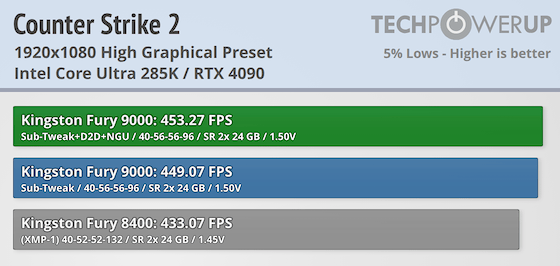
Counter-Strike 2 Results
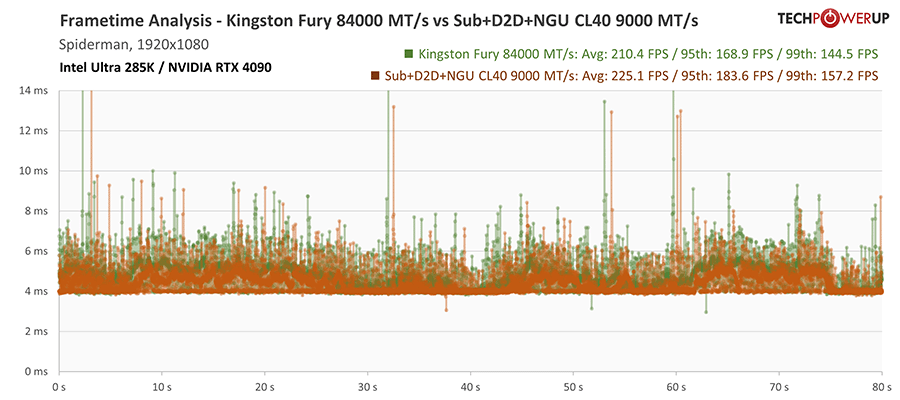
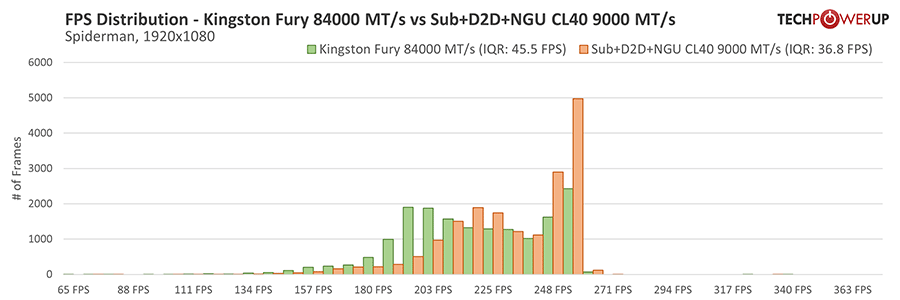
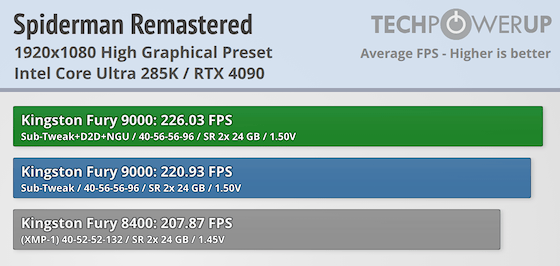
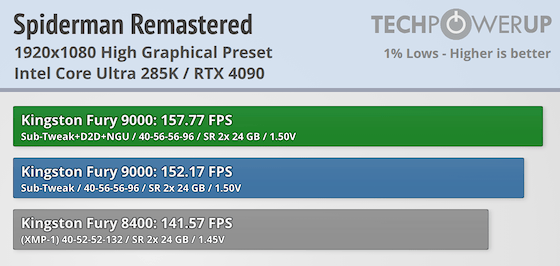
Spiderman Remastered Results
Nov 19th, 2026 00:31 PST
change timezone
Latest GPU Drivers
New Forum Posts
- 3DMARK "LEGENDARY" (475)
- [Poll] 12V-2x6 Connector Protection: What Are You Using? (WireView / Ampinel / Equalizer / Other / Nothing) (43)
- Windows HDR on = Tinted colors (5)
- Time to upgrade CPU and MOBO (42)
- Without Jensen, PC gaming will be (47)
- WarpCoreBench scores! (68)
- Honestly, do you care about GTA VI? (155)
- Very unusual two gaming-pc scenarios. (13)
- TPU's Nostalgic Hardware Club (22168)
- Dual B70 or Dual R9700 Pro on Linux (7)
Popular Reviews
- Acemagic Retro X3 Review
- Ugreen NASync DXP4800 GT Review
- Upcoming Hardware Launches 2027 (Updated Nov 2026)
- AMD Zen 6 Technical Deep Dive
- Pulsar Office Tour & First Look at P1 Dual-Sensor Mouse
- Biwin Black Opal NV7400 2 TB Review
- Sapphire Radeon RX 7700 XT Pure Review
- Sapphire Radeon RX 7700 XT Pulse Review
- Chieftec Iceberg PRO 360 DARK Review
- ASUS ROG Strix B850-I Gaming Wi-Fi7 W Review
TPU on YouTube
Controversial News Posts
- NVIDIA Co-Founder and CEO Jensen Huang Officially Resigns (483)
- Report: Jensen Huang Eyes NVIDIA Comeback (196)
- Open Letter Asking NVIDIA to Reinstate Jensen Huang Passes 115,000 Signatures (184)
- OpenAI CEO Argues Home PCs Waste the World's Limited DRAM Supply (152)
- NVIDIA Launches Investigation Into Jensen Huang's Relationship With Suspected Chinese Spy (136)
- Intel "Raptor Lake Next" 16-Core and 20-Core CPUs Surface (130)
- Legendary Game Studio BioWare Shuts Down Following EA Layoffs (104)
- Dell CEO Says the Memory Shortage Will Get Worse in 2027 (95)