 22
Kingston HyperX Fury RGB 480 GB Review
(22 Comments) »Introduction

With revenue in the multi-billion-dollars range, Kingston is the largest DRAM and flash memory products vendor in the world. While their strongest suit is in memory modules and USB/flash card storage, they are also a major player in the SSD market.
Today, we have to for review their HyperX Fury RGB SSD, which, as the name suggests, comes with adjustable RGB-lighting support. The lighting system is not controlled through the SATA interface, but over a separate 4-pin connection instead, which is connected to the motherboard RGB headers. This approach makes it compatible with ASUS Aura Sync, Gigabyte RGB Fusion, MSI Mystic Light, and ASRock RGB Sync, so you won't have to install another piece of proprietary software for RGB control. Kingston's cable also comes with a pass-through header for the RGB signal, so you can connect additional RGB-capable hardware (from any manufacturer).
The SSD part of the HyperX Fury RGB consists of four 3D TLC chips, a Marvell 88SS1074 controller, and a 512 MB Kingston DDR3 chip. Just like nearly all TLC-based SSDs, the HyperX Fury runs part of its flash in SLC-mode for higher performance, to soak up write bursts, which are written to the slower TLC flash later.
Kingston's Hyper X Fury RGB is available in capacities of 240 GB ($80), 480 GB ($125), and 960 GB ($222). Endurance for these models is set to 120 TB, 240 TB, and 480 TB respectively.

| Specifications: Kingston HyperX Fury RGB 480 GB | |
|---|---|
| Brand: | Kingston HyperX |
| Model: | SHFR200/480G |
| Capacity: | 480 GB (447 GB usable) 32 GB additional overprovisioning |
| Controller: | Marvell 88SS1074 |
| Flash: | Kingston 3D TLC FB12808UCT1-61 |
| DRAM: | Kingston DDR3 512 MB D2516EC4BXGGB |
| Endurance: | 240 TBW |
| Form Factor: | 2.5", 9 mm |
| Interface: | SATA 6 Gbps |
| Device ID: | SHFR200480G |
| Firmware: | 000056R8 |
| Warranty: | Three years |
Packaging and Contents


The Drive
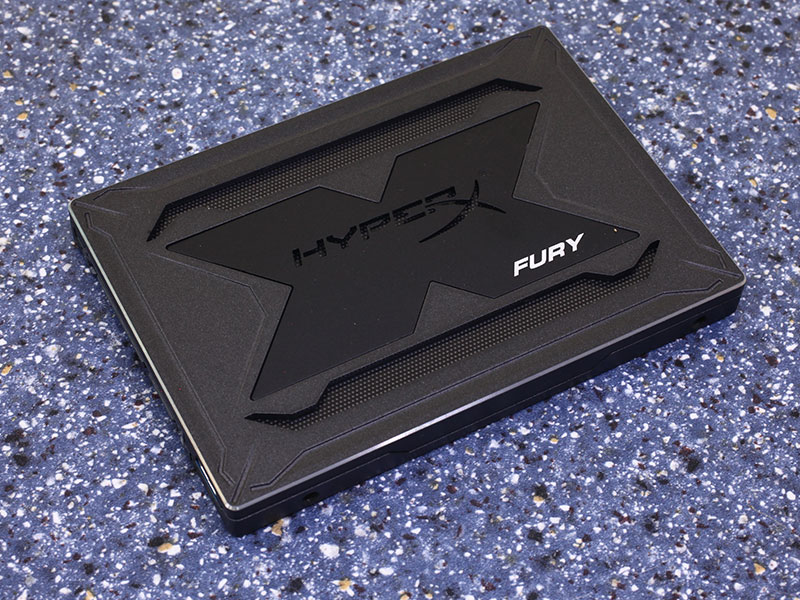

The drive conforms to the dimensions set forth by the 2.5" form factor. Unlike most recent 2.5" SSDs, the Kingston HyperX Fury RGB comes with an all-metal case and is 9.5 mm thick (which disqualifies it for use in most notebooks).

The unique selling point of this SSD is its RGB capability, which looks really really nice. Compared to just a big colored surface, Kingston has chosen to add a circular black mesh in front of the LEDs, which gives them a much nicer look.

The SATA 6 Gbps interface is used. It is compatible with any older SATA standard, but will, in such a case, work at reduced performance. Note the little micro-USB connector on the left side of the drive. This is where you attach the RGB cable from your motherboard.

All RGB color information is transmitted through this separate 4-pin cable, which connects to your motherboard's RGB headers. Do note the pass-through design here, so you can daisy chain multiple RGB-capable devices together (any kind, from any vendor, not just SSDs).


Taking a closer look at how the mesmerizing RGB setup works, we find 75 (!!) RGB LEDs installed. All of these display the same color (they are not addressable individually). The first picture shows the white diffuser, which helps spread out the light, so the individual LEDs aren't visible.


You will find the SSD controller and four flash chips on the PCB. A single DDR3 DRAM chip is also present to provide the SSD controller with operating memory for mapping tables. The other side of the PCB has no storage components.

The Marvell 88SS1074 has been on the market for a while. It supports four NAND channels and TLC flash.

The four flash chips are marked as FB12808UCT1-61, which seems to be rebranded Toshiba 15 nm TLC NAND.

A Kingston 512 MB DDR3-1600 DRAM chip provides fast DRAM storage for the controller to store the mapping tables in.
Our Patreon Silver Supporters can read articles in single-page format.
Nov 20th, 2026 01:10 PST
change timezone
Latest GPU Drivers
New Forum Posts
- RX 7600 + Ryzen 5 5600GT getting the same FPS as my old RX 6500 XT – What am I missing? (9)
- GTA VI (12)
- Intel Core Ultra 5 processor 250K Plus (1)
- How to prevent OLED burn damage due to PC freezes or power outtages? (41)
- WarpCoreBench scores! (79)
- What are you playing? (26236)
- Warning for Windows 10 and 11 users running newer AMD GPU drivers (65)
- Honestly, do you care about GTA VI? (178)
- Anthrophics IPO (10)
- Upgrade Considerations: CPU (12/13/14) and Motherboard (B660/B760 and Z690/Z790) (62)
Popular Reviews
- AMD Zen 6 Technical Deep Dive
- Ugreen NASync DXP4800 GT Review
- Acemagic Retro X3 Review
- Corsair RM1200e (Second Generation) Review
- Upcoming Hardware Launches 2027 (Updated Nov 2026)
- Pulsar Office Tour & First Look at P1 Dual-Sensor Mouse
- Biwin Black Opal NV7400 2 TB Review
- Chieftec Iceberg PRO 360 DARK Review
- AMD Ryzen 7 9800X3D Memory Performance Scaling
- AMD Ryzen 7 9800X3D Review - The Best Gaming Processor
TPU on YouTube
Controversial News Posts
- NVIDIA Co-Founder and CEO Jensen Huang Officially Resigns (490)
- Report: Jensen Huang Eyes NVIDIA Comeback (224)
- Open Letter Asking NVIDIA to Reinstate Jensen Huang Passes 115,000 Signatures (184)
- OpenAI CEO Argues Home PCs Waste the World's Limited DRAM Supply (152)
- NVIDIA Launches Investigation Into Jensen Huang's Relationship With Suspected Chinese Spy (136)
- Intel "Raptor Lake Next" 16-Core and 20-Core CPUs Surface (130)
- Legendary Game Studio BioWare Shuts Down Following EA Layoffs (104)
- Dell CEO Says the Memory Shortage Will Get Worse in 2027 (95)