 7
KLEVV CRAS V RGB DDR5-6400 CL32 2x 16 GB Review
Overclocking Part 2 »Had a Overclocking Dream Lately?
Overclocking Tips and Tricks
Intel Results

DDR5-8000 y-cruncher HWBot Submission
For best chances of a successful overclock is to first find out what type of memory ICs are being used. Here KLEVV was naughty and covered it up with their own markings. No matter, CPU-Z tells us it is SK Hynix. With that information, the next step was to do a quick test to find out if it A-Die or M-Die (2 GB). Generally, 2 GB M-Die isn't going to surpass 7200 MT/s. Going for a quick and dirty overclock by applying 1.5 V and primary timings for DDR5-8000 (40-48-48-128), then raising the frequency until it does not boot will give a good idea what is actually used with these DIMMS.
These are in fact SK Hynix A-Die, but because it is a 6400 MT/s kit, this is not guaranteed. Especially since the part number is missing. Due to the uncertainly that these will be the same for every 6400 MT/s memory kit from KLEVV, overclocking took a backseat for this review. Just the basics are covered here today.
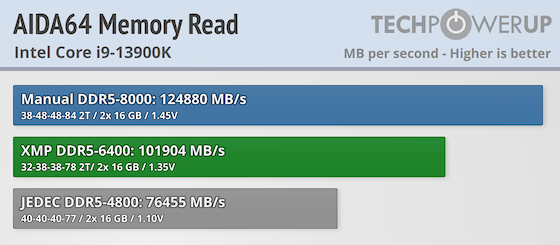

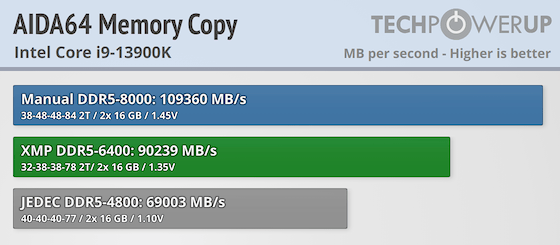

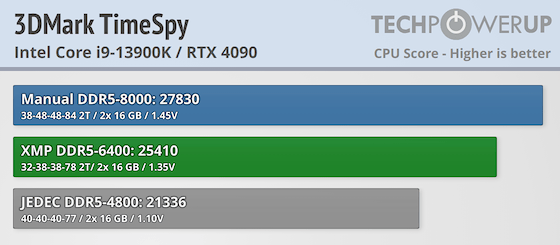


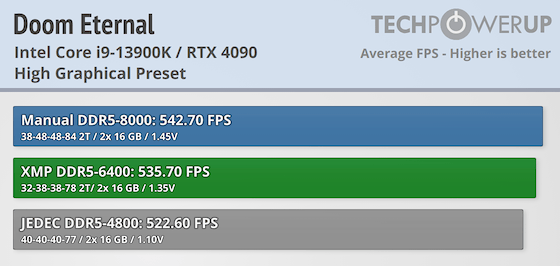
KLEVV CRAS V RGB DDR5-6400 does have some theoretical gains going to 8000 MT/s, though the benefits are unlikely to be seen outside of synthetic benchmarks.
Nov 19th, 2026 02:21 PST
change timezone
Latest GPU Drivers
New Forum Posts
- Time to upgrade CPU and MOBO (44)
- Without Jensen, PC gaming will be (48)
- 3DMARK "LEGENDARY" (475)
- [Poll] 12V-2x6 Connector Protection: What Are You Using? (WireView / Ampinel / Equalizer / Other / Nothing) (43)
- Windows HDR on = Tinted colors (5)
- WarpCoreBench scores! (68)
- Honestly, do you care about GTA VI? (155)
- Very unusual two gaming-pc scenarios. (13)
- TPU's Nostalgic Hardware Club (22168)
- Dual B70 or Dual R9700 Pro on Linux (7)
Popular Reviews
- Acemagic Retro X3 Review
- Ugreen NASync DXP4800 GT Review
- Upcoming Hardware Launches 2027 (Updated Nov 2026)
- AMD Zen 6 Technical Deep Dive
- Pulsar Office Tour & First Look at P1 Dual-Sensor Mouse
- Biwin Black Opal NV7400 2 TB Review
- Sapphire Radeon RX 7700 XT Pure Review
- Sapphire Radeon RX 7700 XT Pulse Review
- Chieftec Iceberg PRO 360 DARK Review
- AMD Ryzen 7 9800X3D Review - The Best Gaming Processor
TPU on YouTube
Controversial News Posts
- NVIDIA Co-Founder and CEO Jensen Huang Officially Resigns (483)
- Report: Jensen Huang Eyes NVIDIA Comeback (196)
- Open Letter Asking NVIDIA to Reinstate Jensen Huang Passes 115,000 Signatures (184)
- OpenAI CEO Argues Home PCs Waste the World's Limited DRAM Supply (152)
- NVIDIA Launches Investigation Into Jensen Huang's Relationship With Suspected Chinese Spy (136)
- Intel "Raptor Lake Next" 16-Core and 20-Core CPUs Surface (130)
- Legendary Game Studio BioWare Shuts Down Following EA Layoffs (104)
- Dell CEO Says the Memory Shortage Will Get Worse in 2027 (95)